Ouch, I can’t believe this question was answered one post before, did not catch it, thanks !
I made a mod to use the Garmin Nxi in the Black Square King Air Analog Overhaul addon (with hardware control), everything works as expected with the default G1000 Nxi and a few work in the panel.xml file, so far so good.
I have two questions to WT G1000 team, maybe they can help :
1- In panel.xml it is easy to program Crew Alert System annunciators with XML code, I identified 3 types which give different colors to messages :
<Annunciation><Type>Warning</Type><Text>#1 AC BUS</Text>
– Warning / RED
– Caution / ORANGE
– Advisory / WHITE
Is there a way to display a GREEN message / annunciator ?
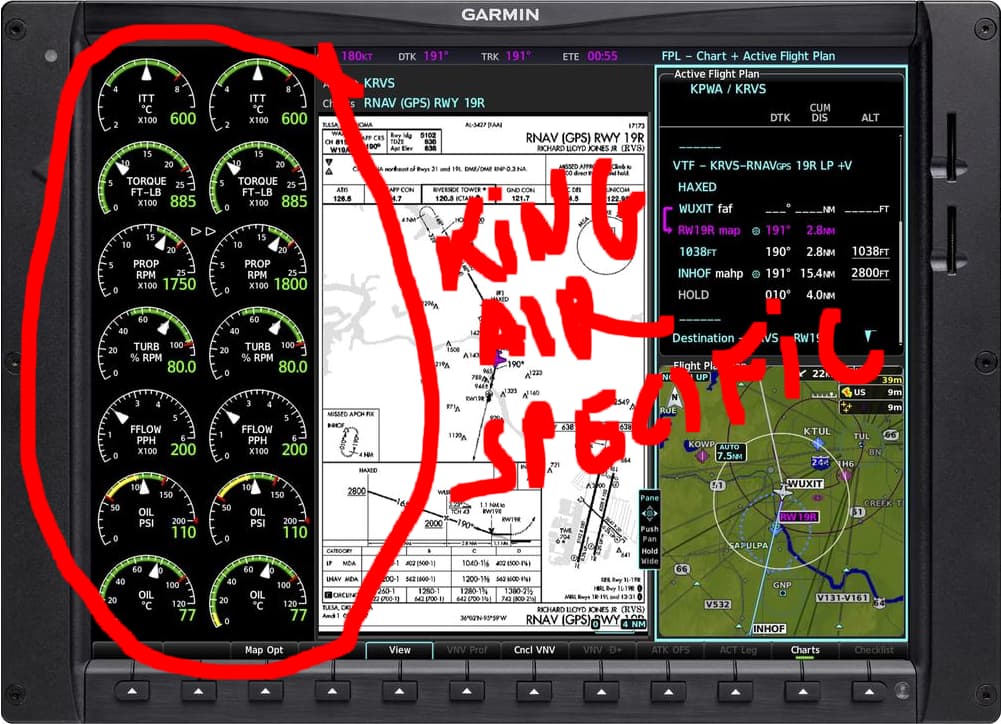
2- Is the G1000 Nxi code still open source and editable ? I would like to work on a change to the pre-configured layout of the MFD to reflect the specific King Air version of it, as shown below. Except the specific gauges one problem might be that the left engine gauges area is wider than in the other aircraft, thus needing to reduce the right plan area.
Hi, I have two installed units by WTS, Version 0.14.0 (26.75 KIB) and Version 1.0.4 (6.74MB), do I need both, is this an install error? Thanks in advanced
I believe that’s all good. The other installation accommodates 3rd party aircraft using the G1000 NXI, so just leave it.
Well, I’m sure it’s me but I can’t seem to come up with a solution. Using my mouse, when I open the flight plan window in the G1000 NXi, activate the cursor and then rotate the inner knob to enter the identifier for my departure airport nothing happens. The inner knob is “clicking” and “turning” but it doesn’t cause any action.
The problem exists in the SimWorks Kodiak and the default aircraft that are equipped with this avionics suite.
I’ve tried both the the “default” and the “lock” cockpit interaction profiles.
My mouse primary interactions are mapped to the left button.
I can highlight the FMS inner knob and use my mouse scroll wheel to “turn” the inner button but, as I said, nothing happens.
Interestingly, when I select other G1000 NXi functions that require the use of the FMS inner button such as the “direct to” window all works perfectly.
Any ideas?
Hello,
try use keyboard Icon, click for first to it to have it as light blue highlighted and type codes from PC keyboard. I expect (hope not) some problems after SU11 as usually after some huge update? In any other problem try assign some joystick buttons or keyoboard for FMS knobs functionality (if it is supported). I recommend strictly post this problem at NXi Official Support Topic also or maybe Admins will do it for you after while…
Thanks omico4146. It was indeed my fault. I neglected to scroll down one line down to the blank lines where you actually input the departure airport identifier. Once I realized my mistake and scrolled down to that field all was good. I appreciate your reply!
I’m fairly new to MSFS and I find I don’t always have the time to start flying after making a flight plan in Cessna 172 G1000 nxi. How can I save the plan for use later. I tried the MORE/LOAD/SAVE/ SAVE and aftrewards LOAD FROM PC, but the .flt file that I entered wasn’t there (the ones from LittleNavMap and Simbrief were). The plan included Departure, airway waypoints arrival and ILS approach procedures.
Thanks.
the G1000 nxi flight plan is a .pln file type not .flt. When you do
More
LOAD FROM PC
look for .pln
I don’t know if I am in the wright place or not but I’m having trouble setting values like altitude. and etc. In
the cockpit, the function turns blue and i can’t change anything
Hi meh1951, Thanks for your reply. Do I save the flight as .pln then? In …LocalState, I have a recently drafted, but incomplete fplan saved as a .pln file but when I open that one, there is nothing in the G1000 nxi flp window either. Should it save a partial fpl or do I save it somewhere other than …LocalState or do I have to do something in the nxi before saving? The parts that I had done in the .pln were 'Load’ed.
Thanks for your help.
LocalState is the default location.
Open up the one in question using NotePad it should look similar to this one.
1 VFR Phoenix Sky Harbor Intl (KPHX) to Mc Carran Intl (KLAS).pln (3.9 KB)
if not then it is foobar
Got to say that the G1000NXi should be working like a top.
hope this helps
Hi meh1951. Thanks for that. I didn’t realise that to save as a .pln file I had to type *pln in the save dialogue box and press enter. So I have just saved, shut down, opened up MSFS2020 again and loded the .pln file with the fpl data.
Thank you.
Hi corcky. If you are trying to do this in the new G1000 nxi,
take a look at;
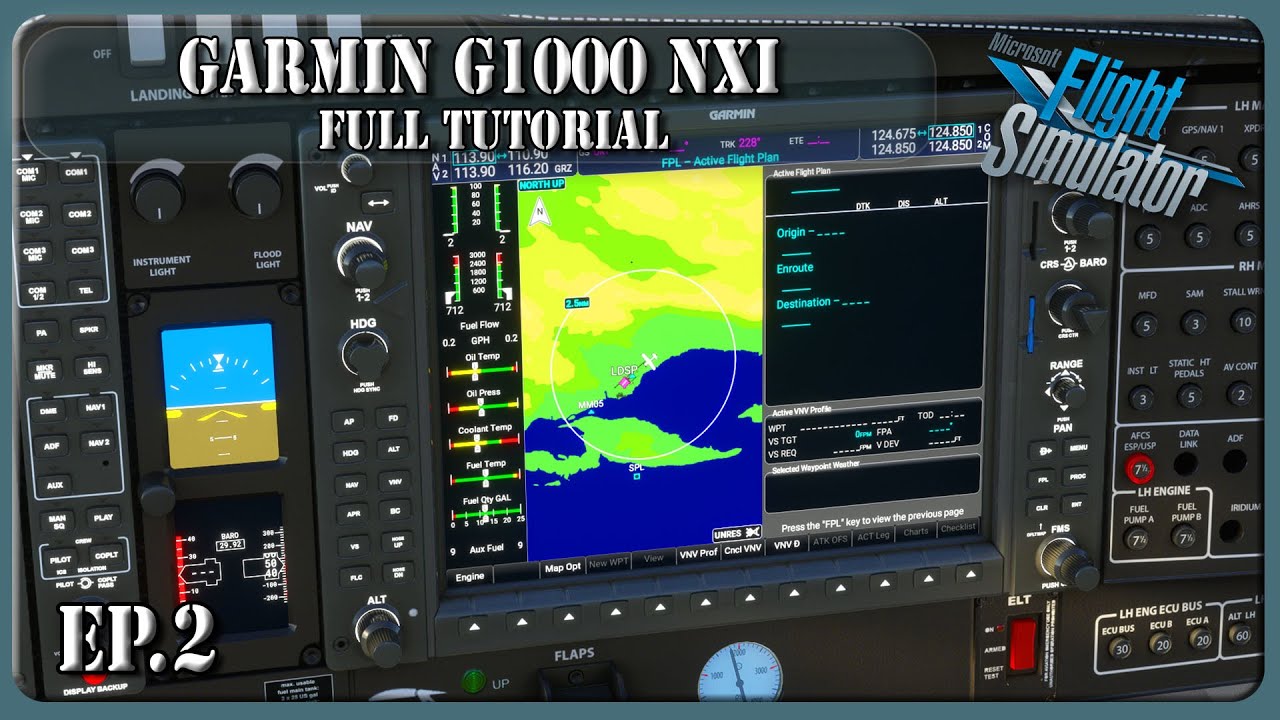
When you have highlighted the keyboard icon (click twice) it turns blue and you should be able to enter text and numbers from your keyboard.
Thanks Springy440, IL try that, Best of luck to you
 Thank you using the Bug section, using templates provided will greatly help the team reproducing the issue and ease the process of fixing it.
Are you using Developer Mode or made changes in it?
no
Have you disabled/removed all your mods and addons?
no
Brief description of the issue:
Bluescreen when using Pop-Out Panels on second screen
Provide Screenshot(s)/video(s) of the issue encountered:
Detailed steps to reproduce the issue encountered:
4 Screen Setup: 1 Main Monitor, 3 small Instrument Monitors
Flight started, Power On, Engine On
L ALT + Click to pop out left G1000 screen, same with right screen
moving screens to my outer instrument monitors
Maximizing one of the two G1000 screens to fit the instrument monitor
up to that point everything is fine
maximizing second G1000 screen to fit the other instrument monitor → Bluescreen
Happens with different aircraft and only when maximizing the screens
PC specs and/or peripheral set up if relevant:
no changes to setup, multi monitor setup and G1000 were in use for a long time
Build Version # when you first started experiencing this issue:
1.29.28.0
 For anyone who wants to contribute on this issue, Click on the button below to use this template:
Do you have the same issue if you follow the OP’s steps to reproduce it?
Provide extra information to complete the original description of the issue:
If relevant, provide additional screenshots/video:
As the G1000 has no control over the popup system and doesn’t do any direct interfacing with the graphics driver, this issue would be sim side.
Please report this to Zendesk, thanks!
DA40.
Not sure if I’m doing something wrong here (probably)…
Was under the impression VNAV would arm & be white on the screen until it activated, at which time it would turn green - assuming we were using a descent.
However, I couldn’t get it to arm at all until I had begun the approach; even then, I was only able to actually have it go green until the IAF, then, even with the manual altimeter set below the prescribed height of the next waypoint on the approach, it wouldn’t activate again.
Once established on final, APR worked normally.
I’m sure I’m missing something, but not sure what it may be…
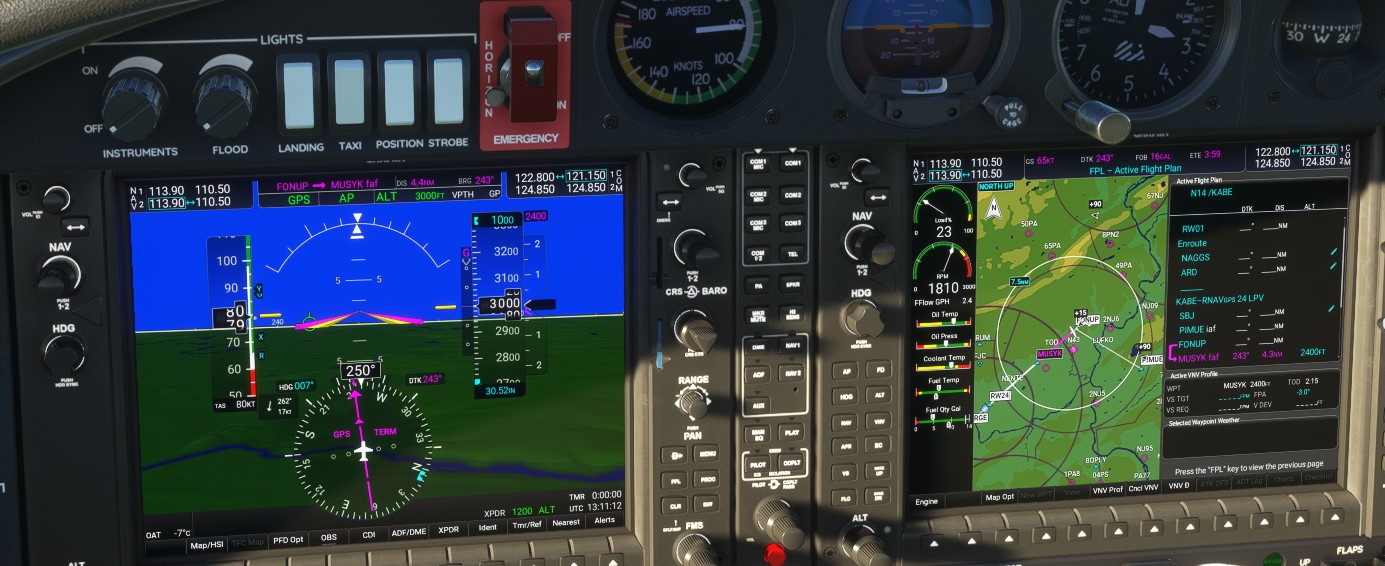
Your setup looks good. Once you reach TOD you will see the diamond come down and it will start your descent.
Thanks - i’ll try it again.
I wish we could instruct the descent to begin AT the waypoint, or at least before TOD, rather than at the TOD. (Is there a way to do that?)
I think part of the issue that the tutorials get out of date once updates are made. I’m not sure I’m following the right ones.