Yep. Same here from World Map. Have to do a lot of deleting and editing to keep a 30 minute flight from being more than twice as long through nonsensical loop backs and holds.
2 Likes
I’m really glad to see that.
I’m just getting caught up on this thread, but I will say that even in the real world, pilots go through what you went through.
I was a student pilot at a flight school that was leading the charge on glass cockpits in general aviation. This was back when the GNS 430/530 was state of the art. They pushed forward the purchase of Avidyne Entegra paneled Piper Warriors.
Lots of the instructors could be heard saying they’ll never let their students learn on the “new toys.”
Meanwhile lots of students were washing out because they found the systems overly complex. Entire training had to be invented from the ground up to handle the new paradigm that was glass cockpit for single pilot IFR. Once you know the system, it actually makes single pilot IFR easier but until then, it makes it much harder.
The more the game mimics the real world (something that is in high demand) the more it becomes necessary to mimic the real world in how you approach the game (to an extent).
4 Likes
I didn’t see any replies to you, so I figured I’d try to give you some guidance here.
When you are getting ready for an approach, you can do so in one of two ways. Either through the FMS or through manually tuning the radios. If you are doing it via FMS, you want to make sure you’ve activated the approach. This involves making sure that either a) you’ve transitioned to the approach in the flight plan view or b) you go to the procedures page and select “activate approach”
Doing so causes Nav 1 to be tuned, and will cause LOC to be visible on your HSI in white with white needles. Once that’s done, you can select Approach mode on the autopilot and it will fly the approach for you. As far as interception failing - I’ve noticed that can happen if you are going too fast. The Longitude likes to make the initial approach at 200 knots which it will slow to automatically if:
- Within 5 miles of the airport
- Below 2000’ above airport elevation
- Flaps extended
For your second issue where the autopilot is working then suddenly stops, my guess is either a noisy joystick axis or a bad ILS beam. Does this happen at any ILS or one in particular? There might be a buggy ILS to report
For failing to capture the localizer, I’m assuming that you are pointed towards an intercept with an intercept angle <30 degrees, nav mode is either FMS or Nav1 (FMS only if on an activated ILS, it’ll switch automatically) and you have the ILS tuned?
Full typical procedure that I use in the Longitude since the update:
- Select a runway to land at (or let ATC provide one if I’m feeling particularly masochistic).
- Open the chart (I recommend navigraph for charts, but there are free alternatives).
- Find an Initial Fix that I’m happy with (One of the various IF labeled points on the approach chart, these are the transitions).
- Set the FMS Procedures page up for that approach, including the transition, load and activate.
- Put the autopilot into nav and vnav mode on FMS - let the FMS fly me to the transition. Select the altitude the chart says I should be at for the glide path, and either FLC to that altitude, or if I’m below the VNAV path, just let vnav take care of it.
- Closing on the turn to final, I put in flaps 1 - this induces the plane to slow to 200 knots automatically. Go to perf page and calculate landing v speeds (needs to know your weight currently, play with those pages on the ground they’re a flow from the top tab to the bottom)
- Once turning to final and seeing the white needles, arm approach mode. Should see LOC and GS in white on the mode annunciator
- 1 dot before GS intercept, put down gear and flaps 2 - FMS automatically slows to 160 knots
- As the GS intercepts, put down flaps 3 - FMS automatically slows to 140 knots
Somewhere in this process, I tend to take over first throttles, then the yoke and transition to a manual approach, aiming for the previously calculated v speeds.
Following this process, I’ve not had a single issue with loading the approach. I have had some rough landings, but that’s down to technique, nothing else.
5 Likes
Not sure if this is the correct place for this question, but I’ll give it a go… 
Flying the TBM with the updated avionics (which I have to say I really like) I can’t seem to find a way to display wind speed and direction on the PFD. Used to be able to get it from PFD options from what I recall, but not now. Is there a way to get that information or was it there in error on the previous display (I had been using the WT G3000 mod)?
Hmmm… it’s still there. I’m using the AAU1 update in the 930 and I just activated and selected Option 1 last night.
1 Like
Thanks very much. For whatever reason I didn’t see it before. 
You have to have airspeed alive. Doesn’t work sitting on the ground. Maybe this is it for you.
It’s still there in one of the menus accessed from the PFD softkeys IIRC. You have the usual 3 choices for the type of display.
Thanks for the replies, yes, I found it. PFD Options > More PFD Options > 1st key.
Not sure why I didn’t see it previously, possibly due to VR having a small FOV and not turning my head enough. 
Hi, apologies for the delay. I’ve tried activating APPR from just before the IAF, between the IAF and the FAF, and at the FAF, and when the issue occurs, APPR never activates at any of these points. However, in testing over the last couple of weeks it appears to only occur about a third of the time. In other words, APPR works normally most of the time, but sometimes it simply won’t activate. Below is a list of approaches where APPR never activated. In all cases NAV remains on throughout and provides guidance to the run way, but it becomes a visual approach from the FAF to the runway.
The modes listed at the top of the PFD are: SPD FMS AP AT and then either V ALT or or VS, all in green. When this issue occurs, I’ve also never seen the GS indicator illuminate at the far right top of the PFD.
A list of approaches where this has happened is listed below. A screenshot of one of these is attached (PHNL ILS 08RL).

I have just over 1,000 hours in the Longitude in the sim, almost all using Dakfly’s mod, and never saw anything like this until the AAU1 update. All of the above testing was done with no mods installed except for a single Longitude livery.
Thanks!
| Arrival Airport | Approach |
|---|---|
| EFVA | ILS Z 16 |
| KPWK | ILS 16 |
| KSBA | ILS 07 |
| KSBA | VOR 25 |
| LGKR | VORDME Z 34 |
| PHLU | RNAV-A |
| PHNL | ILS 08L |
| ROKJ | RNAV 21 |
Do you have any marketplace airports?
Are you flying that livery, or one of the default ones? (A livery can mess things up, though less likely)
For an ILS approach, you want to arm Approach when the white LOCalizer needles appear on the HSI. Doing so will cause it to automatically switch over to LOC first, GS second.
For an RNAV approach (including VOR approaches that are approved for RNAV) you should be able to select Approach mode as soon as you are in the approach portion of the flight plan.
Since you don’t have the white LOCalizer needles in your screenshot, I’m inclined to think that there is incorrect data somewhere causing the FMS to not auto tune the approach.
Normal flow for an ILS will look something like this:
- Load and activate in FMS
- fly to initial fix under FMS guidance, control altitude either manually or with vnav to get to final approach altitude
- sometime prior to the FAF white LOC needles will appear - they may be already mostly centered, also White GS will appear at some point
- Arm APProach mode - you’ll see LOC and GS in white in the mode annunciator
- At some point also prior to the FAF, LOC will become active and your needles will turn green
- As the GS is intercepted, GS will become active and you begin descending to the runway
This sequence works correctly on both the TBM930 and Longitude but 3rd party scenery (including scenery in the marketplace) as well as community mods can interfere (yes, including paint mods)
3 Likes
I just did a quick flight to check the 08L ILS at PHNL. It didn’t seem to have any issues capturing the LOC/GS. I’m running a completely unmodded sim.
I’ll keep checking things.
Regards
P.S. I tried a few more flights and had definitely mixed results. So something strange is going on here to allow some flights to work correctly and some others just go off the rails. Regards

It would seem from the responses I have read, you are not going to get any help here. From what I have found with this program, you just work through the changes as best you can. Also, I agree with you when it worked before it should continue to work AS before.
1 Like
Bigcow74 gave you the answer. I had the same issue as you. All you have to do is set your heading with the the NAV pointer. After takeoff set your AP and the 930 with go to the Heading/NAV…when they coincide hit the NAV and you are good. Also, you used to be able to set Load/Activate on the initial PROC screen… you can not do that now. You hit Load and then can only activate on final…hopes this solves your issue…it did mine.
1 Like
Anyone find a more controllable method on take-off of tracking the TBM 930 straight down the centre-line of the runway?..still a wrestling match!
1 Like
This doesn’t make any sense. Things get improved. They get brought closer and closer to the feature set that was promised on day one. The fact that some stuff got more complicated is a natural side effect of more features.
Some stuff that worked before was a “gamey” shortcut, but it provided fewer options. As those options get added, the shortcuts have to be removed. That’s just how it works.
And for anyone who actually saw the real units (say on youtube with the hundreds of hours of videos produced by various youtube pilots) the version in FS was frankly an eyesore.
Voted and contributed to this bug report. Probably the most immersion-breaking aspect of AAU1. Not only the default airliners are extremely poor in this regard but now the “updated” aircraft, too. Audio callouts are one of the more atmospheric aspects of operating aircraft, them being silent really takes away from the enjoyment and realism.
2 Likes
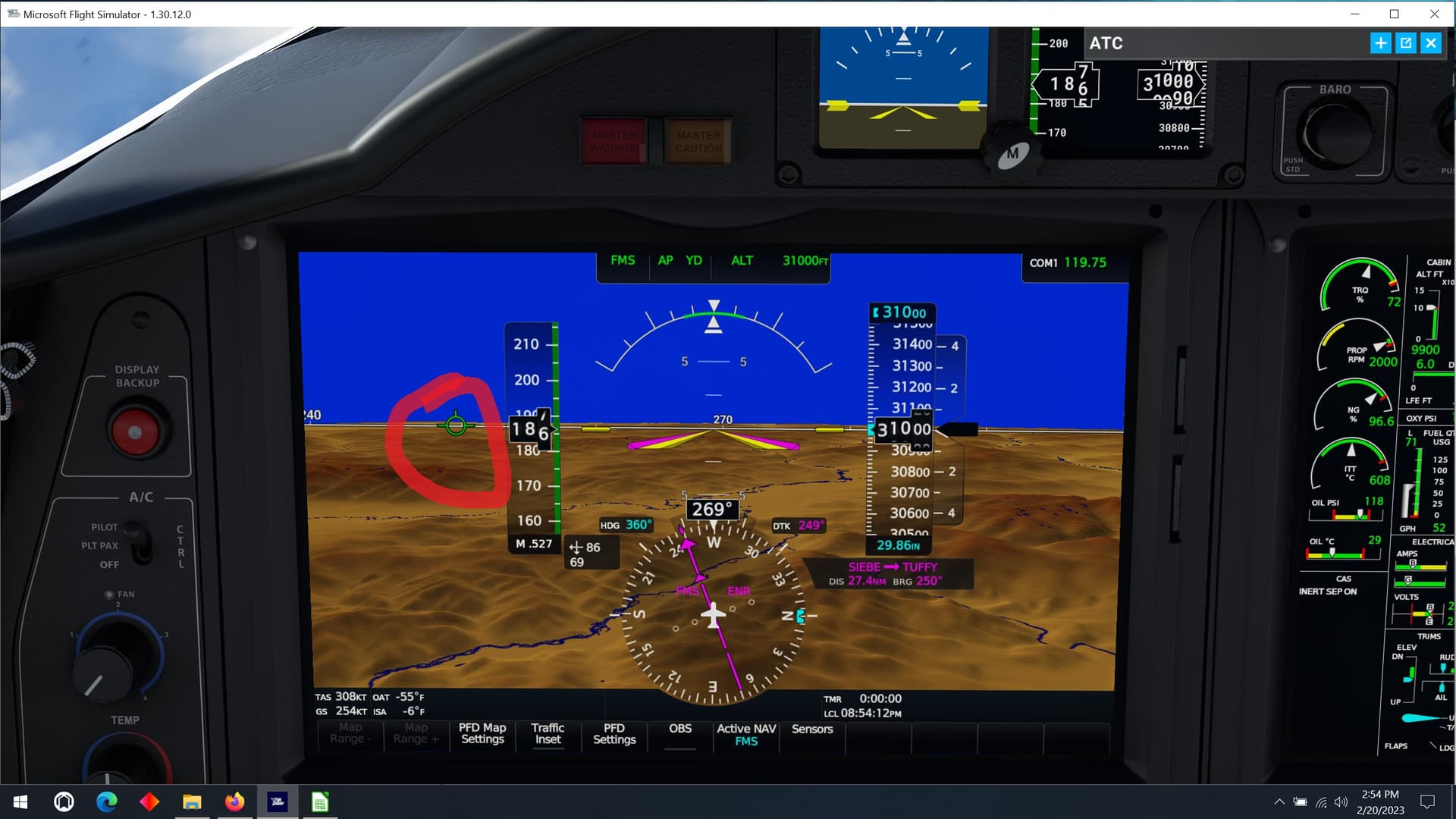
I believe that is the actual direction the aircraft is headed. Note the high crosswind from the right causing the nose to “crab” into the wind. But the aircraft’s actual track across the ground is in the direction of that symbol.
4 Likes
Yep - Flight Path Marker/Velocity Vector.
3 Likes