It looks to be the same choices as in the GUI for Settings - is there a difference or finer grain of choice by going in to usercfg?
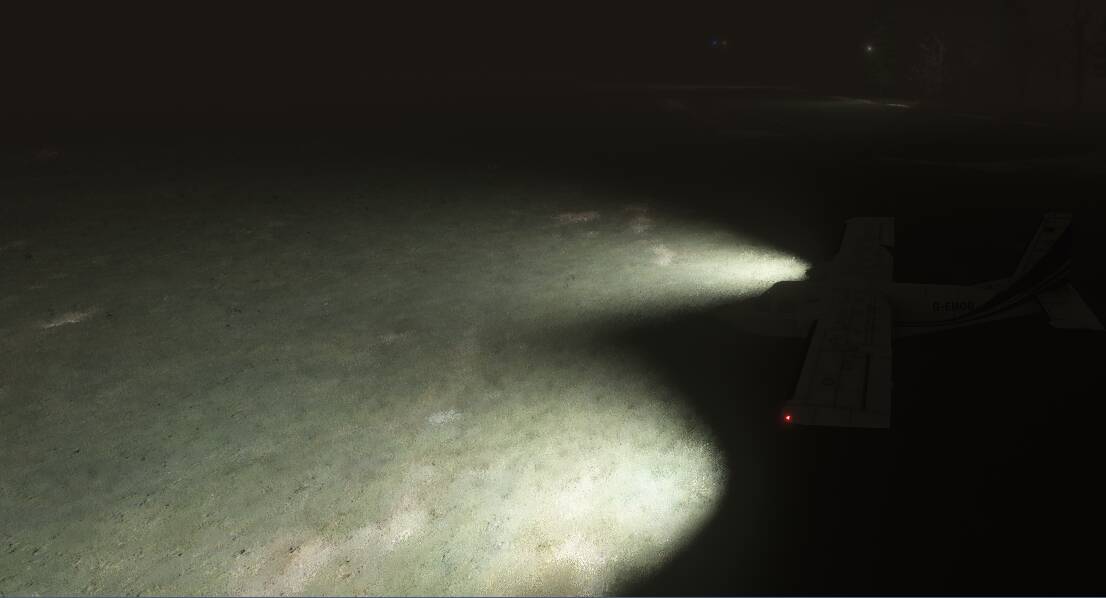
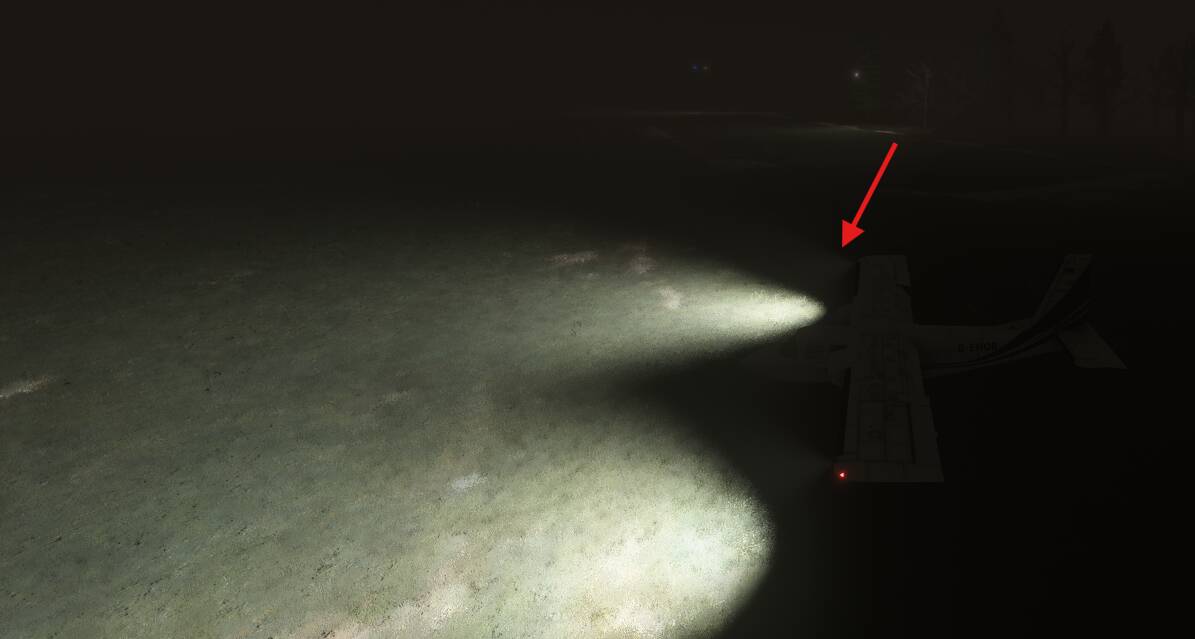
@hobanagerik mentioned values like 0.01, so he was probably referring to editing the aircraft’s .fx files responsible for lights, for example A350_Ext_LandingL.fx, where you can find lines like Volumetric=0.8
or
73X_Light_Landing.fx
Volumetric=1.0
1 Like
The settings I refer to are in the .fx files.
They have a section that looks like this:
[LightAttributes.0]
Type=spot
Size=0.0
Range=5000.0
Intensity=175557
Softness=0.0
SpotInner=10
SpotOuter=50
Volumetric=0.01
ScatDir=0.0
“Volumetric” is the specific setting that gives each light its light cone, and intensity.

1 Like
I agree, after using more aircraft in the SU5 it is clear as day that the 747 is the most unpolished and brings the Sim to its knees.
I even got black avionics and message about memory leaks the avionics will black out
They should be using the 747 as a benchmark because everything else under it will work if the 747 does. As it is now the queen is full of bugs (Entry 1R anyone?) and brings stutters, black avionics, CTDs along with it.
I’m sure we will see numerous new releases and local legends before any serious attempt to fix the 747 is done, it’s now an afterthought and maybe due to the PMDG coming they just won’t bother with the default one
2 Likes
Had time for my first test flight of SU5 Beta this morning in the PMDG 737-900ER, from PacSim’s KSLC to iBlue Yonder’s KPDX, with my usual suite of secondary apps and utilities: SimAppPro to run my Winctrl units; OpenTrack to interface the sim with my IR head tracker; GSX to handle pushback and marshalling/deboarding at the end of the flight; BATC for air traffic control and AI traffic injection using AIG and FSLTL models; Navigraph Charts; and Elevatex for flight tracking.
Not a lot to report, really. Flight went perfectly, sim performed great, and all my utilities functioned normally and as expected. I was intentionally NOT monitoring performance, VRAM usage, mainthread latency or anything else. Just enjoying a casual Sunday morning flight and looking for obvious showstoppers.


Since I didn’t run into any problems, in subsequent flights I’ll start tracking performance, memory utilization, VRAM and GPU utilization, etc. But first impressions were positive. And considering I can actually use my PMDG aircraft in this build, I consider things already about 100% better than the first several builds of SU4 Beta. 
15 Likes
Is there a setting somewhere to lower the effect of clouds being illuminated from underneath at night - the effect is WAY over done and sort of ruins night flying for me… Obviously it wouldn’t be an aircraft confiiguration settings, but thought I’d ask.
No idea about that one, sorry. I have to re-test this in SU5, but under SU4 there was a very weird effect regarding cloud illumination.
It appeared that your distance from lights, not cloud distance from lighting on the ground, determined how lit up the cloud would be. Essentially, as you fly away from a brightly lit city, the clouds get dimmer, until they are invisible.
So here I am looking West at the Florida coast at night.

Now I turn around to look at the clouds behind me.

It’s not your monitor, its really that dark. Now I will slew backwards until I am nearer to the lights.

My proximity to the lights is making the clouds light up. Very weird.
You can see the dividing line when you view this side on.

But as you pass that dividing line, clouds over to the right will light up.
This effect is even more obvious if you climb up above the clouds.

Move a bit further away from the coast, and the sky dome changes, but clouds are still visible.
A little further, and the clouds are dark.

I don’t think lit clouds at night is that unrealistic:
I also forgot about the altitude component, like the city lights are being projected upward in a cone. The higher up you go, the more cloud at a distance is lit up. Go down, and you will see the clouds start to disappear. SU5 hasn’t done anything to address this, but I never expected it to, to be honest.

2 Likes
There’s a dedicated thread for the Albatross - the developer is absolutely amazing in response to issues - let them know there. This is one of the best aircraft in the sim.
3 Likes
Stuck on SU5 beta. Any thoughts on how to revert back to SU4 ?
1 Like
Reboot after rolling back the update (before starting the EXE).
You should be able to leave the beta from Xbox insider app … like many of us have already done 

Did you just push back from PDX on the Delta gates like 25 minutes ago? 
Um, no? I did that flight this morning. PDX was the arrival airport, not my departure.
1 Like
Are you flying over a city as sure that’s light pollution from some major force like a city. I’ve never experienced that lying over barren Scotland, Wales, etc
…understandable as there are limits to beta introduced bugs as well. Managed finally to revert to SU4 by rebooting and hope for some fixes soon
1 Like
@jazzman3084 The broken autopilot on the HU-16 is a new issue in SU_05 beta, along with a couple of minor new graphical bugs (black switches) which I already have workarounds for. The autopilot worked fine in SU_04 and prior. The autopilot in the G-111 version still seems to work fine though.
Quite often bugs like this in early versions of a sim update beta get fixed in subsequent builds, but I’m looking into it.
Cheers.
7 Likes
I hope so. Us 90-series owners have been incredibly patient over this but it it really needs addressing. Can’t imagine Asobo would abandon nVidia users for this long over something like this
3 Likes
Quick feedback: entered beta (Steam), did a 1h test flight in VR with all my mods in a MSFS2020 legacy Kodiak; towards the end of the flight, I experienced the worst stutters I’ve seen for a long time. After the flight, I tried to restart the sim and it crashed on launch. I launched it again to see whether the crash on launch was reproducible and it started up fine.
I left the beta, did another test flight and was relieved to see that everything was working fine again.
I will certainly give the next version another try, but for now, the performance issues I experienced were too significant to stay on this build.
1 Like
I kept getting long load times, both for the world map and after pressing fly now. I also kept getting low bandwidth warnings, despite gave high speed fibre. Checking in Task Manager showed the sim was hardly using download any bandwidth. I finally gave up and left the beta, where all such issues vanished and it was working fine.
Maybe later when the beta is more mature.