Hi
I’ve been using FS2020 for almost 5 years now with hardly any issues.
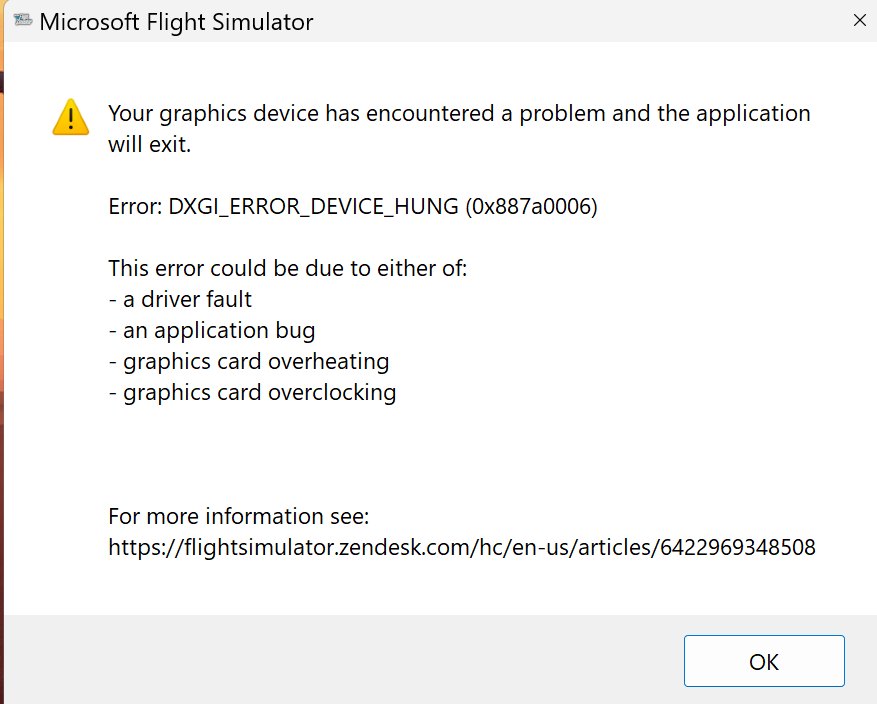
Lately, however, I encountered a Graphic Device Error (DXGI_ERROR_DEVICE_HUNG) - see attached screenshot.
Strangely it occurs only when I fly in a specific area - the north-western shore of Nova Scotia, Canada (waypoint EBKID). In all other places everything is fine, however when I approach the area or start in mid-air anywhere between EBKID and EBONY - I get the error followed by a CTD.
Here’s what I tried so far:
- Updating my NVidia driver
- Running the simulator in SAFE MODE with no add-ons (e.g. AIG TC, MapEnhancement, AIFlow/AIGround)
- Removing all add-on scenery
Nothing works.
Since it does not happen anywhere else, I suspect it is not a HW issue, however I removed all add-ons and the problem persists…
My specs:
CPU: Intel i7 12700kf
Motherboard: MSI B660M-E
RAM: 32 GB DDR4
Graphic card: NVidia RTX 5060Ti
No overclocking, GPU temperature is normal. FS2020 with the latest updates.
I’m lost since this error is usually related to HW failure, however it is reproduceable, which might point to an application problem.
Any ideas?
Thanks
Al