I’m starting to learn about the G1000, but I find it difficult to read the control buttons unless I move the cockpit camera up close. I’m using a 21" Acer monitor with 1920 X 1080 resolution. My graphics card is a Nvidia GeForce GTX 1650, and I’m using an HDMI cable to the monitor. My question: What upgrade would give me the most bang for my dollar to increase viewing of small details in the cockpit: a better graphics card; a larger monitor; a monitor with greater resolution; setting(s) to adjust in General Controls? Maybe everyone has a similar issue, and you need to put the camera up close! Any feedback would be appreciated!
Even when I was playing on a 32in QHD 1440p monitor with ultra textures, I was never really able to fly without having zoomed views mapped to my controller or keyboard.
Bigger resolution/size will help, but I’m not convinced it will completely solve the issue.
Now I’m playing on a 34in WQHD monitor and things are actually a bit “smaller” now due to the aspect ratio.
Now, all that said, 21in does seem on the small side 
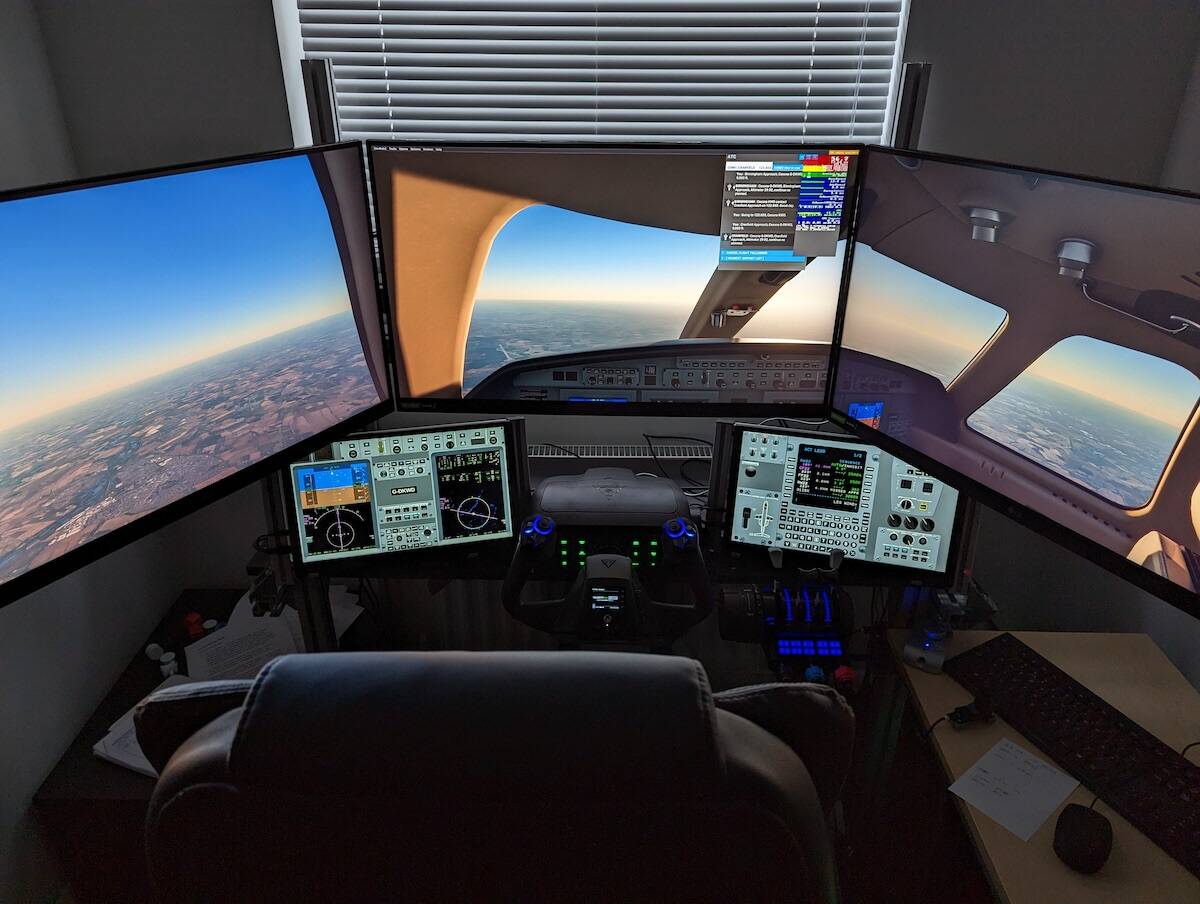
This is something that frustrates a lot of us. What many of us do is move the instruments and controls to additional screens using an App called Air Manager. Doing this means you can keep the main monitor for your outside world view and therefore keep an eye on both at the same time. It makes regular instrument scans like they should be nice and easy. Just like this.

A head tracking device like TrackIr or Tobii can help to easilly move around the cockpit an get a closer view of the instruments just by moving your head like in a real plane. That could also be a possibility.
Wow, I didn’t even know these things existed! Thanks, this is definitely something to consider.
Thanks! This looks like something I definitely want to pursue.
Really like your 5 screen cockpit setup. Want to do the same with mine but my graphics card allows for only 4 monitors and I assume yours does also. I already have a single main display and the 2 touchscreens with air manager but am curious how you have all 5 monitors connected.
I have the three main screens on the DP sockets of the 3080ti, then I enabled the on-board graphics for the mobo (ROG STRIX Z690-A GAMING WIFI D4) which offered me a DP socket and an HDMI socket so they run the two touch panels at 60Hz 1080p, not shown but i later added a 6th monitor - an old PC display I think at something like 1200x900 running off the HDMI socket on the 3080ti - this only runs my Volanta log book and maybe a chart or two if needed.
Its pretty much flat-out and CPU bound a fair bit but the GPU is balanced to give almost equal load to CPU & GPU now by tweaking the TLOD & OLOD values and othe graphics settings where needed. I’m getting 30 to 45 FPS for most scenes.
Oh, so the on-board graphics on mobo can be activated and used in conjunction with the DP ports (and the HDMI port also?) on the graphics card. I didn’t consider that possibility. This is good to hear. Thank you!
The 3080ti comes with 4 ports - 3xDP and 1xHDMI and all are active by default. The mobo ones are dependant on the mobo and the CPU - some do not have built-in graphics ability, the 12900K does, the 12900F does not.
I did use a dual port USB-C to HDMI adaptor (pluggable) at first but Windows 11 sometimes dropped it on boot and it took a bit of fiddling to get going again. The performance hit with the CPU graphics and the USB graphics is identical so I’m unsure if the USB device uses the CPU graphics or not.
It really works the system when you load so many screens but it all plays well together and makes a very nice setup I think.
Thanks for the follow-up. I have a 12900K and a 2070Super currently. I know my mobo has one HDMI port. Don’t know about the CPU but figure it has the capability. I will give it a try by swapping out one of my HDMI cables on the touchscreen and plugging into the mobo HDMI.
Nice, you’ll probably have to dip into the BIOS to turn the integrated graphics on.
Yes, I did that after researching on the internet. Downloaded a UHD Graphics 630 driver and bingo! Works very nice on my touchscreen at 1920 x1080. Thank you so much for leading me this direction.
I have three screens as the main display and three touchscreens running air manager for instruments. Air manager is not free, but it’s well worth the money.
Normally the Garmin glass cockpit screens are popped out to the precise positions needed using popoutmanager, which is a free addon from flightsim.to
My pc has three displayport connections and one hdmi. Another hdmi is connected through a usb3 to hdmi adapter and the last one is an android tablet connected through Spacedesk, which is a free app.
With multiscreen, the high cost of eye trackers is mostly wasted, in my opinion.
“With multiscreen, the high cost of eye trackers is mostly wasted, in my opinion.”
and replaced with the even higher cost of multiple screens and the subsequent performance decrease that comes with driving multiple screens, but to each their own.
I’m saying that if you already use multiscreen, eye tracking is no use..
If you stop using multiscreen, eye tracking is probably more worthwhile..
I have trackir and don’t bother with it now I use multiscreen.
That makes perfect sense.
What size are your monitors? I use the CJ4 in an almost identical setup but with a single ultrawide, I’m debating going to a triple screen set up like yours.