This is more than enough justification to not link the left and right cowl flaps together. Thank you again for all the hard work you’re doing.
@FndrStrat06 Thanks! And I wouldn’t remove the differential function, just maybe add another clickspot / activation method to allow them to move in unison, a bit like the extra overhead fuel selector click spots. Will give it some thought anyway.
But in real plane you can use both switches at the same time. But of course there should be an option to use switches separately.
I just realised that oil cooler flap switches work always together. BKSQ Duke you have also option to use them separately. There is invinsible switch available:
“Since this is tedious in a flight simulator, an invisible switch is positioned
between the two cowl flap switches that will actuate both cowl flaps at the same time.” - Piston Duke manual
Just started flying this after reading all these posts. Very nice and fun surprise - enjoying it in the Italian Alps immensely!
Here in this Albatross video pilot started close cowl flaps at time 10:44 and it takes approx 13 seconds to go almost fully closed position.
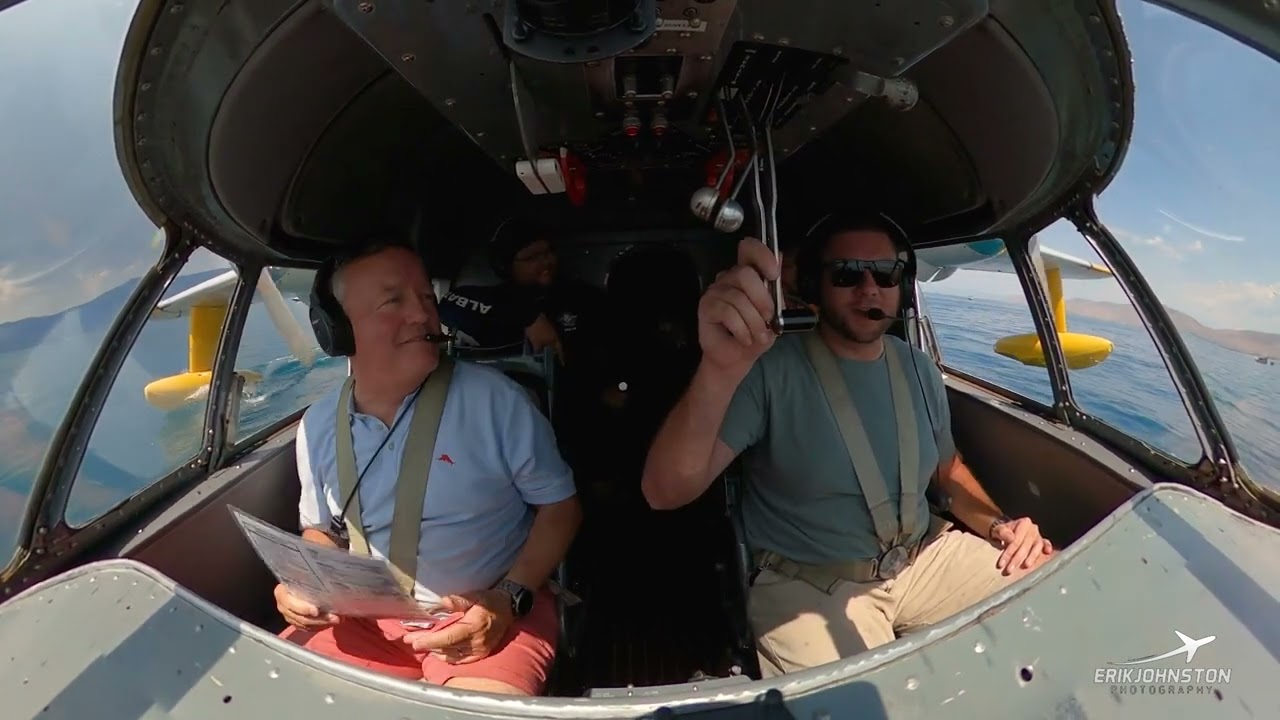
Good catch. Seen that video a few times but I missed that.
It’ll be matched for SU4.
Hi Mike, that sentence made me think - wouldn’t it be possible to include a self-made cube map file in your package with the same name and resolution of the original one so this gets loaded instead?
That’s basically how some mods deal with default textures (like replacing panel textures of a default aircraft or 2D textures of light effects…) assuming that the aircraft packages are loaded after the package which includes the cube maps.
Surely it would be better if Asobo documents an official way within the SDK documentation but maybe that’s still some idea to experiment with that could end up on fs.to at least.
The only thing to ensure is if that would alter the texture for all other aircraft which would be unfortunate 
@Delta2k5 Yup, that would be great, except the cube maps appear to only exist in the compiled shaders file, which is encrypted, and they aren’t listed or accessible anywhere in the VFS, so can’t even find their file names.
I’ve hunted for them many times without any success. Maybe someone else will be able to find them at some point.
@Zwoop68 @FndrStrat06 And here you go… the best of both worlds. 
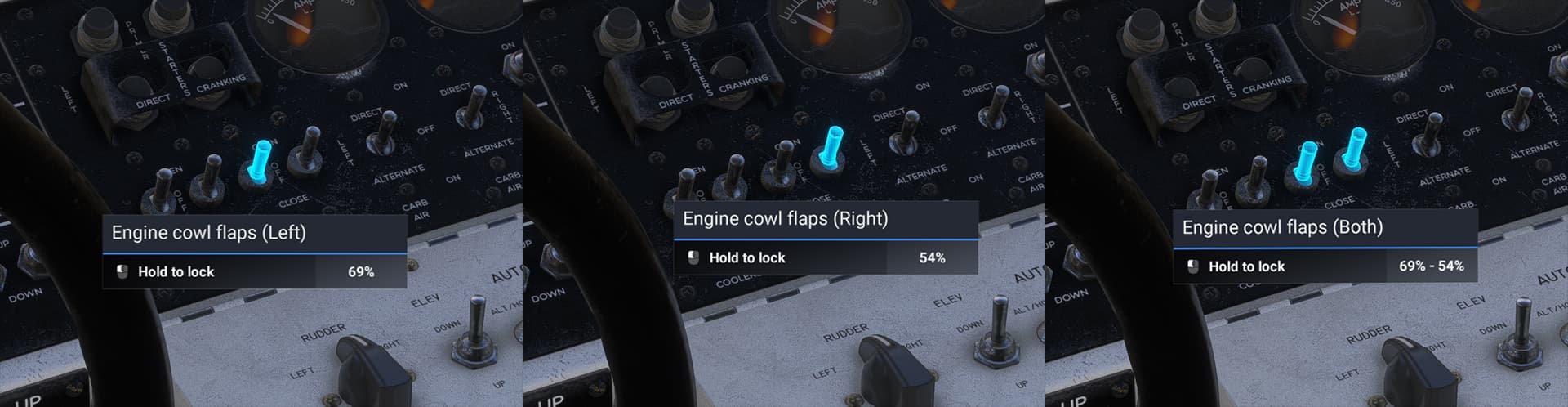
You will be able to click between the two cowl flap switches to grab and activate both of them at once. Also both the cowl and oil cooler flaps have been set to ~13 seconds actuation time.
These will be in the SU4 update.
Cheers.
A perfectly elegant compromise. Fantastic!
Nice, thank you!

Grumman Albatross 2.2.1 Update release notes
Greetings everyone. Now that SU3 is out, the second major update for the Albatrosses has finally arrived! My apologies for the repeated delays, but Asobo made some very useful improvements in Sim Update 3 beta which just had to be taken advantage of. This necessitated SU3 being publicly released before the update could be.
Anyway, while this update wasn’t initially intended to be anywhere near as massive as the first, it actually ended up being even bigger in the end. There are many improvements, some user requests, and a flying boatload of fixes, including several specifically for multiplayer group flights.
Below is a complete list of fixes, improvements, and some known issues and workarounds. A follow-up patch to address some minor remaining bugs will be coming soon.
The Pilot’s Guide has also been updated and is available here:
FIXES in v2.2.1:
- Missing ground roll sounds restored
- HU-16’s missing instrument lights fixed (SU_02 bug workaround)
- Garmin G1000 MFD missing plane location icon fixed (G-111)
- GNS 530 knob animation bugs fixed (HU-16)
- Turn coordinator glass flickering fixed (HU-16)
- Windshield glass flickering in external views fixed
- Analog clock adjustment knob fixed (HU-16)
- Engine power setting / rpm placard values corrected (HU-16)
- HU-16’s max manifold pressure reduced to 51.5" and max rpm to 2700
- RCAF livery roundel fixed to properly match historical period and flag orientation fixed (HU-16)
- Several potential landing light angle control issues fixed, hopefully preventing them from occasionally being stuck aiming down
- Fixed missing fuel selector tooltips
- Tire UV animations fixed
- Wake and prop wash effect materials permanently cached to (hopefully) prevent missing effect textures during streaming
- Wheel brake wear rate and temperature fade tweaked
- Nose wheel steering improved across speed range
- Fixed Garmin G5 slight display flicker
- Fixed occasional propeller max RPM overruns during slow throttle advances
- Tweaked supercharger low and high-gear outputs to better match published figures at medium and high altitudes, with significant improvement in high altitude performance
- Improved accuracy of engine rpm limits, oil pressure, oil temp, fuel pressure, CHT, and cooling flap values
- Slightly increased fuel transfer pump flow rate
- Workaround added for slow analog instrument texture streaming when switching views
- Workaround added for occasional boarding ladder and chock texture corruption when streaming
- Generator warning light logic, alternator RPM cutout, and voltmeter readings fixed
- Passenger boarding sequence at med/large airports in free flight cold & dark start fixed
- External power switch logic changed, no longer requires GPU truck (works in most ramp parking spots)
- Minor fixes for cold & dark and off-airport starts
- Small fixes to G-111 livery textures
- UI Range values fixed for HU-16
- Fixed UI fuel burn rate value
- Checklist “look at” function fixes for walkaround / preflight, and transponder buttons
- Several interior geometry and texture issues fixed (broken UVs, incorrect normal map data)
- Fixed some lighting initialization issues with water apron/runway starts
- Missing takeoff and landing performance data added to EFB
- Some camera names corrected and localized
- Some missing localization entries added
- Multiplayer: Albatrosses seen in multiplayer should now show correct propeller animations
- Multiplayer: Workaround implemented for static height sim bug during water ops. Other players’ Albatrosses should no longer appear to “hover” above the water when they are actually floating on its surface.
- Multiplayer: Workaround for erroneous trim tab deflections
- Multiplayer: Missing windshields fixed
- Multiplayer: Workaround for environment occluder bug when other players’ Albatrosses floating in water are seen from an interior camera on your aircraft
- Multiplayer: Bow splashes and wakes now visible on other players’ Albatrosses
- Multiplayer: Potential fix for copilot standing up through fuselage on HU-16 (Possibly an SU_02 bug only, unable to reproduce in SU_03)
- Multiplayer: Added workaround for sim’s missing main wheel rotation animations
IMPROVEMENTS in v2.2.1:
- Realistic aircraft beaching is now possible! Transitioning between water and land (and vice versa) with landing gear extended is much smoother now, and extending the gear into the water while floating no longer results in the aircraft popping upwards and ‘driving’ on the water’s surface. Please take launching and beaching slowly though, just as you would in reality. The surface under the water can be unexpectedly bumpy. Also note that wheel brakes will not currently work when the wheels are under water (sim bug, reported).
- Propeller wash effects improved, and splash effects added to gear legs when extended into water
- New bow splash and water spray effects on windshield added (easily visible in rough seas and during reverse thrust at low speed)
- New ‘legacy’ avionics panel version added to the HU-16: with dual Nav/Comm radios, ADF radio, and no GPS (accessible via clipboard “modern avionics” option, with persistent setting)
- Enabled control surface gust lock operation
- Added gust lock engagement / disengagement to checklists and manual
- New “Metallic Albatross” livery added for the G-111
- Main and Emergency Exit door handle click spots improved (you can now use external door handles from within the interior when the doors are open)
- Autopilot ALT and VS hold accuracy improved
- HU-16 nose glass texture improved
- Boarding ladder can now be deployed in the water when aircraft is stationary or anchored
- Landing light actuators now work separately again, and the landing lights now add individual and differential drag penalties when extended
- Cowl and Oil Cooler flaps now have variable and cumulative drag penalties depending on their settings
- Improved engine exhaust heat effect behaviour at speed
- Airframe LOD display distances vastly improved (noticeably better in multiplayer)
- Windshield reflections and refraction realism significantly improved
- Windshield refraction on/off option added to the accessories clipboard
- Clipboard “Clean Windshield” option renamed to “Remove Insects” for better function clarity
- Anchor deployment restrictions slightly relaxed (easier to deploy in rough seas now)
NEW OPERATING NOTES:
- Now that the landing lights, cowl flaps, and oil cooler flaps have variable and differential drag penalties, you will need to manage their settings when configuring the aircraft for optimal range and endurance in cruise flight, balancing fuel efficiency and cooling needs. The overall drag increase from having all of these items fully extended / opened is now quite noticeable (potentially losing up to 20 knots IAS at cruise power), as are the yaw moments from having them deployed at different settings between left and right.
KNOWN ISSUES & WORKAROUNDS:
-
Due to a bug in the wear and tear system (as of sim update 3) the sim will accumulate “damage” to the nose gear and tire during transitions from land to water with the gear extended, regardless of speed. This only happens while moving from land to water, not the reverse, and it damages the gear and tire approximately 10% each time, eventually leading to failure if you launch into water many times in a row. This is a sim bug affecting all amphibians, and has been reported to Asobo in detail. Until they are able to fix this I highly recommend checking “Disable Aircraft Stress Damage” in the sim’s “Assistances” settings if you plan to perform several beachings during a single flight session.
-
Due to my workaround for a long standing static CG height sim bug (which causes amphibians to appear to hover when floating on water in multiplayer), selecting an “off-airport” ground start point on the world map, on either land or water, or re-starting a flight, may cause the plane to initially and momentarily appear to be partially underground / underwater during flight load. This is a visual bug only and quickly corrects itself during the loading sequence.
-
Using “active pause” while stationary on the ground may cause the aircraft to “crash”. This bug was caught too late for this update but it has been corrected for the next one. Please avoid using active pause on the ground until then, but active pause in the air works fine.
-
When using the “Legacy” avionics in the HU-16 the autopilot’s altitude pressure source is currently somewhat bugged. This has been fixed for the next update, but in the interim please use the sim’s “Set Altimeter” function to set the correct current barometric pressure if this becomes an issue for you.
-
When using “Legacy” avionics, the NAV/COMM radio screens’ brightness is erroneously tied to the panel light potentiometer. This has been fixed for the next update.
-
After switching between the new “Modern” and “Legacy” avionics suites in the HU-16 I would advise you to restart your flight. You can swap the avionics in mid-flight, but you may encounter issues with GPS/NAV1 autopilot tracking. If this does occur just restart your flight and it should be fine for all flights from then on. Note that the “modern” avionics are still the default setting.
As mentioned above, another (smaller) update will be coming soon, addressing the aforementioned issues and with a few more fixes and improvements that didn’t quite make it into this one (mostly minor autopilot, avionics, and graphical bugs).
I’d like to offer my sincere thanks to all of you here in this thread for your extensive feedback over the past few months, it has really been a huge help.
Additionally I would like to thank the following streamers / content creators: JayDee, AvAngel, TwoToneMurphy, Akula, Andre Nickel, and Cow Town, for their excellent long format reviews and comments on the Albatross. These gave me a chance to really see some rare bugs / issues in action and note general areas that needed improving.
I hope you enjoy this second major update to the Albatrosses, and as always I’m here to assist if you have any questions.
Cheers, and happy flying! (or… boating?)
-Mike
Thanks for the big update! Now I just need SU3 to deploy to me so I can fly it lol
Wow - nice list of updates. New to the plane but loving it - looking forward to flying the changes!
I don’t feel it’s fair that I can’t give you more than 1 reaction. Discord had this figured out a while ago 
I’ve followed this thread from the beginning and I’ve read comments regarding engine sounds and Mike’s response some months ago. I’m just wondering if there’s any other engine sound options that anyone has figured out yet?
As other’s have said, it’s not that they’re bad. It’s more than such a good aircraft pleads for… better?
Thanks. I have passed on all the audio comments, concerns, and suggestions here (and some of my own) to MS’ audio team.
Cheers.
This aircraft and it’s dev are outstanding!!!
Updated the sim to SU3 but it still shows Albatross version 2.1.0.
Anyone got updated to version 2.2.1?
I see 2.1.0 on my end as well. Maybe that hasn’t been pushed out yet?