Game Platform (Exampe: Steam, Xbox, MS Store):
MS Store
ISSUE DESCRIPTION
Did you remove all your community mods/add-ons? If yes, are you still experiencing the issue?
N/A
Description of the issue:
When i launch FS24 the audio switches to a worse quality, this usually happens when software or a program tries to use the mic on my headphones as an input device but i have it disabled for that exact reason. Input device of my headphones is disabled in system settings on my PC and when i did manage to get in sim, i disabled input there too but nothing seems to have changed, everything is set to output only. As soon as i close the sim it switches back to the better audio. My headset is the ‘Soundcore Space One Pro’ which is connected by Bluetooth. If i had to hazard a guess i’d say that the sim is somehow overriding my settings because i don’t have this issue with 2020.
FREQUENCY OF ISSUE
How often does this occur for you? (Example: Just once, every time on sim load, intermittently)
Every time on sim load
REPRODUCTION STEPS
Please list clear steps you took in order to help our test team reproduce the same issue.
Turn on headphones, wait for them to connect
Boot up sim
YOUR SETTINGS
If the issue still occurs with no mods and add-ons, please continue to report your issue. If not, please move this post to the User Support Hub.
What peripherals are currently plugged in? Please name all of them as there could be a potential conflict.
N/A
[PC Only] Are you using Developer Mode or have you made any changes to it?
No
[PC, MSFS 2020 Only] Are you using DX11 or DX12?
N/A
[PC Only] What GPU (Graphics Card) do you use?
N/A
[PC Only] What other relevant PC specs can you share?
N/A
MEDIA
Please add a screenshot or video of the issue occurring.
Audio issue so not able to.
[END OF FIRST USER REPORT]
For anyone who wants to contribute on this issue, Click on the button below to use this template:
Do you have the same issue if you follow the OP’s steps to reproduce it?
•
Provide extra information to complete the original description of the issue:
•
If relevant, provide additional screenshots/video:
•
I have the exact same issue with me Sony WF-XM41000’s. They are also connected over Bluetooth. You’re guessing of the sim overriding the audio settings seems to be right on the nose. Hopefully the devs see this in order to come up with a fix. The sim at the moment is unfortunately not playable for me with the degraded sound quality. I’m sure they will get to it in time.
I have absolutely the same issue. PC, Windows 11, Steam.
I have AirPods Max and every time I start the MSFS 2024, my headphones start producing mono sound. As soon as I exit from sim, stereo returns back.
I’ve checked every audio-related setting in Windows, re-installed audio drivers, and re-installed SIM. I’ve made no progress, and I can’t enjoy SIM due to degraded audio.
Same issue with my Sennheiser Accentum. I only fly VR and this issue is immersion breaking for me unfortunately, so the game is unplayable at the moment. Hopefully a fix is implemented soon. I’ve double checked all audio settings and drivers. No issue with MSFS 2020 or any other game for that matter.
It seems impossible to prevent MSFS 2024 from switching headphones to hands-free mode. Disabling microphone access in windows just results in other workarounds being used. Using external microphone doesn’t help.
For me it started today, but I saw posts with users complaining about it from before.
Detail steps to reproduce the issue encountered:
Just play sim with headphones that support hands-free mode (using sony xm4 myself), upon MSFS 2024 start, headphones change mode to hands-free and users is left with low quality sound.
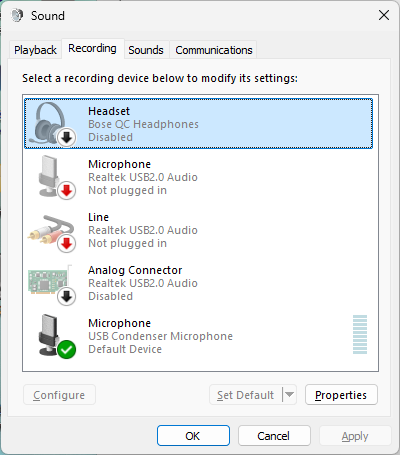
I have the exact same issue with my Bose QC headphones. Starting MSFS 2024 turns on the microphone in the headphones, which changes them into transparency/voice mode, and the audio sounds horrible.
I have not only disabled permission for MSFS 2024 to use a microphone, I have disabled the microphone in my Bose headphones in Windows system settings. That microphone shouldn’t even be an option for any application in Windows. Yet, when starting MSFS 2024, it still happens. Every time.
For what it is worth, I entered a ticket with Asobo. The ticket status has already been changed to solved. However, no appends were made to the ticket at all. I am hoping that simply means that Asobo has this fixed in a (hopefully soon-to-be released) update of the sim.
This doesn’t work for my sony XM4s, on turning bluetooth off and on windows 11 unhelpfully says “oh, that can be a headset” and re-enables the headset service.
Exact same thing. Installed with headset communication disabled. Asked if I wanted to use microphone, I thought - what could go wrong? Quality of loading music dropped to atrocious. Apparently I could ‘change the setting later’. Can’t change it. Audio in MSFS 2024 on my Sony XM5 is now appalling.
Same thing here, my Cowin SE7 headphones are swapped to the obnoxiously poor audio settings. only workaround I’ve found is to use external speakers, or to plug them in to a aux port.
Same here, happened since updating to Windows 11 (with W10 disabling the hands-free “side” of the device did the trick). Extremely annoying, hope they are able to fix it in the next update
EDIT: Found a workaround stopping “bluetooth audio gateway” in windows services. Once stopped it takes about 30 secs to re-detect the headphones as a normal audio device
Do you have the same issue if you follow the OP’s steps to reproduce it?
• Yes
Provide extra information to complete the original description of the issue:
•The audio issues seem to be related to the fact if the same BT device is being used both as an output and input device. This used to happen on MSFS2020 if I used an external tool (like vPilot or BeyondATC) that used the microphone on my headphones. The problem is if I try to use another microphone (from another headset I have lying around) the comms audio goes to that device as well. I can’t seem to find a way to change only the input device.
I don’t think this is a problem with the game but with the BT protocol, either way the fix would be to disable the microphone or let us use another input device which the game doesn’t seem to allow. Since the game uses the microphone by default (unlike MSFS2020) this suddenly becomes a problem.
If relevant, provide additional screenshots/video:
• N/A
 SIM INFORMATION
 For anyone who wants to contribute on this issue, Click on the button below to use this template: