Did that. The issue is with helicopters using collective when throttle axis’ are assigned.

Yep, I mixed up my bindings. “ROTOR GOVERNOR SWITCH ON” and “ROTOR GOVERNOR SWITCH OFF” work correctly.
I think i know what @Bananimal6685 is talking about. In the early days of MSFS2020, when helicopters were not yet implemented, fixedwing controls were used for helicopters:
Cyclic was aileron and elevator
Throttle was collective.
Then as helicopters were “natively supported” by Asobo in MSFS2020 there were new controls available:
Cyclic
Collective
Helicopter Throttle
So the devs of each heli needed to either convert, or allow both sets to work properly.
So there may still be helicopters where the Collective binding and the Throttle binding (fixedwing) do the same thing.
Yes. I completely agree.
but I have yet to come across a helicopter in MSFS2024 that the bindings shown above do not work with.
Still trying to use ‘throttle’ and ‘propeller’ will cause the conflicts described and should not be assigned.
All of the MSFS2024 native helicopters work if assigned to the helicopter specific commands.
I do know that the FlyInside helicopters use ‘rudder’ for anti-torque control in 2020, but those have not been ported over to 2024 yet.
edit: I guess I don’t follow what OP is trying to accomplish. Why would the ‘throttle’ and ‘propeller’ axes need to be changed, if a solution was already implemented with the helicopter specific axes?
Thank you for the bug report.
We have created an internal ticket to see if our team already has this logged, and if not they will attempt to reproduce the issue and create a new bug report. This item is now marked as feedback-logged. If there is an existing bug report or one is created, we will move this thread to bug-logged
One thing we have noticed, is that if the Helicopter is mis-identified as an Airplane, then the helicopter specific controls are greyed out. That’s a bug!
RotorRick
You know what kills me. Some folks come in here and get off topic, MS looks into the issue and some people, not understanding what is going on claim there is a work-around. That’s all MS needs to do what they just did and log it as “Feedback-Logged.” Great! It’ll never get fixed now! The issue is, throttle axis in Helicopter controls is actually moving the collective when you bind the throttle axis in helicopter controls. In a brand-new profile. I’ve been simming for 35 years and know my hardware and software very well. I do it for a living. The mapping is busted and they are now not going to fix it. Awesome!
I’m sorry you feel this way, and I’m sorry if in trying to help I have caused you frustration. I have been simming for almost as long and I understand where you are coming from.
What I think is happening here, is a misunderstanding of how the controls are represented in the menu. If you have a helicopter selected in the menu, all of the controls are listed as “helicopter controls” and vice versa if you have an airplane selected. They will all be labeled “airplane controls”.
When MSFS introduced helicopters in the 40th anniversary edition, they created helicopter specific controls in the sdk. This is not a work around. The bug is that the original ‘throttle axis’ for airplanes affects the collective at all in the first place.
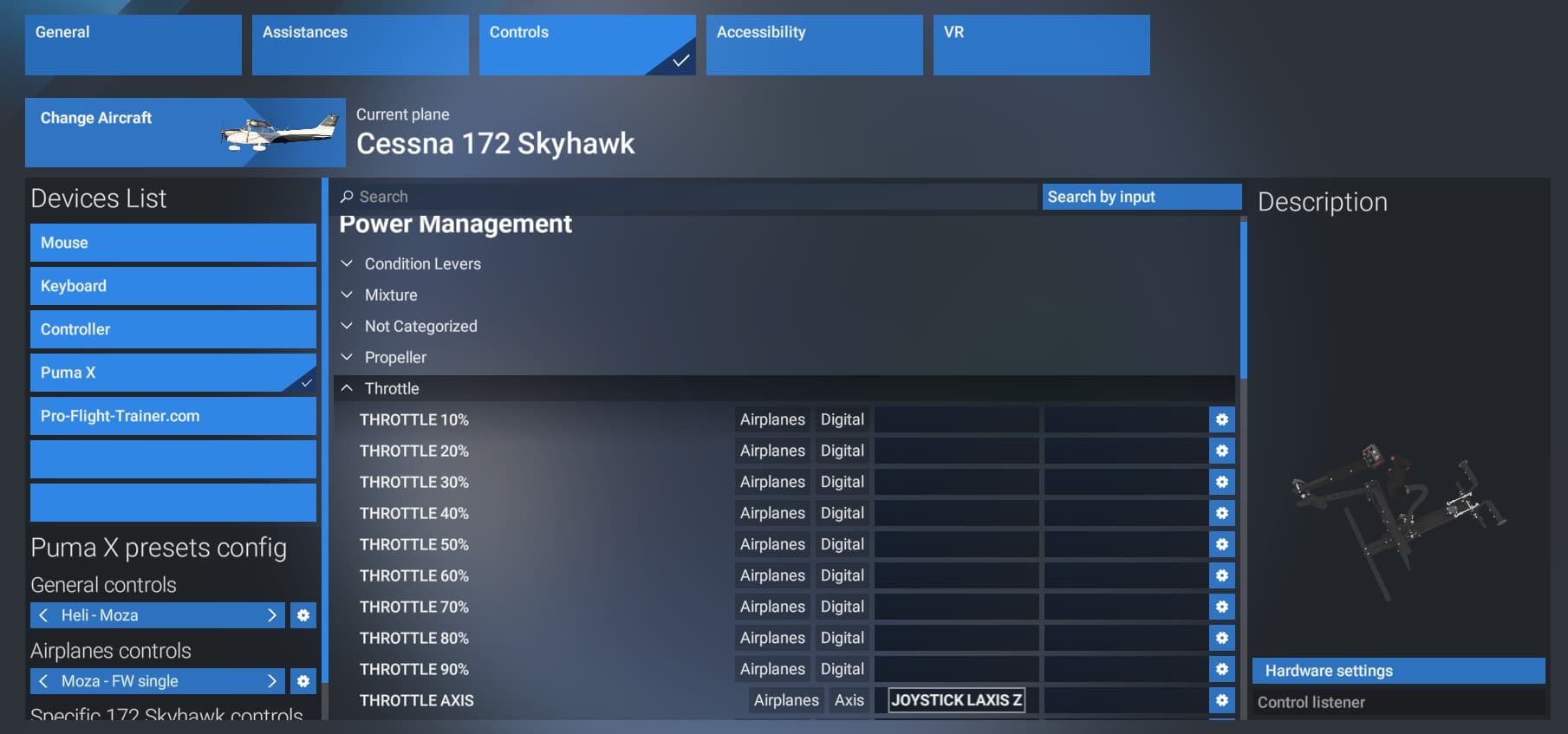
here is the power management menu with the C172:
throttle axis is listed as ‘airplane-axis’
(I have it assigned to a throttle control for fixed wing flying)
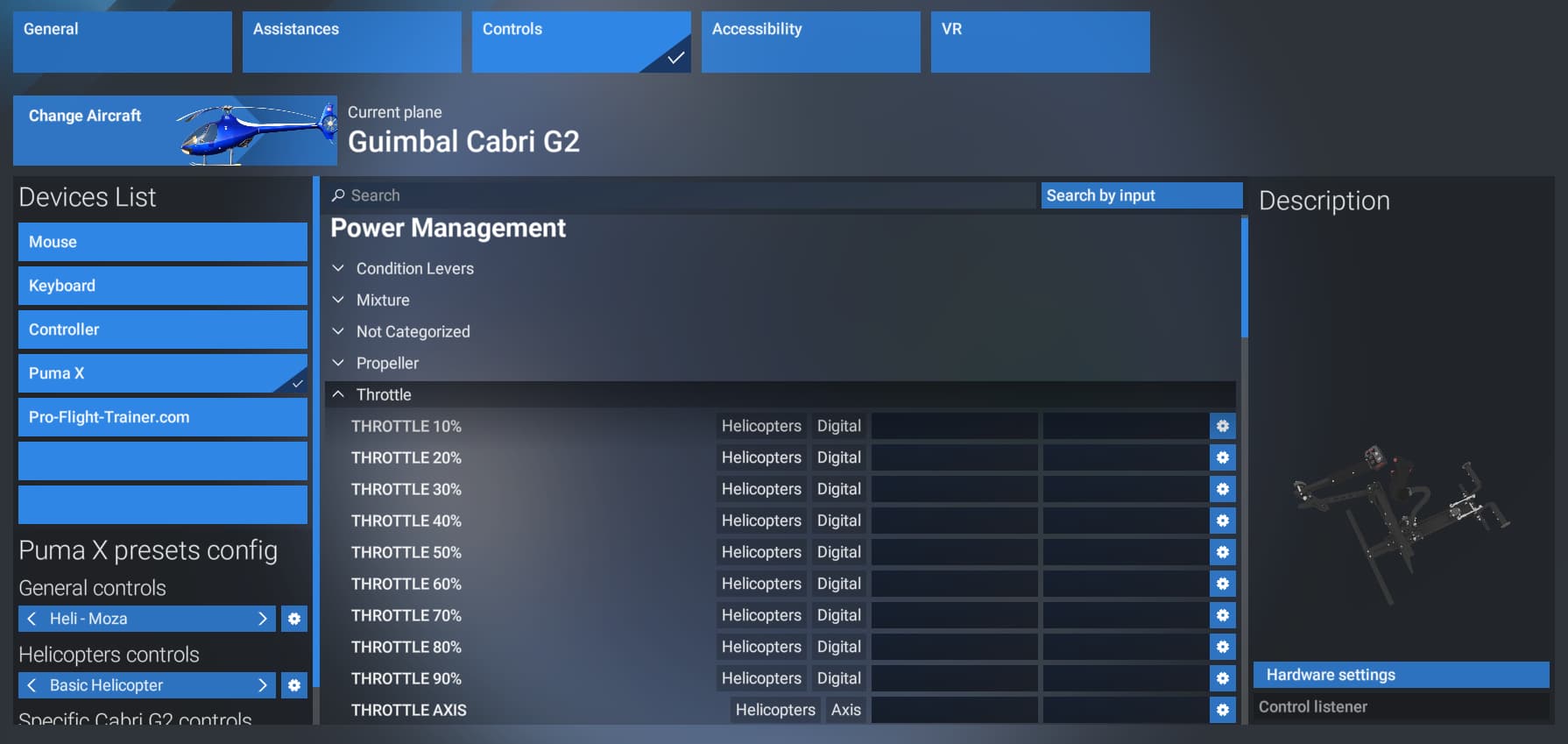
here is the same menu with the Cabri G2:
throttle axis is listed as ‘helicopter-axis’
THIS IS NOT THE CORRECT AXIS TO ASSIGN FOR HELICOPTER THROTTLE. It is a holdover from before MS/Asobo supported helicopters natively. DO NOT ASSIGN THIS AXIS FOR HELICOPTERS!
if you search ‘helicopter’ these are the controls that come up, and are the correct axes defined in the sdk for helicopters:
ASSIGN YOUR HELICOPTER THROTTLE CONTROL TO ‘SET HELICOPTER THROTTLE AXIS’ assign your collective control to ‘COLLECTIVE AXIS’
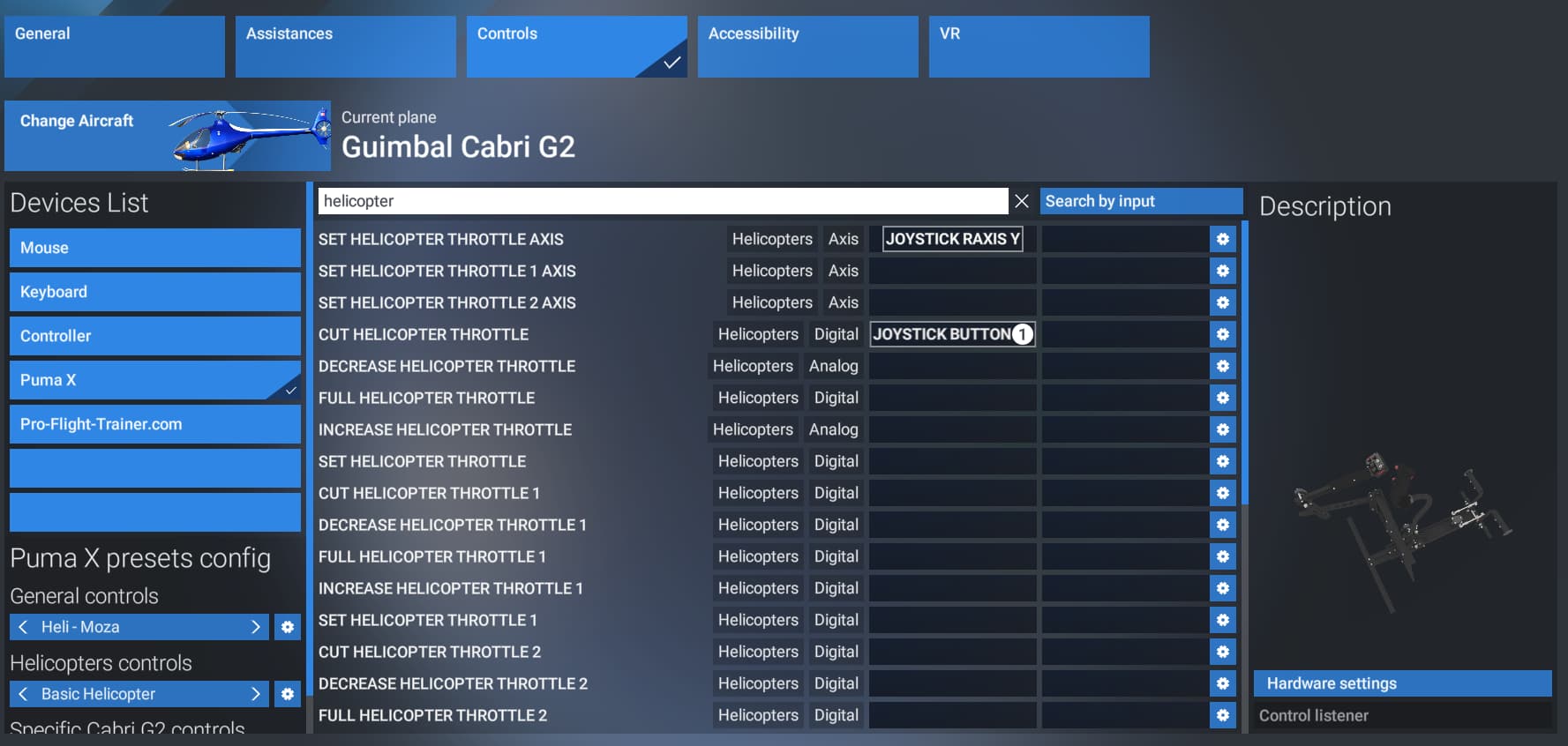
If you assign the axes and commands shown above, the controls work correctly without any conflicts. These are the controls that were created in the sdk to officially support helicopters from the 40th Anniversary onward. Any helicopter from any developer that is using ‘throttle axis’ or ‘propeller axis’ or ‘rudder axis’ is the work-around from before helicopters were supported.
I feel that the main problem is, that the ‘throttle axis’ should not be labeled ‘helicopter-axis’ just because a helicopter is selected in the menu, since it is not the assigned control in the sdk. The real complaint here should be, that the helicopter specific controls shown in the 3rd pick, should be what comes up under ‘essential’ or shown under ‘power managment’ when a helicopter is selected in the ‘change aircraft’ tab. It is misleading that when a helicopter is selected, it still lists all of the airplane commands, but has them labeled as ‘helicopter-digital’
edited for clarity
You’re right. I’m sorry. And thanks for your help. This resolved it. Although some helicopters like the 407 do not respond at all to throttle input, but the collective is no longer moving now, so that is good.
No worries! I’m sorry as well. I’m glad you have been able to get it working!
Both the B407 and H125 aren’t set up correctly to use the throttle axis. You’re previous solution with the 10%-90% as a button press is the best way to handle that as mapped to a hardware control for now. They are both an on/off, idle/flight thing.
the startup behavior of the B407 needs work.
edit:
…and if you have a hardware button for the idle release button, it can either be ‘CUT HELICOPTER THROTTLE’ or ‘THROTTLE 1 CUT’ depending on how the developer set it up. Then you should be able to roll the throttle past the idle release stop
Thank you for your input. And i will try this tomorrow.
Maybe you could help me with another issue I am seeing. Maybe others could be having the same issue. When it comes to my Virpil collective and the input in the game, I pull up and about 50% or so and the collective in game just jumps to full. I have tried every tuning option and i cant get it to stop. Any suggestions or could you send a picture of what you use. Thanks in advance
My twist throttle is working fine right now, it does have to move to the extreme travel to go from idle to flight but I can live with that.
Yes great explanation. Asobo really need some help with the helicopter setups as they just have not thought this through very well and for beginners its hard work. I fly helis in real life and RC helis too and even I find it hard work dealing with these setups!
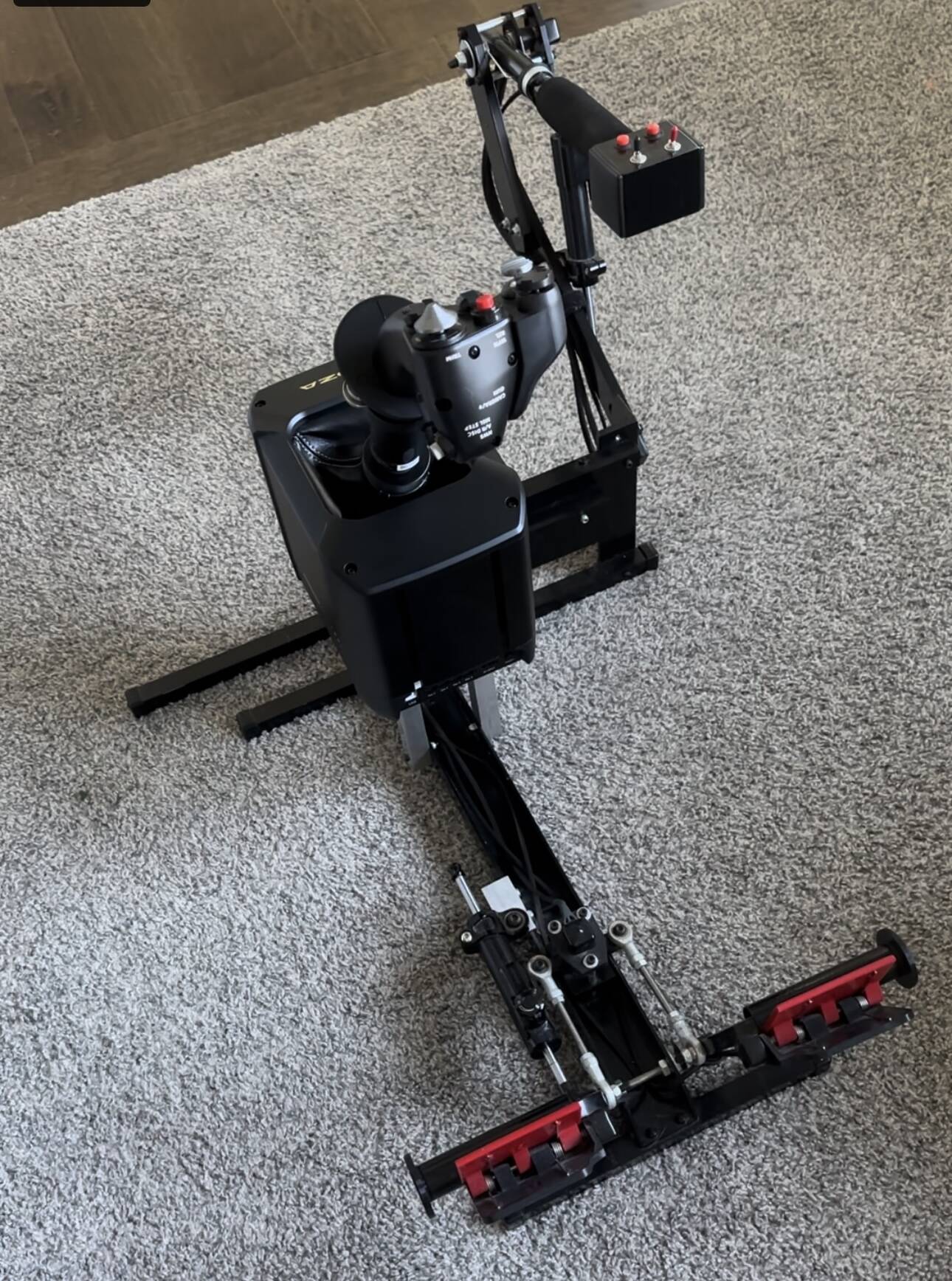
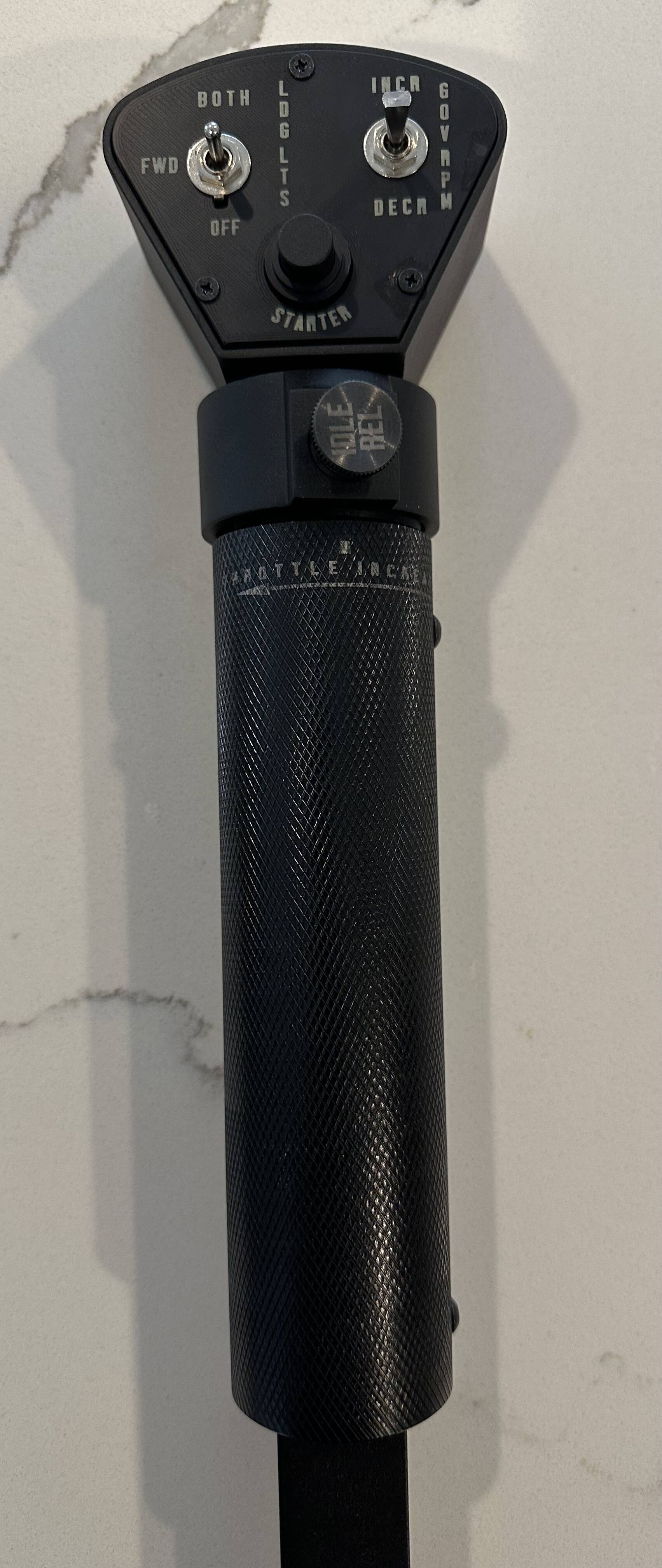
Nice I got mine yesterday.
The Komodo has had the idle release for a while and I find it very realistic for starting in XP Cowan B206.
It worked in MSFS 2020 but have not got to it yet in 2024.
lets take this out of bug reports and over to community support…
good idea we should move it.
Hi Belatu,
I know you from your YT channel. Hopefully you can help me out. I bought MSFS2024 today, and because I’veread that the FlyInside 206 - my favorite helicopter in MSFS 2020 - is compatible, I installed it.
How? I ran the installer and pointed it towards the MSFS 2024 Community folder. Basically, I have both sims installed, meaning the helicopter is present in both Community folders (2020 as well as 2024). So far, so good. The helicopter showed up in the menu. I selected it and went ahead to set up the controls. But to my surprise, what I see is not “Helicopter controls” but “Airplane controls”. I cannot find Cyclic, Collective, Tail Rotor in the list of controls because it looks like the game did not recognize that the FlyInside 206 is a helicopter, not an airplane.
As I am brand new to 2024, maybe it’s only me not understanding the control config menu. Have you successfully installed this helicopter in 2024? How did you set up your controls? Do you have any idea why I get no helicopter-specific controls? When I configured my controls for the Cabri, the Robinson, the Bell, the controls menu automatically showed a “Helicopter controls”.
I hope the above makes sense.