Helicopters out of control

I’m attempting to learn helicopters, and not sure if it’s really just THIS hard, or if something isn’t right with my setup.

I’ve got a VKB gladiator (took out the springs) I’m using as my cyclic, and a VKB STECS I’m using as my collective.

Now I know flying helicopters is tough. But I can’t help but think something else is going on here…I just can’t for the life of me figure out what. I’m sure that I don’t have any conflicting key-binds / axis. Is it really just this hard / sensitive to learn how to hover?

You need to immediately counteract any drift by pushing the cyclic in the opposite direction—for example, a slight nudge of right cyclic to correct a leftward drift, then returning the stick to center. There is a lag of about a second between your input and the helicopter’s reaction, so movements must be very subtle; think in terms of tiny adjustments rather than large, sweeping stick movements. You must compensate early on by paying close attention to the helicopter’s behavior; the longer you let it drift, the harder it becomes to recover. Of course, you also need to manage engine power to maintain altitude and use the rudder pedals to counteract the helicopter’s tendency to spin. When starting out, focus solely on hovering—practice it over and over again. It’s challenging, but you will make gradual progress. Move on to landing next, and then everything else.

Be aware that the Cabri is notoriously slippery and difficult to fly for beginners in MSFS; the R66 is a better choice.

The quality of your hardware (joystick and pedals) also makes a difference; lowering the joystick sensitivity curve—especially around the center—can help. But the golden rule is simply to practice.

take a look at “http://www.youtube.com/@matthew-lets-fly” has a lot of usefull video’s for beginner up to more experienced heli flyers

You might want to look at these for your collective…

Popular Collective Hardware Options

  • Virpil (VPC Rotor TCS Plus / Hawk-60 or Apache grips): Widely regarded as a high-end, precise choice with smooth movement, built-in springs, and true twist-grip throttles.
  • Winwing: Offers robust helicopter controls popular in the flight sim community.
  • Budget and Custom Units: Options like Collective FS on Etsy provide entry-level or 3D-printed setups compatible with standard mounting rails.
  • Alternative Brands: Historical options include K-51 and Komodo, though availability varies.

FWIW

I agree that some helicopters, Iike the Cabri, are out-of-control.
In 2020 I had no issues with it, in 2024 it’s very hard, sometimes impossible because the thing is catapulted up at a crazy rate with very little collective input. This happens to me taking off, but also mid flight.

I think it’s the combination of the new CFD plus exaggerated turbulence. It’s unstable, meaning the calculation goes off on a tangent in some cases.

Don’t be hesitant to enable some of the helicopter assistance options as you learn.

It’s better to have some enabled and get some enjoyable flights in while learning the basics. Then you can dial back the assists as you go.

This is better than jumping into the deep end and quitting in frustration. I’ve made that mistake.

Something that helped me is the size of the helicopter. These tiny things seem to be swayed easily with a little gust of wind and slight controller movements. I learned on a Huey and a EH101 very big and heavy helicopters, it took a big wind to push you across the runway or put you out of control. Slight movement of the controls worked well and didn’t put you out of control in a hurry like it does in a small helicopter.

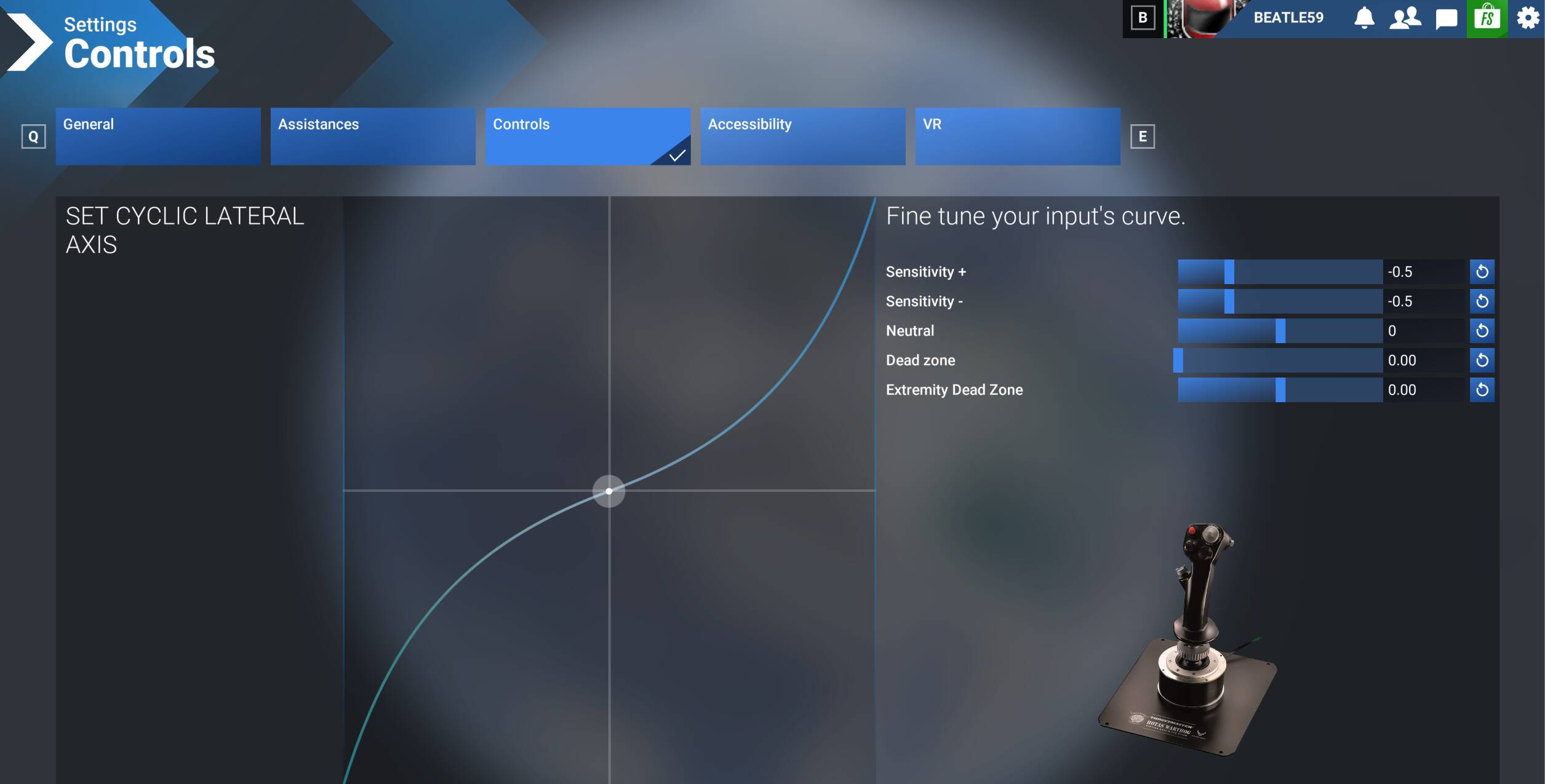
Collective controller settings really do help a lot. This is my settings on a Thrust master Warthog.

This gives me lots of leeway of movement on the throttle(Collective) and fine minor movements.

Cyclic Longitudinal Axis is the same settings.

Then you must practice practice practice. And then practice some more to be good.

Hovering in spot two feet off of the ground then do a 360 without moving from that spot and you are now having better control and command.

When you’re learning to fly, i think it’s best to set the wind to zero in the weather settings… that’s one less thing to deal with.

Good advice! I retired 16 years ago from a lifetime in aviation, started privately, then took the cheaper option and joined the military, had a great time piloting helicopters, followed up with 20 years commercial pilot, instructor and examiner on helicopters from single piston to multi engine turbine with all types of rotor systems.

A couple of months ago at the beginning of the school holidays, I took my grandchildren to a games event, they enjoyed the flight simulator there, so I bought MSFS2024…….. Probably not the best way to approach it after 10,000 hours plus in real helicopters. Avoided playing with the helicopters until a couple of days ago, did the licence - I was astonished how bad the control response was, it certainly wasn’t that difficult irl and I’ve flown plenty of small helicopters such as R22, Hughes 300. I gave in and use the assists, funnily enough the response is much better, not like reality but enjoyable to play.

What I miss is overall, apart from the obvious lack of movement is vision in 2 aspects

1. I always ‘fly the rotor disc’ - watch where the disc goes, the disc is the attitude, the helicopter body follows later particularly with teetering heads, unless you fly the beauty of the helicopter world, the Bolkow 105 (plenty of fabulous hours on those) when the response is instantaneous, and

2. Peripheral vision, I hadn’t realised how much my visual scan included the horizon at the side. I also can’t set the TV screen to show all the main instruments and enough of the horizon; rate of climb and descent is vital but it’s so low down in the cockpit in the little helicopter I’ve resorted to having the HuD info showing it.

I was disappointed to find after getting my licence ( ha ha, a commercial helicopter licence gained in an evening!) that the game only offered 2 heli missions, sightseeing in Montreal Canada and another at the opposite end of the world, a pax transfer across Sydney. The ATC at Montreal was a shambles, it wouldn’t give me a frequency to talk to anyone so I was pinged for moving on the airfield without a clearance, then after doing the first 2 sightseeing orbits, 90% around the orbit of the Olympic dome at Montreal the game totally crashed and MSFS needed a full restart. I did it from cold, ie a complete PS5 shut down. Next attempt, identical system crash 90% around the final orbit. Full restart, this time I tried doing the orbit anti clockwise, but same crash. ( When doing the fixed wing scientific Tornado chasing missions I found the aircraft became totally unstable in clockwise orbits with up & down draughts so strong I lost control, but anti clockwise it was completely manageable…..doesn’t make sense, so I hoped it was the same problem, obviously not) The only good point was by then I had found how to work round the ATC. Gave in at Montreal.
Tried the Sydney mission. System crashed 3 times in a row as I approached the H for departure. Really getting hacked off by now. I exited Missions, chose Free Flight, put in the same parameters, tried Sydney again, no problems with Free Flight. Selected Mission, this time I avoided going into the H at the beginning of the trip, got as close as possible to it until the green box illuminated saying I was at the H & successfully completed the mission. At least after every crash I received a few bits of game currency - not going to get rich very quick doing this!

Tried the Montreal mission in Free Flight, no problems, just for a laugh landed on the top of the Olympic Dome, but didn’t have enough time to try the mission again yet to see if I can get it to work, that’s this evening’s battle.

Despite the problems it’s much more fun than setting an autopilot in a heavy jet to do everything.
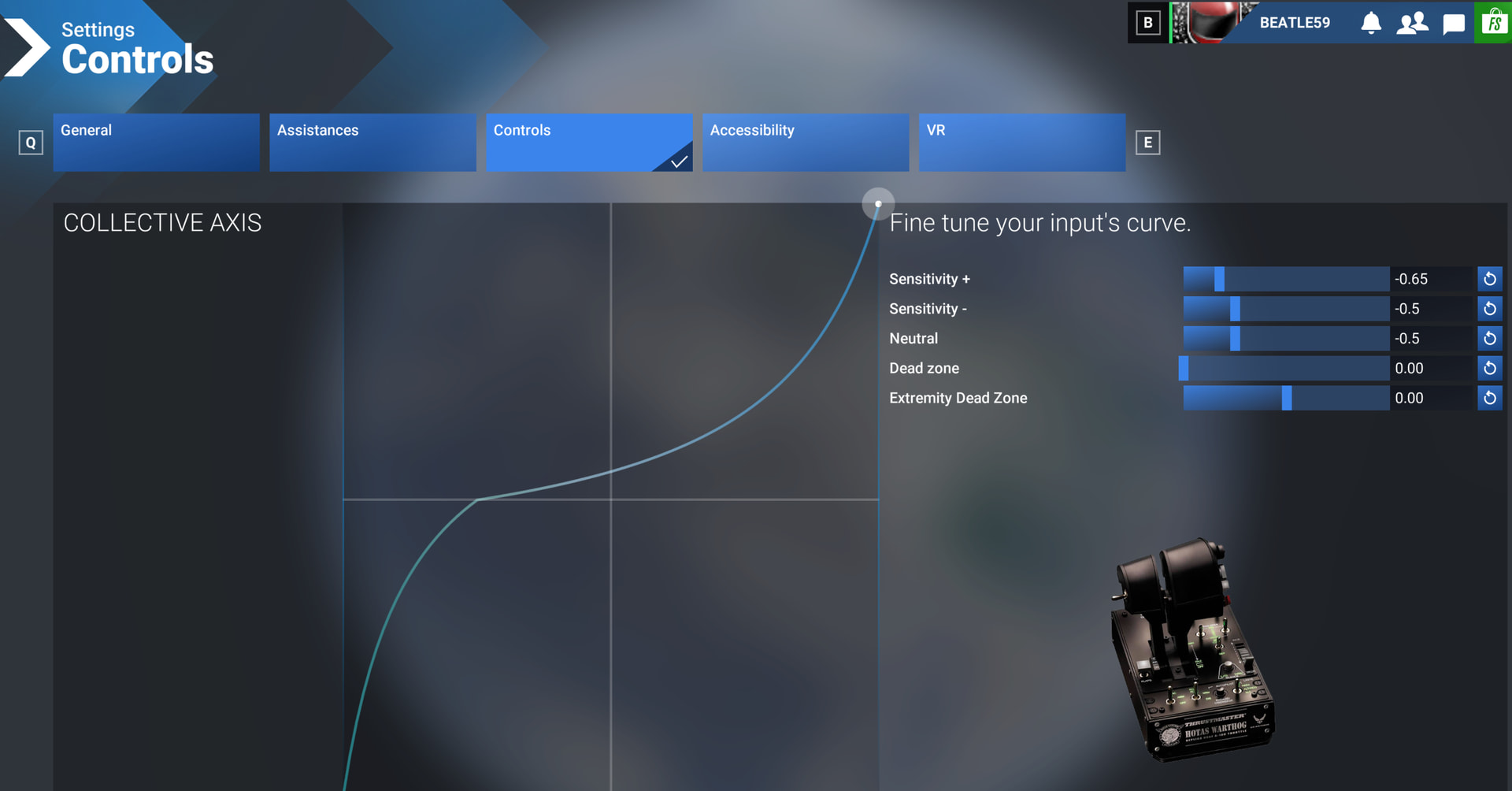
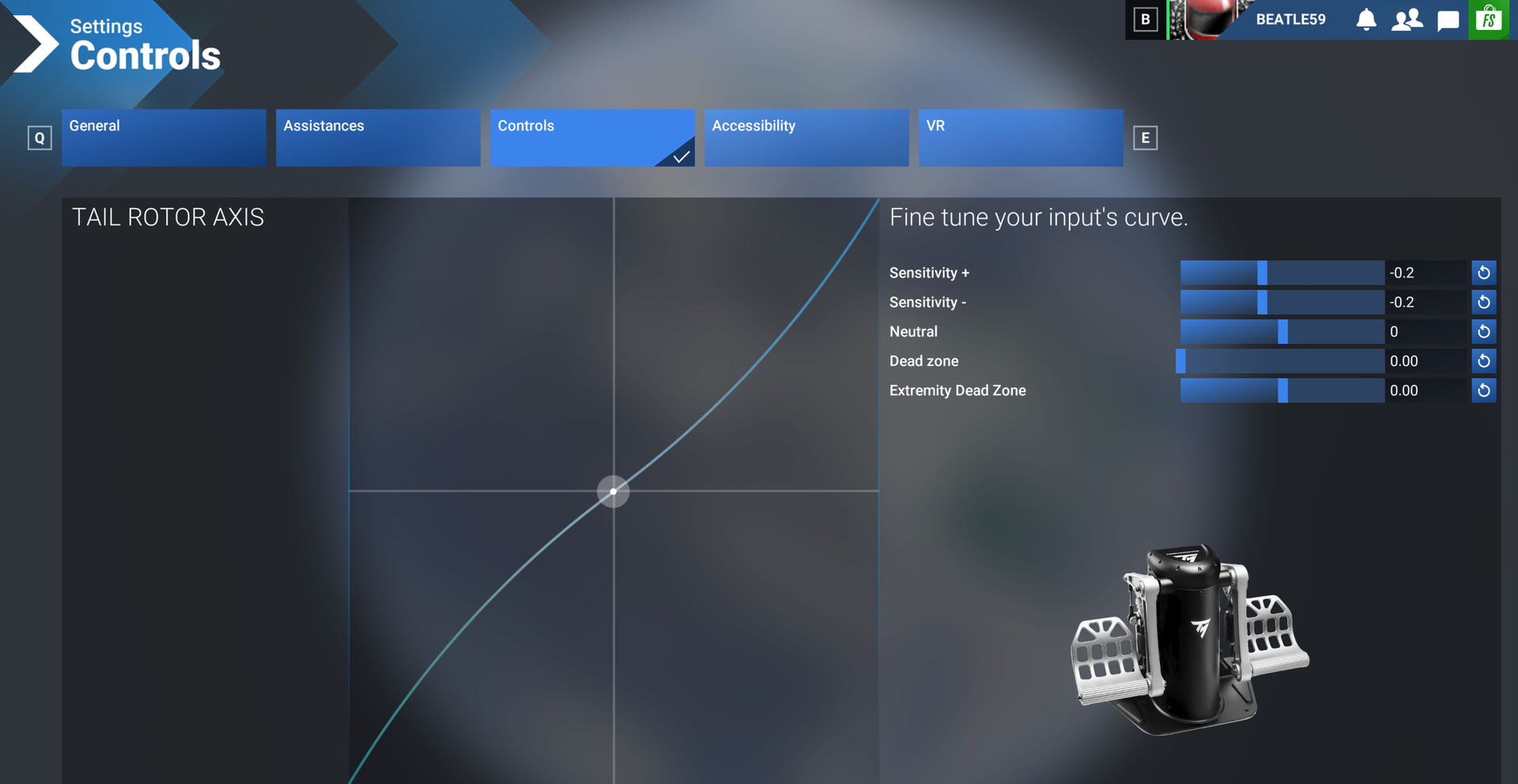
Thank you for the controller settings, that made a big difference, I’ve only played with the twitchy little piston thing so far. I had made some adjustments already but not enough! Your collective setting didn’t quite work out as I have a HOTAS5 on a PS5, but it didn’t take long to set a big throttle movement for not a lot of power change in a typical hover, makes life much easier! Thank you.