The data inside the red boxes:
- ‘Main Thread’ essentially shows how long it takes the CPU to render each frame (latency). It’s not quite that simple, but it’s an easy way to think about it.
- ‘GPU’ is the same, but for the GPU.
Notice that with the ‘Low’ preset my GPU latency is much lower than my Main Thread latency. That tells me I can increase the graphics settings most closely tied to the GPU. FPS is lowest with the ‘Ultra’ preset (as expected) but the latencies are still pretty balanced. That tells me my system is capable of using that preset (depending on the aircraft, airport, etc.)
Note the colors of the latency numbers. Green is great - I have some headroom. Yellow is fine, but tells me the system is working hard. Also notice there are no red spikes in the latency graphs. Spikes are stutters. Stutters are bad, and tell me my system is being overworked, and is unable to keep up with the demands. Or that system is having problems with the flow of data - maybe RAM timings, or some Windows tasks taking up CPU cycles. Unfotunately, some people blame the sim code itself for stutters, when it’s usually a problem with their computer. They’re either asking it to do too much, or they need to work on optimizing the setup.
VRAM is critical. I have 24GB (the 2nd number) so I’m in no danger of exceeding it - ever.
If you only have 8GB, and it’s using more than that, you have a problem.
None of the other numbers mean much to me.
Except the ‘Screen’ and ‘Render’ resolutions. ‘Screen’ tells me I have a 4K monitor and the sim is set to 100% of that resolution. ‘Render’ tells me that DLSS is essentially rendering the image at 2K and upscaling it to 4K to match the monitor resolution. There’s a slight degradation of the image due to the scaling, but it’s practically unnoticeable (thanks to DLSS 4 - a must!) and gives me a good performance boost - 2K is less data, thus higher FPS than 4K.
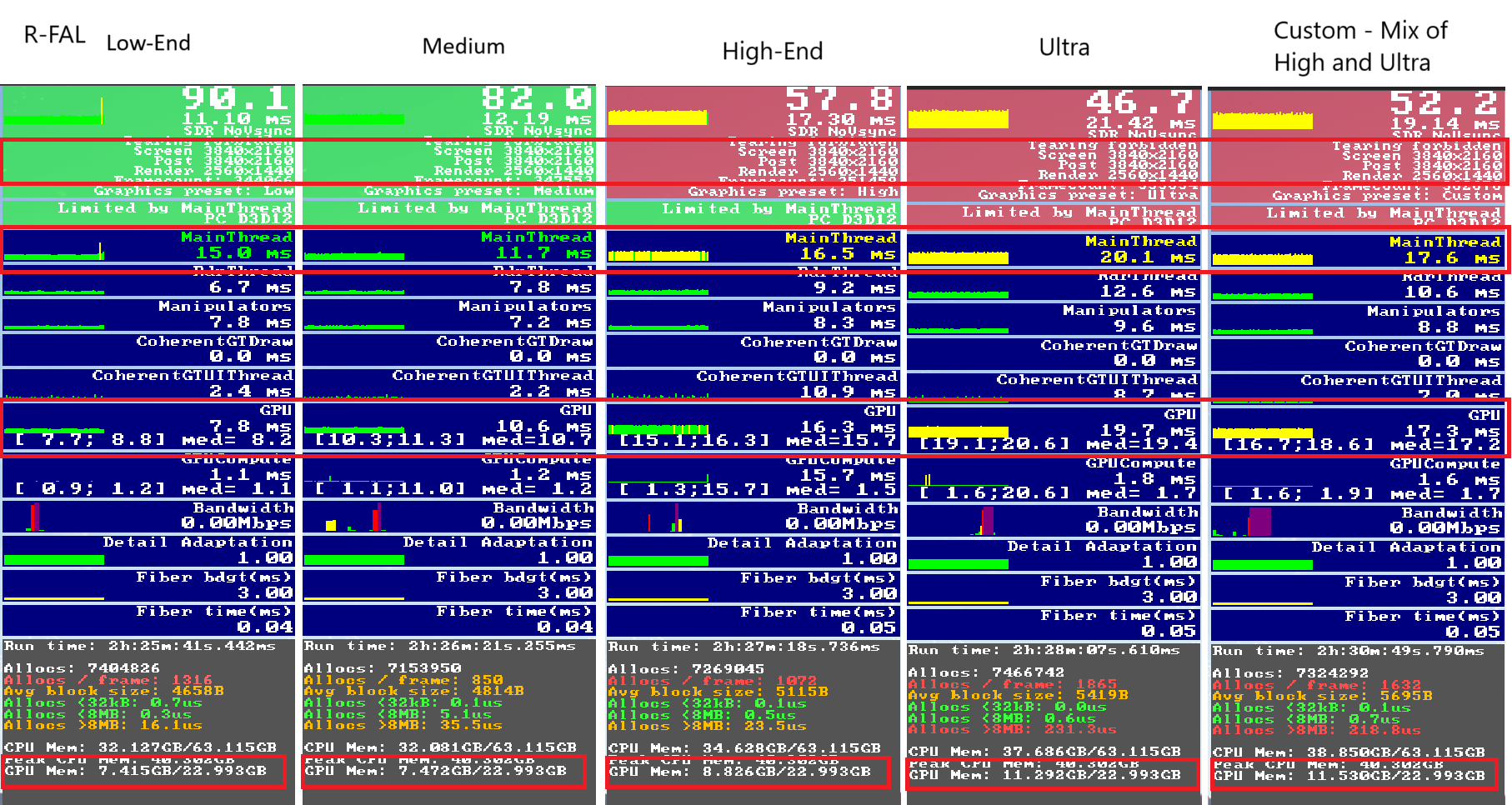
Judging by those results, my system is optimized with the ‘Medium’ preset. But I have plenty of room to use a custom mix of graphics settings, so I run many things at ‘High’ and ‘Ultra’ and still maintain sufficient FPS to be stutter-free.
It’s all a balancing act.