I last updated my chipset drivers after a BIOS update in October.
Since SU4 I’ve been struggling with audio/video dropouts whenever flying over major cities like NYC and Tokyo.
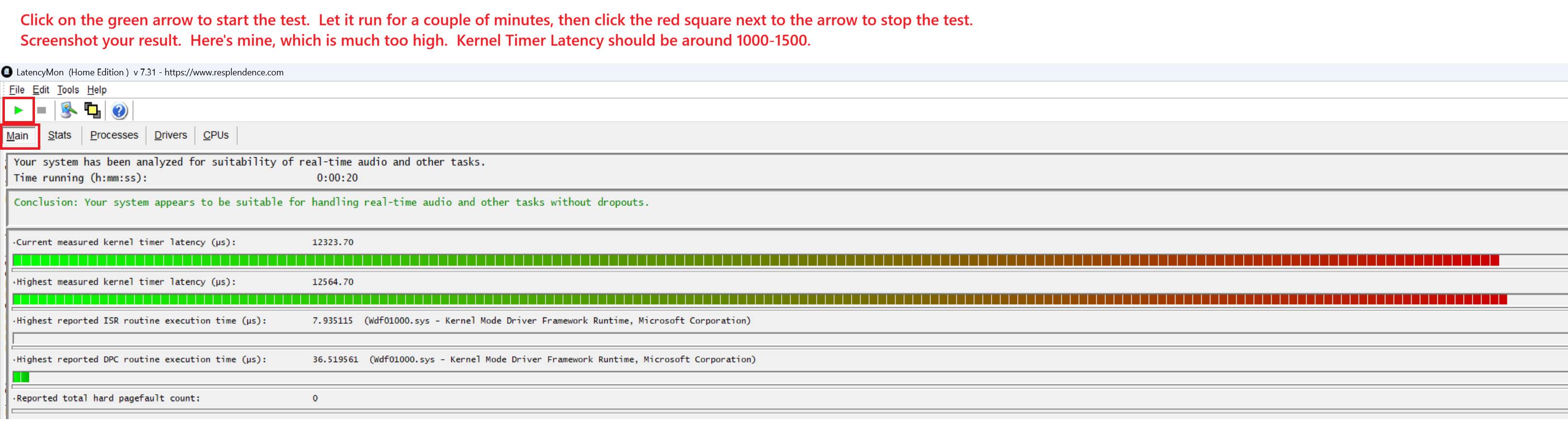
I tracked down a problem using LatencyMon, finding that my Kernel Timer Latency was extremely high. Here’s what it looked like. The number should be under 1000µs.
After updating the drivers I did a flight over NYC. No visble or audible stutters or dropouts. Performance on paper was just ‘OK’ (still seeing frame drops, but no audio/video stuttering) so now I can chalk it up to SU4 and/or the Azure servers.
ETA: I tried one other change. I’ve tested the sim with HAGS On and Off, and always found better results with it Off. So this improvement with it On surprised me.
Good reminder about updates. I’ve been saying for years that motherboard and chipset drivers should always be kept up to date.
One small but important note: even if you’re using a motherboard from a specific vendor, component manufacturers usually provide newer drivers than motherboard vendors. For example, if you’re running a Ryzen CPU on an ASRock or MSI motherboard, chipset drivers should be downloaded directly from AMD rather than from ASRock/MSI, as motherboard vendor packages are often behind the reference releases.
Also, don’t forget about keeping Windows up to date. Recent Windows updates include improvements that positively affect performance and stability on AMD-based platforms.
I’m using CapFrameX beta version 1.7.7. This version is no longer officially available, so you can test with beta version 1.7.6 instead.
The latest builds are available on GitHub, not on the official CapFrameX website. https://github.com/CXWorld/CapFrameX/releases/tag/v1.7.6_beta
I checked both AMD and ASRock sites. The ASRock version was more recent.
Also, wouldn’t the motherboard version include drivers specific to the motherboard?
Wouldn’t that normally be preferable?
Should I install Windows Pro 25H2?
I’m currently on Build 24H2
I would love to see screenshots of other computers’ Kernel Timer Latency using LatencyMon.
The software is easy to run, and can be downloaded free here. Brief instructions are in the screenshots above.
Chipset drivers are made by AMD, not motherboard vendors.
AMD’s package is the core version.
Motherboard vendors receive this package from AMD and repackage it for their support pages. They do not modify the chipset logic - motherboard manufacturers may add bloatware.
In short, there are no motherboard-specific chipset drivers on AMD platforms.
Exception: Intel platforms - there it’s usually better to use chipset drivers from the motherboard vendor.
The newer version is on AMD website and that won’t change.
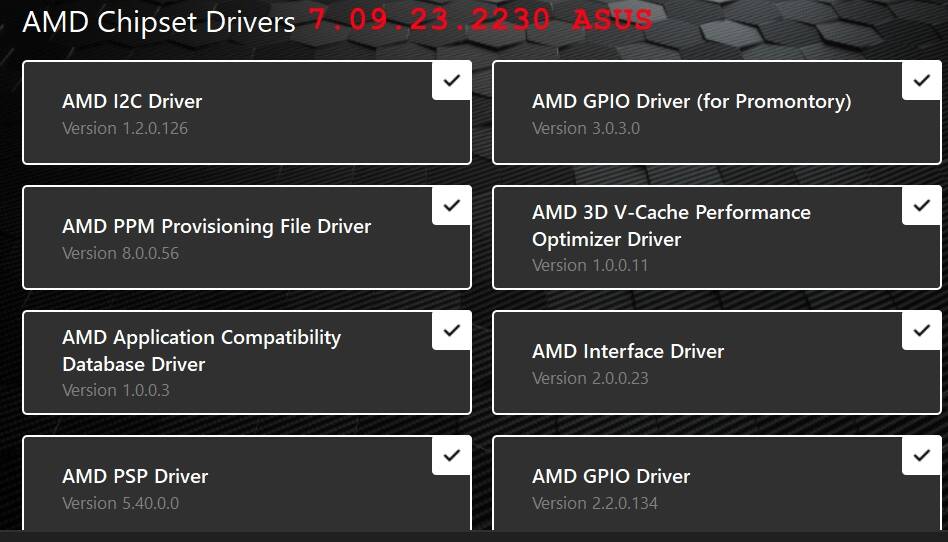
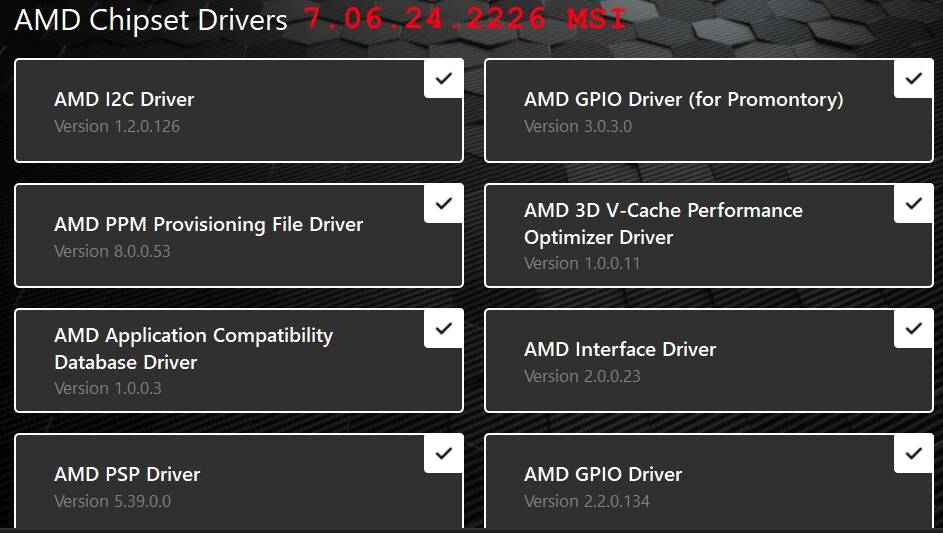
Below is a comparison - it clearly shows that AMD chipset driver version is newer than ASRock.
I’m on Windows 11 Pro 25H2 and I personally have no issues with this version.
Whether you choose to upgrade from 24H2 or stay on it is entirely up to you.
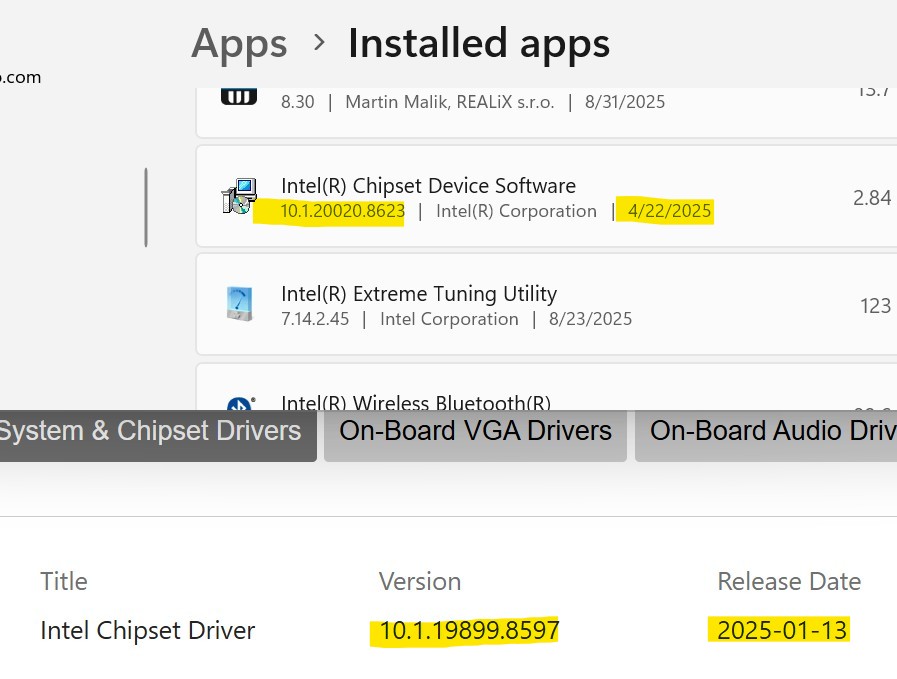
Even though most of you have AMD’s you are all aware of the Intel issues and I am certainly trying to stay out of hot water and keep mine up to date. My BIOS and ME Firmware are guaranteed up to date, but this thread made me question the chipset. After some research, my installed chipset (Apps - version) version is later than the one listed on the MSI page for my MB. When I went to Intel’s website, it instructs pre-built system customers to refer to the builder, which in turn goes right back to MSI.
I cannot find anywhere on Intel’s website a list of chipset downloads, of either my current version of 10.1.20020.8623 or the prior version on the MSI website of 10.1.19899.8597. The current version is dated 4/22/2025 which is 6 weeks after I got the computer and I sure didn’t update it myself. Do I possibly have an Intel update utility and not know it? If I have the most current version right now I am ok with it, I just don’t know how to verify it in the future.