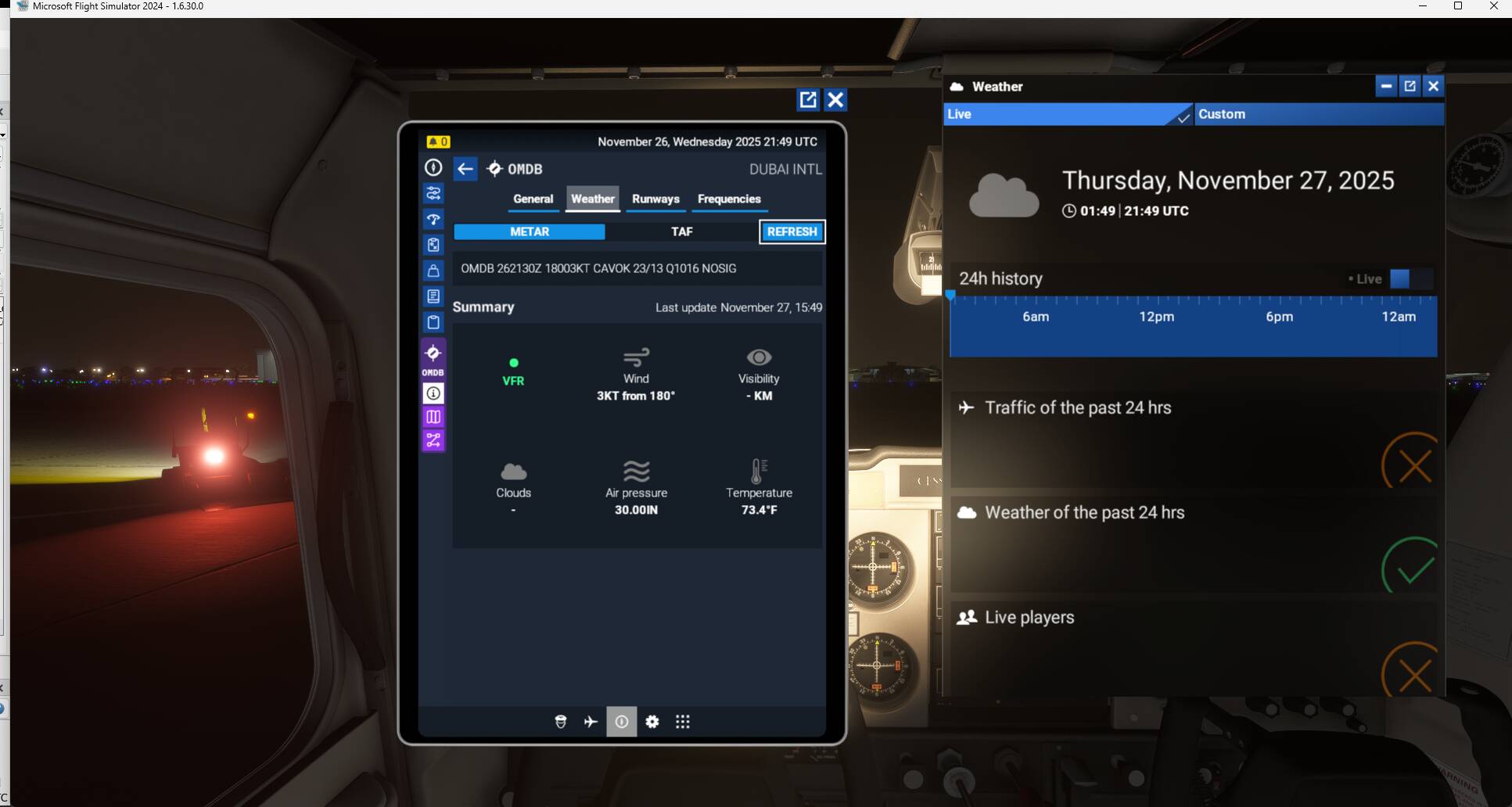
Selecting the prior day for historic time/weather causes the sim to default to today’s date and current weather. It works fine when selecting same day as current. Example: Select sim time 26-Nov 02:20z at 26-Nov 21:45 real time - the sim loads in fine at 26-Nov 02:20z with historic weather for that time. However, when trying to load in to 25-Nov 22:30z at 26-Nov 21:45 real time (within 24hrs window for historic) the sim loads in at 21:45z on 26-Nov with weather for current time. Using the in sim time/weather control to move back to the desired time/weather does not work and it still loads current day/weather. I am able to reproduce this at multiple locations and every time I select a time that is on the prior day but within the 24hrs window for historic.
Weather settings:
Historic/Live
FREQUENCY OF ISSUE
Every single time with the latest SU4 Beta Build.
REPRODUCTION STEPS
Please list clear steps you took in order to help our test team reproduce the same issue:
When starting a flight, select a time that crosses the current day boundary - i.e. on 26-Nov 2025 at 21:45z, select departure time 25-Nov 2025 22:30z with historic live weather function.
Sim loads but it will load in at 26-Nov 21:45z with current live weather for location, not historic date/time/weather.
I can reproduce this every single time I select the prior day within 24 hours at any location. Loading in using historic weather earlier on the same day works fine.
YOUR SETTINGS
If the issue still occurs with no mods and add-ons, please continue to report your issue. If not, please move this post to the User Support Hub.
What peripherals are you using:
[PC Only] Are you using Developer Mode or have you made any changes to it?
No
[PC Only] What GPU (Graphics Card) do you use?
Nvidia RTX 4090
[PC Only] What other relevant PC specs can you share?
I notice that the EFB shows the correct date/time (26-Nov 2025, 22:22 UTC) but clearly the Weather menu and EFB weather don’t match that. Sim date is definitely 27th, not 26th.
Update:
I have narrowed the bug down to time zones where local time is > UTC. That’s why OMDB has the issue, but I just loaded into KMCO like you did and it loads correctly with the same parameters as above in OMDB (In the meantime I put my Community folder back so this is in the PMDG 777):
Sim time set to 26-Nov, 22:22 - loads in correctly at KMCO:
Can you please test at OMDB and see if you get the same issue? I also tried at EGLL yesterday and had the same bug as in OMDB, so native UTC also has the issue.
I just did a flight VCBI-VRMM, time earlier today (Zulu and local).
When I departed VCBI, the EFB METAR was showing current weather despite historic weather active. I used the B shortcut to set Baro in order to test which QNH was active and it set it to 1007, which was the correct one for the departure time.
I can click refresh as much as I want, it didn’t refresh the METAR. Shortly after this screenshot, I checked the METAR for VRMM in the EFB and it correctly showed the 1400Z one.
After this I tried loading into OMDB again as per your suggestion. I set time to 23:45Z yesterday - it loaded me in at 16:40Z yesterday with current live weather. I then used the Weather/Time menu in sim and set it to 23:45Z and it correctly did it and the EFB then also showed the METAR for 23:45Z yesterday.
I’m at a bit of a loss - there seems to be an issue with EFB Historic Weather METAR but I also get very erratic behaviour from setting historic time where sometimes it loads correctly and other times it doesn’t I never had those issues before the latest Beta build.
Yeah I just came across this. It’s currently 03:20 Zulu and I rolled back live weather/time to 22:40 the prior day and the time was all jacked up. KROC airport.
Did you select the time from the slider on general flight selection screen or by clicking on Flight Conditions and doing it on the screen that it takes you to?
I found that doing it from the main flight selection screen causes lots of issues with time but when I do it via clicking on Flight Conditions it usually works.
I have been struggling to reproduce my issues with historical weather and past sim time as well. I too have been having weird sporadic issues where the metar in the tablet wont match the sim time and cases where it just displays the current metar.
I will continue trying to compile all the times I have this issue and make notes of variables that exists like airport, time etc.
I had a spell where it was better but on my last 4 flights I was unable to set historic weather or time. It just defaults to current date/time and weather regardless of what I set in the main menu. I can set the time back to earlier/yesterday via in sim panel but the weather remains stuck on current weather no matter what I do. I also noticed that the EFB and in sim panel constantly disagree on the current date…
If you change the the historic weather once you’ve started a flight and open the EFB at the weather tab, are you clicking on the refresh option to get the corresponding Metar ?
Hi, thanks for inquiring and yep hitting the refresh button works when everything is synced. But something occurs where even when you hit refresh it just stays stuck on the real weather time even if the sim time is historical.
Next time it happens, I will make a screen recording of this.
That’s the challenging part and I completely understand. I just can’t find the common denominator that makes it occur all the time or even the reason why it happens.
When it works, it works but once it gets out of sync for whatever reason there is no way to sync it again except a flight/sim restart.
I will keep trying to find what actually might be triggering it to give you more detail for the devs to troubleshoot
Same here. It seems to be worse when crossing into “yesterday” - i.e. I rarely have an issue when flying in the evening real time and select a time earlier the same day. Most of the issues are where I do a flight lets say 18:00z real time and select something like 22:00z yesterday for historic weather/time. Especially where there’s a larger offset between local to UTC is seems to put things out of sync, i.e. 18:00z real time, 22:00z yesterday sim time but the corresponding local time for that is +4, so 02:00 local sim time. I also find that the EFB gets “stuck” on an old METAR quite often, even when the sync issue is not present. BeyondATC would read me a different ATIS to what the EFB shows (often 2-3 hours out of date by the time I arrive at destination with historic time). No matter how often I press refresh, it doesn’t update - sometimes it magically refreshes on its own after a while.
@Kryptonite9961 I only use AS to feed historic weather to SimBrief when flight planning but I close the app before even firing up the sim and never use it to render weather in the sim.