My 4 year old Honeycomb Alpha yoke’s main panel switches do not operate.
The generator, battery and avionics switches are all stuck “open” or “off” - regardless of their up or down position.
The light switches are all stuck “closed” or “on” - regardless of their up or down position.
I can confirm this in both X-Plane as well as MSFS 2020. In MSFS “control options”, the settings for the generator/battery/avionics switches do not show being “lit up” regardless of their up/down position.
The settings for the light switches always show as being “lit up” regardless of their up/down position.
Any ideas??
I would first look in windows to see what the switches are doing there using the control panel in Win10 or joy.cpl in Win11. If all is well there, then you know the controls are fine and something else is wrong. If the controls are stuck in Windows then you know its a contol problem.
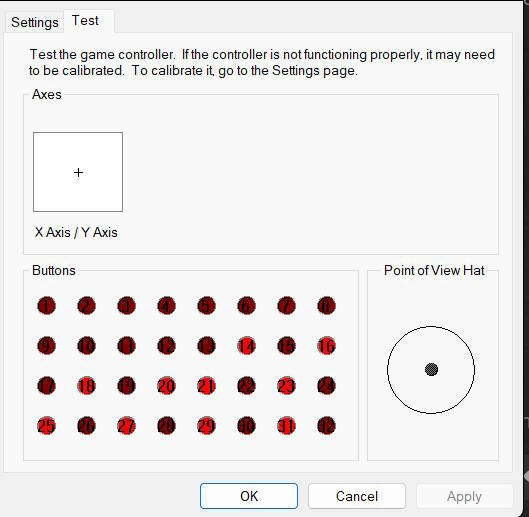
Oyster - great suggestion. Attached is a screenshot of the yoke buttons. The ones that are lit up correspond to the switches that are stuck “open”.
If I manually flip those switches off, the red lights on the button display remain on.
So, the switch contacts are shorted out (or shorted on!) on the Honeycomb yoke.
Any thoughts on a solution to the bad switches??
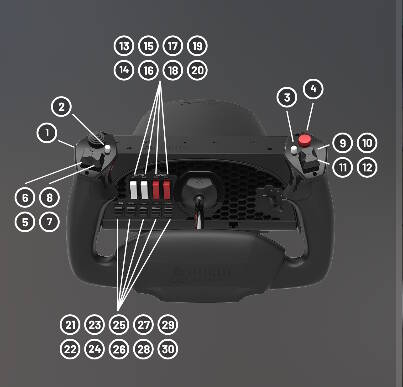
P.S. note that switches #14, 16, 18 and 20 correspond to the master/battery/avionics and are stuck “on” (bright red in prior control panel image). Same issue with the lights switches #21, 23, 25, 27 and 29.
I think you have proven the yoke is bad. I don’t know why all went bad at same time. Maybe the cable is bad. I doubt the switches are all bad..
Thanks for the reply, Oyster - it would be pretty weird for all switches to short.
The switch positions are read by a microcircuit on the yoke and then converted to a series of bits which are sent to the computer. I’m afraid that’s the extent of my knowledge. Hopefully someone will chime in with ideas on how to fix it. Hopefully not a new yoke.
Oyster - as a workaround, I am reprogramming the battery/generator/avionics buttons in MSFS to be set using the “on” shorted switch positions. Obviously, they will always be on, so I can’t turn them off but at least I can start the engine and use the radios/comms. And, the lights will just have to always be on for now.
Thanks again for your input.
Pete
Let me know if you get a permanent solution.
Uninstall the current driver and the Honeycomb Yoke first.
Then reinstall and recalibrate it by following the Aerosoft guide in the link below.
https://forum.aerosoft.com/index.php?/topic/171928-how-to-calibrate-the-honeycomb-alpha-yoke-internally/
You need to be logged into their forum to view the full instructions.
TenPatrol - thanks for the response. The Aerosoft link you sent me does a calibration for the yoke - pitch and roll.
The yoke itself works fine. It’s the control panel switches that are shorted and stuck to on or off.
Any thoughts??
Try using a different USB cable.
Response I just got from Honeycomb support:
Hello ,
I regret to inform you that, at this time, we do not offer the specific component you are looking for as an individual spare part. I understand how inconvenient this might be, and I sincerely apologize for any frustration this may cause.
To assist you further, I would recommend visiting a local electronics technician or an electronics store. These professionals often have the expertise and resources to help you find a suitable replacement or repair the component in question.
Once again, I apologize for any inconvenience and appreciate your understanding. If you have any other questions or need further assistance, please do not hesitate to contact us.
You can check at the following shop site if any spare parts are available:
https://flyhoneycomb.com/collections/spare-parts
https://eu.flyhoneycomb.com/collections/spare-parts
Mine started doing the same thing about a month ago. I think it’s the Rj45 port on the base. If I push the cable to the left it’ll work. For now I’m thinking I’ll add a rubber band from th4e yoke shaft to the plug in part of the cord to hold tension on it, just have to find a rubber band lol.
Eventually I’ll take it apart and look for broken solder joints or see if I can see anything wrong with it.
Jason - thanks for responding. Is the Rj45 port where the USB cord is connected to the base??
Please let me know if you find out anything else about the issue or if you find anything after opening the case.
Pete
P.S. I tried wiggling the end of the USB cord attached to the base with no change. The red lights on the game controller window didn’t flicker or go off.
Jason, do the same lights stay “on” as mine?? See screenshot.
You wrote what answer you got from support, but you didn’t write what question you asked.
Never - and I mean never - move the USB cable sideways, up, or down while it’s plugged into the Honeycomb yoke. Doing so can damage the port and even worse, it could cause a short circuit.
Just a reminder: I already wrote that you should try connecting Yoke to the PC with a different USB cable. These cables are easy to buy anywhere. As for the RJ45 port, that’s just a standard network socket - you probably already have a regular network cable at home, so you can test it as well.
the switches and buttons on my base I don’t have any issues with, just the switches and buttons on the yoke.
Jason - ok, thanks for the clarification. How old is your Honeycomb Alpha?
hmm, maybe got it late 2020.