Hello Captains.. Many have reported the trim wheel being either non responsive or making only slight changes with many turns of the wheel (my situation).
Just wondering if anyone has heard of a recent fix or workaround? Thanks..
Hello Captains.. Many have reported the trim wheel being either non responsive or making only slight changes with many turns of the wheel (my situation).
Just wondering if anyone has heard of a recent fix or workaround? Thanks..
Oh for which aircraft. Mine is fine in the ones I’ve used (so far)
I get some response (but veeery slow) in prop planes and almost zero response with any jets. The trim wheel used to give me approximately equal response across all planes up until a couple of MSFS updates ago. Others have reported this, maybe it does not effect all users?
My Bravo trim wheel is also very sluggish. (Move trim wheel on Bravo a little, trim wheel in cockpit hardly moves). Seems to me we need a slider so we could move between SU5 (working fine here) and SU6 (not working at all). Trim up/Trim down Buttons on my Alpha joy stick are better but some sensitivity adjustment would be welcome. The slider would determine howmany button closure switch actions are sent to the sim for movement of the external trim wheel. Some where between one button press and thirty would be a starting point.
I find the bravo’s trim sensitivity comfortable. It always bothered me when I had too-coarse-grained trim controls, preventing me from trimming straight and level, the honeycomb lets me make very fine adjustments. I agree they erred on the too-fine-grained side, and configurable sensitivity would be nice, but it’s really not that much trouble to spin the wheel four or five times
I haven’t tried on all my planes, but it is different from plane to plane in the ones I fly regularly. From works fine to having to spin a lot. It seems that various developers default increments to their planes differently. Since, it’s a “button press” it would be good if they gave us bind options for something like 1 increment and 10 increment presses in either direction or even 5. Than we can choose the binds per plane, instead of waiting for each dev to update based off the amount of complaining customers do 
They do ramp up and down for tuning things like the heading bug, that would be good to try on the trim wheel. I thought it would actually work like that, but not that I’ve been able to tell. Right now, for some planes, I use my mouse wheel for big changes than the trim wheel to fine tune.
Works fine on the TBM, Longitude and 172 Tex.
Some planes fine, some planes not so fine. Since Bravo is intergrated into sim, not sure reloading drivers would fix it, think going to try. However, I can see trim change if I go to outside view. Very sensitive for the F-14, almost no effect in the C-17 freeware plane, and some in 787 and 747.
Looks like the trim wheel works for some but certainly not all… Which sensitivity setting should I mess with to make it more responsive?
Don’t have it but I suggest if you haven’t recalibrated your controls since SU6 then do so.
You can set it however you like in FSUIPC7. I mean truly fine-tune it. You can also have different settings for different aircraft or different classes of aircraft. The program has a learning curve but the documentation is thorough and the developer answers questions within hours on their forum. I know it’s an extra cost in time and money but it is worth every penny.
Would be pointless here, I’m afraid. The Bravo’s trim wheel is not an axis thing; it sends pulses in the shape of button pressed events. The faster you turn it, the more pulses per time unit.
There is no way within the sim to adjust this either, so you have to resort to something like SPAD.neXt or FSUIPC to gain more control over it.
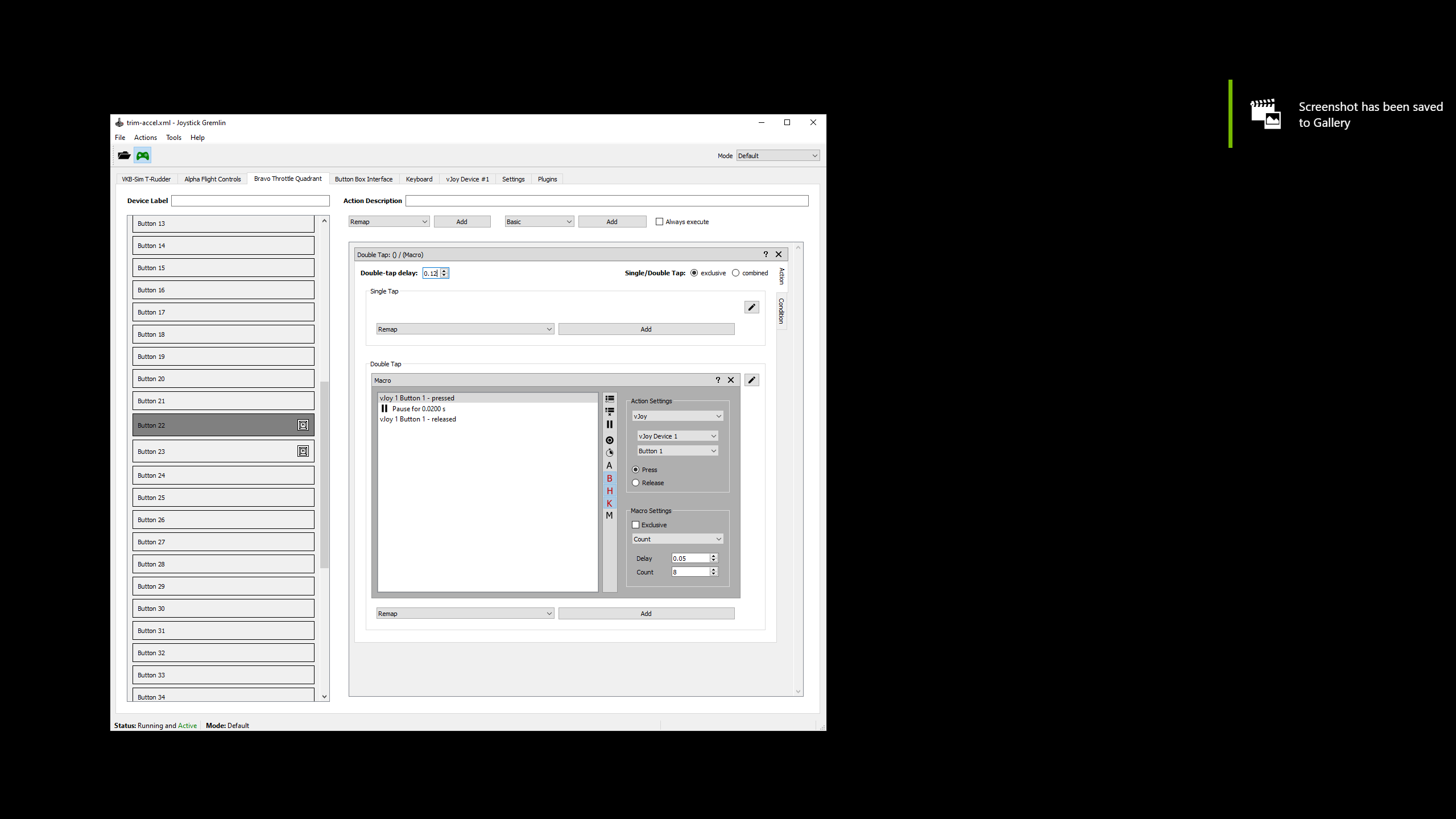
For a free option you can use vjoy and a program called Joystick Gremiln. Fixed my trim issue on the Bravo flying the TBM. The trim now operates at 2 speeds allowing for fast and fine tuning trim. Here is the video. I used different delay timings to suit the bravo which is different to the trim wheel in the video. For the Macro’s I used 0.05 which works really well in VR.

Excellent solution and video.. thank you very much! I’ve downloaded and I’m trying this out.
I was just looking for a solution too. Mine was fine before the last update (was hoping the new update would fix it, but no mention in the notes)
Rotating the trim wheel used to have a noticeable effect and was easy to use, now massive movement has almost no effect in the Seminole I was just flying.
Indeed, if you look at the wheel in the cockpit and turn the trim wheel on the Bravo there is almost no movement at all, even spinning the wheel does little - you have to restore to using the mouse again to trim the plane. A real shame as the trim wheel was really good when it used to work well…
The fundamental problem with the Bravo trim wheel is that it’s very imprecise. If I use spad.next to control the trim axis on a GA plane with the wheel such that 360 degrees of rotation takes you from all the way pitched down to all the way pitched up, each “button” pulse tirggers after about 3 or 4 degrees of rotation, about a half inch or so, and is the difference in the sim between “pitching wildly down” and “pitching wildly up” – you cannot actually trim for level flight if you configure the Bravo wheel in this way.
So the only way to get the precision needed to trim the plane is to lower the “speed”, reducing the trim delta for each button press. This causes the amount of “travel” around the wheel to be multiple times greater than in reality.
IMHO this is just a bad design decision by Honeycomb.
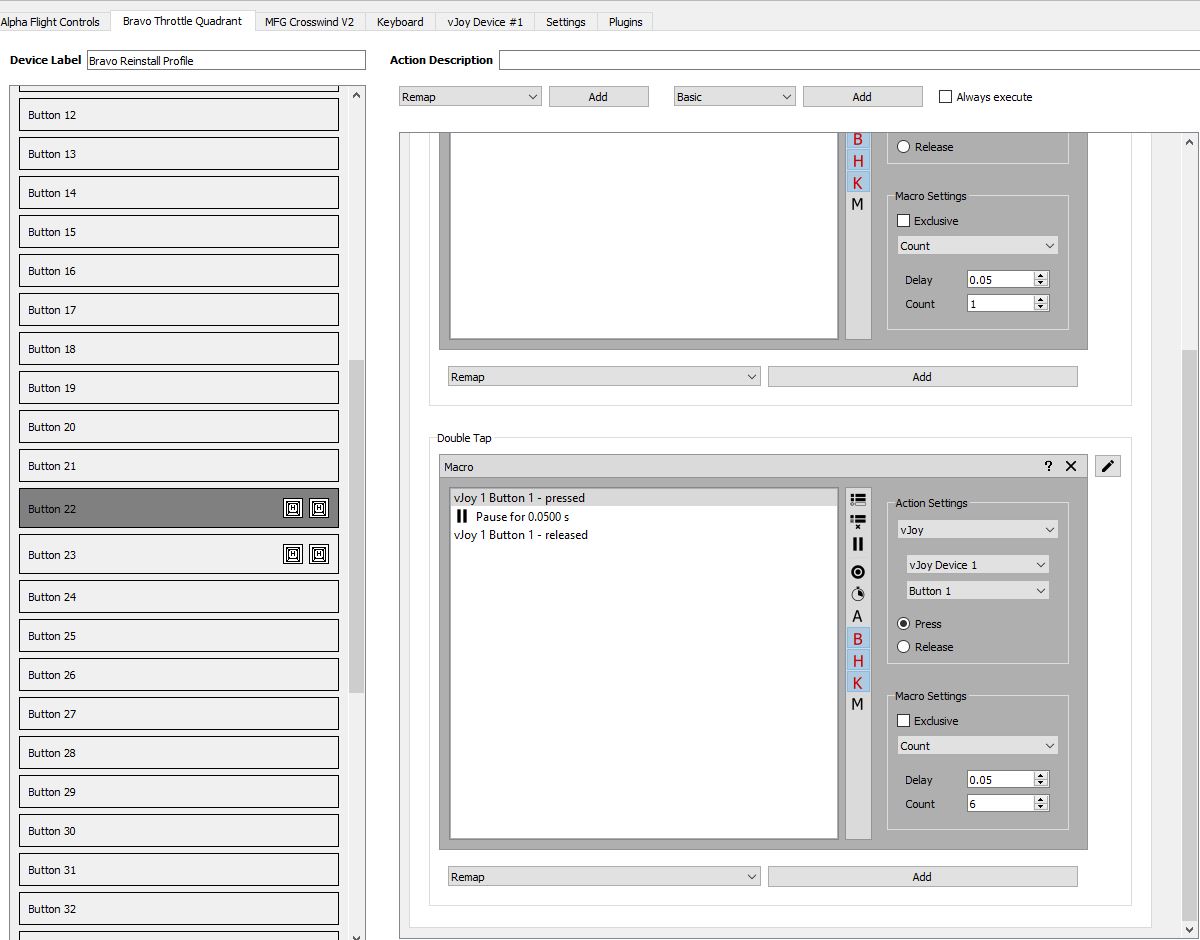
so you used 0.05 delay for double tap , or in the repeat macro and kept the 0.02 for double tap ?
please post a screen shot as I’m sure it will help other users as well, also easier to find, this is mine at the moment , not totally happy with it though .
tnx
Here are my settings. I have single tap and double tap macro’s. I am using VR so delay settings may be different if your not using VR as per the video.
if i lower both your delays , then i should be in 2d settings , since the sim polls the keys at half rate in VR ,
thank you !
@Sim4good Hi There, I have followed the directions to the letter, everything looks right, after setting up the macros, I tested with the Joystick Gremlin Input Viewer and I see the buttons working fine as I move the Honeycomb trim wheel. I have the Joystick Gremlin profile Activated also.
In MSFS Controls Options I have the VJOY Device enabled and buttons 1 and 2 added for Trim Up / Down But as I move the trim wheel I see no activity on the Vjoy Device profile button labels ie. they are not flashing when the trim wheel is moved (compared to your video where they flash). And therefore the trim wheel is not getting the info to respond quicker.
I must be missing something, but cannot figure it out. If you have any thoughts please let me know? Thanks