Is there a software update or driver update for the Honeycomb Bravo or any of their devices? Also how do I know if mine are up to date? Reason I ask is I’m having problems with various features. Thanks.
Yes, it was updated recently to also support 2024 and can be found here;
But honestly, you’d just be better off using Better Bravo Lights from flightsim.to
1 Like
Thank you Skypilot! Could this be the reason I can not get the AP on the Bravo to work?
I have MSFS2020 I’ve downloaded New Instal NUMEROUS times over the past three weeks. One of two things happen; one, It does not download, or two, it downloads as a zip file and will not open or install. I’m running Windows 11 on a brand new gaming system specifically meeting MSFS2020 specs. Would you be able to help me and guide me through this process? My chief complaint is that I can NOT get the AP on the Bravo to work/bind in the cockpit of the C172 G1000. I’ve watched hours of YouTube from all the great YouTubers on this subject and it simply does not work for me. I’m hoping you or someone who stumbles across this can help. It’s been a real downer for me. Of course thank you for your time.
As a test, just download the Better Bravo Lights and give it a try and see if everything is working.
You don’t need to tweak or change anything out of the box, just install and test.
Of course with 3rd party apps such as Spad or AAO’s I assume you won’t need any of that Honeycomb official stuff.
So I downloaded the Better Bravo Lights and it gave me a few lights I wasn’t previously getting. However, the AP is still not able to adjust the G1000 in the cockpit. On the Bravo, I get an illuminated light on each of the soft keys, but I’m not able to make adjustments-example to HDG or VS.
I have MSFS 2020 on PC which version of SPAD should I consider and look into? I’m new at this and want to research. Thank you for your help.
OK so this is just for research reasons, I’m not promoting anything here and I’ll only talk about SPAD because I haven’t really used the other apps such as Axis and Ohs (AAO) or FSUIPC.
Also to strongly note that all these apps become really useful and are worth the investment only if one wants to use a good number of external peripherals. For a single joystick and perhaps a simple throttle controller and/or rudder pedals, having to pay for apps such SPAD can be an overkill (or at least an expensive hobby). I’d go down the SPAD road only if I was planning to start building a cockpit with several controllers and instruments of all types.
There are essentially 2 versions of SPAD, a standard one costing 25 EUR+VAT and the complete at 90+VAT (but after a year you still also have to pay yearly fees to keep getting app updates, which are really a must-have as MSFS keep evolving and more 3rd party aircraft or controllers become available). Such subscriptions cost between 10-15 EUR per year depending on version and there are hefty discounts for 2-year or 3-year packages. In the past I think there was also a one-off lifetime subscription but it doesn’t seem to be available anymore.
For differences between versions you may look at Edition Feature Comparison - SPAD.neXt. Going for the Standard version might be the logical thing to do, but Complete also supports the very popular Elgato Stream Deck, virtual devices (which can come in handy if you know what they are and how to use them, I’d recommend Youtube tutorials) plus early access to new features (which is often a must, as these often apply to new 3rd party releases in MSFS and may take a while to get them migrated to the main version of SPAD).
But it’s not cheap. And it’s not easy to figure out despite having a GUI (most other similar apps don’t). So I’d recommend to go through some Youtube tutorials first (check here) and also check what apps such as AAO have to offer. Once you’ve set up such apps and have built a cockpit with several peripherals you don’t look back and you don’t care about MSFS in-game settings and you can’t sim without SPAD or AAO etc. I haven’t used in-game control settings in years, I just unassign all that’s not related to camera controls and use only SPAD for everything else.
2 Likes
Thank you! Very detailed response. I have one more question that I posted in a different post that I’m still looking for a solution. Do you think Spad would get the autopilot on the Honeycomb Bravo to integrate and work the G1000 and other AP systems on other aircraft? Thanks again.
I use Spad because I have a Class Echo controller. Using the Class Echo I have complete control of the G1000 MFD & PFD as well as the full functions of the autopilot. I thoroughly like the class echo and wouldn’t do FS without it.
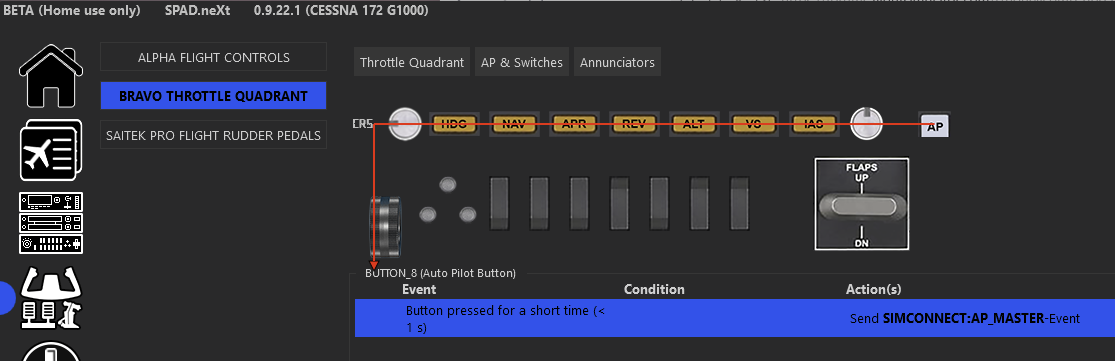
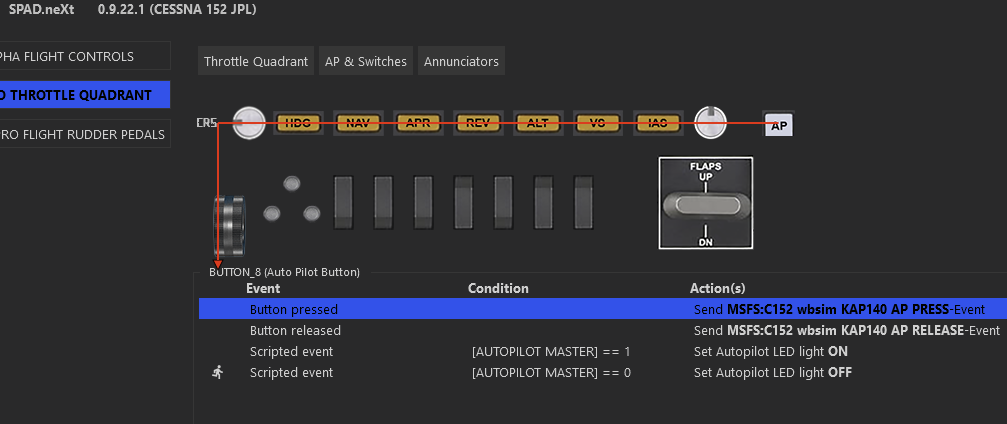
Yes, Spad fully integrates with both Alpha and Bravo without the need of any extra Honeycomb software. You just select the Bravo button in Spad GUI, assign it to an MSFS event or variable and that’s all there is to it. Here’s an example:
This is for the default G1000 in a C172:
And this is for the C152 JPL/WBsim:
And this is for the PMDG B737:

Completely different implementations, all of which are doing the same thing (enabling the autopilot and also controlling the button’s LED).
The hard part is to find which event/variable you need to use, because it depends on each aircraft implementation. Some aircraft developers are using default and well-documented Simconnect API stuff, others are doing their own thing usually to circumvent some MSFS limitation.
But in the end you’ll always find your way around, either by experimenting, or my asking either here or in Spad/AAO Discord channels/forums or even by going through the community profiles available via Spad, where other users with the same device (e.g. Bravo) upload their own settings which you can download and experiment with.
I use SpadNext Complete for a mix of Saitek panels and the Streamdeck.
Autopilot, and all other functions work perfectly.
I would not be without SpadNext. It is an amazing piece of software and very activily supported.
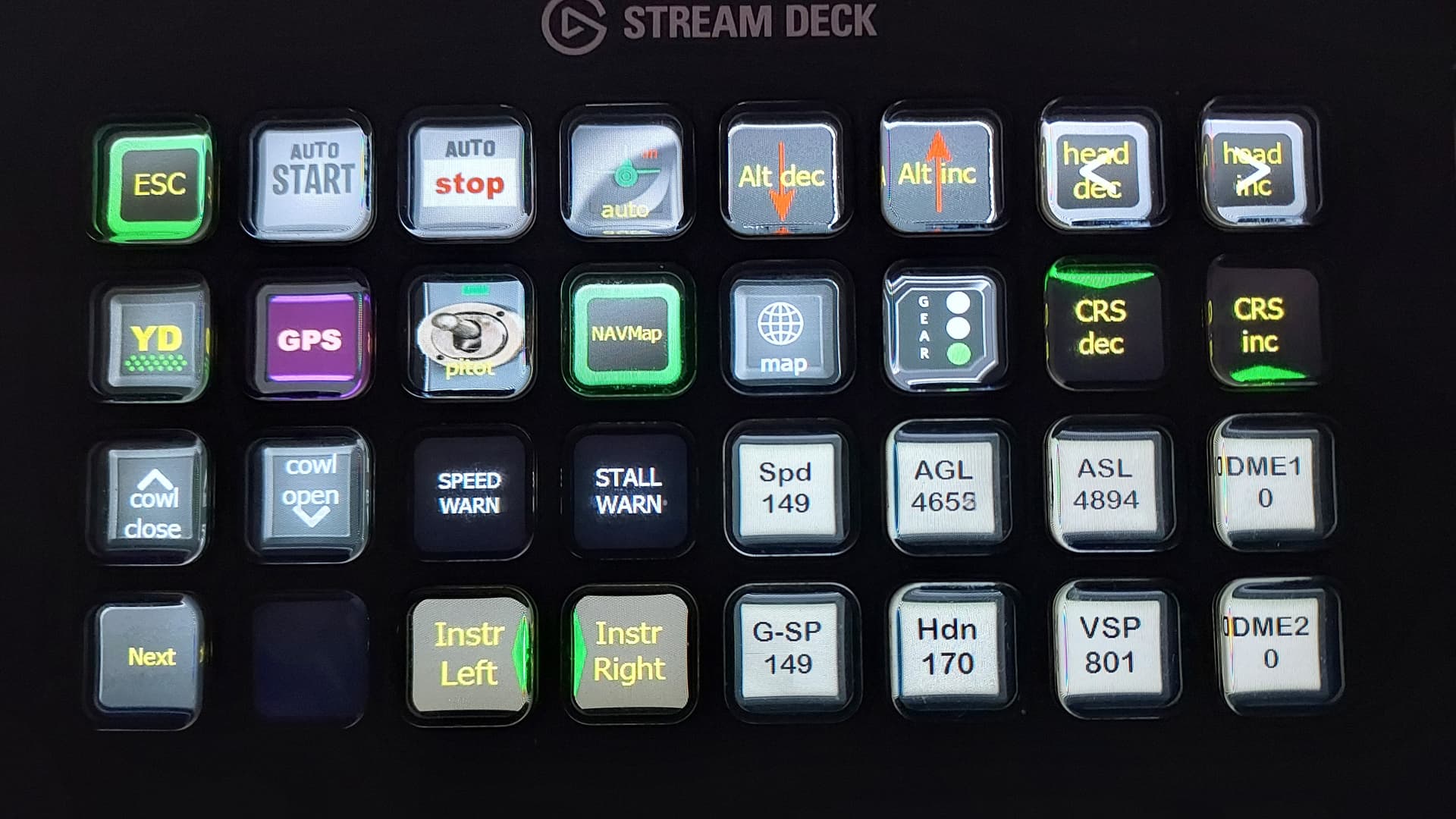
Here just one of my general aviation pages. All SpadNext controlled. Most buttons are animated so the GPS button will switch to vor1 and show that. Several buttons feed back altitude, speeds ,heading etc.