I had a major stutter at like 50 agl Sim Update 3 beta landing in SKBO
ugh!!!
I had a major stutter at like 50 agl Sim Update 3 beta landing in SKBO
ugh!!!
Same. In many airports.
This is obviously related to ‘services’ being loaded in on short final….. ooops I mean’t STREAMED in on 2024.
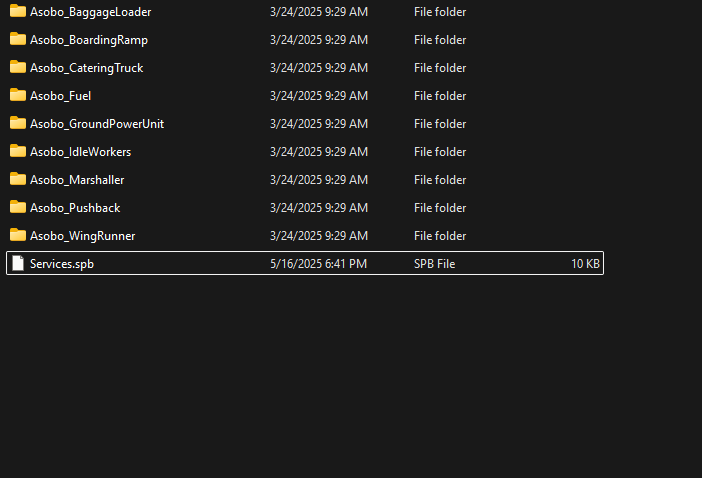
In MSFS 2020. You were able to type the word “OFF” within the spb file in the services\AirportServices\Shared folder and Rename it to OFFServices.spb.
This completely fixed the same issue that plagued 2020. I started doing this in 2021 and I’ve never looked back.
Although because of MS and their neuroticism towards piracy, they no longer allow these files to be localized on your system, So the spb file is hidden and can’t be changed. Which means the issue can’t be fixed. The only other fix (which doesn’t work half the time) is to adjust services for each aircraft - https://support.fenixsim.com/hc/en-us/articles/12457373150095-Sim-Hangs-Freezes-Lags-When-Landing
I was able to fix the Kodiak and short final stutters using this method explained within the Fenix website.
Although if you buy a plane from the marketplace and it’s encrypted (most are) you can’t access the individual aircraft files to turn off services. So the issue persists.
Clearing caches, reinstalling drivers etc will NOT fix this. Until Asobo allow us local access to these files again, this issue will persist.
I just did it in MSFS2024. It didnt do anything to stutters.
In the latest version you can now disable AirportServices in Graphics settings - well sometimes you need to adapt it in the UserCfg.opt - but it’s there.
Well, then you’re in for a nice surprice because the textures are terrible now after SU16 release…
It seems that with latest SU3 beta (1.5.25.0) the issues are resolved for me. Will keep an eye on it.
Hi!
From my latest tests I’m also not experiencing this issue anymore.
Being mindful that I always have my VRAM in check even at large airports I never thought this was a VRAM issue.
I do get low framerates in large airports when flying airliners and with BATC but not those single digit frames like a slideshow we used to get.
Now it’s more common to get some large sequencial stutters on takeoff. Not slideshow but lots of stutters for a couple of seconds at mid takeoff.
Doesn’t happen always. Couldn’t figure out some common ground for these to happen yet.
I guessing it’s a mix of large airports and having to constantly delete the rolling cache with each update which forces the sim to redownload everything around the airport.
Cheers
With the latest beta this also seems resolved for me!
have you tried on several airports? with and w/o addons? Unfortunately this issue keeps happening to me. I’m on SU2 but there are reports of this issue on SU3.
I suggest trying the SU3 Beta. The latest builds have been peachy for me.
It’s better on my side in general, some airport works perfectly now, some just little stuttering, however EGGW was horrible to land yesterday. Same old song.. seamless approach (stable 60fps and 15ms) until the last 200ft, whenit went 10 fps (SU3 beta)
My last two flights on fs2020 were horrible: huge lags in the middle of the descent and then on the final approach. I have never had such a bad experience with the game. My PC and in-game settings have not changed yet.
Join su3. Its great
thanks. I’ll wait until it’s released. As it is now msfs24 is unplayable
SU3 still exhibits the same problem. Starts out fine and then stutter/lag increases as time goes on, to the point where it lags ever two seconds, for several seconds at a time. Not to be dramatic, but it is not usable at the moment. XBOX Series X.
I’ve tested all the beta builds of SU3, as well as the final version of SU3 (This thread could be renamed  ).
).
First, the facts:
I primarily fly airliners and particularly enjoy the FENIX (which is relatively complex and demanding in terms of performance). I also always fly with GSX, BATC, Sef Loading Cargo, and Navigraph map open on my PC.
I have a mid-range PC that runs most games smoothly. My general settings: DLAA, all settings on medium, TLOD/OLOD: 200/100, FG DLSS*2, 1080p. Excellent 1GB internet connection.
When taking off from a complex airport, everything often goes quite well, with no major lags, just a few very acceptable stutters. Shortly after takeoff, FPS often increase, and in flight, I regularly reach the frame rate limit set in the game: 45 FPS * 2 with Frame Gen = 90 fps.
The approach goes smoothly, but upon reaching the airport during the final flare, the game becomes unplayable due to numerous freezes. Once the plane stops on the runway, FPS return, and the game becomes fluid again. However, when I throttle up to taxi, fluidity disappears once more.
Next, my tests and assumptions:
Having tested almost every conceivable tweak, both in-game and out, such as Rebar, PBO, RAM speed, the following points emerge:
If I fly over a region with photogrammetry (with the Fenix at 2000 feet, for example), it seems that when approaching a city (like Paris), everything is fine, but as the city moves behind the plane, VRAM usage increases until it exceeds the acceptable threshold, latency starts to rise, and fluidity disappears.
When on the runway of a complex airport, it appears that VRAM usage is highest when the terminals disappear behind the plane.
I’ve tested all “Offscreen Terrain Precaching” options (even disabling it in the CFG file), and it seems that the Low level is not acceptable for fluidity. The Medium level is the most suitable for me but causes some stutters and FPS drops. Higher options, like Ultra, are satisfactory at the start of the flight but quickly degrade performance.
My assumption:
Shouldn’t we look into optimizing the “offscreen terrain precaching” parameter? This might explain the stutters during landing if everything I can’t see behind the plane (and don’t need) is loaded en masse and in high quality just a few meters from the ground (grass, buildings, trees…).
This would also explain why issues often arise when “leaving” large PG cities…
I would love to hear feedback from Asobo/MICROSOFT or any of you to know what you think about this issue, which is clearly not resolved in SU3. I hope SU4 will arrive soon with the necessary optimizations to address this problem.
After a few flights in SU3 I can confirm the horrid stuttering at landing is gone, need to do more tests but it seems the performance is back to what it should have been from day one.
For me its not gone, infact its worse. Every landing or takeoff my game is stuttering, even with my settings on medium to low with nvidia frame gen. My build is a ryzen 5 5700, rtx 4060 8gb vram, 16gb.