Hello everyone, I know its another performance issue. Lately just upgraded to a RTx4090. Real quick. System Specs I912900k 64gigs of DDR5 and RTX 4090. Windows on a HDD 250 gig no not a SSD. However, MSFS is on a SSD or NVME drive. MSFS from what I’ve seen, I should at least get 40 and up FPS. This is not the case. I’ve tried everything on google and you tube. Rolling cahce is off. Nvidia settings are set to what the major current streamers are using. I cannot figure out why I’m still getting 20fps. Also, checked to make sure my 4090 is in Performance mode not eco mode. Only thing I cant think of is my CPU bottlenecking. While flying sometimes see it spike to over 68%. Also don’t want to throw money at the problem. A little frustrated. Any input, Tech advice, or help appreciated. Thank you .
Try using frame generation.
Okay ill try experimenting with it
I have an i9-14900KF / RTX 4090 and i9-13900K / RTX 4080 Super and it doubles my FPS (I play at 1440p).
Yeah im looking at the i913900ks unlocked. Would 3440X1440 considered 3k resolution? My current resolution.
I believe so. I used to play on a 5120x1440p monitor which I think was dubbed 5k resolution.
Frame generation is not the solution. i9 13900K won’t add significantly more FPS and is not recommended due to microcode issue.
Finding the root cause of the low FPS is essential.
edit
@Jarhead0514
List all your hardware in detail.
My first thought would be CPU bottleneck, depending on your ingame settings such as terrain LOD.
The displayed CPU usage is not a good indicator in my opinion.
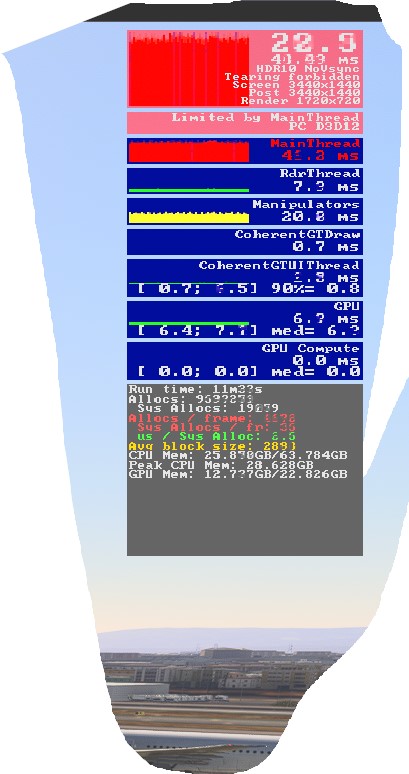
Activate Developer mode ingame and display the FPS interface, it shows you if it is currently limited by GPU or CPU (limited by main thread).
Also check GPU usage, if its below 100% it also indicates CPU bottleneck (giving you don’t limit the FPS)
My LOD is 150. Yeah i went into Dev Mode and Main thread was the constant issue. 20fps and main thread showed red with pink spikes at times. GPU is not even touched. GPU usage is at 30 to 40 percent.
MSI Z690
Intel 12900k
64 Gigs of DDr5
Asus RTX 4090
MSFS on SSD 2TB
1000w Evga Nova PSU
Asus software and or msi afterburner, nvidia geforce experience installed?
Asus for GPU MSI for Motherboard. Nvidia for GPU drivers ASUS for overclocking
Ok
1 Open asus software and restore all settings to their default values.
- Save changes
- Uninstall ASUS software.
- Restart PC
2 Open MSI Afterburner and restore all settings to their default values.
- Save changes
- Uninstall MSI Afterburner.
- Restart PC
3 Open Nvidia Geforce Experience and restore all settings to their default values.
- Save changes
- Uninstall Geforce Experience.
- Restart PC
4 Uninstall MSI Center
Restart PC.
Wonder how I am getting 2x more fps than OP with my 13900k when flying Fenix with GSX paxes, //42. A320 Immersion and ULTRA settings. On 3440 x 1440 with HDR.
Have you monitored your CPU temps when the sim runs at 20FPS?
Yea averaging between 58 and 60 Celsius

In the MSFS setting, please select DX11 instead of DX12 - apply the changes and then close MSFS.
https://forums.flightsimulator.com/t/how-i-am-i-getting-20fps-with-high-end-hardware-rtx-4090/656555/13?u=tenpatrol
Have you followed my suggestions?
Yea i did and didnt do anything still sitting at 20fps. Also went to Dx11 isntead of DX12 and made it worse. Frames were at 18fps
Please do not open MSFS. Instead, go to the NVIDIA Control Panel > 3d settings > manage 3d settings > program settings tab
Create a profile for the flightsimulator.exe and set power management mode to “prefer maximum performance”.
Apply changes.
Rename community folder to community_copy
Create empty community folder.
Launch MSFS.
Go to graphics settings - take screenshots of all the settings, and attach into topic.
Do the same for Traffic and Data settings.