Unsure if I upgrade to a 4070 Ti or 4070 Ti Super - its entirely about the VRAM.
In Australia the price difference is around $200-300 AUD. I use aircraft like the PMDG 737 and FBW A320, as well as payware such Orbx YMML, Flytampa Sydney, etc.
Playing at 1440p with a 5800X3D, 2070 Super, 32GB RAM. No immediate plans to go to 4k.
How important is 16gb VRAM in MSFS with add on scenery, or can I get away with the 12gb VRAM of the 4070 super? I usually upgrade GPU’s every ~4 years or so.
16gb helps me a lot. I’m not very tech-savvy in all terms to explain the why, but it’s way smother, and I’m able to run high textures and 8x8 filtering after all other optimizations without huge Performance drops when approaching the ground in photogrammetry or an airport in VR. and this helps to have a stable image quality without shimmering.
If you just plan to run in 2D at 2k, don’t be bothered by my comment. I’m sure others will tell you more.
For VR use - very important. With my 3080Ti with 12GB VRAM, there was no way I could smoothly run large payware airports especially on VATSIM with lots of traffic. After the 4090 upgrade with 24 GB VRAM - no problem whatsoever running the largest payware airports on busy VATSIM events. One problem - now I’m buying lots of payware airports
Rob the Bank! Things will never again get cheaper, or gamble and wait until a 5000 series is in the Stores and get a good deal on a new or used 4090. It’s you against your own patience.
I’d not recommend anything under 16 GB. If you plan to fly to / from large, complex airports or fly complex airliners like those from inbuilds & PMG, or use DX12, 16GB will help lot. See the second paragraph in this post by @Tremaine111:
Other comments on the forums about having 16 GB include:
I’d be interested in knowing too. Like OP, 1440p, no VR. I probably wouldn’t even use DX12 cus I hate the ground textures popping through bug. I guess that means an AMD card could be an option.
Tbh, I’m inclined to wait until MSFS2024 and the 5000 series.
I use MSFS at 3440x1440 with a 4080 16GB , no HDR, no VR and I my VRAM usage rarely goes above 11GB (even at FT EHAM or IniBuild KJFK). My settings are adjusted for image quality and clarity, while maintaining acceptable FPS according to what my i7 9700K can push.
Using a 12 GB GPU (3080 Ti) on a 1440p monitor here. I can forget about trying to use PG and 8K liveries.
The only thing stopping me from an upgrade to a card with more VRAM is whether it will be necessary with the ‘thin client’ concept for MSFS2024. I’ll wait to see how the new sim performs on my PC.
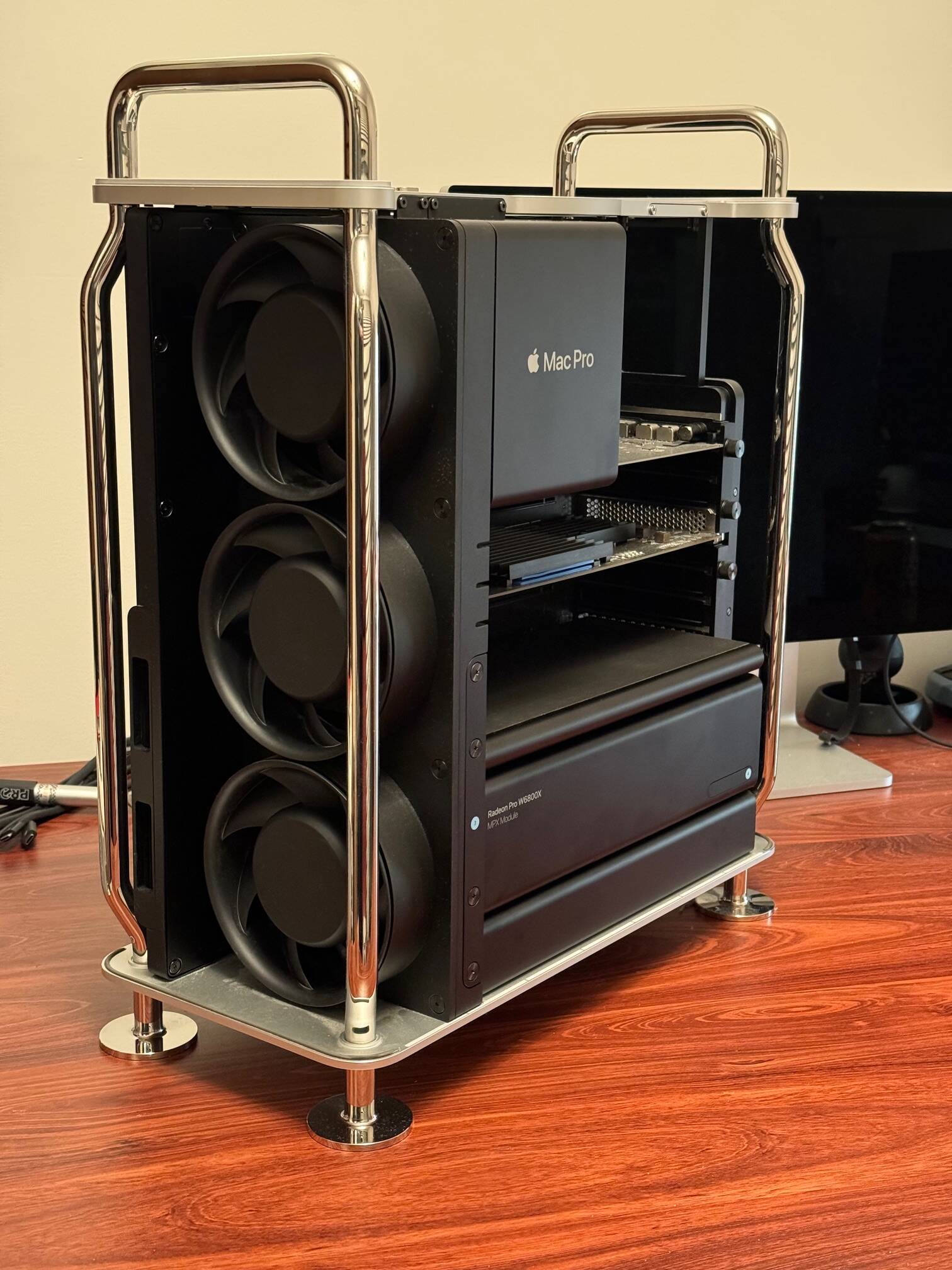
My machine (a 16 core 3.2ghz Xeon 7,1 Mac Pro) has a 32GB Radeon W6800X, and that 32gb has been useful when I’ve seen the sim using 24GB of that.
Aside from some unusual VR glitches in 2D mode it is rock solid stable under Win 11 Pro for Workstations. I only have 48gb ram but that’s not an issue.
I run at 4K or even 5K (5120x2880) in windowed mode.
In this machine I have ideas to get the W6800X Duo (dual GPU 64gb) if they ever come at the right price. It can run a pair of them (4 GPU and 128GB VRAM) but that’s a monstrous cost and they are very hard to find.
@ForfeitMitten15
Those extra GPUs will come in handy when you want to compare MSFS 2020 & 2024 side by side. Just stream 2020 to GPU #1 & Monitor #1 and 2024 to GPU #2 & Monitor #2 !!!
Nobody as far as I know has used those GPUs with Flight simulator.
I discovered I’m one of the few even using that computer for Flight Sim. It can run windows on a separate drive no problems so why not.
Small matter of $$$ to get two Duos and the Fabric Link to join them together. They are very expensive. But I want them.
My aim with this machine is to gradually upgrade it to the maximum configuration you could order, which when new was AUD$81,000. Mine was AUD$16,000 new. The $81K machine had $17K of video cards and some $40K of RAM (1536GB). There would be few around like that.
I use it for work mostly and you can just keep loading it up and it never faults. I just chews through everything.
Probably because a regular GeForce or Radeon card is a fraction of the price and more powerful. Likewise with any basic Intel or AMD CPU. That Xeon appears inferior to a current i5, at least in terms of relevance to MSFS.
Whatever your sentimental attachment to this supposed behemoth of a computer, in 2024 it’s simply no longer a powerful machine. If you’re wedded to Apple, anything M2 based will be make it look completely obsolete.


 There would be few around like that.