Hey guys; New to MSFS and flying in genera.
I bought the Honeycomb Alpha yoke and the Logitech Saitek Throttle Quad.
I am in a Cessna single-engine aircraft, using default flight controls.
The throttle and mixture levers do what I would expect, but the prop lever does nothing at all in this aircraft. If I look for movement in the cockpit while moving the center (blue) control up and down, I see nothing. While flying or on the ground, the center lever appears to have no effect at all.
I would really like to have that control mapped to my flaps, which would make landing a lot easier. Having to punch a button repeatedly to set the flaps is kind of clugy, although I did manage to land my plane using the default controls.
When I try to map the Y axis to the flaps, nothing happens. I cannot change flap position by moving the lever up or down. I suppose this is because MSFS is looking for momentary switch contacts, not a pot (variable resistor) to control flaps.
So, if I cannot use the Y axis on the throttle quad to control flaps, what would it be useful for in a small aircraft?
Thanks for your help
Ethan TX
Other small aircraft that are stock sim have separate propeller controls, so it’s not a complete loss to map the Blue handle axis to prop control for when you need it.
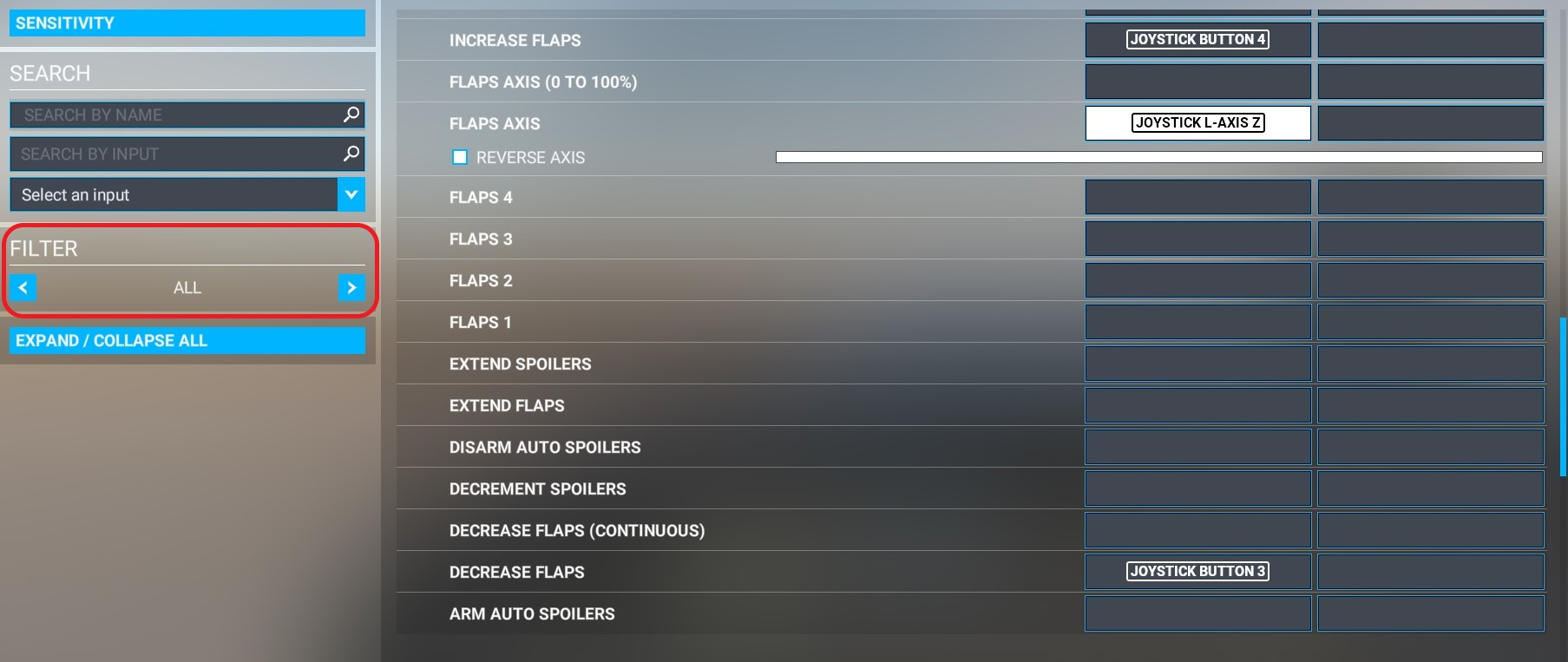
Binding flaps to the prop lever works, see below.
But first let me tell you why it’s not such a good idea.
First of all, as already mentioned, many aircraft use the prop lever that you’ll need to use them.
Secondly, not all planes have the same number of flap notches (i.e. the AN-2 have 8, some only 2).
So the position of the lever won’t be the same for, let’s say the first notch, depending on the aircraft.
Not instinctive, and requires checking the position.
Not to mention the CTSL and some gliders having negative flaps where it’s normally zero !
And you don’t have to press the button X times all the time. A long press puts you at zero or full flaps.
So using a button isn’t so bad.
It’s up to you…
I’ve re-plugged my old Saitek quadrant just for you (I don’t use it anymore, I’ve found a better and more reliable one for pots).
To bind flaps to prop lever, use “FLAPS AXIS”, not “FLAPS AXIS (0 TO 100%)”.
In my case, “REVERSE AXIS” must be unchecked to prevent the movement from being reversed, but you’ll have to check with your TQ.
IMPORTANT: on the left side don’t forget to set “FILTER” to “ALL” to have access to all available bindings.
Voilà, voilà…
Thanks;
I chose the Logitech Saitek Throttle Quad for its price and generally favorable reviews. I couldn’t afford the $300 for the Honeycomb Bravo, but I did buy the Honeycomb Alpha yoke.
I guess I was expecting a lever for the flaps because I think the Honeycomb Bravo does have it. If I find that I’m spending a lot of time with MSFS, and the Logitech throttle quad becomes a problem, I’ll get a better one.