msfs-2024
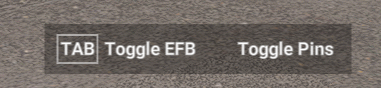
As the title says How can I remove “[Tab] Toggle EFB Toogle Pins” banner?
msfs-2024
As the title says How can I remove “[Tab] Toggle EFB Toogle Pins” banner?
There is no way yet. The dev of the freeware “handlebar remover” addon is looking into it, but he’s fairly sure (as am I, having also looked into it) it’s encrypted and not possible. I really hope they make it possible to hide it, it’s so large and intrusive (and unnecessary, really.)
See also that wish: Can I hide "Toggle" prompts?
It beats me. Can’t remember how long it took them to remove that ridiculous button from the loading page in MSFS 2020. I strongly dislike the Fly Now which should only sense when you start midair.
This is a joke. These kind of forced onscreen messages drive me nuts. Give us the option to get rid of such annoying clutter!
Please, please make these messages optional. It’s an immersion killer to see them on screen.
Hello all,
I was wondering, can you remove the grey bar with “Toggle EFB” in it, on the bottom of your screen if you are in walk around mode? See a screenshot below. If somebody knows, please let me know.
Greetings,
Boudewijn Nijssen
There is no such option at the moment, see existing wish: Can I hide "Toggle" prompts?
Ok, thank you DementedCorn327.
Greetings, Boudewijn Nijssen
Wh removing this is such a difficulty?
This useless message reminds me of my six years old car that still notifies me every single time I start it that Renault is interested in some useless data of mine.
There is a solution for this issue here: https://flightsim.to/file/99623/msfs-2024-walkaround-ui-removal-mod/ since Asobo has refused to listen to the community regarding their useless message boxes that no one asked for and that don’t add any value to the sim but frustration.
It also resolves the newly introduced toggle button to exit which stays open until lift off in SU4.
