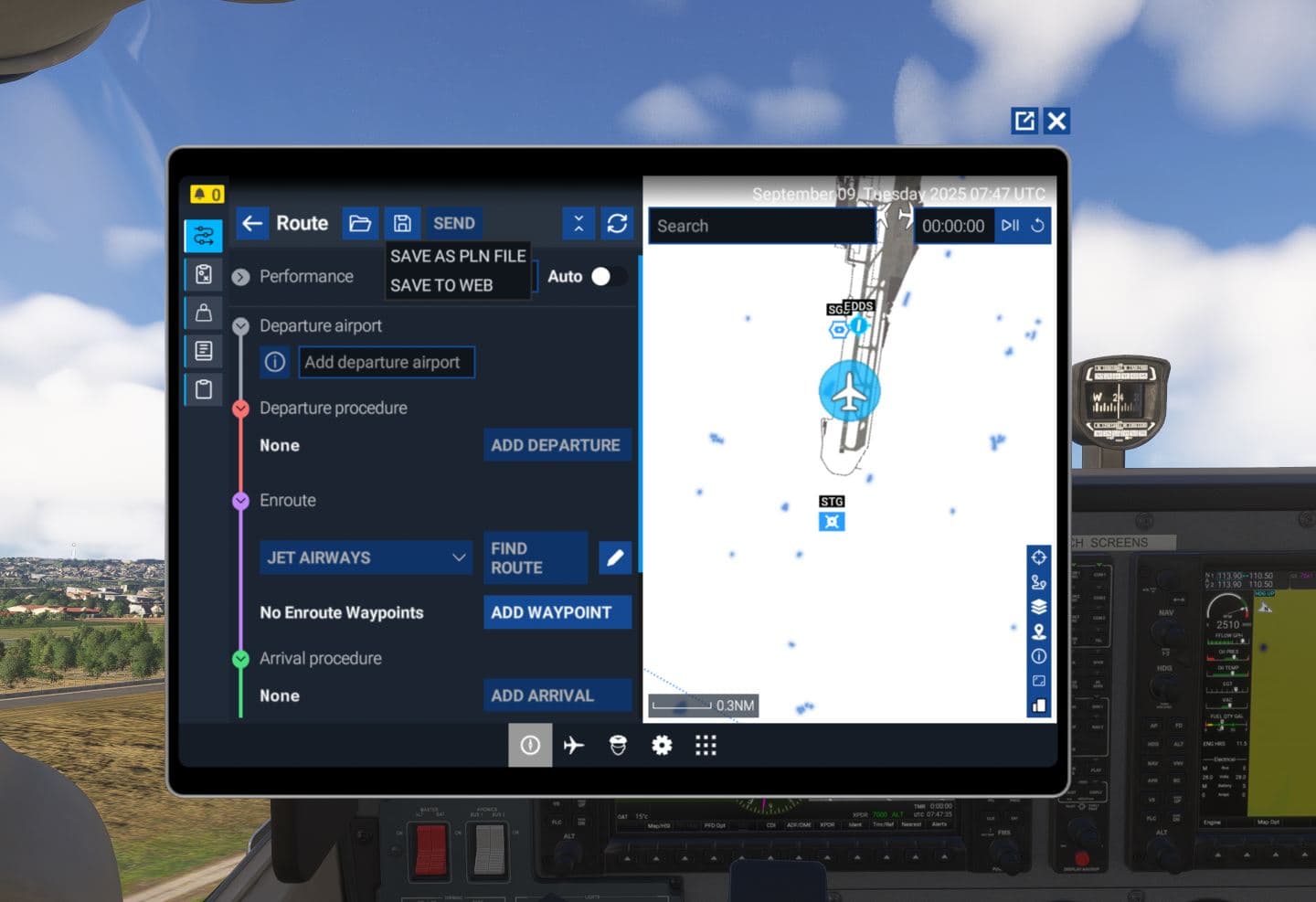
Hello guys, I wanted to share with you all a quick video I put together showing how you can save and load an FLT file in MSFS 2024 for those who wish to continue their flight where they left off. There is a workaround to do it, so here it is

Hello guys, I wanted to share with you all a quick video I put together showing how you can save and load an FLT file in MSFS 2024 for those who wish to continue their flight where they left off. There is a workaround to do it, so here it is
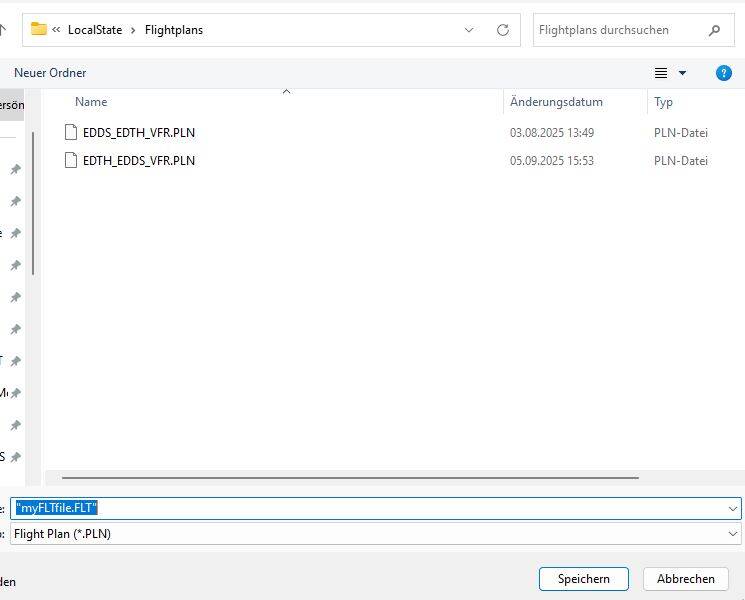
You have to type the filename with quotes like “MyFlightfile.FLT”. Then it does not append the .PLN extension. Worked for me with SU3.
What is the point?
Save flight, .FLT files, does not work.
Only save Flight Plan, .PLN, files work.
It works for both .PLN and .FLT files.
During a flight pause the simulation and open the EFB
Click the disk symbol and select SAVE AS PLN FILE
Select Save to this PC
Select the folder and type the file name with quotes ending with .FLT. The quotes are the key!
The you will find then the .FLT file in the Folder.
For loading Click on the folder symbol in the EFB bag and select LOAD PLN FILE
Select the folder where your .FLT file is. You will not see the .FLT file due to the *.PLN filter.
Type in “myFLTfile.FLT” with the quotes and open.
There are some issues with loading: If you are saving a .FLT file during take off you will fall back on the runway and start at the runway again. If your altitude is high enough it seems to work.
There may be more issues, I have not done extensive testing, but so far it worked for me doing a fast change of plane and airport.
Just found another thread on it: MSFS 2024 Save FLT files - #6 by MagentaLine and a lot more info here: FS2024: Might have got in progess save/load flights working on PC? - #5 by MagentaLine
Save flight (.FLT) does not work.
You can save a .FLT file using quotes but the “saved flight.FLT” file
does not continue the flight when loaded.
The issue is with 2024 not 2020.
We’ve been asking since day one of 2020 to give us a save so we could “pick-up” where you left off. They have not in 5 years. I must assume that it’s too hard.
A flight cannot be saved in FS2020 or FS2024.
Only a Flight Plan can be saved.
I save them all the time in 2020.
Why 2024 does not have this function I have no idea.
Every past sim has this basic function.
Maybe we are arguing over the terminology or something.
If you are simply saying that you can save a .FLT file, I will not argue against that.
I contend that it is useless.
If you are saying that you can fly to somewhere and then save the flight, I contend that it cannot be loaded and then be able to continue the flight as it was when you saved it.
FS2020 and FS2024 does not have that capability.
I think it’s not a matter of it being hard I think it’s because they have bigger priorities right now and probably have fixing the saving/loading flights ability on the back burner
Where are you getting this info from? 2020 can definitely save and load from wherever, inflight included and currently testing but seems that so can 2024. See my post history.
No it will save but it does not work. Try it. Fly somewhere then land and save the flight. At a later date load up the flight and see if you can continue.
Lol, I have been doing it for years and it works. I even have an app published on FS.to that autosaves. Works for both sims.
Still can’t get your program to work with FS2024
I have just put in another update. This goes directly into the SDK and avoids the need to load flights via workaround PLN load and whatnot.
It now has a button that loads the flight into your sim so long as you are in the main menu or free flight menu. I just tested it a few times and spawns me mid-air exactly where I left off with same weights, state and all that on an A320 and a GA.
Try 2.1 please. Would love to hear if it works.
Please send a link
Will give this a try. Thanks!
Here u go MSFS (REAL) Autosave for Microsoft Flight Simulator | MSFS . I thought you had it since you said you can’t get it to work for you.