Read that Alaska will be (maybe already is?) running flights from KSEA to Iceland (BIKF). Figured I’d do this with the iFly. Simbrief instead informs me that the flight is impossible. I finally got it to accept the route by eliminating all cargo and dropping the PAX count down to 75. What am I missing here? If it struggled that much with an eastbound flight, no idea how the jet will make it back to KSEA without a refueling stop.
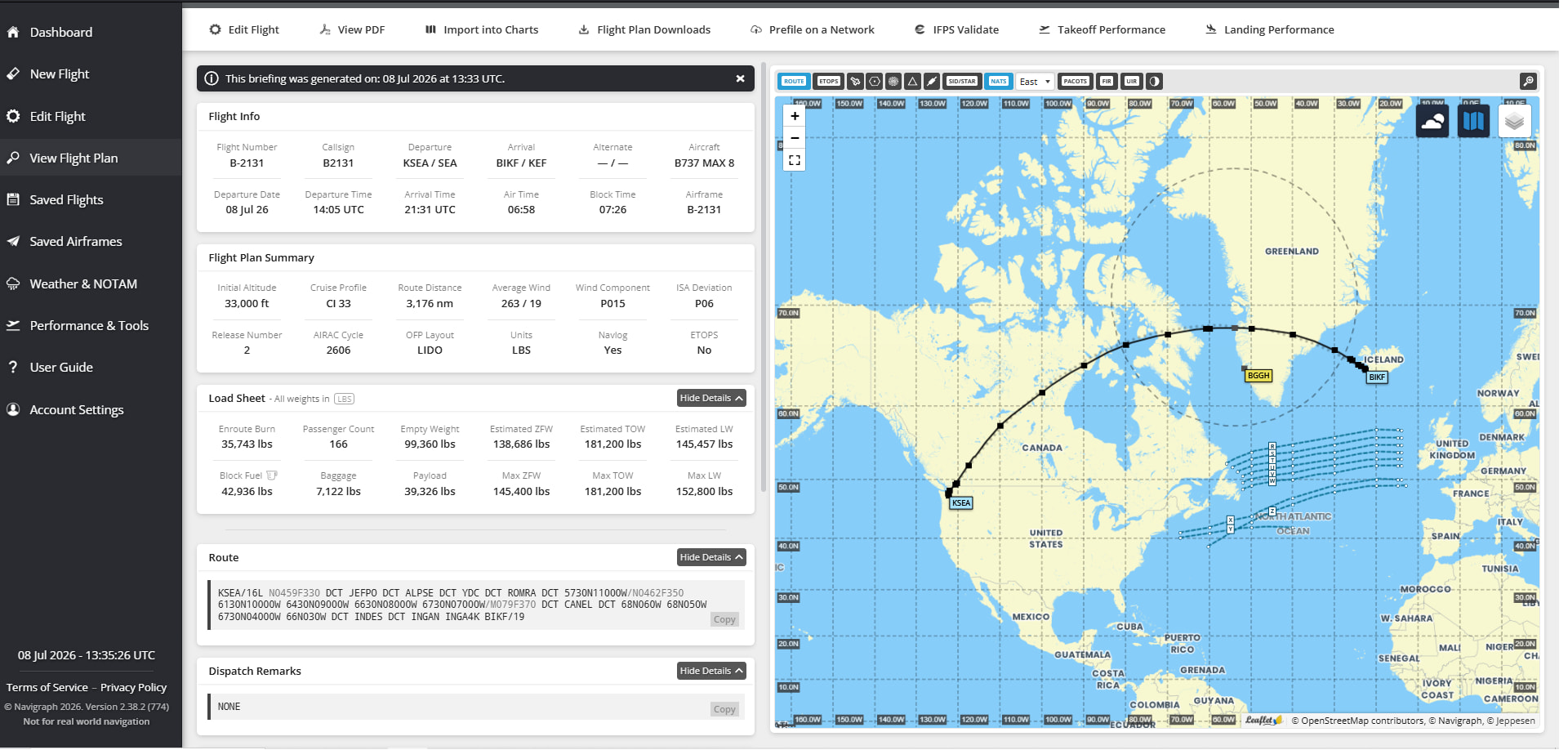
No alternate would not be realistic though. It’s true that there aren’t many viable alternates; you’re basically committed to landing in Iceland after passing Greenland, but there are several usable airports in Iceland. It may be dependent on the variant used for the simbrief plan? In reality, our Max8s (the only 73 that can fly the route) have a capacity of 159, in a 3 class cabin.
I’ve been wanting to try this in the sim and haven’t yet been able to mess with it. I’ll get around to it eventually, but summer is busy.
Oh I agree, I was just pointing out that it could be done in the sim!
Not too many worries there about alternates.
I’ve found that the plane never loads cargo even when SimBrief factors in 4-5,000 pounds usually. But I can’t change my cargo weight in the EFB when importing SimBrief weights, it’s always stuck to 0. Resulting in my airplane being 4-5,000 pounds lighter than my planned weight.
Actually, I can’t either change my zero fuel weight when using the SimBrief numbers by “read from SimBrief data”. I can only change the fuel.
Had Simbrief run this flight going westbound, BIKF to KSEA (nearby KPDX was the alternate). 146 pax, 7K of cargo. Fuel deficit of 3,500 lbs. Wonder if the real aircraft is going to have PAX / cargo restrictions to make this leg work? Block time of 8 hrs, 18 min. Sorry but that’s about 4 hrs past my threshold for being stuck in a narrowbody, in steerage class. Yikes…
This flight has been operating for about 6 weeks now. From what I understand, there hasn’t been much in the way of payload restricting. The plan is to accept tech stops in Edmenton when necessary - though I haven’t heard that that has happened yet either - before bumping payload. There’s been much stronger than anticipated demand; they’re even considering throwing a 787 on the route, surprisingly. (It’s only really feasible on the 737 in summer.). I haven’t done it yet, but hope to see it in the next month or two. They are definitely getting every penny of the premium price they’re asking for first on that flight; no first class seats have gone empty or been given to cheap upgrades yet, all full price purchases. So there’s plenty of people who agree about 8 hours in coach lol. But yeah, load factors have been really solid.
For sure. I was just agreeing that if it can’t be planned with an alternate in simbrief, there must be something wrong with the simbrief profile.
Unless simbrief doesn’t plan step climbs? That would seem to be a significant problem for all the folks who use it for long haul flight planning though? I’ve never planned a long enough flight in simbrief to notice.
SimBrief can plan step climbs. There is a slider to enable it under the “Selections” section of the planning menu. It is “off” by default.
Did a little digging into this tonight. I pulled the dispatch packet for the real life flight that operated BIKF - KSEA today, and then started messing with the simbrief aircraft profile and planning options to achieve the same planned landing fuel.
As far as the aircraft profile, I changed the fuel factor from P02 to M02. That yielded landing fuel that was a few hundred pounds low for the same ZFW, but close enough. I’m sure winds have changed a bit since the flight was dispatched.
As far as Simbrief telling you the flight is landing with negative fuel, that isn’t really true. It’s telling you it’s landing with negative fuel compared to what it thinks is required. If you look in your OFP, you’ll see you’re still landing with fuel. You have to play with some options here (and kudos to simbrief for including these options).
The most important thing is that this flight isn’t operated as a normal flag flight. That would yield a signficantly higher fuel requirement. It’s dispatched under an exemption to normal flag rules - an ops spec provision titled B043. This is the totality of contingency fuel planning. So, on your Simbrief planning page, change “Contingency” to “None”. Then, change “Reserve Fuel” to “FAA (B043)”.
Real flight numbers (in thousands of pounds):
ZFW 137.0
TOW: 181.5
Ramp fuel: 44.9
Planned fuel on destination (landing fuel in SEA): 6.8
Simbrief numbers:
ZFW: 137.0
TOW: 181.2
Ramp Fuel: 44.9
Planned fuel on destination (landing fuel in SEA): 6.5
That’s close enough, especially since winds have changed since the original flight. The current simbrief profile, with the fuel factor of P02, overburns that by 1,800lbs. Experimentation is necessary to see if the simbrief profile needs adjusted, or if the aircraft fuel burn needs adjusted. If anyone tries any long flights like this and doesn’t mind sharing your fuel burn numbers vs planned numbers, I’d be curious. It’ll be a while before I have a chance to try it.
Can the icons on the tablet be re-aranged somehow ?
Find it more logical to order them in my startflow order fir example
Yes, if you click and hold then app icons you can move them around. Since Hotfix 2, they remember their new positions properly as well.
Super will try that one !
Thanks fir the tip
What is the purpose of the “INFO” sub-page for the MFD? I see how you can select fields using the dials at the base of the panels but I don’t see how you can populate any of the fields with actual data. Is this screen even used in RL?
Same question for the “C/R” function.
Hi. I test 737max in SU6 beta. It work but you don’t have click sound in cockpit and no gpws sound but its not problem, because in su6 it have very best performance 110 fps in airport and no frizz
Oh thank god there is no frizz
Yes I think I can confirm these sound issues. I don’t think I got RAAS sounds or landing call outs.
I’m having a lot of problems with this aircraft (MSFS2024), especially since updating to the first HotFix. Sometimes the simulator freezes when trying to start a flight, and it rarely loads and then hangs on the aircraft view. I’ve uninstalled and reinstalled several times, and it’s still the same. I’ve always used beta versions and haven’t had problems with other aircraft. I’ve reverted to the latest stable version of the simulator, and it’s still the same. Anyone else experiencing this?
Yes but i use Vraas and i remember not hear flaps in cockipt
I had these same problems and opened a ticket. They had me follow their “clean install process” and it fixed the freezing issues. No problems any longer. It’s on the discord if you want to follow it. It’s uder FAQ on the discord.