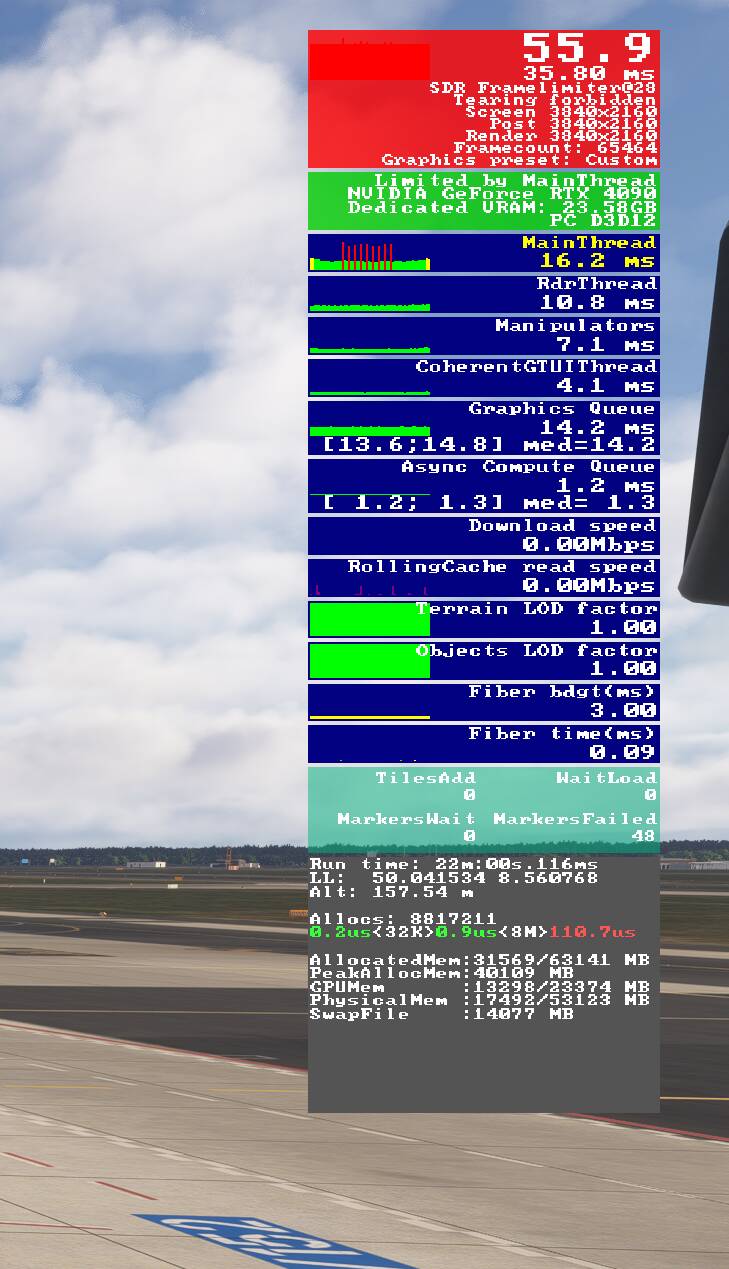
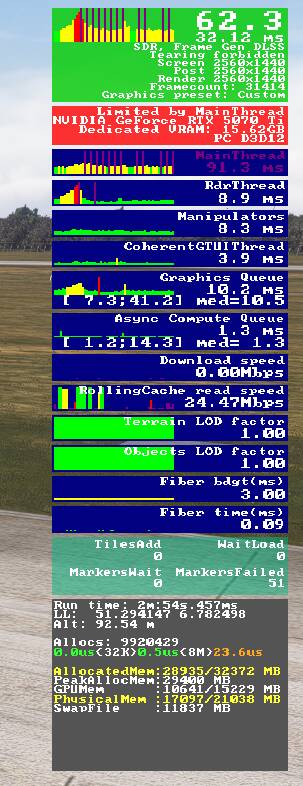
I’m experiencing a strange issue on a fresh Windows install. When I pan the camera quickly, the main thread repeatedly spikes for several seconds before eventually settling down. During this time, the frame rate drops and causes noticeable stuttering.
If I’m not panning, both the frame rate and main thread remain stable and essentially flat.
Has anyone encountered something like this before or know what might cause it?
I have the same issue! This happens when panning the camera around and it’s so noticeable that it’s unplayable!
I have tried reinstalling my GPU Drivers, Chipset, Bios Update, performing clean installation of GPU drivers, trying PBO off vs on, XMP off vs on, capping my FPS and tuning down graphics settings. I’m so frustated. Tried to ignore it, but did a flight yesterday, and even panning the slightest bit makes it extremely noticeable. I didn’t have this before.
This is exactly the kind of videos that make the mods and cms laugh. Why? Because what on earth has panning 360s at that speed has to do with flight simming? Why would they spend time to solve such an issue while it is clearly not a use case? The sim loads and unloads objects when you pan. When you pan at that speed no gpu can keep up. It’s that simple.
I honestly can’t tell if you’re serious or just trying to be ironic.
The stuttering does not only happen when someone does “insane 360 spins at light speed"
It happens when i pan just a bit more than what I normally look at, even when I do it slowly. That is a completely normal use case in a flight sim. You don’t stare at one fixed point like a statue. you scan the cockpit, runway, sky, traffic, instruments and surroundings. Thats literally the point of a flight simulator.
So no, this isnt some stupid stress test.
The sim is clearly struggling with streaming and object loading, and thats exactly why it stutters. And if it stutters when I pan slowly, then something is fundamentally wrong. Not with the “use case" but with the engine.
Saying “no GPU can keep up” is just a lazy excuse. Plenty of modern games stream worlds smoothly while you move the camera.
So yeah what makes me laugh is people pretending this is normal and then acting like anyone who points it out is doing something “wrong"
What about your LOD/TLOD settings? It looks for me like your CPU affecting settings appear to be too high for your system for some reason.
Try to limit your FPS at the lowest acceptable - 30 or 24/20.
If red spikes are still there:
Try everything at low settings and changing your CPU-affecting settings set them (LOD/TLOD) that MainThread is yellow without those red spikes. After this adjust GPU-affecting settings that your MainThread is not grater 30-32.
If the settings you have after this look too low for your system - something is wrong with the system (hardware or software) or your Sim installation
This can happen without panning also. It also does not seem to be directly related to loading resources as it can continue once textures etc are loaded. I have currently reduced off screen terrain pre-cache to medium which at the moment seems to have solved it. However this is likely annacdotal.
That’s what I ended up with. Reducing tlod to 30-40 seemed to reduce the big purple spikes in the frame counter mostly. There’s definitely something wrong with the off screen pre-cashing.
Yes something’s going on. I didn’t have this issue in SU4 Beta. Maybe it has to do with the off-screen caching. All the options seem to have no impact on the panning.
After some further testing, i have come to the conclusion off-screen terrain pre caching is the culprit. Setting it to Ultra + Too high settings for your system + RAM overusage → Stutters, unplayble and extremely noticeable intermittent ones.
Setting it to Medium + Acceptable settings + RAM almost maxed but still acceptable → Yes, some stutters when you move the camera very fast, but not those intermittent short spikes that are very noticeable.
Nonetheless it does still happen but it’s not that noticeable to what i was experiencing initially.
Capping the FPS to what your system can handle also helped ALOT (in my case). Nvidia App → VSYNC On, Fixed Refresh, 120hz (this may vary from system to system). Settings high, shadows and reflections and stuff ultra, with TLOD 200 and OLOD 100. iniBuilds EGLL and KJFK still seem to be pretty hefty on performance, but there i also have not noticed the intermittent spikes.
MkStudios EDDL, iniBuilds LOWI and some other airports seem to be working just fine, as long as you don’t pan like a madman. (Which you will never have to do trust me)
Now, i don’t know if this 100% fixed the issue for me. I’ve had an scenario with the same settings where these intermittent spikes disappeared for a time then appeared out of nowhere again. Without changing the settings and off screen terrain pre caching was set to ultra.
I have tuned it down a notch, so lets see if that helped.
I’ll get back when i experience this again.
Hopefully this is fixed and can also help you troubleshoot further.
I’ve seen this when taxiing without panning. It comes on all of a sudden and after a few seconds disappears. Can’t seem to pin down what the sim is doing at the time this occurs.
I had this a few times. Are you by any chance using a logitech panel? I stopped the logitech plugin through the task manager and all went back to normal. Luckily restarting it didn’t bring the problem back.