Hello
My question is I think rather simple, wondering how I can check whether the speed of my internet connection is limiting the performance of the sim or not.
Specifically:
My connection is fiber to the home 1Gb. When I connect directly with Ethernet cable to the PC, I get the full 1 Gb.
If however I use a powerline connection (through the electrical network of the house) I only get 150 Mb.
Visually the sim behaves in the same way in both cases but wanted to make sure - is the Developer Option Frame Monitoring panel of use in this respect, i.e. could I perhaps observe behavior of the indicator related to the internet connection to determine whether 150Mb versus 1Gb is of any importance?
Thanks.
I think 150 Mb/s is fine during gameplay. I’ve watched the ‘Download Speed’ metric in Dev Mode, and I don’t think I’ve ever seen it exceed 20 Mb/s. Most of the time it sits pretty idle.
2 Likes
@BegottenPoet228 I flew around LA a bit today (LOD 200/200, Ultra settings) and the maximum download speed I saw was 158 Mbps. On average, it was around 30 - 40 Mbps.
@MontgomeryB28 150 Mbps should be sufficient - the most important thing is that the connection is stable, without lags or stuttering.
As mentioned, speed is important but quality more so in terms of stability and low latency.
Thank you all for your contributions - based on them I will test again with the cable (at 1 Gb) and monitor the download speed on the FPS panel to see what I am getting as a maximum. My understanding is that if I am not getting more than 150 most of the time , I can go with the 150 link while if I am getting higher numbers, the 1 Gb is needed.
You can also use Task Manager (Performance) to monitor total network usage.
1 Like
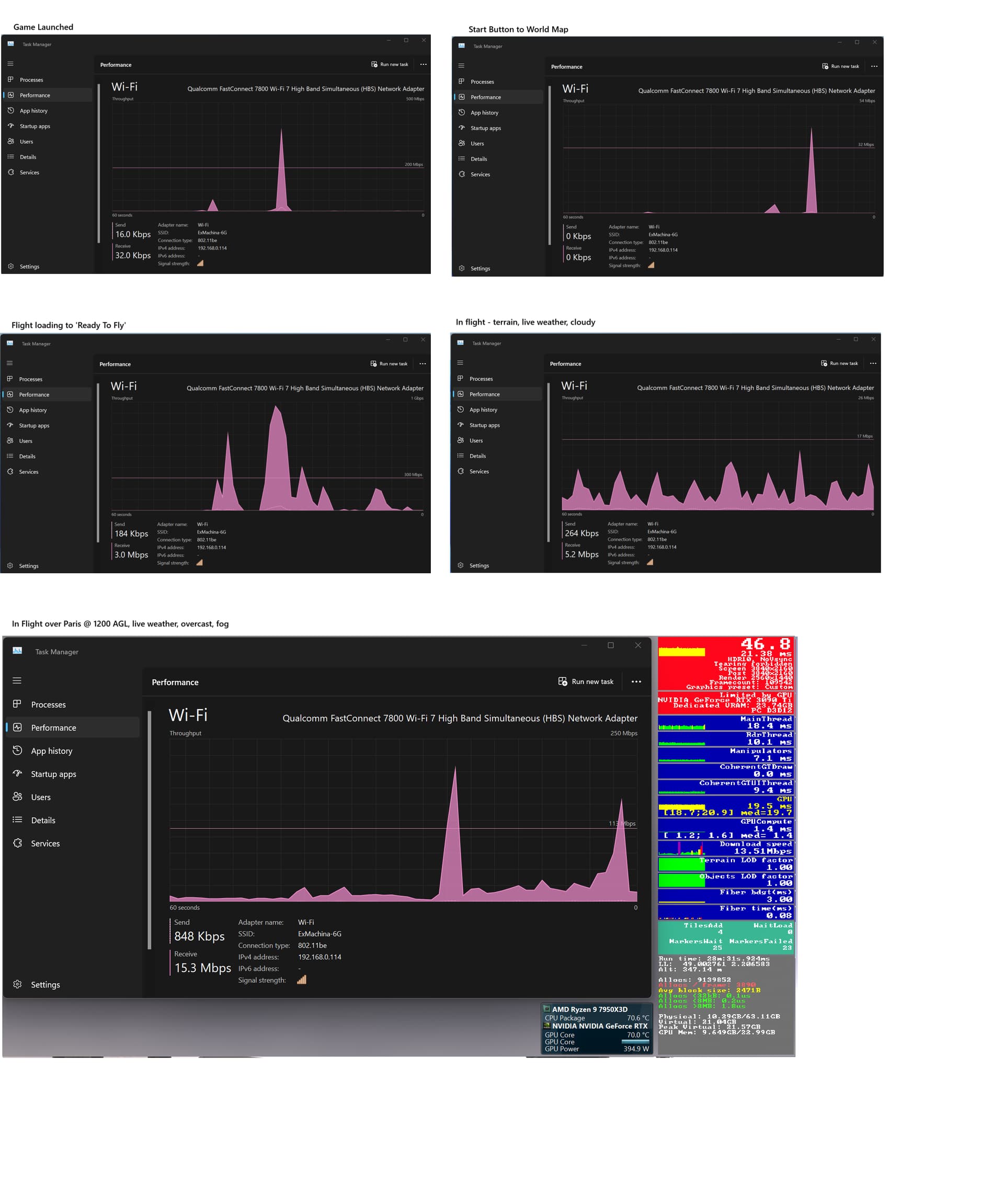
I just did a test.
F-18
4K, DLSS 4 Quality, Mostly Ultra.
Paris @ 1200 AGL, live weather (overcast and fog), no traffic.
I had a few small stutters, even when network throughput was low. Mostly smooth, though.
I noticed high download bitrate when the flight was loading, and as you can see, it hit over 200 Mb/s at one point in the flight. Mostly around 10-20 Mb/s.
1 Like
Not sure why the image isn’t clickable (to expand it.) I wonder if they changed something in the last forum update. Or is it clickable for others, but not for me (since I posted it?)
Not clickable for me either. I have seen this before a couple of times; not recently though. Thanks. --Redeye
1 Like
First time I’ve seen this happen.
Weird. Right-click > Open in new tab will show it full size.
Thanks, that worked great.
I’ve submitted this to the mods. They informed me that it’s a known issue and have elevated it.