Intriguing Discovery… 76T & Bad FPS Areas Geometrically Linked to Class B Boundaries

,

This has been a very interesting find and highlights some interesting aspects of what is going on in the sim. I spent the better half of the morning profiling frames through nSight to see if I could glean anything about what’s going on. The frame time has always been very good even when running at one frame per 2 seconds so I didn’t expect there to be any issue so far as rendering is concerned. However, sometimes it can lead you to interesting places.

First and foremost, though, I do not believe this to be specifically an issue of “where you are”. It’s only tangentially related. In other words, if its true that if you’re in that area and that is the issue, it should be consistently reproducible. However, it is not, but there is a relationship. In some cases it will begin stuttering further towards DFW than others, but not much. In some cases, it will stop immediately upon retreating to the “safe zone” so to speak. Yet in other cases it will persist long after you’ve gone back to your safe space. If you drop the terrain LOD down to 10, it actually does not happen at all.

Here’s where the real problem I have is. The terrain detail distance is one of the single biggest determining factors in performance in the sim, yet it is so incredibly poorly explained. Having spent a few hours in nSight on this, it appears so far that I can tell that from a range of 10 - 100, it is increasing in area the distance to which you can see terrain features such as trees, buildings, and detailed tiles. After about 100, it seems that the distance does not increase but you’re populating more stuff within that max range.

This is why “where you are” is tangentially related. It seems to be that the way the data is streamed in is not always symmetric or deterministic. IE: I can be at an exact place in space, moving the same direction, at the same speed, at the same altitude and it won’t be guaranteed that the next terrain data tiles to be loaded in will happen at the same point. Nor will they be unloaded at the same point. If there is a scenery issue then in theory it should be possible to find that place and reproduce the issue constantly.

There is an issue in the process, it appears, that the data may exacerbate. It’s possible its simply in the process itself. Without more specific information as to the streaming process and data sanitation it’s really impossible to say.

I can say for certain, however, it is not a rendering issue. It does not appear to be a connectivity issue from the user end, although, there could be one within their cloud network. It simply appears to be that there are some areas with either old/conflicting data that are exacerbating a bad process or that there is errant data causing the process to stall. Without more information it’s impossible to know.
1 Like

There is also an FPS “Black Hole” near the Summit Airport (KEVY) in Middletown, DE. Not coincidentally it seems, the airport also sits just outside the 30 NM Mode C ring around the Philadelphia Class B airspace. Frame rates begin to tank as you near the airport. I have also read posts regarding FPS slowing to slide show speeds to the west of Melbourne Int’l Airport (KMLB). This area of lost performance is also contiguous with the Orlando Class B 30 NM ring. I could not however duplicate the issue there. I also tested two other airports that reside just outside the edge of Mode C rings, specifically Shelby-Cleveland County (KEHO) located just west of the Charlotte Mode C ring and Gwinnett County-Briscoe Field (KLZU), just outside the northeastern edge of Atlanta’s Mode C ring. There was no degradation of performance at either airport.

To add on, I have gotten the sim to crash reliably three times in the experimentation process specifically when swapping terrain LOD values. The faulting exception codes are related to heap corruption. So it appears that whatever process is loading/unloading assets is not minding it’s business properly.

2 Likes

I think this is a key as you can use this method to predict problem areas. Excellent work!

1 Like

But it IS. Everybody is able to exactly reproduce the issue that this thread is about at the exact same location as outlined by the TO.

You’re writing about different issues which surely exist but let’s not mix up different effects into one thread.

6 Likes

This conflict of instruction is exactly what happened to HAL in 2001 and look what he did… lol

6 Likes

No, I am not mixing up different issues. I have tested the exact area of outline that was mentioned in the post. If it’s true that its related to the mode C ring or airspace SPECIFICALLY, then that line is hard. Move in, bad perf. Move out, good perf. This is simply not what happens. If you load up at T36, you’ll find it’s consistently bad, but that does not imply anything about airspace being causative but being related in terms of where these problems are most likely to happen: crowded urban centers. Not only that, but once the problem is elucidated, it does not go away reliably or deterministically. That means there is some other causative agent that the problem area is pointing you to. Not the problem area itself.

It appears to be a load/unload corruption issue. Again, without specific knowledge of that architecture it’s impossible to know.

Except that that is exactly what happens. There is a razor sharp line dividing ‘good’ and ‘bad’.

2 Likes

Except it is. If I spawn outside the area of effect, then move the drone camera in to it, I get <1fps, and I reverse out my framerate recovers instantly. If I spawn inside the area of effect, I get <1fps until I leave the area. It is both reliable, and predictable.

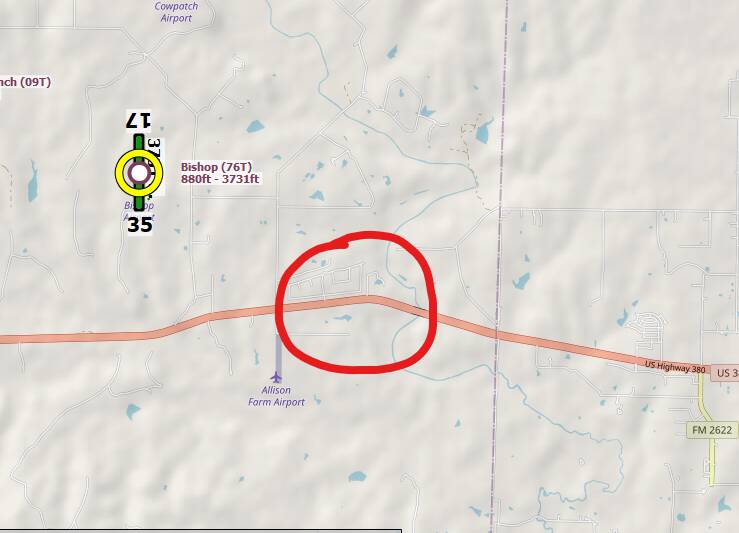
Follow the road below west, and just after you pass over the river, your framerate will practically stop. I’ve marked the red area to show where it will hit you, every single time.

Wow. This is some amazing analysis! Great job! I just hope all this gets resolved soon!

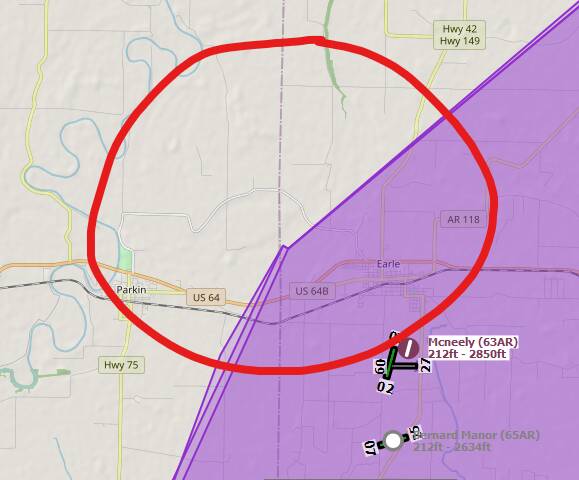
Spawned at 63AR, the entire area here is prone to stuttering, but I did not see the almost entire lockup as seen at 76T:

image

This seems eerily similar to Stephen King’s “Under the Dome”… remember the plane crashing mid-air against an invisible wall? That’s it.

5 Likes

Impressive work, I will try to plan my flight plans outside restricted areas

Okie dokie. Here’s a vid of what I’m trying to elucidate here.

7 Likes

This forum needs a rep system, because Oh my gosh you deserve some ! If MS/Asobo can scrape a few marketplace credits for a Bug Bounty system, that’s even better but… :shushing_face:

4 Likes

Remember that you are flying in 3D space, and that you can be at the exact same lat and long, but you may get different behavior at different altitudes and direction of flight.

Class Bravo airspaces look like an “upside down wedding cake”. Get on SkyVector and search for KLAX. See all those heavy blue lines? Those delineate tiers of the cake. In general, the farther out you are, the more room you have to fly under a tier.

I think that given the fact that they are working on ATC logic and phraseology, and the OP has clearly established a connection with airspaces, I do not believe this solely a scenery thing. I think part of the problem is the sim getting stuck in the thread that’s trying to figure out ATC responsibilities and actions.

By the way OP, EXCELLENT research and connecting some not-so-obvious dots!

3 Likes

Appreciate the comments everyone. I’m curious to see if what BonniestManx065 said about the issue disappearing above 20,000 feet is true, or qpHalcy0n1’s assessment about the issue morphing somewhat if LOD is set to 10%, but today’s day job workload won’t let me boot the sim till later tonight (PDT). With a new community post featuring this thread however, hopefully the Asobo Dev’s are on it.

8 Likes

Wow. Seriously impressive. A scientist in me marvels at your ability to troubleshoot an issue.

asobo should get this guy on their salary list.

2 Likes

Brillant, really but what if you don’t have any Class B airspace, like in France or in Italy, and still have the bug ?
Try to take off from LIRS and have a 120° route. After about 30 second you’ll be in a FPS " black hole".
But there is no boundary in this area, you are in a class D airspace and the boundary is miles away. No class B for sure.