Installer: Updated Dependencies to the latest available Versions
Fix for Calculator L-Var Template not working with L-Vars ending on L
Improved Calculator L-Var Template and Value Manipulator: An additional Reset Value can be configured. When the Variable is equal to the defined Limit it will be set to the Value of Reset
Updated to StreamDeck SDK 6.1 (now the new Minimum)
Hmm, I don’t really know much of AAO to be honest.
But I’d imagine that the only Thing that can be copy & pasted directly is the L-Var Name. The rest has to be manually configured depending on the Use-Case.
For the LVAR Command of PilotsDeck that is.
If it is about RPN Code to set something in AAO, you can copy and paste that directly into PilotsDeck for a CALCULATOR Command.
Gabe, check the AAO SD plugin documentation. Sure I saw something there yesterday and it looks like a cut and paste operation. I wasnt looking for this exactly and just speed read through things to gain an overview but I think, or hope, that it might help.
Hi. Thnx. Yeah I found out that searching the A and Ohs database alliws you to right click and copy… and then paste it into the relevant “K” section in the SD profiles.
I’m sussing it out bit by bit.
Unfortunately I just got a SD + Plus … and that is even more complex with Stacked Dials, and swiping… blah blah !
Apparently, the Lvar you want from the database, needs highlighting, then Right Click, Copy… and then you highlight the relevant box in the SD profile key… and hit ‘Ctrl + V’ to paste it !
Tell you what, the dudes that make these programs are gods.
Swiping comes automatically when you configure Pages.
Although I organize my Actions with Folders on the normal Decks, I found that using Pages (and thus having the Ability to swipe to switch the page) is more fluent. You can easily & fast switch between FCU and RMP for Example.
The stacked Dials are only really useful for specific Use-Cases imho. Radio-Panels with an Outer/Inner-Knob are an great Use-Case. With pushing the Knob you can switch between Outer and Inner, turn as needed and then use a Tap on the Touch-Panel to change Frequencies.
I made a short/general Summary for that Use-Case on the COM Radio Action: GitHub - Fragtality/PilotsDeck: Directly control the FlightSim from your StreamDeck!
Or you use my Fenix or FBW Profile as an Example and copy that Stack Action out of there
I don’t know - is there an official and documented API?
Even if there was one, it is not really reasonable imho. The Plugin already covers the Majority of Sim Platforms and still it is only a “secret tip” at best.
Major Plugin Overhaul - it is basically a new Plugin under the Hood!
Please make an Export/Backup of your Profiles your created with PilotsDeck! The Intention is that existing Profiles just continue to run (with a bit smaller Fonts), but it is better to be safe than sorry
Installer
Improved UI
Check & Installs all Requirements (either automatically or by starting the Setup for you)
Check for the vJoy Driver now tests for the Brunner Version/Fork - which should work on both Win 10 & 11
Ability to remove the Plugin (including all Customizations!)
New Profile Manager Application
Enables easier Profile Installation in a few Clicks - extracts & copies the Files for you, assists with adding the Profiles to the StreamDeck, automatically removes old Profiles on Updates
Own Package Format to distribute Profile Files, Images and (Plugin) Scripts as one File
Allows much easier Profile Mapping to switch Profiles automatically depending on the Aircraft (or Sim)
Profile Switching now only can switch back to specific Profiles when the Simulator exits
These Profile Mappings will automatically be transferred to new Profiles on (Profile) Updates
Plugin
Property Inspector is now tabbed to allow easier Navigation
Option to add a Guard (Image & Command) to an Action (Guard Images can also use Image Mappings)
Added Image Mapping to more Actions
Top and Bottom Image for the Korry Action can independently enabled/disabled
Most Actions can now be used on an SD+ Encoder (except Simple Button and Gauge Dual)
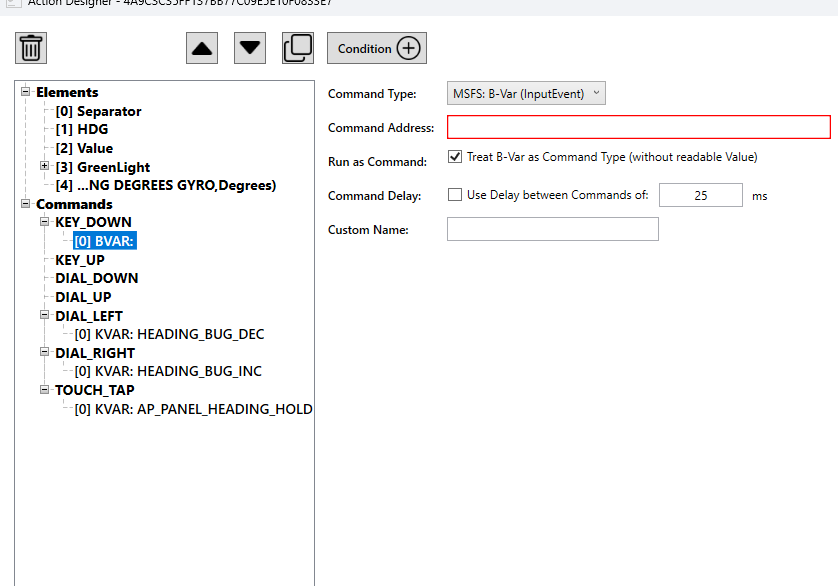
B-Var Support added - per default handled as Command-only but can also be used as a Variable
Added dedicated Command Type for K-Var (allows to define a Sequence)
HVAR Command supports passing a Value to the H-Var
New Calculator (“C:”) Variable to read the Result of Calculator/RPN Code (read only)
Added Internal (X:) Variable to share Data within the Plugin
Added Copy and Paste Buttons to all Actions to share single Actions between Users (or to copy between a Keypad and Encoder)
Added a new “Composite Action” that gives you much Freedom to design your own Action (Display and Command wise) - most Feature Requests should be now possible with that Action (and can even replace Actions that would only be possible with Lua Scripts)
This new Action is configured through its own dedicated “Action Designer” UI (opened via the Property Inspector)
The Script now has its own Engine to run Lua Scripts (does not need external Engines like FSUIPC or FlyWithLua anymore)
The Functions of these Lua Scripts can be directly addressed as a Variable or Command - like all other Variable/Command Types
Multiple Script Types available to be run on-demand (Variable, Command) or constantly when the Session runs
The Scripts can read all Variables and send all Commands the Plugin supports
FSUIPC7 is now only the secondary Connector for MSFS - it is possible to use it without FSUIPC7 installed if needed!
Remote X-Plane Setups are now supported
Images can now be stored in Sub-Directories to better Organisation of different Packs and easier Navigation
Image Drawing overhauled - Images are now drawed on top of each other (i.e. on the Dynamic Button)
Added an Icon in the System Tray / Notification Area to restart the Plugin or show the Developer UI
The Developer UI offers Links to some Reference Source to look up Variables or Commands and to access the Plugin’s Folders easier
The Developer UI has also a Monitor View to look up the current Aircraft-String/-Path or the Plugin’s State, Ressources & Statistics
Changed vJoy Driver Library to the Brunner Fork
Plugin Configuration is now persistent between Updates and allows much more Tweaking
Removed Error Image (and Error State)
Sim Connection, State Handling Variable Handling completely overhauled
Moved to .NET 8 (LTS) and upped minimum OS to Window 10
NOTE / IMPORTANT
A Backup of your Profiles is recommended!
This Update fixes the Font-Scaling Issues experienced by some Users after the 0.8.0 Release (especially when using a shared Profile from someone else). Due to the Nature of the Bug and to provide a clean Solution going forward, the Plugin will adjust the Font-Sizes to keep the same visual Size on the StreamDeck (once, when an Action appears for the first Time).
Or put differently: the Plugin tries it best so that your Actions look the same as before. Due to rounding there is Margin of Error of 0.5 - so that is the worst the Text will be “off” in (visual) Size The Recommendation to make a Backup is mainly to keep the Ability to go back to the previous Version, but the Update is intended as a simple “drop-in” as usual.
But there is a Caveat: The Conversion of an Action has to be done under the Windows Font-Scaling / DPI Setting it was created to lead to the correct / intended visual Result:
If you’re a Profile Author, you need to update/convert your Profiles on your PC and then distribute the Profiles as an Update to your Users (just navigate through all Pages/Folder of a Profile, export, distribute).
If you’re a Profile User, you need to ask the Author to provide an updated Profile. The Profiles I share will be updated shortly.
Installer
Fixed using wrong .NET Runtime on new Installs / Updates
Set FSUIPC 7.5.1 as Target Version
Set StreamDeck SW 6.8.1 as Recommended Version
Plugin
Fixed Font-Scaling affected by Windows’ Text Scaling/DPI Setting
Render DPI is now fixed at 96 DPI (the pre-0.8.0 Default)
Font-Sizes will be automatically converted to keep the same visual Size
The Conversion uses the current Windows DPI, so it is only correct on the PC where an Action was designed
The Conversion is only applied once when an Action becomes visible for the first Time on the new Plugin Version
Improved Session-Ready-Detection for 2024
Slightly, as the SDK allows - Asobo has no Interest in improving a Situation that exists since 2020
Added MSFS 2024 SDK Links to the Developer UI / QRH View
Added Button in the Developer UI to open the Profile Manager from there
Manifest Version corrected
Updated SDK / Libraries
Profile Manager
Fixed Links not working for Profiles with Spaces in the Filename (Package Installation)


 Thank you!