Evening all,
Truely baffled, purchased fenix earlier in the week and all was fine, landed in LEIB and attempted to a return leg back to EICK.
Followed the correct steps and keep receiving INVALID F-PLN UPLINK in INIT.
I have follow these steps https://kb.fenixsim.com/invalid-f-pln-uplink-message-when-importing-from-simbrief
Also reset the SIM and tried again.
MCDU>ATSU>INIT FLT REQUEST> INIT REQUEST FLIGHT DATA
Also deleted NAV data in Programs/Fenix/NavData - reproduced new folder on startup with I’d imagine current data
Any further questions let me know and I hope someone can help.
Have you tried the secondary plan workaround?
1 Like
No data which I can see?
Or what is the workaround?
Odd, because it was working fine
It’s where you load Simbrief in to the secondary flight plan instead
Also I’m not sure if you can do return legs in the Fenix without restarting as I’ve never done it before (need to do this!!)
1 Like
Apparently you can now but I haven’t done it myself (seen on YouTube)
Same issue on sec flight plan.
Same error message
I noticed my fenix is not showing on navigraph hub. is that normal? but again, it worked previous lol
Update for Fenix is in this tab.
1 Like
Only solution I’ve found to work successfully for me is to do FMS stuff first, then import flightplan into EFB. I’ve never once had this happen since setting things up in this order.
1 Like
Moved to USH that is more appropriate for community support
1 Like
Does the flight plan have LON/LAT coordinates?
I see this issue with those and they have to be converted to short hand if I remember correctly.
There was a KB on it but I can’t find it anymore.
1 Like
How do you get that to appear, I only have the other 2?
Might sound very stupid but not sure what those are?
Not at all
Can you share your flight plan?
I don’t know to be honest. It always was there since I bought Navigraph :). Contact Navigraph support and they will help you.
1 Like
Thank you.
Here you go
LEIB/24 N0434F320 EPAM4E EPAMA N856 UMURE DCT XIKEN/N0453F360 DCT KARES DCT ARBEK DCT REBUL DCT USKAR DCT MOPAS DCT GIROM DCT GONUP DCT MANAK UY110 TIRAV UT183 BAGAD DCT DOLUR DCT UPCAB DCT IJALA DCT EVRIN DCT BUNED BUNE3REIDW/10L
Nope, looks good.
I would follow-up on the Navigraph end as it seems like the NAV Data in the Fenix may be out of date if you don’t have it in the HUB.
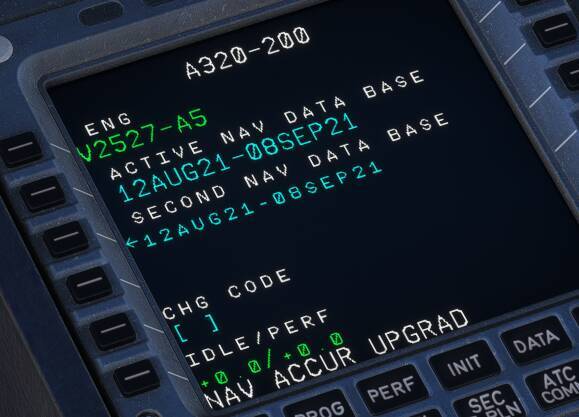
When you check the Nav Data version in the Fenix what’s the date?
You’ll see it here
If it is not a valid / current date then
Do you have an active Navigraph subscription?
If yes,
Uninstall Navigraph Hub and re-install and see if it picks it up.
3 Likes
Thank you so much!
Uninstalling Navigraph Hub and deleting Nav data from programs files done the trick.
Fenix is now showing in Navigraph Hub.
Really appreciate you helping me.
2 Likes
system
March 16, 2026, 7:45pm
19
This topic was automatically closed 365 days after the last reply. New replies are no longer allowed.