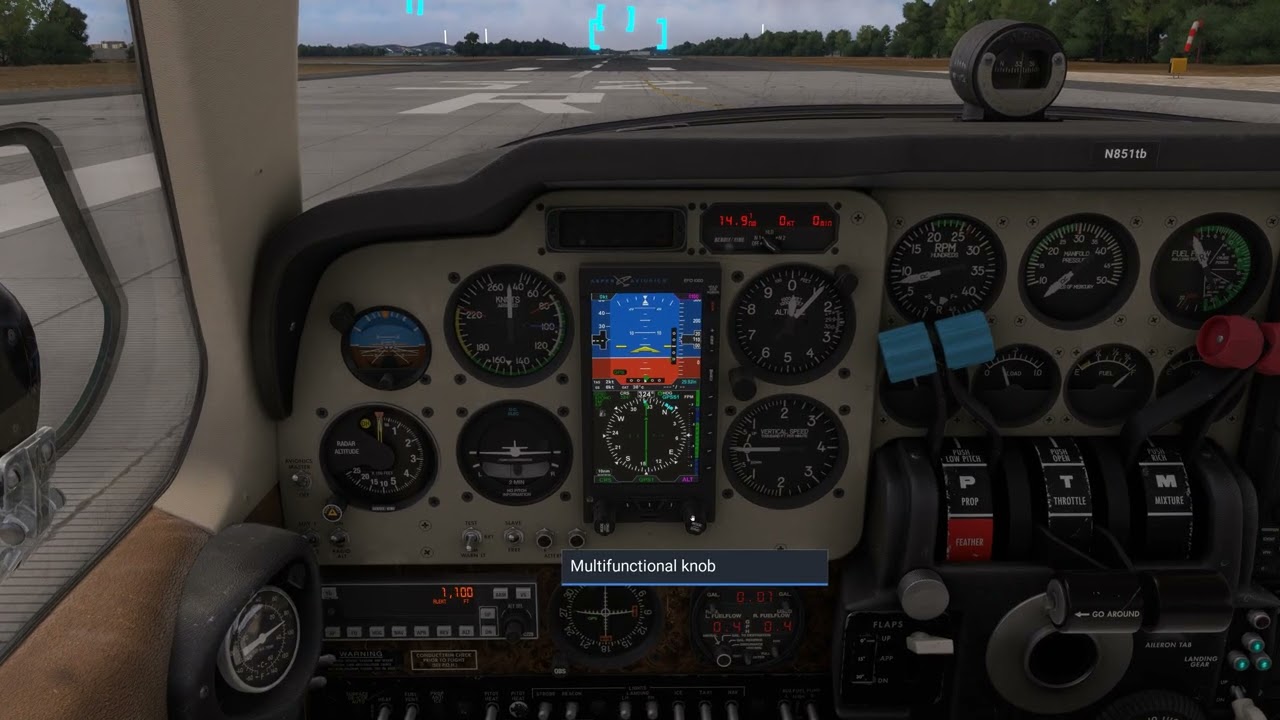
Issue with the Carenado B55 CDI not deflecting on the Aspen. Can anyone help?

Hey all,

I’m having a few issues with the Carenado Baron B55 for MSFS2020.

First issue: No matter what I do, the CDI will not deflect on the included Aspen EFD1000 in GPS mode.

I’m a real pilot, so I think I’ve set up the Aspen and GPS correctly. I own this aircraft (in real life) and it has the EFD1000 and GTN750 installed, so I know how to do this. I have used both the included Garmin, and the PMS50 GTN750 with the same result. Here are more details on the problem:

- The CDI needle on the HSI always shows me on course. It never deflects.

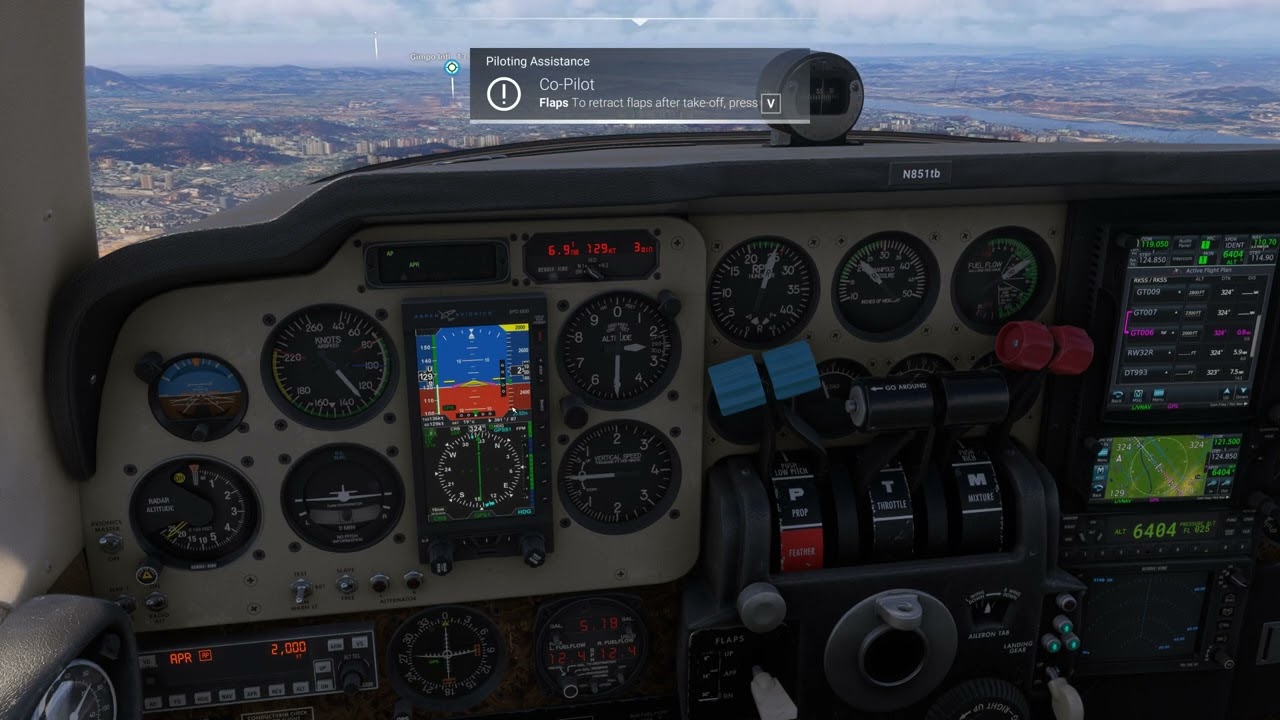
- As you can see in my first screenshot, I am off course (as seen on the GPS), the CDI on the GPS shows me off course by a half dot, the CDI on the attitude indicator shows me off course by almost full deflection, yet the CDI needle on the HSI shows perfectly centered.
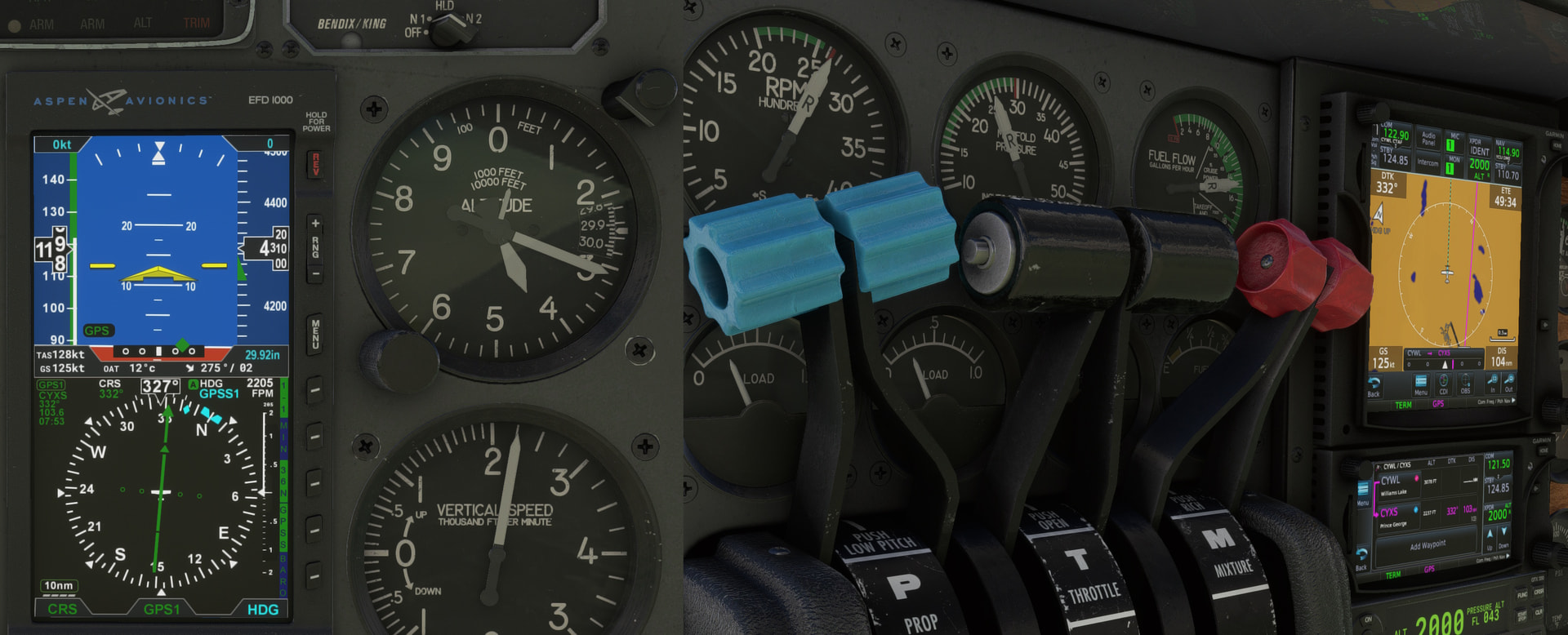
- When I tune a VOR and switch to VLOC mode, the CDI needle on the HSI deflects as expected. Only in GPS mode does it not deflect.

- This is true for when I’m enroute, and shooting an RNAV approach. It never deflects.

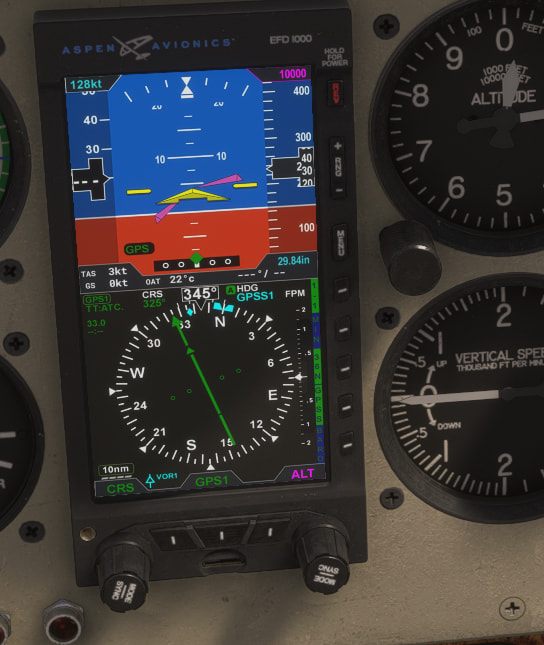
- When I switch from the Aspen to the analog gauges(2nd screenshot), the analog HSI deflects correctly. It is only happening with the Aspen.
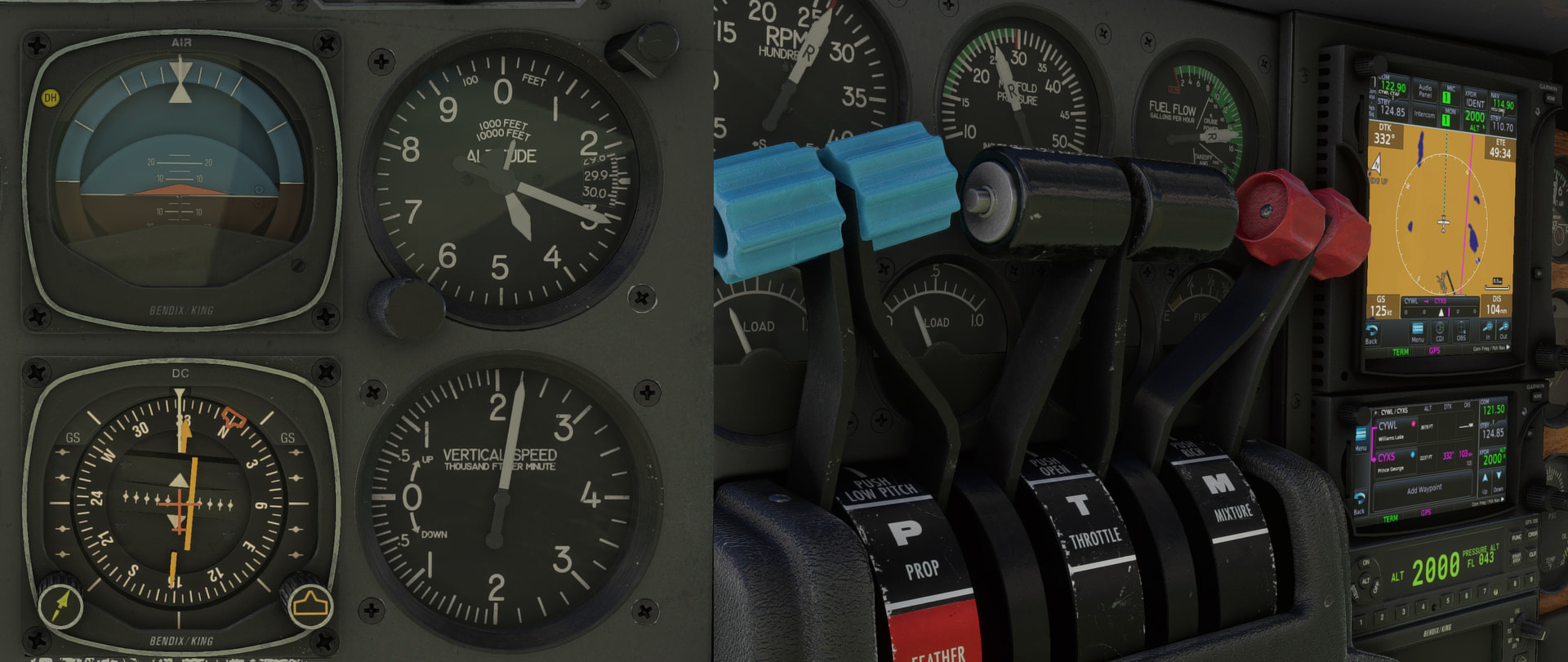
- The CDI needle always displays as green instead of magenta, even when the CDI selector is on GPS1. I’m not sure if that is intended, or if it is part of the problem.

Second issue: I cannot set the Altitude bug on the Aspen, nor can I change the CRS with either of the knobs.

-When I try to change the heading bug, it works as normal. When I attempt to push the knob in to change HDG to ALT on the Aspen, the knob animates as if I’m clicking it, but HDG never changes to ALT. I have tried to operate both using “Lock” settings in MSFS Cockpit Interaction System settings, and the "Legacy"mode. Both to no effect.

My system:

Sim: MSFS 2020 (Most Recent Version)

Aircraft: Carenado B55

OS: Windows 11

Equipment: Honeycomb Alpha, Honeycomb Bravo, Logitech Rudder pedals, keyboard, and mouse.

I would really appreciate any help on this. I’ve spent a small fortune getting my sim set-up, as I’m practicing for my muti-ifr, and this is really killing me. Thanks everyone.
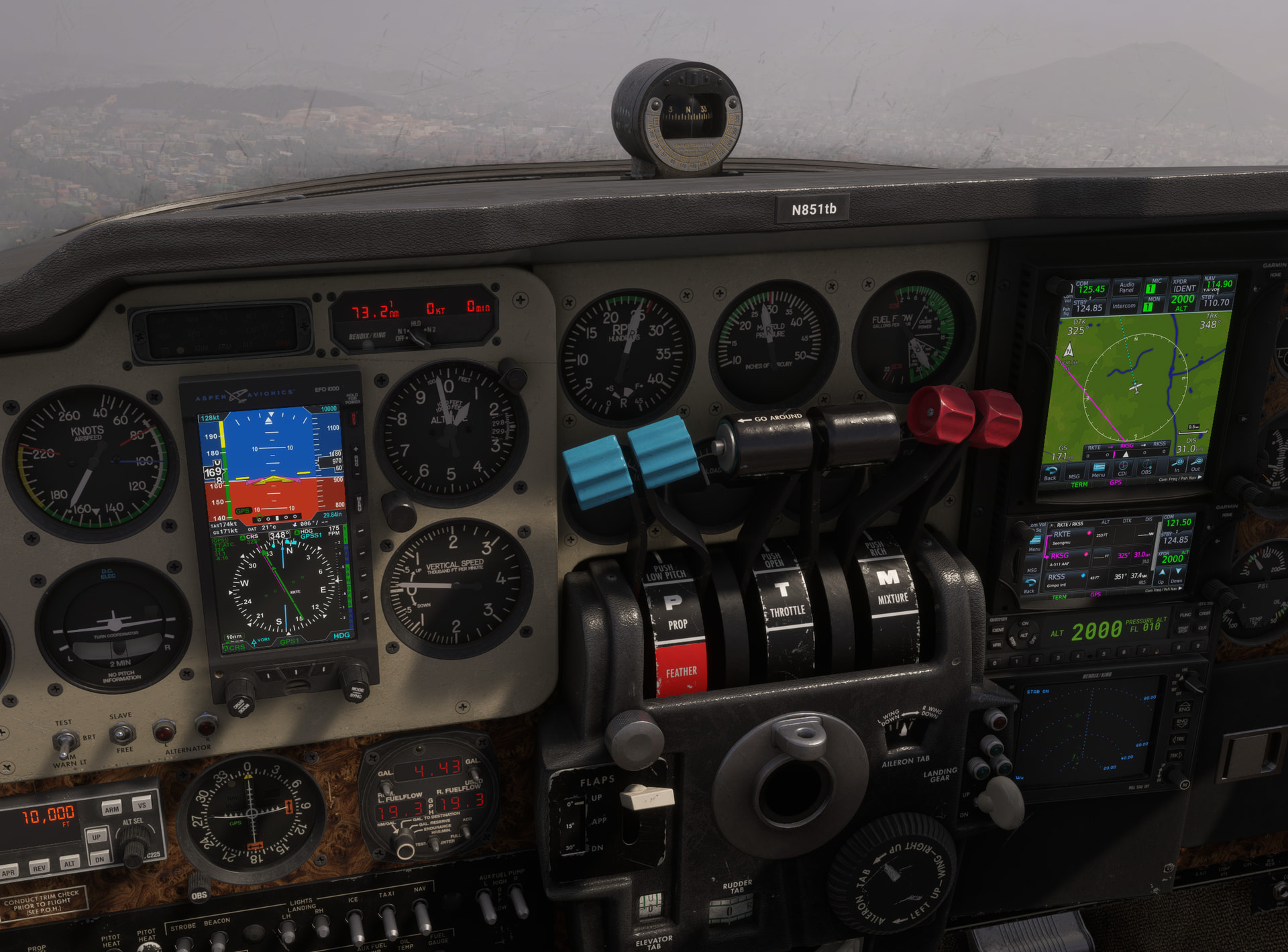
I’m experiencing the same issue where the HSI in GPS mode only displays a static green line pointing directly toward the course, rather than showing actual course deviation.
I actually didn’t even realize it was a bug at first. Looking at real-world footage of the E1000, the HSI should clearly show the aircraft’s deviation from the planned course, but in my case, it just acts like a fixed pointer.
I simply assumed this was just how the GPS implementation worked in the sim.

And altitude could be adjusted using the E1000 button.

Submit a request – Carenado Support

Please try contacting Carenado Support.

Thanks for the reply. I’m glad I’m not the only one experiencing this issue. It means it’s not a hardware issue on my end.

Another issue I’ve noticed is the Aspen doesn’t give any glideslope information on RNAV approaches. I haven’t tested ILS yet. Are you able to confirm if this is the case for you as well?

Lastly, regarding the altitude bug, I can’t seem to get HDG to change to ALT. I try and push the right-hand button on the PFD, and it animates, but doesn’t change out of HDG mode. How do you get yours to activate?

I have contacted Carenado and I’m waiting on their reply. Being this is a $30 addon, I honestly expect more out of the Aspen. It’s a bit of a showstopper for me right now. The only other aircraft that is close to this one is the Black Square B58. It’s a really good plane, but lacks the Aspen.

In Legacy Mode, you can cycle through the HDG, ALT, and BARO settings by clicking and holding the left mouse button on the altitude adjustment knob, then clicking the right mouse button.

The RNAV captures the horizontal path, but it fails to capture the vertical path. I’ve attached a video for reference. It is definitely a bug. As far as I recall, the ILS was working correctly.

I tried the legacy mode again and it worked. Not sure what I was doing the first time I tried that, but that’s fixed for me. Thanks for your effort there.

I’ll let you know what Carenado says if they ever get back to me. In the meantime, if anyone else has any insight, I’d really appreciate it.

I tried again at a different airport with the GNS530. It is RNAV LNP.
It worked normally this time.

You mean the CDI deflected?

No, I misunderstood. Please ignore my previous post

Hi again. I just wanted to provide an update, as I’ve heard back from Carenado support. The first reply I got was this:

Thank you for your valuable feedback.
We’ll consider it to include as a modification on the future version we will release for the aircraft.

Since that didn’t really address my question, I prodded a bit further and got the following response:

We need to investigate this bug further, since the issue occurs only with the Aspen, not with analog instruments (see image), and the variables being called are the same. However, when using VLOC, the CDI offset works correctly. It is likely that one of the latest SIM updates caused the Aspen’s logic to malfunction. We apologize for the inconvenience; we are working on it, but we do not yet have a timeline for a fix.

So it appears they are, or at the very least will, be working on a solution. I’ll update if I hear back.

I received the same kind of response as the first reply you posted.

Unfortunately, I do not trust Carenado’s promises about updates.

Right after this aircraft was released, I reported that the GNS430 FPL button was completely non-functional, and it still has not been fixed to this day.

What is worse is that the request was marked as “resolved.”

Also, the E1000 HSI course deviation issue has existed since release.
In other words, this is not something caused by the latest sim update.

That is also why, when I first replied, I mentioned that I did not even realize this behavior was considered a bug.

It is better not to expect updates from Carenado.

The same applies to bugs in their other aircraft as well (for example, the default Saab 340).

Maybe I sound too pessimistic, but after watching their behavior for so long, that is simply the conclusion I came to.