I’m trying to track down a very stubborn stability issue with MSFS on Windows 11 and would really appreciate feedback from anyone who has seen similar symptoms.
System (short):
Windows 11
ASUS ROG STRIX B650E-E Gaming WiFi, 64GB RAM
High-end NVIDIA GPU (RTX 5090)
VR: Pimax Crystal Super
MSFS (mostly VR )
Symptoms:
Random BSOD: KERNEL_SECURITY_CHECK_FAILURE (0x00000139) while flying
System reboots immediately after the crash
Before or during the issue:
Severe input lag (mouse and keyboard feel delayed or “queued”)
Sometimes USB devices appear unresponsive for a short time
This can happen:
In VR (more often)
Sometimes even without heavy load
Important finding:
Initially I suspected USB overload because I run a home cockpit (Arduinos with MobiFlight, WinWing FCU/MCDU, Leo Bodnar → Throttletek, etc.).
However, at least once, the same crash and input lag also happened with ALL cockpit hardware disconnected.
At the time of the crash, only the following USB devices were connected:
Pimax Crystal Super (USB + DP)
2 Logitech wireless dongles (keyboards)
(both directly connected to the motherboard, not via hub)
This strongly suggests:
Not a simple USB hub issue
Possibly a kernel / driver / DPC latency / PCIe interaction problem
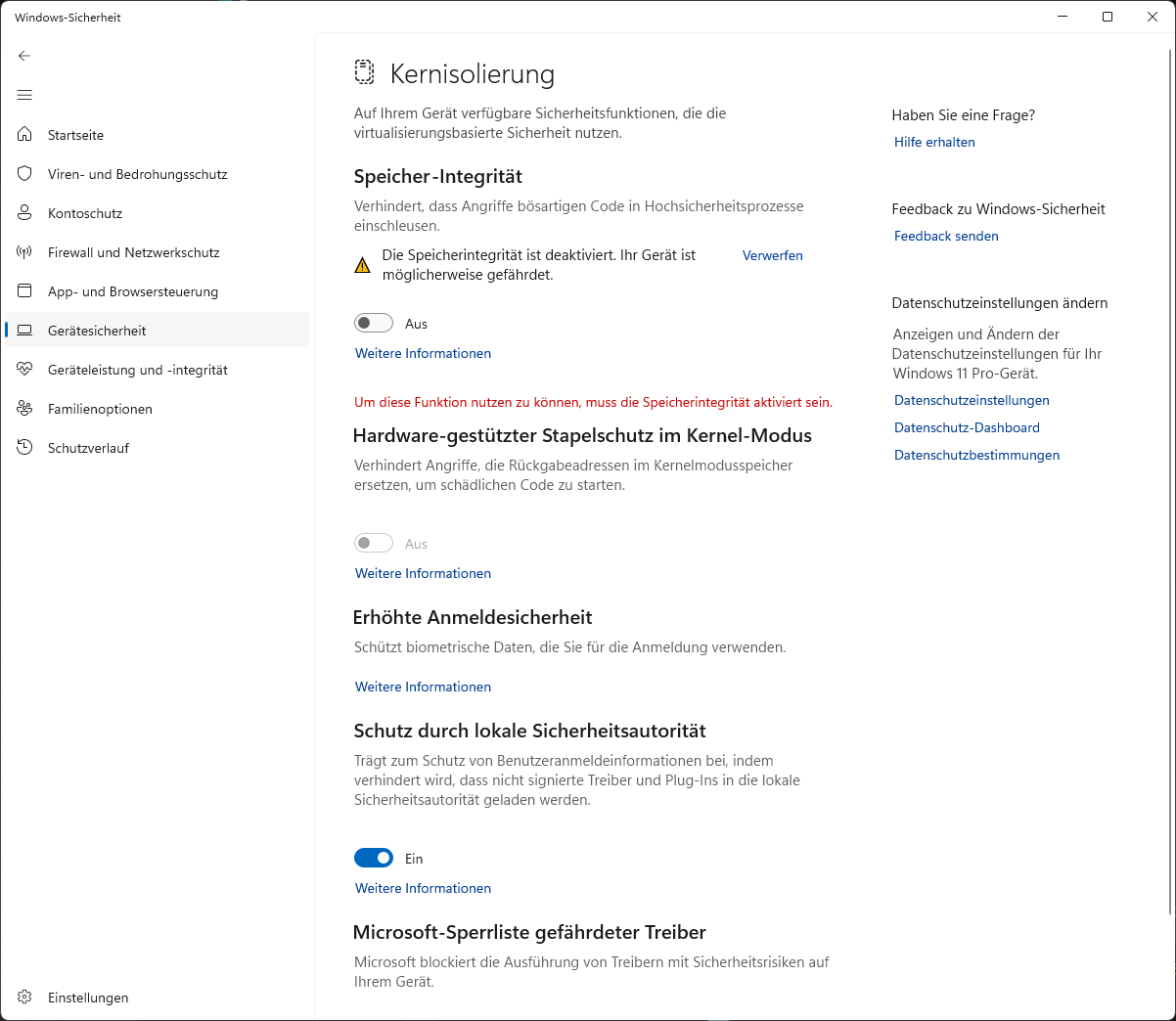
Did you turn off virtualization in the BIOS based on the recent BIOS „tuning“ thread here in the forums? I am no expert at all but read somewhere that it can have something to do with kernel.
If you are getting a BSOD, you should start by asking for help on Windows support pages or the support pages for your motherboard or CPU. The MSFS forum is generally not the right place to ask about a BSOD, since these errors are usually related to the operating system, drivers, or hardware rather than MSFS itself.
Go to Windows settings > Privacy & Security > Windows Security > Device Security > Core Isolation Details
Thank you for your post! Your topic has been moved to a sub-category of the User Support Hub
The General Discussion category is meant for discussions that fall outside of our other sub-categories.
If you would like other users to help you with an issue you are experiencing in the sim, consider these User Support Hub categories for your future post:
Thank you for all the suggestions. I have tried various driver and software udpates. And I have just now done a BIOS update but have not had the chance to test it out. Also I have to try to turn of virtualization.
I will keep you updated on the results
I have checked back and implemented various tips, but the problem persists.
ChatGPT and Gemini pointed towards an USB problem regarding the amount and type of USB devices for my homecockpit. I now plan to get a second hub and see if that helps…
Update from my side: Two LLM AIs pointed me towards replacing / extending my USB Hub Setup. I had an Orico 16 Port UBS hub with most of the home cockpit devices on it. I added a Sabrant 10 Port USB hub and put the traffic-heavy devices (everything with analogue input, axis etc.) to that and left the normal I/O traffic on the Orico. The error seems gone for now so for anyone experiencing the same, this might also do the trick.
I’m having KERNEL_SECURITY_CHECK_FAILURE (0xFC) on login screen — new motherboard, need input
System:
CPU: Ryzen 9 9850X3D
Motherboard: Gigabyte AORUS X870E (just replaced under warranty, previously ASUS ROG Strix X870E-E)
GPU: NVIDIA (driver recently DDU’d and reinstalled — older version)
MSFS 2024, full add-on stack (Fenix, Navigraph, ChasePlane, SimAppPro)
Issue:
Crash to reboot on MSFS login screen right after getting the board back from warranty replacement. Pulled the dump — bugcheck 0xFC, ATTEMPTED_EXECUTE_OF_NOEXECUTE_MEMORY. Loaded module list shows nvlddmkm.sys active at crash time.
Already tried:
Confirmed EXPO/XMP is disabled, running JEDEC — ruled out memory
Clean DDU + reinstall of an older NVIDIA driver — crash persists
About to try the latest driver straight from nvidia instead of rolling back. Anyone hit this specifically after a motherboard swap? Wondering if it’s leftover driver state tied to the old board’s hardware IDs, or a PCIe init issue with this AORUS board specifically. Appreciate any input before I go deeper into event logs.