MCP and knob…where does this refer to exactly?
MCP is short for Mode Control Panel. I think that’s not technically the correct term for Garmin units (it comes from Boeing flight decks) but I’m referring to the panel in the top middle with the auto pilot selections and knobs. The Altitude knob for the G3000 and G5000 toggles between 100 and 1000 feet increments when pushed in. In FS, that involves clicking the middle of the knob.
The ALT SEL knob rotates in 100’s not 1000’s of feet no matter where you click on it.
That’s false. I’ve been flying the Longitude almost exclusively since AAU1. I have almost a hundred hours in that aircraft since then.
It 100% toggles between 100 and 1000 feet when “pushed”
In Legacy cockpit control, this is a click in the middle.
In “lock” mode, it’s a right click while locked.
I don’t know what it is in VR, and there is no control bind for it that I could find.
That’s the correct terminology. Garmin call the whole system AFCS (Automatic Flight Control System) but the actual unit you interact with is a GMCxxx, meaning Garmin Mode Control and the xxx is the model number.
1 Like
Sorry if I didn’t mention I fly the TBM 930 not Longitude.
It is the same in that aircraft.
While the exact MCP model is different, the function of the Altitude Select knob is identical.
I’m assuming by ‘pushed’ you mean 1 click on left mouse and release?
I did click, the mouse hand changed size to a smaller hand but rotating the mouse wheel I did not notice a change from 100’s to 1000’s values in either the longitude or TBM.
Is there a procedure I’m missing?
I don’t know what interaction you are using. Controller and VR are outside of my knowledge as I use a mouse for most cockpit interactions.
If using Legacy control mode, there are 3 click zones. One to the left, one to the right, and one in the center.
The center one changes increments between 100 and 1000.
If you are using “lock” then click and hold followed by right click toggles increments then moving the mouse left/right or scrolling changes the amount.
If you are using some other interaction with the cockpit, I don’t know what the physical control interaction is, but whatever interaction equals “pushing” the knob rather than rotating it (similar to the knobs on the G1000 that are both push and rotate, and similar to the heading knob which when pushed syncs the heading)
Firstly lassombra8785 thanks for taking the time to go over this with me.
In the Garmin 1000, all the knobs are 2 tier, turning the bottom gets you 1 incremental value as you turn and turning the top gets you another…you don’t have these 2 tier knobs in the TBM 930.
I use a mouse in ‘Lock’ mode and have tested in both VR and non-VR. When I left click the ALT_SEL knob as mentioned the hand changes size to smaller but the actual knob does not depress or change in any way.
As I am using “lock” I click and hold followed by right click as you mentioned but it does not toggle increments when moving the mouse left/right or scrolling.
how do you “press” the heading knob (to sync it to straight ahead)?
The same functionality works on the Alt select knob, but changes increments.
I am aware the G1000 has two tier knobs. I’m trying to get you to explain how you accomplish the various “push” actions that different knobs use, because you are missing that utility here. On the G1000, the lower right knob when pushed opens a cursor. On the Heading knob on the G3/5000 when pushed it syncs heading select to current heading. On the CRS knob on the G3/5000 when pushed it sets the course to the direct course (or inbound course for a localizer). These are all “push” functions. Garmin loves to incorporate push functions into their rotary knobs. The same push function is available on the altitude select knob and changes its increments.
Bracketed in red are the 2 secondary actions that sync my heading bug to straight ahead when clicking on the heading knob…and each work. There are 2 options, right mouse or mouse 4…either one works.
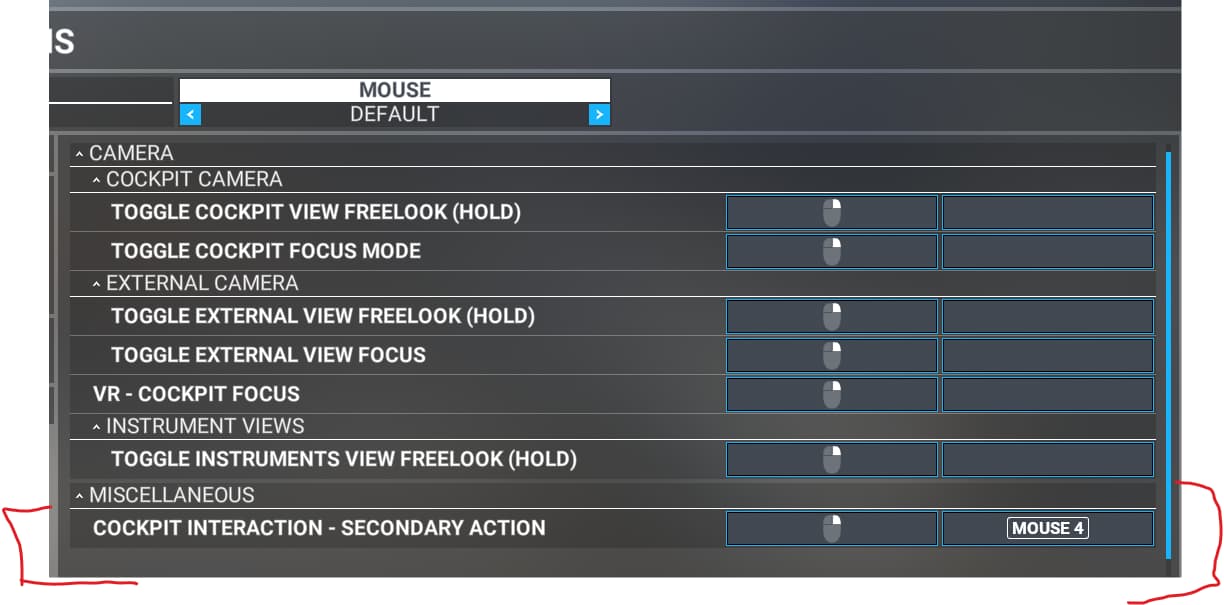
TIL that there was a keybind for that.
That same keybind should change the scale of the altitude select knob.
What exactly is TIL you are referring to, sorry I don’t understand the reference below.
‘TIL’ = Today I Learned…
One thing with acceleration is that the period where it resets to slow needs to be short, like 1 second.
Also, FSX (and P3D) had this bug where it would get stuck in the high speed regime, and you couldn’t then set smaller headings anymore.
Thanks for that explanation.
I’ve got a work around by mapping the ALT SEL to a rotary dial on my controls that can spin the ALT SEL very fast as well as other knobs.
There is a heading bug mapping command for syncing to North…I’m trying to find which command would sync to the lubber line…would you know if there is one?
Many heading bug knobs have press to reset to current heading though, but unsure if it has a keyboard shortcut for it.
I’d suggest searching the keybinds for ‘heading’ in options. That’s all I can think of.
Yes I’ve done a lot of trial and error but it may take a combo of 2 commands.
This topic was automatically closed 30 days after the last reply. New replies are no longer allowed.