I am using Navigraph data (2013 rev1) and when I load the scenery from FS2020 I get an error saying that one file cold not be read. I’m not sure if this is sgnificant at all but tohught I would ask just in case.
Screenshot:
I have updated FS2020 using the Navdata beta tool
I have then updated LNM data using the Navdata FMS Data Manager
I then loaded the FS2020 scenery in LNM in case
On loading, I get the error message.
Is this anything to be bothered about or can I ignore it 
Cheers.
this is a known issue and will be fixed with the next update. You can ignore it (everything else is loaded without problems) or exclude the file
.../Community/navigraph-navdata/scenery/fs-nav-base/global/maintenance.bgl
from loading. This can be done in LNM options on page “Cache and files”.
1 Like
Thanks for the reply and Happy new year. 
Thanks and a
Happy new year to you all too! 
2 Likes
How can I get the map back to its original size? It is now full screen.
Thanks,
Thank ypu, I will look for a list of keyboard short cuts in the manual.
Hi,
Thank you so much for this awesome product. The level of detailed information is amazing and so very useful.
I just installed it last night and am still learning how to utilize the functionality. The installation was very smooth.
I have a question on the ETA hh:mm information. It shows as as 17hr + for a trip from LSZH to ENNA when the actual estimate is about 1545nm is 3hr ++
I must be doing something wrong here I believe. I haven’t set up any aircraft yet. Can you please advise.
Thank you and Happy New Year.
Edit 1:
Completed the Aircraft Performance data and now the estimated flight time shows the correct data.
But the waypoint ETA always shows a constant number even when the aircraft is approaching near.
Any help is most appreciated. Thank you.
Edit 2:
Solved. Just read this section again and understand that the value is static.
“ * Leg Time: Flying time for this leg. Calculated based on the selected aircraft performance profile (see Aircraft Performance). This is a static value and not updated while flying. Empty if performance calculation failed.
ETA: Estimated time of arrival. This is a static value and not updated while flying. Calculated based on the selected aircraft performance profile. Empty if performance calculation failed.’’.
2 Likes
@AthenaGrey1
Thank you for the kind words!
I might change the static fuel and time in the table in a future relase.
Updated actual distance, time, fuel, ETA to the next waypoint, TOD and destination is for now only shown in the progress window.
You need a more or less complete aircraft performance profile to get more accurate data. Default is good enough for travelling time based on 100 KTS cruise, TOC and TOD.
Happy New Year to you too!
Alex
3 Likes
Hi, since few days I’ve downloaded and I’m using LNM and I find it a very nice and smart tool!
Does it have also an integrated page that cna be opened while flying from the top toolbar?
How should it be enabled?
Thank you and I wish you all a happy new year!
Yes indeed, I use it all the time. It’s a zip file with installation instructions from Github - just Google it for the link.
msfs2020-toolbar-little-nav-map-main
2 Likes
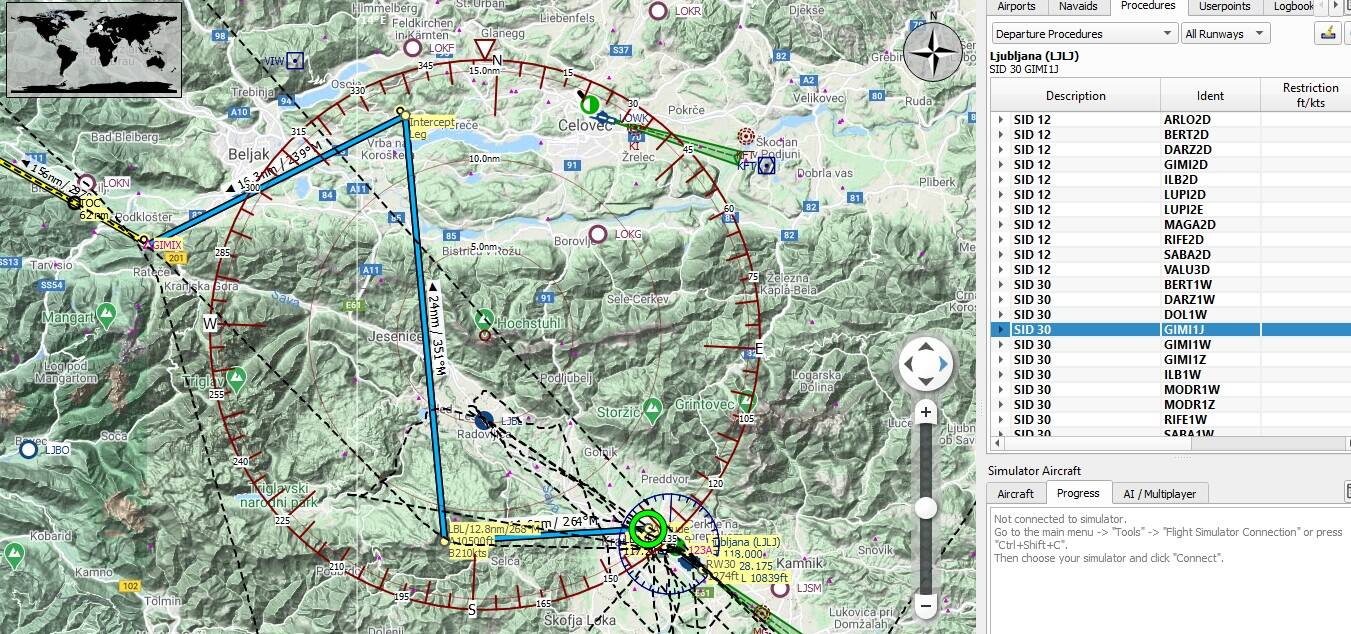
Why sometimes there are weird procedures in LNM? Don’t know why there is that strange intercept leg. Is this navigraph fault?
The handling of procedures is freaking complex. Therefore errors can appear. For me this is an endless story.
So, these might be LNM bugs. Can you tell me which procedures and AIRAC this is?
Happy New Year!
Alex
1 Like
Thank for answer and ofcourse Happy New Year.
This is AIRAC 2014, but it was the same also in 2013. Procedure is SID32 - KOPA3A.
Thanks. Will check. Looks really strange indeed.
Yes and here is another one:
1 Like
Ok thank you, I’ll give it a try.
1 Like
This is the chart for that SID. Usually it’s flown manually until the intercept.
MSFS flight plan doesn’t always show this correctly so AP NAV wouldn’t fly the procedure and thus the need to fly by hand.
2 Likes
Yes I know, but LNM is doing strange intercept leg. It should do like navigraph.
1 Like