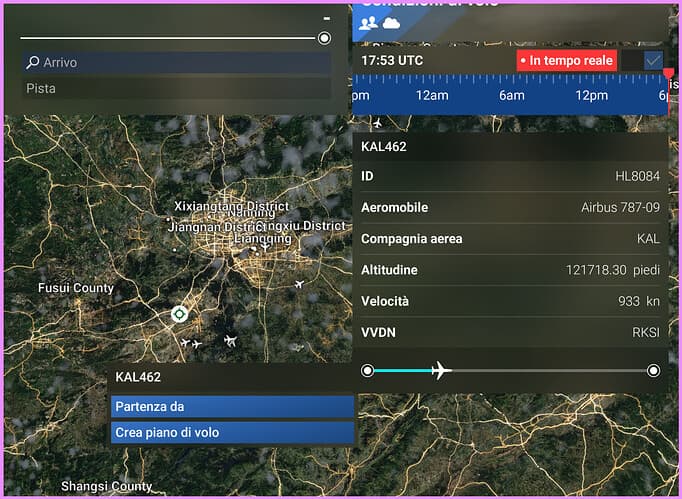
ISSUE DESCRIPTION
In free flight mode, when live air traffic is displayed, hovering over a real aircraft the altitude and speed are shown incorrectly. Many aircraft are shown as flying at >100kft - pretty unlikely!
I suspect that the source data is given in feet (e.g. 30kft) but is incorrectly assumed to be in metres, and so multiplied by 3.280 and then declared to be feet.
Same or similar issue with the speed - speeds dsiplayed as 800kts+ are too fast.
Once gameplay starts having selected one of these aircraft, the flight is at a sensible altitude and speed.
FREQUENCY OF ISSUE
Every time
REPRODUCTION STEPS
Please list clear steps you took in order to help our test team reproduce the same issue:
- Free flight mode
- Select a live flight
- View the details
YOUR SETTINGS
Xbox
If the issue still occurs with no mods and add-ons, please continue to report your issue. If not, please move this post to the User Support Hub.
What peripherals are you using, if relevant:
[PC Only] Are you using Developer Mode or have you made any changes to it?
[PC, MSFS 2020 Only] Are you using DX11 or DX12?
[PC Only] What GPU (Graphics Card) do you use?
[PC Only] What other relevant PC specs can you share?
MEDIA
Please add a screenshot or video of the issue occurring.
[END OF FIRST USER REPORT]
 For anyone who wants to contribute on this issue, Click on the button below to use this template:
Do you have the same issue if you follow the OP’s steps to reproduce it?
•
Provide extra information to complete the original description of the issue:
•
If relevant, provide additional screenshots/video:
•