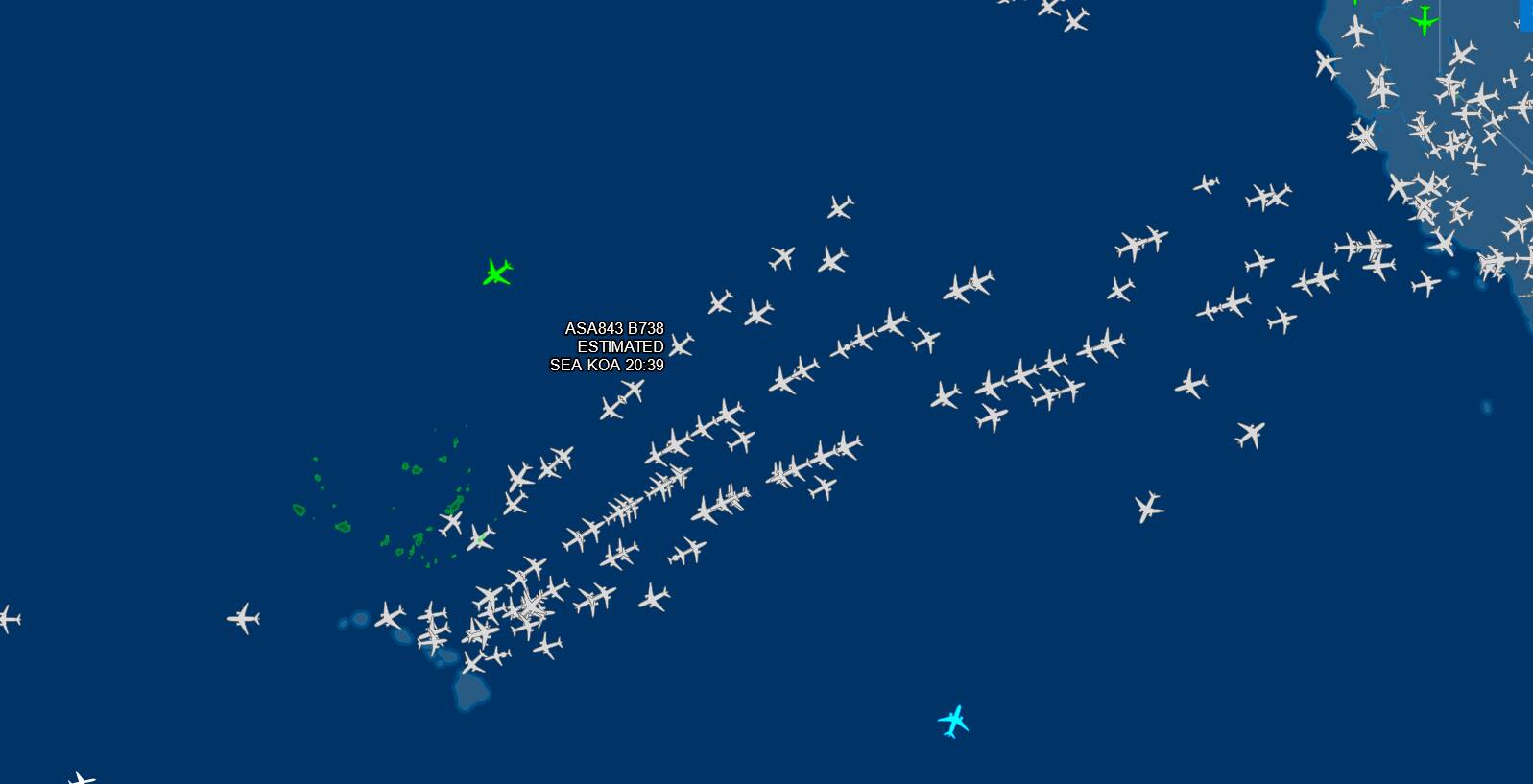
For me, I just disable the Traffic name plate.. That way I don’t have floating texts on the sky that disrupt my immersion. While also, keeping me in the dark from knowing what flight numbers they are to even compare it to.
As long as I get traffic chatter in my ATC, doesn’t matter what flights they are.. I’m happy.
Do we know the data format of the Flight Aware data? The MSFS back end would have transform the data into something usable by the sim and then feed the right information to users using Live Traffic. I wonder if Flight Aware has a data feed that is usable by MSFS. It might be better/faster to get the information directly from the source and bypass the middleman.
BTW, I’ve heard reports of IRL invalid Flight Awage data. This seems to happen when a pilot files and IFR flight plan electronically. Either the flight plan is cancelled before takeoff or the flight doesn’t depart before flight plann expiration. Somehow Flight Aware doesn’t get the cancellation and assumes the flight departs and arrives on schedule. Very strange!
Strange … I was hanging on a drone at the airport and watching the traffic. There was a full house on all three lanes during the approach. Every second plane went around.
There were really a lot of planes.
OK, this isn’t an exact science unfortunately and as @Neo4316 points out, there are a lot of variables.
Things that I’m aware of that can impact live traffic:
Obviously having the right data settings on, Real Time Traffic selected etc
Hvaing multiplayer on - the sim has a limit to the number of aircraft it will “track” in the bubble around you and multiplayer aircraft count in that - more MP planes = less real world planes. Rumour has it the limit is 50 within 200Nm of you, but that’s just a rumour
Quality of data that the sim gets from Flightaware and the timing of that data
Time delay between real world and the sim
Things that probably or possibly impact on live traffic:
Which server you are on, server load, ping etc - seems likely
Number of static aircaft at an airport - i.e. the slider for ground traffic - do these count towards the limit or not? Don’t know
Static aircraft in add-on airports - do these impact on the limit too?
Rumour - if the AI can’t find a parking stand for the rea time traffic they despawn on landing
There are probably exclusions or aircraft in FlightAware that can’t be shown - e.g. incomplete data - this is why there is this line in the recent patch notes: “Aircraft that are not on the ground but that have an altitude of zero will now appear at a default altitude of 5000m” - this is clearly an attempt to deal with incomplete/inaccurate data from flightaware
Use generic models for AI aircraft - another rumour is that if you have this set to OFF, then the sim will remove AI planes it can’t depict becuase it doesn’t have matching aircraft model
So to properly test this v flightaware and v real departures/arrivals at an airport, I think you need to:
Trun on all the right data settings (obviously)
Turn off multiplayer
Turn ON generic AI plane models
Park the drone above a big airport (any airport really with some real traffic) so you can see all runways and the surrounding area
Turn on nameplates so you can see the aircraft and their call signs
Keep a note of flights arriving and departing on flightaware
Keep a note of flights arriving and departing according to the airport real world arrivals/departures
Keep a note of flights departing in the sim - note the time the aircraft spawns on to the stand and the time of actual wheels up
Keep a note of flights arriving in the sim - note the time of wheels down and the time of park at stand
If you keep track of all that you should be able to see how many real world planes are depicted in the sim and also what the time lag is between real world and the sim. I’m not sure what the arrival/departure times in fliightaware and real world arrivals/departures boards refer to - leaving/arriving at stand or wheeels up/down. The info here should be enough. It will also tell you how flight aware compares to the real arrivals/departures and how the sim compares to both.
Given personal experience, you need to do this for at least an hour. When you first spawn in, I usually see 2 or 3 aircraft around, landing or departing. And then a pause almost as the data is refreshed from the servers of 15-20 minutes before new traffic appears. Most of the time!
You also need to know that the sim doesn’t “Stream” the Live traffic. They just receive the data like Flight Number, Departing airport, Arriving Airport, and the sim just spawns the aircraft at a random gate/parking spot.
They don’t spawn the aircraft by taking the exact GPS coordinates of the flight, and keep track of them every minute. As soon as the sim spawns them randomly at the gate, it’s basically stop the streaming an the AI takes over to be simulated according to the downloaded flight plan. This means, they can depart at a different runway according to the AI ATC in your flight session, not the actual movement in the real world.
live traffic should be nearly the real traffic. As soon as the transponder is activated, the plains could be visible, an that at the position, where they are in the real world. MS should cooperate with flightradar24. Think about car navigation. You wouldn’t be happy with your navi, when the Life data is 30 minutes old.
That is easier said than done. Let’s think of a scenario where the sim is directly streaming the traffic data in real time. What happens if your connection is less than ideal? And I’m talking about the connection from the whole lane. You have the real aircraft transponder broadcasting their position at a fixed rate, then this data gets captured by the online service like FlightAware or FlightRadar24. Even they have a predetermined rate on when the aircraft position gets refreshed and shown. Then this data gets integrated into the Azure server, and the Azure server feeds this traffic data into your sim, taking into account where you are and the aircraft in the vicinity of your airspace. This is to avoid the sim rendering thousands of aircraft at the same time where the majority of them won’t even be visible to you anyway.
These refresh rates are already variable and there’s a slight delay. Due to these delays, if you’re directly streaming the live traffic position, you’ll be constantly looking at aircraft frozen suspended in mid-air, and teleport a few km every 5 seconds.
Not to mention that without them interacting with the ATC traffic in your session, they would generally ignore that you even exist. For example, you could have just landed and about to vacate the runway but the runway exit is at the end of the runway, generally if the Live traffic can be interacted by the in -game ATC, the ATC could tell them to go around because you’re still on the runway. But with direct live streaming, it can’t do anything because in real life, your aircraft doesn’t exist so the runway is technically clear, and the Live Traffic would be continuing the landing and plow through you while you’re still on the runway.
That’s why I think it’s a bad idea to directly stream the live traffic position into the sim. There’s a lot more problems that it can cause. That’s why it’s a flight simulator. We can draw as much data as we can from the real world, but at the end of the day, even these Live Traffics need to be “simulated” because it needs to take into account that you as a pilot exist in the simulated world and needs to be able to interact with each other.
As much as you would like it to be perfect. There’s no such thing as a perfect system. There has to be a few things that just can’t be done. And we need to balance things out, with what we can do and what works, and that just have to be enough.
I had a good experience last week when leaving Bogota to Medellin : plenty of real traffic. Really enjoyed this as a first since I bought FS2020!
Now I’m sad. I’m crossing the Pacific from Vancouver to Honolulu and nothing. I’m alone in the sky, no chating while Flightaware indicate that the sky is full! Look at the map, I’m about in the middle of the group but it’s death in FS.
Then back to the old FSX approach with AIG and others compiling real traffic airlines schedules.
This was an hobby on its own. I think I was passing more time compiling and downloading liveries and models than flying in the sim.
There must be an in between solution in 2021.
Yep, They pulled the plug on June 26, 2021. Since then the Real Online Traffic has been all but non existent, and when the is some, it disappears, moves at mach 5 or is frozen in air.
Is this why, when I go to the world map and go to an airport and just below the list of available runways for that airport, there is a “live traffic” tab and when I click on it, it is supposed to tell you what airlines are flying around that airport. Mine says “Sim not connected”. I am connected to the internet and I can do multiplayer flights, but I don’t see any “real traffic” and I don’t even see any of the regular players such as goofball 123 or something like that. Is there a fix?
Yes, I did check that…several times. Both are on. But when you go to the world map and select an airport as the departure, it brings up the different runways along the right side and below that list is a tab that says “Live Traffic”, and according to a youtube post I found, that tab is supposed to show you what live traffic is at or near that airport. So when I click on that tab, it brings up a screen that is supposed to list all of the flights that are going on, but on my sim, it has in large red letters, “Server Offline”. That appears to be my dilemma.
I have solved my problem with not having any real time live traffic. I use a vpn service and it is running all the time. I found out that if I turn off my vpn when flying then I do get tons of live traffic. So if anyone is not getting any real time traffic, then turn off your vpn before you launch msfs, and you will be surprised to find plenty of traffic.