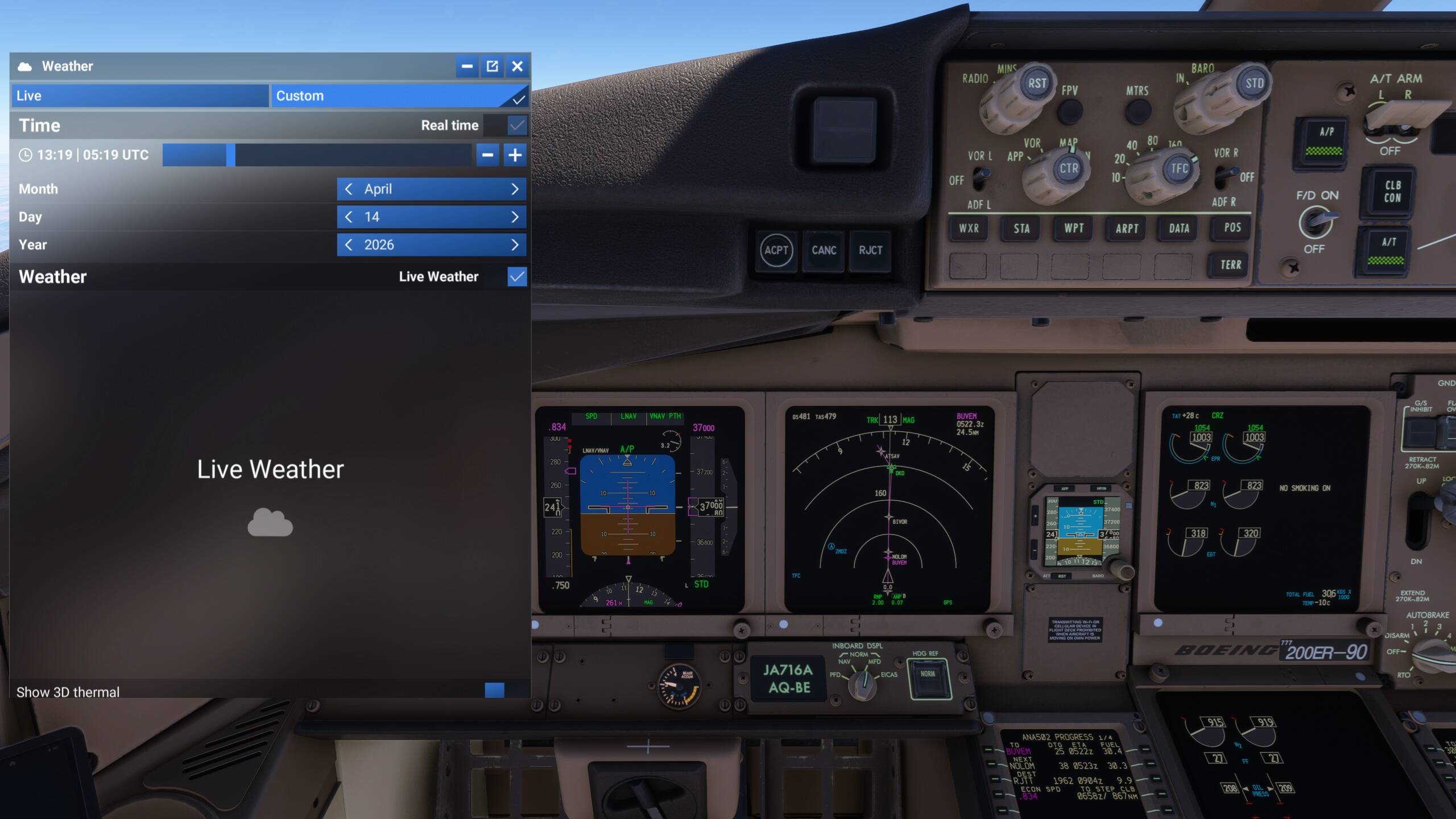
I have the same issue. Using 24hr Historical Weather causes wildly incorrect temperatures at altitude, causing horrible climb performance. Immediately switching the “Live” weather off and to a preset fixes the temps and restores the climb performance. I only get to fly in the late evening/early mornings, when I can’t fly “Live” time/weather, so being able to use the 24hr historical “Live” weather is a must for me. I usually set the simulator time to be about 12+ hrs behind me. Why does the simulator show that it offers 24hr historical weather if it doesn’t actually work? Unfortunate… hoping there can be some fix for this eventually so I can fly with “real” weather instead of having to just pick a preset all the time.
To anyone using REX Atmos make sure it is not opened until you have loaded into your flight ensuring you have chosen live weather in the menu when selecting your airport and aircraft. There is some glitch that causes the live weather when chosen in the menu to get replaced with incorrect data from rex including scorching hot temps at FL400 for example which is impossible. Fixed the issue immediatly for me
I’m not using Rex Atmos and still having this issue. 50 degree temp swing when using live weather and nothign at all.
Do you have the same issue if you follow the OP’s steps to reproduce it?
Yes
Provide extra information to complete the original description of the issue:
Time
30-01-2026 - 0623zLocation
Lat = 56.780639
Lon = 14.392311
Alt = 10259.106495m above ellipsoid
Alt = 10225.585831m above geoid (AMSL)
Alt = 10030.086850m above ground (AGL)
If relevant, provide additional screenshots/video:
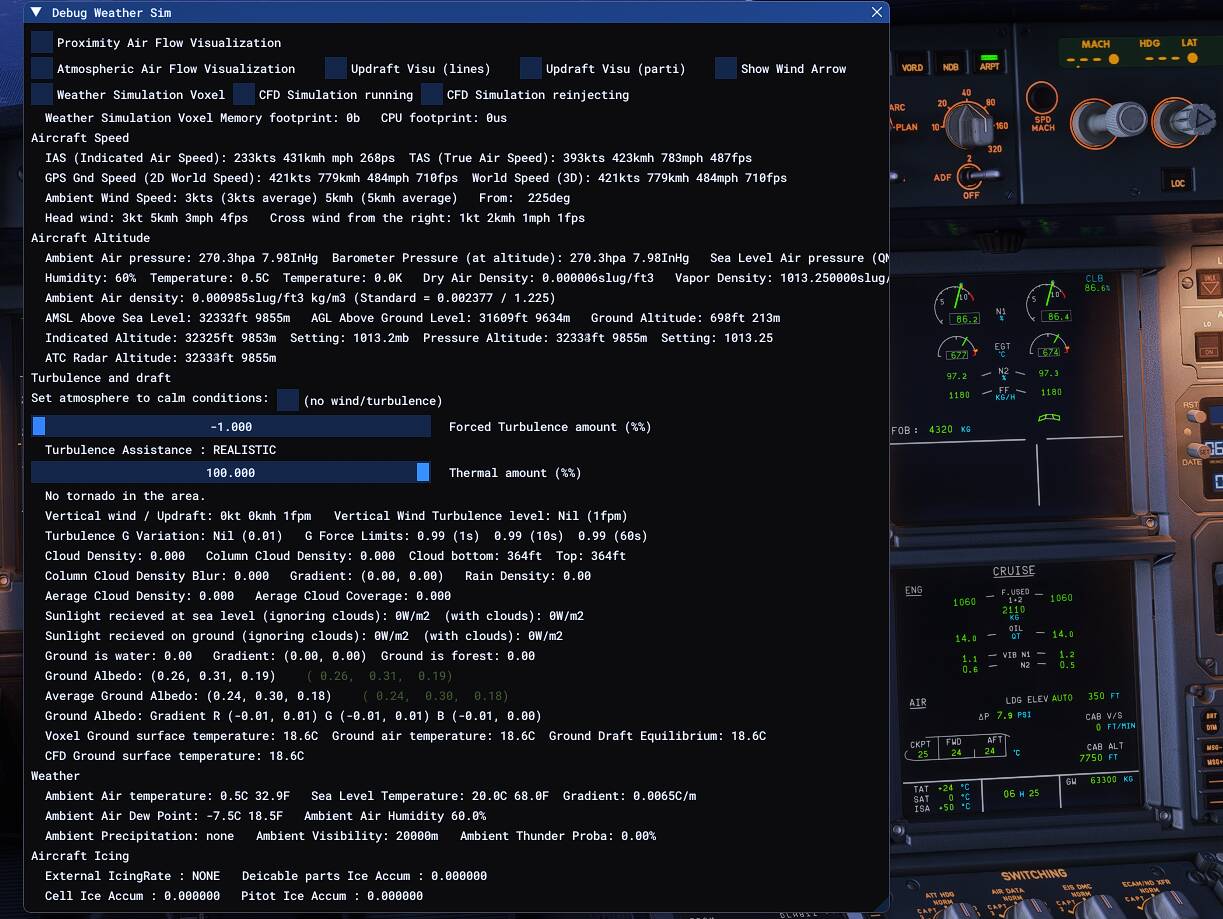
Good data! Fixing this bug should start with sorting out the mess of units, use only the SI system in the calculation engine and have the conversion to the desired aeronautic units done at the interface towards the UI and the instruments.
yep, I’ve been having the same issues for a while now. Sometimes I start the flight with correct live weather, but at some random point during cruise everything suddenly changes and I end up with a TAT of +33°C. That’s pretty bad — especially when flying on VATSIM, to say it nicely.
Yep its been happening alot more now. Im really having these issues. Any future fix planned??
hey,
I created a new rolling cache (120 GB). Since then, I haven’t had these problems anymore. I also uninstalled Atmos Core, but I will reinstall Atmos to check if that was the cause.
ISSUE DESCRIPTION
Temperatures at cruise altitudes are way above expected / normal values, and seems that in increases as altitude increases. This causes the density altitude to be way above expected values, and makes the aircraft incapble to cruise.
Had to revert to “clear” weather in order just to maintain and have normal / expected temperatures.
FREQUENCY OF ISSUE
This has been the case for atleast the last 2000nm now on my flightplan from EGLL to RJTT.
EGLL/27L DET2G DET L6 DVR L9 KONAN UL607 MATUG DCT AMASI DCT BOMBI DCT DETEV DCT DINKU L603 BESNI L605 BIBAG Q104 AKIMA DCT PESAT DCT BUDOP DCT DVA DCT BULEN DCT RIXEN UA17 YAVRU UA4 SIV UW706 TBN UG67 SARPI DCT BARUS DCT BARAD M747 SUBUT DCT LEYLA N161 SARIN A368 FKG W188 LIKMI W270 DKO W69 HUR B339 LADIX W34 VAPGU W100 ORAVA W201 UNSEK A326 DONVO G597 AGAVO Y644 EGOBA Y697 LANAT Y71 XAC XACV RJTT/16L
REPRODUCTION STEPS
Cruise Aloft 
MEDIA
Are you using REX Atmos?
Nope. No environmental addons.
PMDG 777 + Chaseplane + GSX is as good as it gets…..
I’ve been having this problem for months, I hope it gets fixed soon.
confirmed same here…flying over germany at FL260 and got 33C plus TAT. Its killing me 
Same here. I get TAT over 35c at FL350 and had to turnoff live weather in order to stay at FL350. This only started happening a few days ago.
Do you by any chance use the REX Atmore Code software?
Yes, but even when I shut REX Atmos down, still the temps are high.
Hi @HZSAL
From a lot of discussion on this topic, it seems the issue with temperature being too high at altitude when using this specific mod is a bug with the REX Atmos Core software, and not a default sim bug. Players have noted that if you open the REX software before loading into a free flight scenario, there is a chance you will encounter this issue. I believe the recommendation is to only open the REX software after you have loaded into a free flight and are in walkaround mode or in the cockpit of your aircraft.
Thank you for the explanation. Will make sure to only start REX after loading the aircraft.
Do you have the same issue if you follow the OP’s steps to reproduce it?
I have the same issue, it occurs every time.
Provide extra information to complete the original description of the issue:
If relevant, provide additional screenshots/video: