Guess I never saw it till there was an announcement of an update when I loaded 2024.
Did anyone succeed to bind controls to the switches GENERATOR NO1 and NO2?
I could flip the switches with “x (>L:FO_SWITCH_DC_POWER_SOURCE_NO1)” and “x (>L:FO_SWITCH_DC_POWER_SOURCE_NO2)” where x = 0 (ON) or 2 (RST), but without any other effect.
Monitoring the Lvars, I noticed “L:BUS_CONNECTION_1_9” and “L:BUS_CONNECTION_1_10” change when I move the switches clicking on them, but unfortunately these Lvars are not settable.
Sorry, I misinterpreted your question. I’ll look into it a bit more.
The control is working fine (controlled by SimConnect).
DC POWER GENERATOR 1 & DC POWER GENERATOR 2
The variables used are as follows:
Local Variable
FO_SWITCH_DC_Power_Source_No1 … (RPN format L:FO_SWITCH_DC_Power_Source_No1)
FO_SWITCH_DC_Power_Source_No2 … (RPN format L:FO_SWITCH_DC_Power_Source_No2)UnitsName: Number
Value to set
0: ON
1: OFF
2: RESETThis is a sample video of the assignment to both a knob (Axis) and a button (BOOL=0/1 On/Off only). In the video, the toggle button’s On and Off positions are reversed.
The analog value range of my MIDI controller’s knob is 0-127, but I calculate and convert it to a value range of 0-2 before passing it to SimConnect.
In this case, the center of the knob is off, the left is on, and the right is reset.
There may be some minor details that are incorrect, but for now, I’ve confirmed that
When the value of the local variable BUS_CONNECTION_1_9 is 0, calling the SimEvent ELECTRICAL_BUS_TO_BUS_CONNECTION_TOGGLE with arguments 1 and 9 changes the value of BUS_CONNECTION_1_9 to 1,
and that when the value of the local variable BUS_CONNECTION_1_10 is 0, calling the SimEvent ELECTRICAL_BUS_TO_BUS_CONNECTION_TOGGLE with arguments 1 and 10 changes the value of BUS_CONNECTION_1_10 to 1.
ELECTRICAL_BUS_TO_BUS_CONNECTION_TOGGLE
Sample video
[quote=“silkyskyjp, post:415, topic:739493”]
Thank you for answering, silkyskyjp.
My understanding of your video is that you use the same Lvars as me, but with different results.
And there are different behaviors:
- on your side, when the switch #1 is up, the above voltmeter reads 0, on my side it reads 28 V.
- on your side, when you flip the switch #1 down using the mouse, the above voltmeter still reads 0, on my side it reads 0 V and the underneath FAIL illuminates.
See the enclosed screenshots: - center: initially, switch 1 ON, voltmeter 28 V, light OFF (normal).
- left : switch 1 OFF, using the mouse, voltmeter 0 V, light ON (normal).
- right: switch 1 OFF using the Lvar, voltmeter still 28 V, light still OFF (abnormal).
As a summary, executing “0, 1 or 2 (>L:FO_SWITCH_DC_Power_Source_No1)” makes the switch actually flip with no other effect (same for both of us).
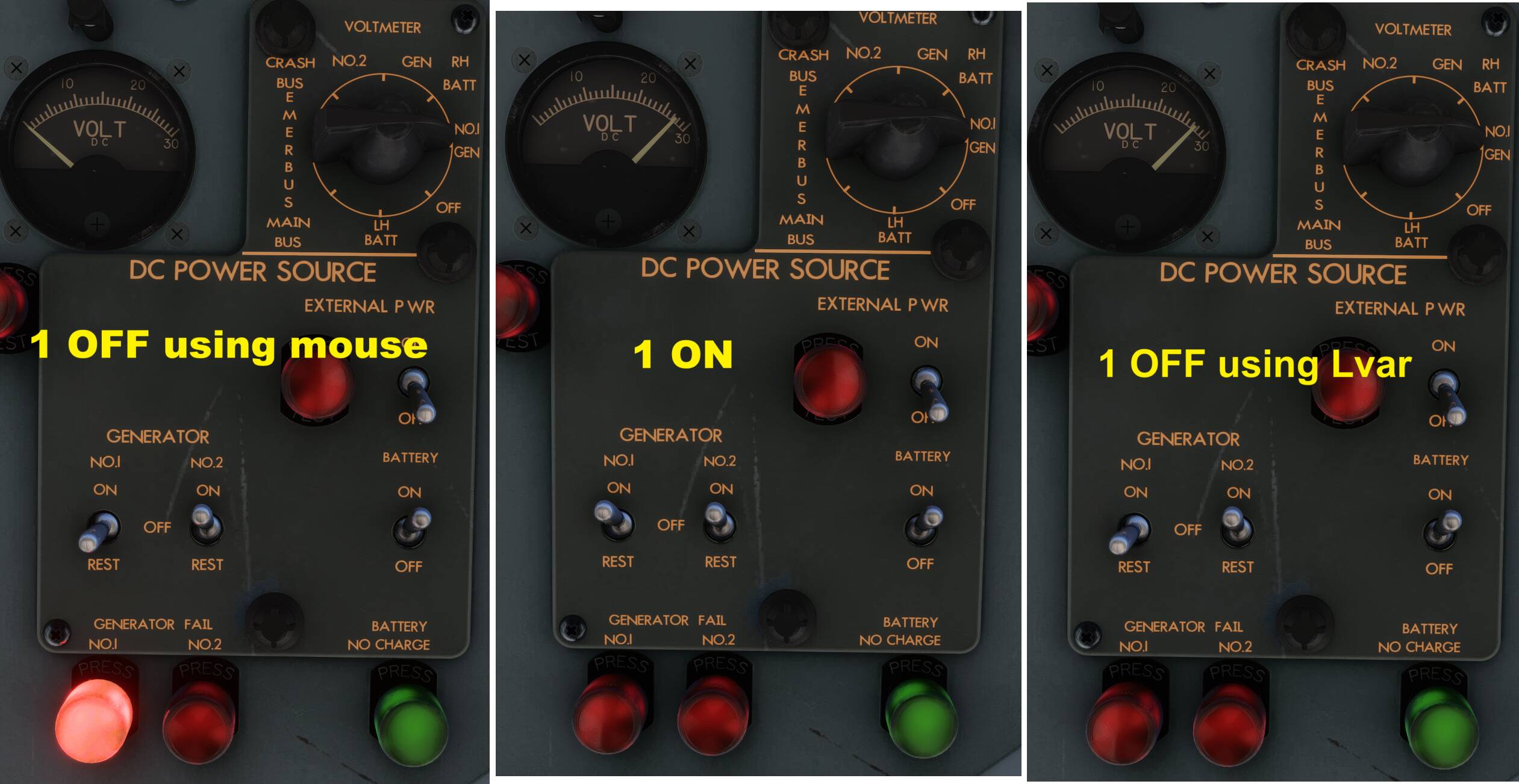
Eventually, I found how to toggle the electrical connections.
As mentioned before, I had noticed that the Lvars “BUS_CONNECTION_1_9” and “BUS_CONNECTION_1_10” toggled when I acted on the switches 1 and 2 with the mouse.
I found the Event “ELECTRICAL_BUS_TO_BUS_CONNECTION_TOGGLE” that takes 2 arguments, the numbers of two busses.
So, testing the current “BUS_CONNECTION_1_9”, and depending on what is desired (ON or OFF), the Event is to be sent or not.
Finally, here are the calculator codes I use :
. Set GEN 1 ON :0 (>L:FO_SWITCH_DC_POWER_SOURCE_NO1) (L:BUS_CONNECTION_1_9) 1 != if{ 9 1 (>K:2:ELECTRICAL_BUS_TO_BUS_CONNECTION_TOGGLE) }
. Set GEN 1 OFF:2 (>L:FO_SWITCH_DC_POWER_SOURCE_NO1) (L:BUS_CONNECTION_1_9) 0 != if{ 9 1 (>K:2:ELECTRICAL_BUS_TO_BUS_CONNECTION_TOGGLE) }
. Set GEN 2 ON :0 (>L:FO_SWITCH_DC_POWER_SOURCE_NO2) (L:BUS_CONNECTION_1_10) 1 != if{ 10 1 (>K:2:ELECTRICAL_BUS_TO_BUS_CONNECTION_TOGGLE) }
. Set GEN 2 OFF:2 (>L:FO_SWITCH_DC_POWER_SOURCE_NO2) (L:BUS_CONNECTION_1_10) 0 != if{ 10 1 (>K:2:ELECTRICAL_BUS_TO_BUS_CONNECTION_TOGGLE) }
(I apologize for posting a similar post, unable to properly respond.)
Regarding the different results despite using the same Lvar as you, the operation in this sample video does not follow the correct checklist for the YS-11, but rather is primarily intended to adjust the value of the Local Variable BUS_CONNECTION_N. Therefore, it is highly likely that the voltage and other factors are different from the series of steps you took to successfully operate the aircraft.
Thank you for the verified calculator codes.
In order to assign and operate processes currently performed with a mouse, etc., to a controller, I thought the most time-efficient development method would be to create the actual processing content in the XML files included in each aircraft folder, or equivalent calculator codes, or other similar code that can be implemented.
In my case, I enjoy development as a hobby, as well as flying in the sim, so I developed using my current method in my preferred style and posted this, but it may (probably) be different for many people. Please understand this.
I used the xml change technique to make a mod for the Boeing 707, but unfortunately the YS-11 xml files are encrypted.
Hi, is that 707 mod of yours available on flightsim.to?
The leading edge flaps animation mod, yes.
1 Like
It’s true that there are some aircraft for which you can view XML files and some for which you can’t.
My environment is MSFS2020, and for the YS-11, you can check the definition and operating voltage and other conditions in several XML files in the following folder.
(I’m not sure if all the information necessary to customize operation is included, but I think some degree of customization is possible.)
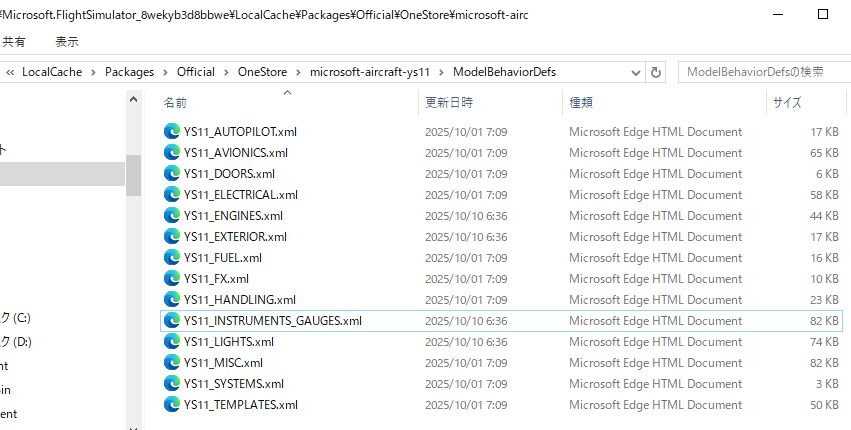
Thank you for the information. My environment is FS2024 where the folder ModelBehaviorsDef is absent; using the Virtual File System projector, the xml files can be found elsewhere but their sizes are all 0, so no way to retrieve the data available under FS2020.
So, I installed the YS-11 under FS2020 and could see the xml files. Taking YS_11_DOORS.xml as an example, I found how to open/close a door using a Simvar and could actually control the door not only under FS2020, but also under FS2024.
Thanks again for the info!
1 Like
Thank you for the valuable information.
Incidentally, in previous versions of Flight Simulator (X, 2004, 2002, etc.), there were companies in my country that built aircraft for the sim and sold custom add-ons.
Unfortunately, I don’t think there are any aircraft currently released.
(The reason is purely speculation, but it’s likely for business reasons.)
For that reason, I’m personally grateful that Microsoft and IniBuilds are releasing aircraft for my country, and to people like you who use their services and provide even more valuable information.
Still hoping for yet another update but it’s been a couple weeks now. Here’s hoping for next week at the latest, but ini previously represented (in a somewhat confusing way) that it’s Asobo/Microsoft’s decision to proffer further updates to this aircraft.
Can Microsoft/Asobo comment here as to if they have requested that inibuilds update the YS-11 further? Has inibuilds completed any additional updates that may be forthcoming in the marketplace?
From inibuilds: “For other feedback or feature requests, please make a post on the respective Microsoft Forums. As this is a Microsoft Product, any decisions on such matters rests solely with them. Their teams regularly go through the feedback and decide accordingly. Thanks!”
1 Like
That’s not the kind of thing I have ever seen on this forum and wouldn’t expect that to change. Best bet might be a response from Jorg in a livestream if enough users submit questions about it though.
Theres always the option to open up a topic here and put all the reports/ wishes etc in there AND VOTE.
We the people, you know ?
So, what these responses from Inibuilds mean is, what you see is what you get.
Unless MSFS pays us more money, we won’t be doing any further work on it, so the ball is in MSFS’s court.
I guess I can understand that, they don’t work for free.
2 Likes
Presumably the HU-16 Albatross dev is getting extra payments weekly then for all of his updates.
I just hoped at least the more glaring issues would be fixed like the transparent interior opposite of the passenger door when it’s open. Plus everything else outlined here and on the ini forums. Should know better I guess. Few devs follow up with fixes these days.
On to the next aircraft…
4 Likes
It is wierd that contracting someone (any Dev company) to produce a product for this sim does not include some kind of product fix clauses after release. It seems like a no brainer. Most engineering companies have an after market product support why not the world of gaming?
1 Like
What is further confusing is the very company who developed this aircraft, who claims they won’t fix it further without MS’ intervention, regularly updates the aircraft they sell under their own brand free of charge. Therefore, this really doesn’t look like a monetary issue.
So what is it?
It is this never-ending nonsense with these LL/FF/ES aircraft that stopped me purchasing them since the 307. I only bought the C-47 when it released due to proceeds going to the USO, otherwise I wouldn’t have bothered.
6 Likes
Totally agree, after all why is it always up to us to put pressure on a dev to fix things. I mean where exactly are we supposed to go to when we need fixes? (ie with each party passing the buck) It is one of THE most frustrating aspects of this sim.
4 Likes