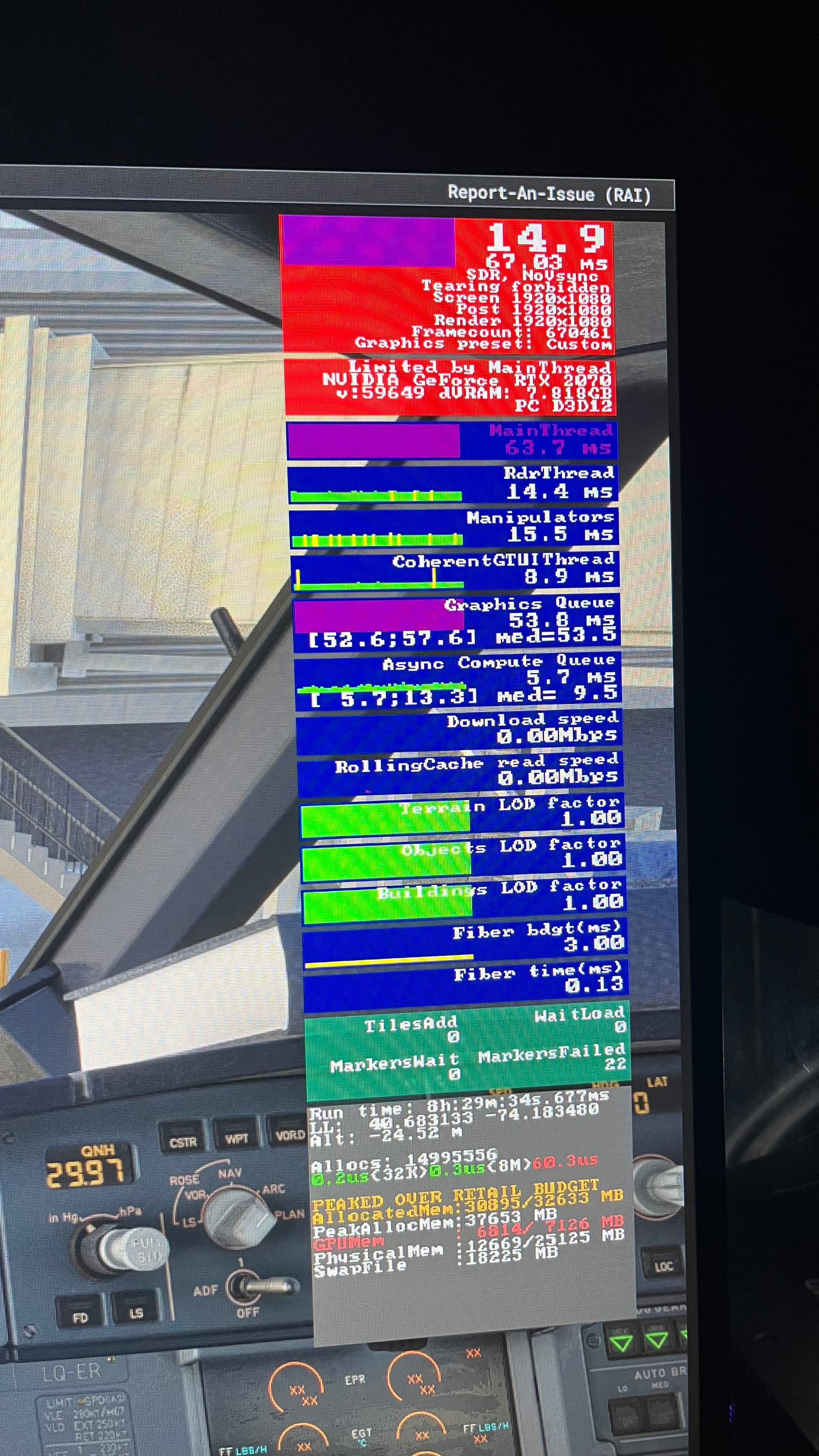
First picture, flying after 8,5hrs multiple hops, ending in KEWR (with addon scenery and fenix a320) at the gate with just the plane and the scenery, nothing else.
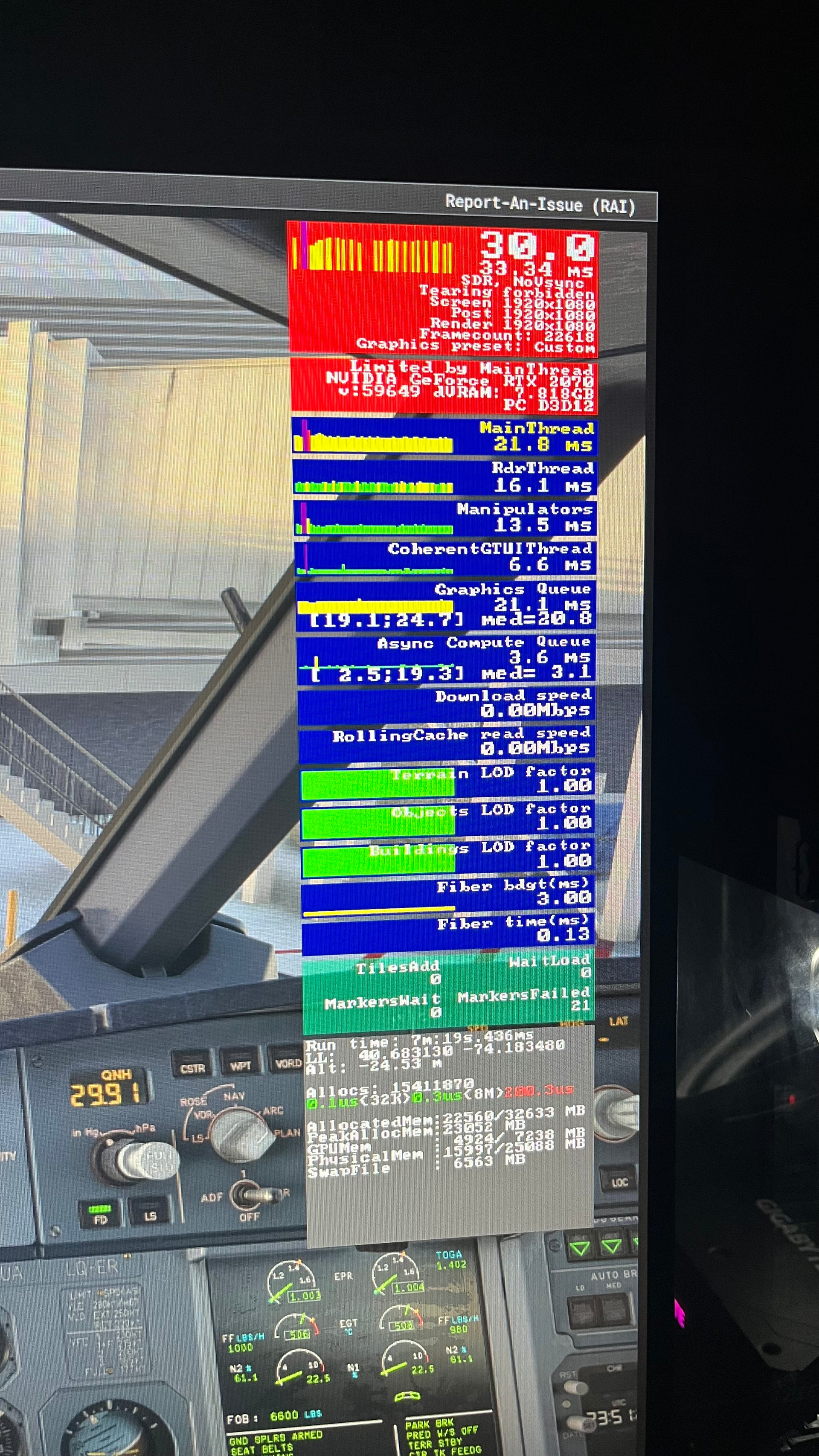
Second picture, after rebooting pc and restarting sim, suddenly good performance with same conditions as before….
There must be some kind of leak. Idk what it is, but I asked around some people and this happens often, not all of the time. And no, its not the scenery or my PC specs, dont ask for it.
I hope this will be fixed in SU6. Its not worth it anymore to clear caches, tweak everytime, restarting after every flight, trying to find a *** solution to performance issues. Im done with this, i just want to fly…..
I hope this will get picked up, including all other performance issues, because there are plenty.
Thank you for this report. We’ve moved your topic into the User Support Hub.
The Bug Reporting Hub is for posting suspected or confirmed bugs that other users are able to reproduce without duplicating an existing bug report. Using the template or providing all the relevant information about your bug and sim setup is required in order to provide valuable information, feedback, and replication steps to our test team.
If you are not sure if your issue is a bug or need further input from the community, please use the User Support Hub category. If the community can replicate your issue, first search the Bug category to see if there’s an existing topic. If it already exists, contribute to that report. Duplicate bug reports will be closed.
If you believe it is a new report and no duplicate exists, then create a new bug topic using the provided topic template.
All issues caused by or involving third-party addons/mods should be reported to the third-party developer. Assure that no addons/mods are used when reporting issues in Bug Reports.
I suspect I am also seeing a memory leak after the recent update.
Take off without problems, buttery smooth. Fly for a couple of hours and the GPU insufficient memory - lower your settings placard starts to appear every now and again and in increasing frequency.
Half an hour later and it is time to land - standard airport, not third party addon and below 500 ft it turns into a slideshow, complete juddery mess ( in this case Genoa and Leeds East Airport in blacksquare duke). Barely able to land. This is despite turning down TLOD from the usual smooth 400 to 350 and buildings from ultra to high and other settings from high to medium.
Never seen it like this before.
Specs:
Ryzen 7 9800X3D.
Nvidia 4080.
Gygabyte X870 Aorus Elite.
Silicon Power DDR5 ram. 64GB over two matched 32GB sticks.
You should disable hibernation, but before doing that, you need to turn off Fast Startup - Fast Startup can only be disabled while hibernation is enabled.
Fast Startup negatively affects drivers, which in turn can impact games as well.
Open the Control Panel and change the view from Category to Small Icons. Then click Power Options > Choose what the power buttons do > Change settings that are currently unavailable. Uncheck Turn on Fast Startup and save the changes. After that, select the High Performance power plan.
Turn off Hibernation via CMD.
To turn off hibernation via CMD, open Command Prompt as administrator and run:
powercfg /h off
This will disable hibernation and also remove the hiberfil.sys file from your system. Restart PC.
Set your windows power plan to maximum performance.
But why do you think there is a memory leak in the simulator, if the same flight of 8hrs was fine the second time? The flight was the same in both cases, so it seems, the difference was outside the simulator.
Restarting the flight only, so the second picture is when simulator is just been restarted, not restarted and then 8hrs of flying. Sorry for the confusion. And it happens only when VRAM exceeds the limit once for a quick moment. So when it reduces again, you know that your performance will decrease over time.
But this is the complete opposite of a memory leak. If there was a memory leak, the usage would not decrease.
Anyway you should choose your settings so the VRAM limit is not exceeded. This is possible, also for a 12 hours flight. I did a flight yesterday EDDM → RJTT in real time (inibuilds A350-900, Lufthansa Livery). More than 12.5 h Block time, close to 14 hours including Cold&Dark, boarding and deboarding. No memory leak, the memory usage was in RJTT at the same level as in EDDM.
I think, you just have too high settings. So far there is no notice for a memory leak, at least if you take care, your usage stays within the limits. And this is of course your task, not the one of the simulator.
Im sorry but no too high settings. When I differ performance from time only, there is nothing related with settings. And if settings will depend on if you get performance degradation or not, then thats on their end. I won’t go to roblox mode when they can’t delevop a stable (time related) flightsim.
People need to understand that it’s not about settings when the sim performed super well before SU 5.1. I’ve never had CTD, GPU messages in small airports before this update.
Don’t tell me it’s my settings that are too high when i haven’t changed a thing and just updating the sim. It’s simply not true.
Don’t forget you have exceeded your memory limits for both RAM and VRAM.
No, this is nonsense. If you choose too high settings, it’s your fault, and it will definitely lead to a degradation in performance. So you can cause it anyway. The question is: will it also happen if it is not your fault?
Ultimately, it’s up to you whether you enjoy the simulator or not.
This is also nonsense. Additional features, security fixes, bug fixes, etc.: All of these things can consume additional resources. Windows 11 also doesn’t work on my 386 from 1992.
It is therefore normal to have to adjust your settings after an update. Those who do so can enjoy the game. Others just complain and won’t change anything. It’s your choice.
What I can tell you is that: It is possible to complete a 14-hour flight without experiencing a memory leak or any performance degradation. If you see red values in your FPS window for RAM or VRAM, for example, then this could be the reason. Add-ons can cause trouble, too. Test it. It is up to you to prove that the problem also occurs with no add-ons (and no programs connecting via SimConnect) and with low settings.
Disable Fast Boot in the BIOS (if your motherboard has that option, or something similar).
Set the Windows power plan to High Performance (or Ultimate Performance).
Also, don’t pay too much attention to people recommending the Balanced power plan for this kind of use. They can recommend whatever they want, but for maximum and consistent performance, use High Performance or Ultimate Performance.
Those are the fundamentals. Other tweaks depend heavily on your specific hardware (CPU, GPU, RAM, motherboard, etc.), so there isn’t a universal list that applies to everyone.
Don’t forget you have exceeded your memory limits for both RAM and VRAM.
That was once, and it was due to my mistake opening another program reducing available VRAM. MSFS is known for VRAM issues so don’t call me out on that. Oh and whilst sitting at an unoptimized MSFS2020 airport.
Ive spent over half a year tweaking and finding the right solution, and I have that solution, best performance I have is now. But that does not mean I don’t have performance issues at all…
Im tired of defending… im not replying anymore to these kind of comments.