Evening everyone
so I’ve got a little issue that I can’t seem to resolve
Since su5 when I’m planning around by clicking my right mouse button the camera is very laggy/jitteey and it always stops at random places
I’ve deleted my profile now and reset it to original but it’s still doing it
I mainly fly the a330 so after this flight I’m going to go sit in another aircraft and see if it’s the same m
Could anyone help who’s had similar issue ?
Or could anyone who uses tcu airbus throttle and joystick post all there mouse settings
Thanks
What I’ve noticed is that when it stops the mouse arrow re appears
I’ve deleted all my mouse binds and only binder my right click to the cockpit and External freelock ( hold ) buttons
This sounds like an interrupt (IRQ) problem.
Download and run LatencyMon. It’s a free tool that can tell you lots of useful information.
Step 1: Go to this website
Step 2: Download and install free home edition of ‘LatencyMon’ software.
Step 3: Run ‘LatencyMon’
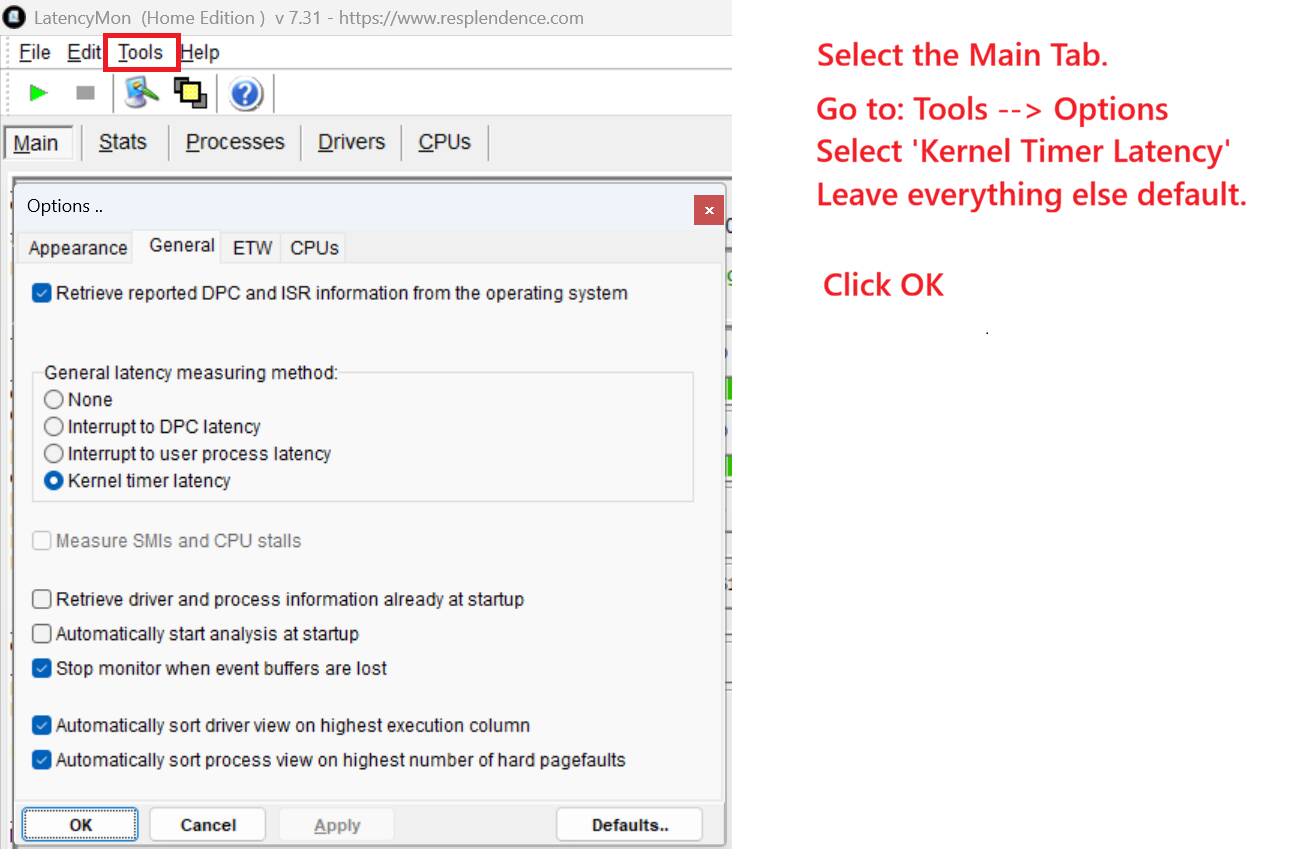
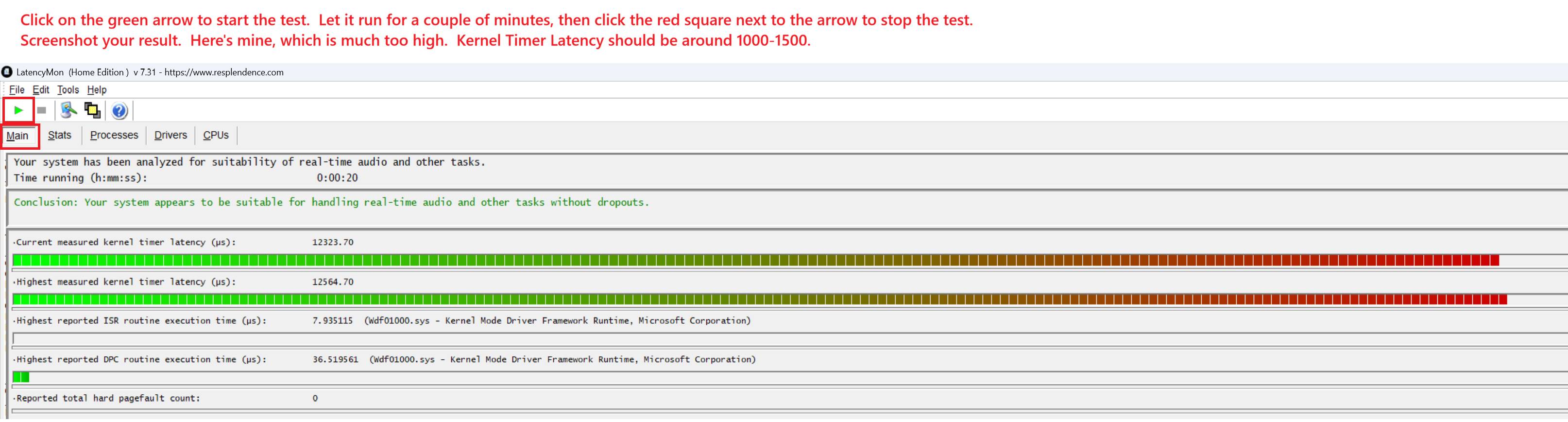
Step 4: Set up and run this test.
Let me know if you have any questions.
Once you’ve established the latency results:
-
First, make sure you have the latest system BIOS recommended by your motherboard manufacturer.
-
Next, install the latest chipset drivers by either AMD or your motherboard manufacturer. (Download the one with the latest date.)
If those don’t fix it, then I recommend doing what I did: Manually assign interrupt affinities for both of my USB controllers. As stated in the article, you are not setting affinities for the individual devices, rather, you are setting them for the controllers. Also, you may want to do the process for your network card. I found no difference in LatencyMon or my network performance when I did that
It’s a process, but my mouse never gets ‘stuck.’
https://www.xbitlabs.com/blog/how-to-use-interrupt-affinity-policy-tool/
You can also manually assign GPU affinty, but that’s a bit risky.
I found my LatencyMon results improved dramatically when I did my GPU. I had no issues, but some reports show people ending up with unbootable systems.
Thanks for the reply. I’ll give this a go next weekend
I’ve also got the latest bios and nvidia gpu etc this only started since su5 maybe su5.1 will fix it when its released
If I have any questions I’ll get back to you when I’m free on the weekend
Hi,
I recommend to you check very carefully all bindings (name of expected control/axis) for all profiles so no other binding affects your functionality. Why I recommend this, it is common that after update some bindings/profiles are broken, reset so you need to be sure. IRQ? uuuuf I don’t expect this because in case of IRQ problem, generally device is not completelly functional.
I hear what you are saying, but if USB controllers have to wait for another device to release an IRQ, couldn’t that cause the kind of behavior OP is having? Moving the affinity to another CPU core seems like a logical troubleshooting step.
So today before work I reset my mouse bindings and only had zoom in zoom out and right click for mouse so that’s not the issue
if I unplugged my throttles and joystick and it still does it would this eliminate the bindings ? I did have a Quick Look but couldn’t see anything
when I get more time I will try do what begotten said that’s if I don’t mess it up. Not very tech savvy
Weird thing is it’s no where near as bad on the outside view but it still does it
So I’m on now trying to sort this. I’ve had a look at that app and I’ve no clue what to make it of it to be fair so I’m going to leave that alone until I know what everything means
Before this started it was fine. Never stuttered when panning and didn’t lag at all since then though it’s bad it’s like the right click button is disconnecting
after sitting here for over a hour I’ve figured this started I belive after the new series of nvidia gpu updates, nvidia app optimised my game it’s self and even though I’ve reset everything I could remember back I noticed today g sync was turned on in nvidia, I always had this off and v sync on but even after this it’s still doing it so I’m gonna leave it alone now and try again tomorrow and quite frankly if I can’t sort it I’ll just get rid of the pc as it just seems to be a constantly tweaking simulator rather then a butter smooth enjoyable simulator and I have a pretty solid pc 9800x3d 4090 so it isn’t weak and mt settings are a mix of high and ultra mostly high though
Like I said above it worked fine now it doesn’t so I don’t belive it’s a iqr issue as it worked fine for 19 months then didn’t.
I’ve also tried creating a new blank mouse profile after deleting my profiles and even when binding right click to free lock etc it won’t move it probably because I didn’t bind enough
on the standards msfs settings it works but again gets stuck
could someone post up a picture of all the settings like under camera option etc so I can check with like see if something is off
So what I’ve tried so far
a clean non binded mouse set up then binded free look and look left right etc but it just doesn’t do anything I’m obviously missing something
verified and repaired msfs
Deleted nvidia app as it kept turning g sync on and downloaded nvcp and set fixed re fresh rate with v sync on
deleted all profiles for mouse and reverted to the original msfs trans one and deleted as much as I dare like vr drone stuff etc all with no luck
Deleted joystick hat quick views but kept my custom ones for looking up at control panel etc as they all work fine
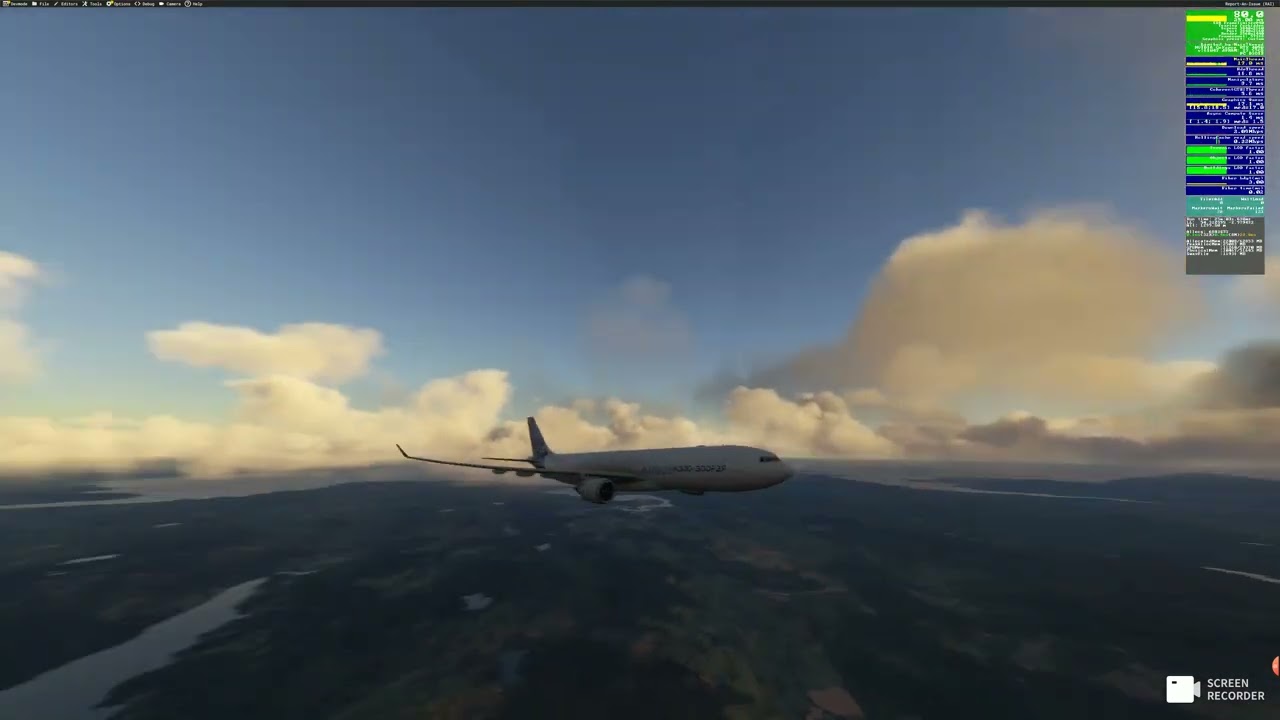
I’ve recorded a video ( sorry about the quality ) to hopefully show you what I’m up against and what I’ve realised is after coming out the menu it seems to work fine for around 3 seconds then starts
I don’t think it’s performance as even on dlaa with a limit of 25ms it rarely goes over that 25ms unless I’m spamming my mouse left and right unrealistically quick, also take off taxi etc is smooth as I think I can get it and most of the fps bar is green apart from graphics que sometimes into yellow, I will point out that once I started recording the frame pacing did go to yellow and start jumping up and down but mostly below 25ms I can do that again tomorrow and test the max
I also don’t belive it’s mouse lag as it works fine on everything else and worked fine for 19 months since I got the rig. This only started happening since the new release of the driver before the recent hot fix and when nvidia optimised my game so it’s either the driver or because nvidia done that but I’ve since put back my settings to what I could remember
If someone could be so kind and just post some screen shots of there mouse settings and maybe camera option settings to see if I’ve got something on I shouldn’t or via Versa
In the video I was constantly moving my mouse and as you can see it pauses frequently and also sometimes re clicking right button does nothing at all
So after another 4 hours messing on I’ve uninstalled and re installed - made no difference
I’ve unplugged all the usb and tried - no difference
I’ve made blank profiles of keyboard - no difference
What I did notice was my wireless card was only doing around 430mbs even though this is enough I’ve reset router and unplugged it and now it’s on 6ghz ( was on 5 ) and pumping out 800mbs download so I don’t know if that had maybe done something
I’ve reset settings to default on everything and boom it’s not now stick as much it does it once in a while when going mostly over screens etc but it’s better and usable now so I just need to figure out how to smooth it more so it was either the wireless card dropping when panning or the settings I’m fuessing when the card reverts to 5ghz we’ll see if the speed stops up and weather it reverts
So now I’ve got to re bind everything I need for Fenix and career inibuilds and keyboard but to be fair that shouldn’t take long as it’s custom views etc and I only really use 3 anyways
so my next mission is to make it even smoother as I know fine well I could move around and I didn’t see any sort of jitter and there is some there but maybe that’s because it’s building shaders etc again but we’ll see after a few flights
Hi im have same issue. am use Logitech G502 Hero wired
Hey, I solved this by deleting user config folder. I’d back up your settings etc first before doing it as it deleted everything in mine. Maybe something got bugged