New issue for unknown reason , Simbrief flight plan created , MSFS2020 started and ATR72-600 selected . The Simbrief plan is uploaded to EFB without issue , but when sent to FMS it’s an old flight plan that is loaded . If MSFS2020 restarted the correct flight is uploaded to the EFB but the same old flight plan is sent to the FMS . Anti-virus disabled , MSFS 2020 ATR re-installed with same results . Any help appreciated .
It sounds like you may have saved it in the FMS at one time and that saved plan is being automatically called up when you enter the airport codes.
Doesn’t appear to be the problem . The EFB is uploading the simbrief flightplan but it’s not writing it to the FMS when I select " set flightplan " on the EFB it like it used to . It loads the last flight plan before this problem started . After looking at everything I have found it is happening the same way on one other payware/addon but not all. What do those two have in common ? Read/write issue ?
Have you tried with an empty Community Folder?
It could be the result of some odd mod conflict.
Tried it , same result . Imported Simbrief flight plan to EFB okay , selected " Set Flightplan " on EFB and the same old flight was entered into the FMS . I wonder where the flight plan is written to when you select " Set Flightplan " .
That would depend on what you have selected for the ATR in the Simbrief Downloader.
It should be in this:
Microsoft.FlightSimulator_8wekyb3d8bbwe\LocalState\packages\microsoft-aircraft-atr\work
The old flight plan that loads into the FMS when I click " Set Flightplan " on the EFB is the only flight plan in the work/simbrief folder .
That is the issue.
Check your setting in the Simbrief Downloader.
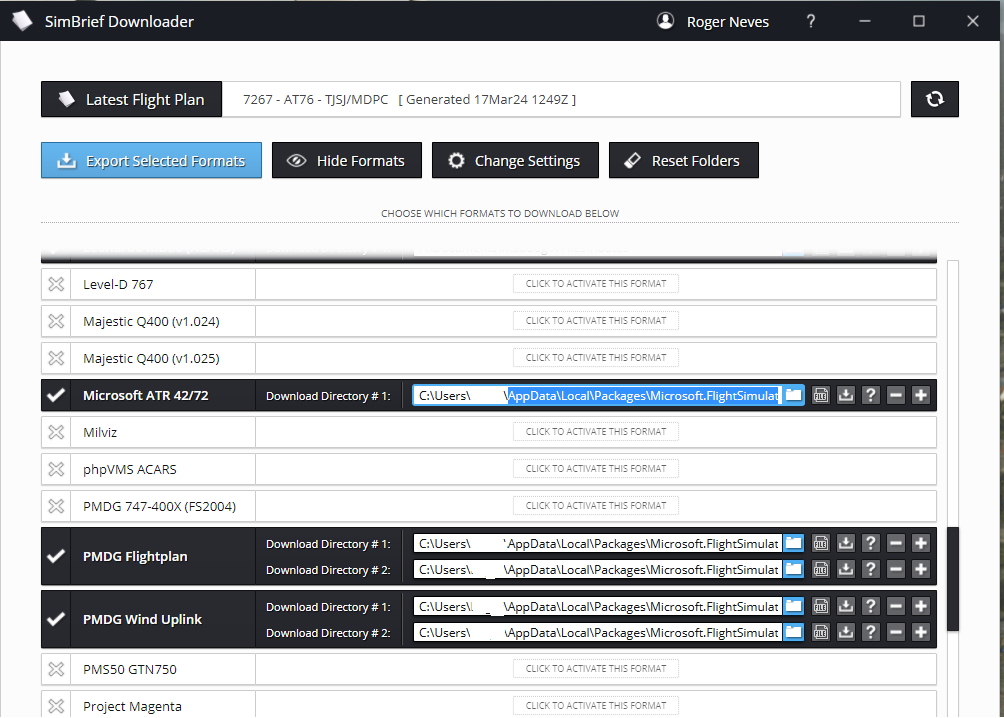
If it is good, then you may have a read/write permission issue
I haven’t set up a link in the Simbrief downloader for quite a while . I certainly didn’t set one up for the Microsft ATR when I purchased it . I entered my Simbrief ID in the EFB and that was it .
1 Like
I think that is what’s happened.
The EFB loads because of the direct link, but the plan is not in the work folder, so the FMC doesn’t see it.
I think you’ve solved the problem . I went to look into Simbrief downloader and it wouldn’t open . Corrupt ? Downloaded and installed again . Tested , problem solved , I never would have thought it was a Simbrief downloader problem . I though it wasn’t used anymore , EFB did it all . GREATLY appreciate your help !
1 Like
This topic was automatically closed 365 days after the last reply. New replies are no longer allowed.