MSFS 2020 CTD after todays 8/7 update

Just had (2) consecutive CTD while the sim was loading. This was after I had already updated to SU 16 the other day and had several successful flights. Upon start of sim it wanted to update again (Nav aid update?) . Once it updated it began loading then approximately 50-60 percent into loading it crashed. It did this (2) in a row. Running 580.88 drivers (clean install and no NVIDIA app). Did not have this issue prior to today’s update.

The following are the event logs…

Log Name: Application
Source: Windows Error Reporting
Date: 8/7/2025 1:39:17 PM
Event ID: 1001
Task Category: None
Level: Information
Keywords:
User: DESKTOP-AFGL0LD\usnao
Computer: DESKTOP-AFGL0LD
Description:
Fault bucket 1210536732375847248, type 5
Event Name: MoBEX
Response: Not available
Cab Id: 0

Problem signature:
P1: Microsoft.FlightSimulator_1.39.9.0_x64__8wekyb3d8bbwe
P2: praid:App
P3: 1.39.9.0
P4: 00000000
P5: 1B0_E658703.dll_unloaded
P6: 2.7.10.0
P7: 67940d50
P8: 000000000002ccc0
P9: c0000005
P10: 0000000000000008

Attached files:
\?\C:\ProgramData\Microsoft\Windows\WER\Temp\WER.66ffbc28-6eda-464a-96f6-dafc68236a46.tmp.mdmp
\?\C:\ProgramData\Microsoft\Windows\WER\Temp\WER.5566e159-26c2-46ce-9040-69a61ef23742.tmp.WERInternalMetadata.xml
WPR_initiated_DiagTrackMiniLogger_OneTrace_User_Logger_20240808_1_EC_0_inject.etl
\?\C:\ProgramData\Microsoft\Windows\WER\Temp\WER.14c2a25a-4838-4fed-aab6-2ccb8ee1bea2.tmp.etl
WPR_initiated_DiagTrackMiniLogger_WPR System Collector_inject.etl
\?\C:\ProgramData\Microsoft\Windows\WER\Temp\WER.4d5be01c-fede-48a7-99df-61eadc2d0e64.tmp.etl
\?\C:\ProgramData\Microsoft\Windows\WER\Temp\WER.02d458d5-8ed0-4cfb-9eb9-f285ebe3158f.tmp.csv
\?\C:\ProgramData\Microsoft\Windows\WER\Temp\WER.8d6cdf69-ba30-4e8d-bee4-0ab315831415.tmp.txt
\?\C:\ProgramData\Microsoft\Windows\WER\Temp\WER.958eb753-d96b-44ee-b614-ea569388ae2e.tmp.xml

These files may be available here:
\?\C:\ProgramData\Microsoft\Windows\WER\ReportArchive\AppCrash_Microsoft.Flight_26105ce2e34824ab248cef0bd69dea9a9e71a0_586ca05b_6206826c-d1b8-44d3-90fa-29ab4f08b83d

Analysis symbol:
Rechecking for solution: 0
Report Id: 25728d6c-2854-475a-88c3-8933ae804328
Report Status: 268435456
Hashed bucket: 43b8c20ecf53395c70ccb0be90d31150
Cab Guid: 0
Event Xml:

1001
0
4
0
0
0x8000000000000000

55430

Application
DESKTOP-AFGL0LD

1210536732375847248
5
MoBEX
Not available
0
Microsoft.FlightSimulator_1.39.9.0_x64__8wekyb3d8bbwe
praid:App
1.39.9.0
00000000
1B0_E658703.dll_unloaded
2.7.10.0
67940d50
000000000002ccc0
c0000005
0000000000000008

\?\C:\ProgramData\Microsoft\Windows\WER\Temp\WER.66ffbc28-6eda-464a-96f6-dafc68236a46.tmp.mdmp
\?\C:\ProgramData\Microsoft\Windows\WER\Temp\WER.5566e159-26c2-46ce-9040-69a61ef23742.tmp.WERInternalMetadata.xml
WPR_initiated_DiagTrackMiniLogger_OneTrace_User_Logger_20240808_1_EC_0_inject.etl
\?\C:\ProgramData\Microsoft\Windows\WER\Temp\WER.14c2a25a-4838-4fed-aab6-2ccb8ee1bea2.tmp.etl
WPR_initiated_DiagTrackMiniLogger_WPR System Collector_inject.etl
\?\C:\ProgramData\Microsoft\Windows\WER\Temp\WER.4d5be01c-fede-48a7-99df-61eadc2d0e64.tmp.etl
\?\C:\ProgramData\Microsoft\Windows\WER\Temp\WER.02d458d5-8ed0-4cfb-9eb9-f285ebe3158f.tmp.csv
\?\C:\ProgramData\Microsoft\Windows\WER\Temp\WER.8d6cdf69-ba30-4e8d-bee4-0ab315831415.tmp.txt
\?\C:\ProgramData\Microsoft\Windows\WER\Temp\WER.958eb753-d96b-44ee-b614-ea569388ae2e.tmp.xml
\?\C:\ProgramData\Microsoft\Windows\WER\ReportArchive\AppCrash_Microsoft.Flight_26105ce2e34824ab248cef0bd69dea9a9e71a0_586ca05b_6206826c-d1b8-44d3-90fa-29ab4f08b83d

0
25728d6c-2854-475a-88c3-8933ae804328
268435456
43b8c20ecf53395c70ccb0be90d31150
0
1 Like

Also…

Log Name: Application
Source: Application Error
Date: 8/7/2025 1:39:14 PM
Event ID: 1000
Task Category: Application Crashing Events
Level: Error
Keywords:
User: DESKTOP-AFGL0LD\usnao
Computer: DESKTOP-AFGL0LD
Description:
Faulting application name: FlightSimulator.exe, version: 1.39.9.0, time stamp: 0x00000000
Faulting module name: 1B0_E658703.dll_unloaded, version: 2.7.10.0, time stamp: 0x67940d50
Exception code: 0xc0000005
Fault offset: 0x000000000002ccc0
Faulting process id: 0x7788
Faulting application start time: 0x1DC07DAA6F60C3A
Faulting application path: C:\Program Files\WindowsApps\Microsoft.FlightSimulator_1.39.9.0_x64__8wekyb3d8bbwe\FlightSimulator.exe
Faulting module path: 1B0_E658703.dll
Report Id: 25728d6c-2854-475a-88c3-8933ae804328
Faulting package full name: Microsoft.FlightSimulator_1.39.9.0_x64__8wekyb3d8bbwe
Faulting package-relative application ID: App
Event Xml:

1000
0
2
100
0
0x8000000000000000

55429

Application
DESKTOP-AFGL0LD

FlightSimulator.exe
1.39.9.0
00000000
1B0_E658703.dll_unloaded
2.7.10.0
67940d50
c0000005
000000000002ccc0
0x7788
0x1dc07daa6f60c3a
C:\Program Files\WindowsApps\Microsoft.FlightSimulator_1.39.9.0_x64__8wekyb3d8bbwe\FlightSimulator.exe
1B0_E658703.dll
25728d6c-2854-475a-88c3-8933ae804328
Microsoft.FlightSimulator_1.39.9.0_x64__8wekyb3d8bbwe
App


Log Name: Application
Source: Windows Error Reporting
Date: 8/7/2025 1:59:38 PM
Event ID: 1001
Task Category: None
Level: Information
Keywords:
User: DESKTOP-AFGL0LD\usnao
Computer: DESKTOP-AFGL0LD
Description:
Fault bucket 1210536732375847248, type 5
Event Name: MoBEX
Response: Not available
Cab Id: 0

Problem signature:
P1: Microsoft.FlightSimulator_1.39.9.0_x64__8wekyb3d8bbwe
P2: praid:App
P3: 1.39.9.0
P4: 00000000
P5: 1B0_E658703.dll_unloaded
P6: 2.7.10.0
P7: 67940d50
P8: 000000000002ccc0
P9: c0000005
P10: 0000000000000008

Attached files:
\?\C:\ProgramData\Microsoft\Windows\WER\Temp\WER.ff9b0db6-6ff8-43a2-a638-d4252462b39c.tmp.mdmp
\?\C:\ProgramData\Microsoft\Windows\WER\Temp\WER.d38d9a2c-06be-4fa6-a43f-f70ef586e72b.tmp.WERInternalMetadata.xml
WPR_initiated_DiagTrackMiniLogger_OneTrace_User_Logger_20240808_1_EC_0_inject.etl
\?\C:\ProgramData\Microsoft\Windows\WER\Temp\WER.fe132e12-2d67-48a7-b010-923cf9d4894a.tmp.etl
WPR_initiated_DiagTrackMiniLogger_WPR System Collector_inject.etl
\?\C:\ProgramData\Microsoft\Windows\WER\Temp\WER.b346720d-b992-4c08-9de7-a1af14a7cdac.tmp.etl
\?\C:\ProgramData\Microsoft\Windows\WER\Temp\WER.561c7f2b-e847-48e0-884a-dc53faaed3d1.tmp.csv
\?\C:\ProgramData\Microsoft\Windows\WER\Temp\WER.858f2b2b-8b46-4dfe-ae0b-d6a2fe4987ed.tmp.txt
\?\C:\ProgramData\Microsoft\Windows\WER\Temp\WER.d1a5606d-92d3-4978-bb16-357fd149eb7d.tmp.xml

These files may be available here:
\?\C:\ProgramData\Microsoft\Windows\WER\ReportArchive\AppCrash_Microsoft.Flight_26105ce2e34824ab248cef0bd69dea9a9e71a0_586ca05b_306921cd-6528-4e5a-87f1-a55b760fea80

Analysis symbol:
Rechecking for solution: 0
Report Id: 8fd44881-22e1-4e5a-9604-dbf6950ca4c9
Report Status: 268435456
Hashed bucket: 43b8c20ecf53395c70ccb0be90d31150
Cab Guid: 0
Event Xml:

1001
0
4
0
0
0x8000000000000000

55512

Application
DESKTOP-AFGL0LD

1210536732375847248
5
MoBEX
Not available
0
Microsoft.FlightSimulator_1.39.9.0_x64__8wekyb3d8bbwe
praid:App
1.39.9.0
00000000
1B0_E658703.dll_unloaded
2.7.10.0
67940d50
000000000002ccc0
c0000005
0000000000000008

\?\C:\ProgramData\Microsoft\Windows\WER\Temp\WER.ff9b0db6-6ff8-43a2-a638-d4252462b39c.tmp.mdmp
\?\C:\ProgramData\Microsoft\Windows\WER\Temp\WER.d38d9a2c-06be-4fa6-a43f-f70ef586e72b.tmp.WERInternalMetadata.xml
WPR_initiated_DiagTrackMiniLogger_OneTrace_User_Logger_20240808_1_EC_0_inject.etl
\?\C:\ProgramData\Microsoft\Windows\WER\Temp\WER.fe132e12-2d67-48a7-b010-923cf9d4894a.tmp.etl
WPR_initiated_DiagTrackMiniLogger_WPR System Collector_inject.etl
\?\C:\ProgramData\Microsoft\Windows\WER\Temp\WER.b346720d-b992-4c08-9de7-a1af14a7cdac.tmp.etl
\?\C:\ProgramData\Microsoft\Windows\WER\Temp\WER.561c7f2b-e847-48e0-884a-dc53faaed3d1.tmp.csv
\?\C:\ProgramData\Microsoft\Windows\WER\Temp\WER.858f2b2b-8b46-4dfe-ae0b-d6a2fe4987ed.tmp.txt
\?\C:\ProgramData\Microsoft\Windows\WER\Temp\WER.d1a5606d-92d3-4978-bb16-357fd149eb7d.tmp.xml
\?\C:\ProgramData\Microsoft\Windows\WER\ReportArchive\AppCrash_Microsoft.Flight_26105ce2e34824ab248cef0bd69dea9a9e71a0_586ca05b_306921cd-6528-4e5a-87f1-a55b760fea80

0
8fd44881-22e1-4e5a-9604-dbf6950ca4c9
268435456
43b8c20ecf53395c70ccb0be90d31150

Log Name: Application
Source: Application Error
Date: 8/7/2025 1:59:36 PM
Event ID: 1000
Task Category: Application Crashing Events
Level: Error
Keywords:
User: DESKTOP-AFGL0LD\usnao
Computer: DESKTOP-AFGL0LD
Description:
Faulting application name: FlightSimulator.exe, version: 1.39.9.0, time stamp: 0x00000000
Faulting module name: 1B0_E658703.dll_unloaded, version: 2.7.10.0, time stamp: 0x67940d50
Exception code: 0xc0000005
Fault offset: 0x000000000002ccc0
Faulting process id: 0x32C0
Faulting application start time: 0x1DC07DD9FB619B3
Faulting application path: C:\Program Files\WindowsApps\Microsoft.FlightSimulator_1.39.9.0_x64__8wekyb3d8bbwe\FlightSimulator.exe
Faulting module path: 1B0_E658703.dll
Report Id: 8fd44881-22e1-4e5a-9604-dbf6950ca4c9
Faulting package full name: Microsoft.FlightSimulator_1.39.9.0_x64__8wekyb3d8bbwe
Faulting package-relative application ID: App
Event Xml:

1000
0
2
100
0
0x8000000000000000

55511

Application
DESKTOP-AFGL0LD

FlightSimulator.exe
1.39.9.0
00000000
1B0_E658703.dll_unloaded
2.7.10.0
67940d50
c0000005
000000000002ccc0
0x32c0
0x1dc07dd9fb619b3
C:\Program Files\WindowsApps\Microsoft.FlightSimulator_1.39.9.0_x64__8wekyb3d8bbwe\FlightSimulator.exe
1B0_E658703.dll
8fd44881-22e1-4e5a-9604-dbf6950ca4c9
Microsoft.FlightSimulator_1.39.9.0_x64__8wekyb3d8bbwe
App

1 Like

Going to do another clean install of GPU drivers with DDU and will report back. Will use 580.88 (no NVIDIA app)

Success!

  1. Uninstalled NVIDIA driver software using Revo Uninstaller. Then rebooted.
  2. Disabled network card then rebooted into safe mode.
  3. Ran DDU then rebooted.
  4. Installed 580.88 drivers (no NVIDIA app)
  5. MSFS 2020 started sucessfully

NVIDIA get your (you know what together) you’ve been dropping the ball lately with ■■■■ drivers.

Nice. And this is with DX11?

Likely when switching from one to the other and back.

Sorry, not sure what you mean. I just wanted to confirm that your fix solved the issue for DX11.

To have to do all of that is ridiculous to be able to run any program. Far cry, Red Dead, battlefield, Call od duty, never ever had to do any of that craziness to be able to run after an update.

Asobo needs to hire better programmers.

1 Like

Looking as if it’s an NVIDIA issue.

Log Name: Application
Source: Windows Error Reporting
Date: 8/7/2025 1:59:38 PM
Event ID: 1001
Task Category: None
Level: Information
Keywords:
User: DESKTOP-AFGL0LD\usnao
Computer: DESKTOP-AFGL0LD
Description:
Fault bucket 1210536732375847248, type 5
Event Name: MoBEX
Response: Not available
Cab Id: 0

Problem signature:
P1: Microsoft.FlightSimulator_1.39.9.0_x64__8wekyb3d8bbwe
P2: praid:App
P3: 1.39.9.0
P4: 00000000
P5: 1B0_E658703.dll_unloaded
P6: 2.7.10.0
P7: 67940d50
P8: 000000000002ccc0
P9: c0000005
P10: 0000000000000008

Attached files:
\?\C:\ProgramData\Microsoft\Windows\WER\Temp\WER.ff9b0db6-6ff8-43a2-a638-d4252462b39c.tmp.mdmp
\?\C:\ProgramData\Microsoft\Windows\WER\Temp\WER.d38d9a2c-06be-4fa6-a43f-f70ef586e72b.tmp.WERInternalMetadata.xml
WPR_initiated_DiagTrackMiniLogger_OneTrace_User_Logger_20240808_1_EC_0_inject.etl
\?\C:\ProgramData\Microsoft\Windows\WER\Temp\WER.fe132e12-2d67-48a7-b010-923cf9d4894a.tmp.etl
WPR_initiated_DiagTrackMiniLogger_WPR System Collector_inject.etl
\?\C:\ProgramData\Microsoft\Windows\WER\Temp\WER.b346720d-b992-4c08-9de7-a1af14a7cdac.tmp.etl
\?\C:\ProgramData\Microsoft\Windows\WER\Temp\WER.561c7f2b-e847-48e0-884a-dc53faaed3d1.tmp.csv
\?\C:\ProgramData\Microsoft\Windows\WER\Temp\WER.858f2b2b-8b46-4dfe-ae0b-d6a2fe4987ed.tmp.txt
\?\C:\ProgramData\Microsoft\Windows\WER\Temp\WER.d1a5606d-92d3-4978-bb16-357fd149eb7d.tmp.xml

These files may be available here:
\?\C:\ProgramData\Microsoft\Windows\WER\ReportArchive\AppCrash_Microsoft.Flight_26105ce2e34824ab248cef0bd69dea9a9e71a0_586ca05b_306921cd-6528-4e5a-87f1-a55b760fea80

Analysis symbol:
Rechecking for solution: 0
Report Id: 8fd44881-22e1-4e5a-9604-dbf6950ca4c9
Report Status: 268435456
Hashed bucket: 43b8c20ecf53395c70ccb0be90d31150
Cab Guid: 0

Log Name: Application
Source: Application Error
Date: 8/7/2025 1:59:36 PM
Event ID: 1000
Task Category: Application Crashing Events
Level: Error
Keywords:
User: DESKTOP-AFGL0LD\usnao
Computer: DESKTOP-AFGL0LD
Description:
Faulting application name: FlightSimulator.exe, version: 1.39.9.0, time stamp: 0x00000000
Faulting module name: 1B0_E658703.dll_unloaded, version: 2.7.10.0, time stamp: 0x67940d50
Exception code: 0xc0000005
Fault offset: 0x000000000002ccc0
Faulting process id: 0x32C0
Faulting application start time: 0x1DC07DD9FB619B3
Faulting application path: C:\Program Files\WindowsApps\Microsoft.FlightSimulator_1.39.9.0_x64__8wekyb3d8bbwe\FlightSimulator.exe
Faulting module path: 1B0_E658703.dll
Report Id: 8fd44881-22e1-4e5a-9604-dbf6950ca4c9
Faulting package full name: Microsoft.FlightSimulator_1.39.9.0_x64__8wekyb3d8bbwe
Faulting package-relative application ID: App
Event Xml:

1000
0
2
100
0
0x8000000000000000

55511

Application
DESKTOP-AFGL0LD

FlightSimulator.exe
1.39.9.0
00000000
1B0_E658703.dll_unloaded
2.7.10.0
67940d50
c0000005
000000000002ccc0
0x32c0
0x1dc07dd9fb619b3
C:\Program Files\WindowsApps\Microsoft.FlightSimulator_1.39.9.0_x64__8wekyb3d8bbwe\FlightSimulator.exe
1B0_E658703.dll
8fd44881-22e1-4e5a-9604-dbf6950ca4c9
Microsoft.FlightSimulator_1.39.9.0_x64__8wekyb3d8bbwe
App

Hard to say but I too don’t appear to have any issue/s with any of the other games on my system. Some of which are…

DCS World

Call of Duty

GTA V Enhanced/Legacy

American Truck Sim

European Truck Sim

Delta Force

VTOL VR

BeamNG drive

IL2 Sturmovik BOS

WOT

Arma 3

Six Days in Fullujah

War Thunder

Well after doing what I did in the 4th post I just had the sim CTD again while starting up loading. I had made no changes to the sim settings after the previous clean install.

These are the event logs…

Log Name: Application
Source: Windows Error Reporting
Date: 8/8/2025 12:29:29 AM
Event ID: 1001
Task Category: None
Level: Information
Keywords:
User: DESKTOP-AFGL0LD\usnao
Computer: DESKTOP-AFGL0LD
Description:
Fault bucket 1210536732375847248, type 5
Event Name: MoBEX
Response: Not available
Cab Id: 0

Problem signature:
P1: Microsoft.FlightSimulator_1.39.9.0_x64__8wekyb3d8bbwe
P2: praid:App
P3: 1.39.9.0
P4: 00000000
P5: 1B0_E658703.dll_unloaded
P6: 2.7.10.0
P7: 67940d50
P8: 000000000002ccc0
P9: c0000005
P10: 0000000000000008

Attached files:
\?\C:\ProgramData\Microsoft\Windows\WER\Temp\WER.6b742a7b-535a-430b-b4cb-e880c158cb93.tmp.mdmp
\?\C:\ProgramData\Microsoft\Windows\WER\Temp\WER.4bc22a92-dc37-4114-90a4-3587b2b4011c.tmp.WERInternalMetadata.xml
WPR_initiated_DiagTrackMiniLogger_OneTrace_User_Logger_20240808_1_EC_0_inject.etl
\?\C:\ProgramData\Microsoft\Windows\WER\Temp\WER.28fe9032-f45a-41e0-a8f5-45bdfd4f5bcb.tmp.etl
WPR_initiated_DiagTrackMiniLogger_WPR System Collector_inject.etl
\?\C:\ProgramData\Microsoft\Windows\WER\Temp\WER.cec1d083-3ded-4a1d-a85e-a9f4292167c1.tmp.etl
\?\C:\ProgramData\Microsoft\Windows\WER\Temp\WER.0fa113cb-6c73-44fd-ac07-6b2f57aae73c.tmp.csv
\?\C:\ProgramData\Microsoft\Windows\WER\Temp\WER.3b9d0951-7e85-4f82-98c7-ea75332f4d44.tmp.txt
\?\C:\ProgramData\Microsoft\Windows\WER\Temp\WER.8fbe8a51-a37c-4868-b005-a7b5ca81c56c.tmp.xml

These files may be available here:
\?\C:\ProgramData\Microsoft\Windows\WER\ReportArchive\AppCrash_Microsoft.Flight_26105ce2e34824ab248cef0bd69dea9a9e71a0_586ca05b_94409913-95bc-4f83-9099-42ed8087d6be

Analysis symbol:
Rechecking for solution: 0
Report Id: 04a46d5a-64c8-4f44-8e80-e507cd0a81fd
Report Status: 268435456
Hashed bucket: 43b8c20ecf53395c70ccb0be90d31150
Cab Guid: 0
Event Xml:

1001
0
4
0
0
0x8000000000000000

55858

Application
DESKTOP-AFGL0LD

1210536732375847248
5
MoBEX
Not available
0
Microsoft.FlightSimulator_1.39.9.0_x64__8wekyb3d8bbwe
praid:App
1.39.9.0
00000000
1B0_E658703.dll_unloaded
2.7.10.0
67940d50
000000000002ccc0
c0000005
0000000000000008

\?\C:\ProgramData\Microsoft\Windows\WER\Temp\WER.6b742a7b-535a-430b-b4cb-e880c158cb93.tmp.mdmp
\?\C:\ProgramData\Microsoft\Windows\WER\Temp\WER.4bc22a92-dc37-4114-90a4-3587b2b4011c.tmp.WERInternalMetadata.xml
WPR_initiated_DiagTrackMiniLogger_OneTrace_User_Logger_20240808_1_EC_0_inject.etl
\?\C:\ProgramData\Microsoft\Windows\WER\Temp\WER.28fe9032-f45a-41e0-a8f5-45bdfd4f5bcb.tmp.etl
WPR_initiated_DiagTrackMiniLogger_WPR System Collector_inject.etl
\?\C:\ProgramData\Microsoft\Windows\WER\Temp\WER.cec1d083-3ded-4a1d-a85e-a9f4292167c1.tmp.etl
\?\C:\ProgramData\Microsoft\Windows\WER\Temp\WER.0fa113cb-6c73-44fd-ac07-6b2f57aae73c.tmp.csv
\?\C:\ProgramData\Microsoft\Windows\WER\Temp\WER.3b9d0951-7e85-4f82-98c7-ea75332f4d44.tmp.txt
\?\C:\ProgramData\Microsoft\Windows\WER\Temp\WER.8fbe8a51-a37c-4868-b005-a7b5ca81c56c.tmp.xml
\?\C:\ProgramData\Microsoft\Windows\WER\ReportArchive\AppCrash_Microsoft.Flight_26105ce2e34824ab248cef0bd69dea9a9e71a0_586ca05b_94409913-95bc-4f83-9099-42ed8087d6be

0
04a46d5a-64c8-4f44-8e80-e507cd0a81fd
268435456
43b8c20ecf53395c70ccb0be90d31150
0

Log Name: Application
Source: Application Error
Date: 8/8/2025 12:29:23 AM
Event ID: 1000
Task Category: Application Crashing Events
Level: Error
Keywords:
User: DESKTOP-AFGL0LD\usnao
Computer: DESKTOP-AFGL0LD
Description:
Faulting application name: FlightSimulator.exe, version: 1.39.9.0, time stamp: 0x00000000
Faulting module name: 1B0_E658703.dll_unloaded, version: 2.7.10.0, time stamp: 0x67940d50
Exception code: 0xc0000005
Fault offset: 0x000000000002ccc0
Faulting process id: 0x4638
Faulting application start time: 0x1DC08359F87F0EE
Faulting application path: C:\Program Files\WindowsApps\Microsoft.FlightSimulator_1.39.9.0_x64__8wekyb3d8bbwe\FlightSimulator.exe
Faulting module path: 1B0_E658703.dll
Report Id: 04a46d5a-64c8-4f44-8e80-e507cd0a81fd
Faulting package full name: Microsoft.FlightSimulator_1.39.9.0_x64__8wekyb3d8bbwe
Faulting package-relative application ID: App
Event Xml:

1000
0
2
100
0
0x8000000000000000

55857

Application
DESKTOP-AFGL0LD

FlightSimulator.exe
1.39.9.0
00000000
1B0_E658703.dll_unloaded
2.7.10.0
67940d50
c0000005
000000000002ccc0
0x4638
0x1dc08359f87f0ee
C:\Program Files\WindowsApps\Microsoft.FlightSimulator_1.39.9.0_x64__8wekyb3d8bbwe\FlightSimulator.exe
1B0_E658703.dll
04a46d5a-64c8-4f44-8e80-e507cd0a81fd
Microsoft.FlightSimulator_1.39.9.0_x64__8wekyb3d8bbwe
App

Installed the NVIDIA app and hit ‘Optimize’ and the sim started.

But for how long?

Going to leave the sim settings as they are and report back if I have any other CTDs.

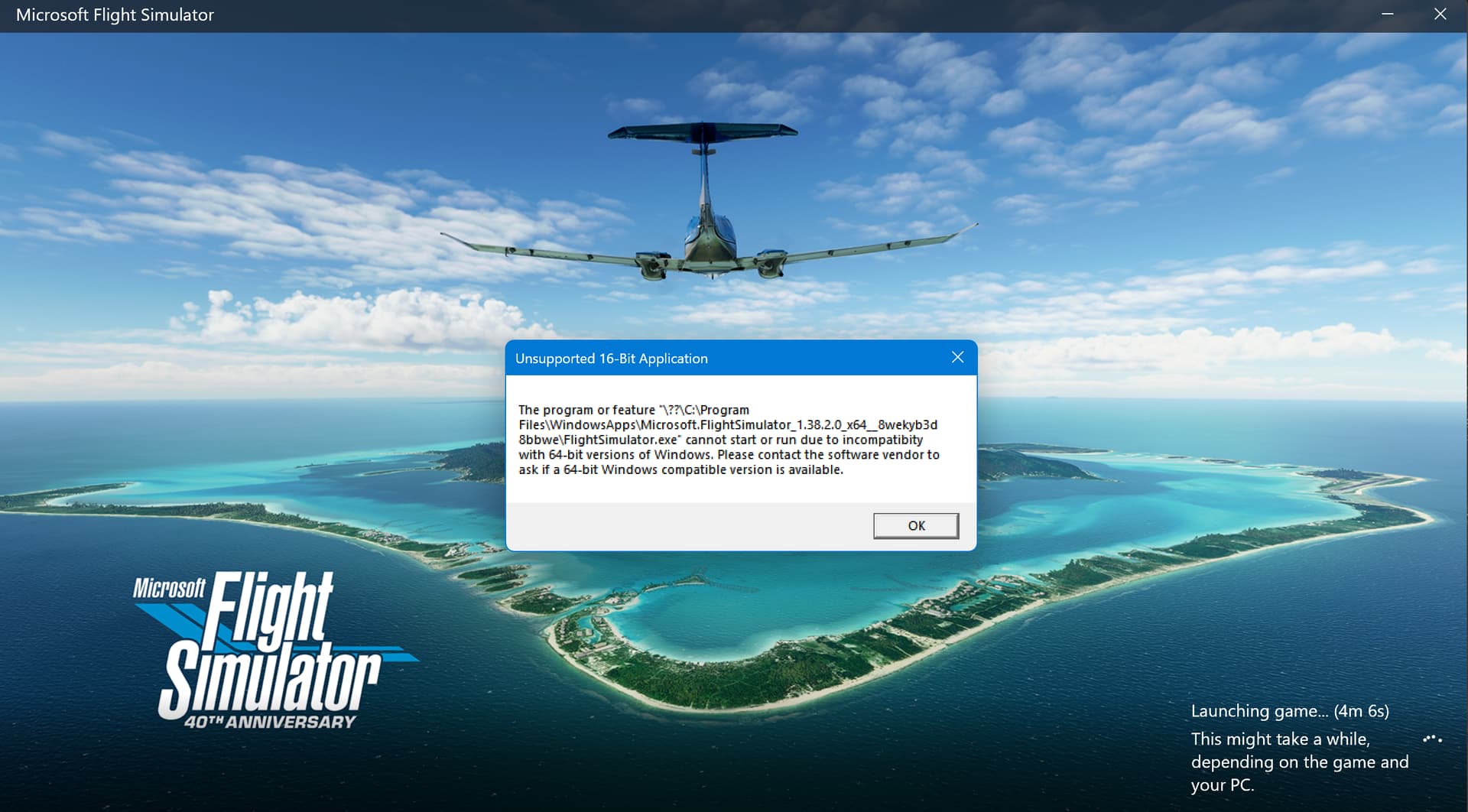
Similar problem here. Crashed with a Space Plane error then wouldn’t start at all. Got this error. Never seen it before.

1 Like

@udidwht
I spent a bit of time today testing 580.88 with MSFS 2020 and DirectX 11 without the NVIDIA app.

So … if you don’t want to play MSFS 2020 with DX12 - for example, because of a performance drop - you can go back to driver version 577.00.
You won’t get CTDs during loading in MSFS 2020 if you choose DX11, as long as the NVIDIA app is not installed.

In the topic linked below, I explained how to do this properly and shared some additional details on how to correctly roll back the driver.

Solution - https://forums.flightsimulator.com/t/nvidia-geforce-game-ready-driver-580-88-discussion-thread/731811/127?u=tenpatrol

1 Like

Hi ,

Mine CTD was during flight:

The below was in-flight from WSSS-LTFM:
Faulting application name: FlightSimulator.exe, version: 1.39.9.0, time stamp: 0x00000000
Faulting module name: FlightSimulator.exe, version: 1.39.9.0, time stamp: 0x00000000
Exception code: 0xc0000005
Fault offset: 0x0000000000268824
Faulting process id: 0x6F40
Faulting application start time: 0x1DC122A11DBB4FC
Faulting application path: F:\SteamLibrary\steamapps\common\MicrosoftFlightSimulator\FlightSimulator.exe
Faulting module path: F:\SteamLibrary\steamapps\common\MicrosoftFlightSimulator\FlightSimulator.exe
Report Id: 8fb849ef-88ce-4864-963d-ddbb77f3f77d
Faulting package full name:
Faulting package-relative application ID:

The next was from YSSY-WSSS and approaching downwind of WSSS’ 20R;

Faulting application name: FlightSimulator.exe, version: 1.39.9.0, time stamp: 0x00000000
Faulting module name: FlightSimulator.exe, version: 1.39.9.0, time stamp: 0x00000000
Exception code: 0xc0000005
Fault offset: 0x0000000000268824
Faulting process id: 0x2A68
Faulting application start time: 0x1DC11819616B776
Faulting application path: F:\SteamLibrary\steamapps\common\MicrosoftFlightSimulator\FlightSimulator.exe
Faulting module path: F:\SteamLibrary\steamapps\common\MicrosoftFlightSimulator\FlightSimulator.exe
Report Id: a766d254-0ed2-4a8f-9a77-e0930141fcd3
Faulting package full name:
Faulting package-relative application ID:

After some months of flawless flights, in the last two days I have experienced some CTD’s which start as freezing and the CTD. No idea what could be causing this, since no new drivers and no new elements in Community have been added. That’s quite frustrating…after 5 years of MSFS!

What’s showing in the event viewer log?

Also rnn the following commands (w/admin rights) and when all completed successfully and without error/s. In the following order:

Dism.exe /online /Cleanup-Image /checkhealth

Dism.exe /online /Cleanup-Image /scanhealth

Dism.exe /online /Cleanup-Image /Restorehealth

sfc /scannow

Dism.exe /Online /Cleanup-Image /AnalyzeComponentStore

Dism.exe /Online /Cleanup-Image /StartComponentCleanup

RESTART computer as the last step.

Here is the log:
Nome applicazione con errore: FlightSimulator.exe, versione: 1.39.9.0, timestamp: 0x00000000
Nome modulo non valido: FlightSimulator.exe, versione: 1.39.9.0, timestamp: 0x00000000
Codice eccezione: 0xc0000005
Offset errore: 0x0000000001e6c1b9
Id di processo in errore: 0x20E4
Ora di avvio dell’applicazione in errore: 0x1DC12B7910D8BA6
Percorso dell’applicazione in errore: C:\Program Files\WindowsApps\Microsoft.FlightSimulator_1.39.9.0_x64__8wekyb3d8bbwe\FlightSimulator.exe
Percorso del modulo in errore: C:\Program Files\WindowsApps\Microsoft.FlightSimulator_1.39.9.0_x64__8wekyb3d8bbwe\FlightSimulator.exe
Id di rapporto: 0159d9e6-b380-4e7e-8afa-a288ab51715d
Nome completo del pacchetto guasto: Microsoft.FlightSimulator_1.39.9.0_x64__8wekyb3d8bbwe
ID applicativo relativo al pacchetto guasto: App

I’ll run what suggested by you and try. I’ll report back in a couple of flights.

Thanks