MSFS 2020 not responding to FSUIPC7.5.7 Key Assignments
Occurrence is every time
Hello MSFS2020 Forum,
With the release of GlassOut for multiple monitors I have re-started the migration from P3D to MSFS2020 for my homebuilt B737 cockpit.
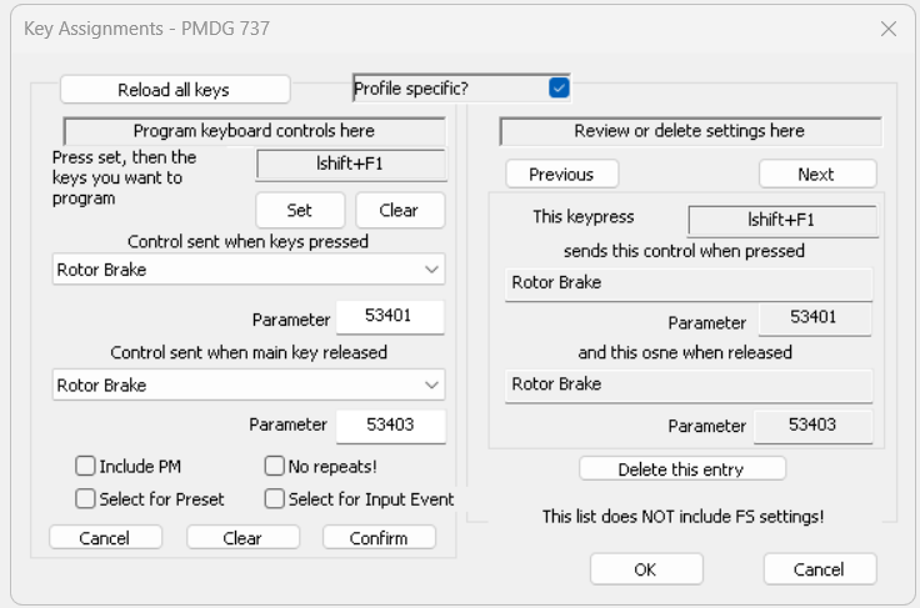
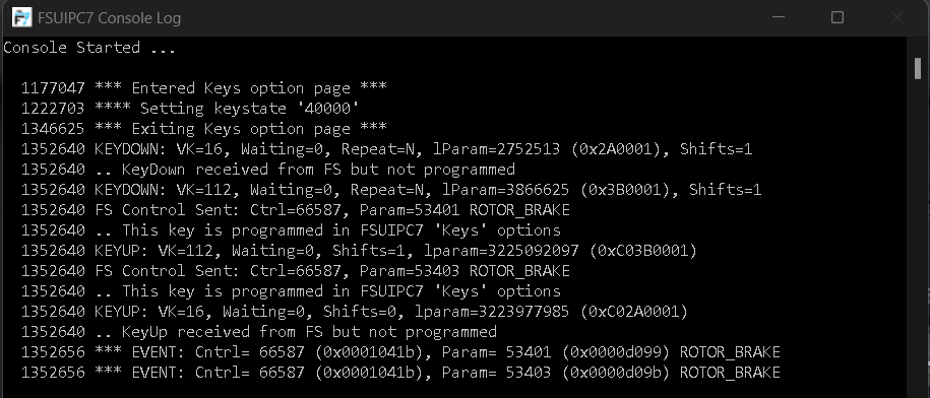
When trying to use the FSUIPC7 (Licensed) Key Assignments using Rotor Brake control for the PMDG 737 CDU, the commands totally work as-long-as I leave the FSUIPC7 main page active (see below image & Console Log). The moment I mouse click on any active sim display the commands stop working. Joystick AXIS continues to work.
I have fully uninstalled FSUIPC7 from the PC, cleaned Windows 11 Registry, reinstalled it, applied the license key and the problem persists.
Per the PMDG 737 SDK instructions I’ve confirmed Data Communication Output and Data Broadcasts in the 737_Options.ini
[SDK] EnableDataBroadcast=1
The CDU Screen Data is enabled for both CDUs:
EnableCDUBroadcast.0=1
EnableCDUBroadca st.1=1
This physical setup worked in P3D with addon iFly737 CBE - Cockpit Builders Edition
Since this occurring on the MSFS side and works immediately after programing FSUIPC7, it seems to be a MSFS issue…I could be wrong.
Any help or suggestions will be appreciated. Thanks in advanced.
[PC Only] Are you using Developer Mode or have you made any changes to it? No
[PC, MSFS 2020 Only] Using DX12
SIOC - Opencockpits USBKeys for the Capt & FO CDU key push capability