I opened a similar post about the misalignment between the planning phase data about winds and actual in mission winds strength few weeks after the release of ps5 version. It’s not only a problem with Cessna but also with other planes. The only way to cope with this “not bug but a feature” is to modify the settings of realism and the result is more manageable some times… Not always but sometime it reduce the situations
My main concern is that in any game (yes referring to it as a game now) is that I don’t expect to go through extensive configuration to get the game to play the way it should play based on the concepts related to the game. Many people point out that you should set this or configure that - but I’m old school (to some extent) and just expect a game to play properly. This game is based on operation in a real world setting. So I assume that it was designed to take into consideration what is being used and what effect the real world would have. I.E. - don’t think I should have to configure the rudder to work with every aircraft I fly. I assume the design of the game has characteristics that will be used when use of controls is being done.
Ok - that’s my rant for today.
For the comment about aircraft stalling – I really don’t think this occurred as I expect an aircraft to loose power on a stall and then if performing a landing that if anything would happen would be a hard landing - not that it moves 50 feet to the left and flips.
And to continue the story - another thing I saw was when I first started with 2024 (don’t remeberr if occurred with 2020) is that on landing my aircraft was bouncing excessively. I don’t mean a couple of small bounces - I mean bounces of 30 feet into the air - and doing this all the way down the runway. Now I was able to get this stabalized via config (that interestinghly AI helped with) and now don’t have this occurring. But I did not like the fact that execcissve bouncing was occurring. I assumede the physics or the game would handle that properly. Have you sen this? Is there any actual pilots whould could validate that this is a natural occurrence. For me - I’ve seen planes bounce and is usually 1 or 2 bounces - then comes to ground - fairly quickly.
Peter
And I just started a mission in career. Started the aircraft - and got a message indicating I broke something - what started the aircraft wrong?
Just did a med vac run - and about 25 nm from airport - lost electrical - then coming down to runway distance - indicated I was out of fuel and it crashed – the tanks where half full on take off - and this was an employee run so I assumed everything was setup - didn’t know I had the pay for gas for the employer !!!
Yes but in.the real world there isn’t one “feel” for all rudder pedals, each are different
And old school games did just work without fiddling with settings. Most old school games were so simple that the amount and feel of inputs was very limited. Unfortunately that’s not games today
Why would it lose power during a stall?
That’s a known issue with career mode with some aircraft, unfortunately career mode is still a mess of bugs and work arounds.
Do you have these same issues in free flight?
Another career mode issue. It seems to either underestimate fuel burn or put in exactly what it expects you to burn with no extra meaning you’ll probably run out of fuel, another career mode issue.
2024 was quite broken when it released, there have been 4 major updates and many smaller behind the scene updates since then, career mode is actually better now than it was when it released but is still broken and no where near true realism. Unfortunately it’s just the state that the game is in currently, there will be updates in the future but for now this is what we have to live with.
don’t recall happening in free flight - but going throug the process of using something along the line that can give me a good basis in flight training - which would be nice if they had like fsx
meant that - a limit was reached and aircraft moving back
As things are moving along it is getting somewhat frustrating. I herd about X-Plane a while back and from what I read is considered a better simulator than MSFS. Has anyone used X-Plane 12 - and if so do you consider it superior to MSFS (talking about behavior - not visualization - that is something MSFS excels at).
Just be careful with flight simming as a base for real world training, no matter which sim they’ll never replicate real flying, and you could build bad habits that could hinder you in the real world. There’s a thread on here about that topic with some good info.
OK I think the other reply was referring to the wing stalling and loosing lift while you were still in the air. That will usually cause a wing to drop and you won’t be able to just add aileron in the other direction to fix it. Not necessarily stopping or slowing down, you can stall at full power and anny speed if you exceed the wings critical angle of attack
My point was more specific to what I was seeing which was a drastic movement of the aircraft that I was not sure was occurring. As I was landing I did not feel a stall would have occurred.
From what I’ve read from others that seems to be either a setting or a bug in the Sims career mode. If you keep running into that I’d try flying in just free flight which doesn’t seem to have the same bugs
Currently looking at using VATSIM. Anyone try. Looking for something that would give me a better means to understand flight rules and procedures. I herd this was a good system. Anyone try this?
Peter
Vatsim is good, some controllers prefer you have some knowledge of procedures and rules as it’s meant to simulate real life. There is training material on their website which I would recommend going through if you’ve never talked on a radio before
Edit: Although they simulate real life as best they can, I find that there’s not always a controller available for the route I’d like to fly and even though you may be flying from a large towered airport all the frequencies may be handled by one person.
Also since they don’t deal with realistic traffic volumes there are a lot of short cuts that can be given that normally wouldn’t happen irl
It appears that many of the “adjustment” you are seeking, and complaints of what is “needed”, are to meet YOUR specific needs & hardware, and might not be that required for an “optimum” out of the box experience that meets YOUR “perceived” Expectations.
THIS SHOULD NOT BE A “Problem”
But what it will require of you, to meet your possible UNIQUE expectations, is for you to carefully go through the numerous setting that Asobo has provided, to meet the needs of people looking for a “BESPOKE” customized experience, and put the work into making the Sim what “YOU” want it to be.
Note: You are not going to find a neat, simple, compact answer to your question in a forum, mainly because your questions and requirements are way to Vague for ANYONE (apart from maybe a very Patient AI), to be able to help you in any meaningful way… despite the best intentions of this great MSFS Community to want to help others.
See the PM I just sent you that (with the assistance of AI) goes into far more detail than I am permitted to post directly in this forum
this deviates from the point - why should I have to do this - the game should work appropriately - is it not considered reasonable that an aircraft behaves accordingly to the laws of physics?
OK - ran into an issue again - this was in a free flight run. Dealt with rudder not working correctly (on the left)
I have a video I did here:
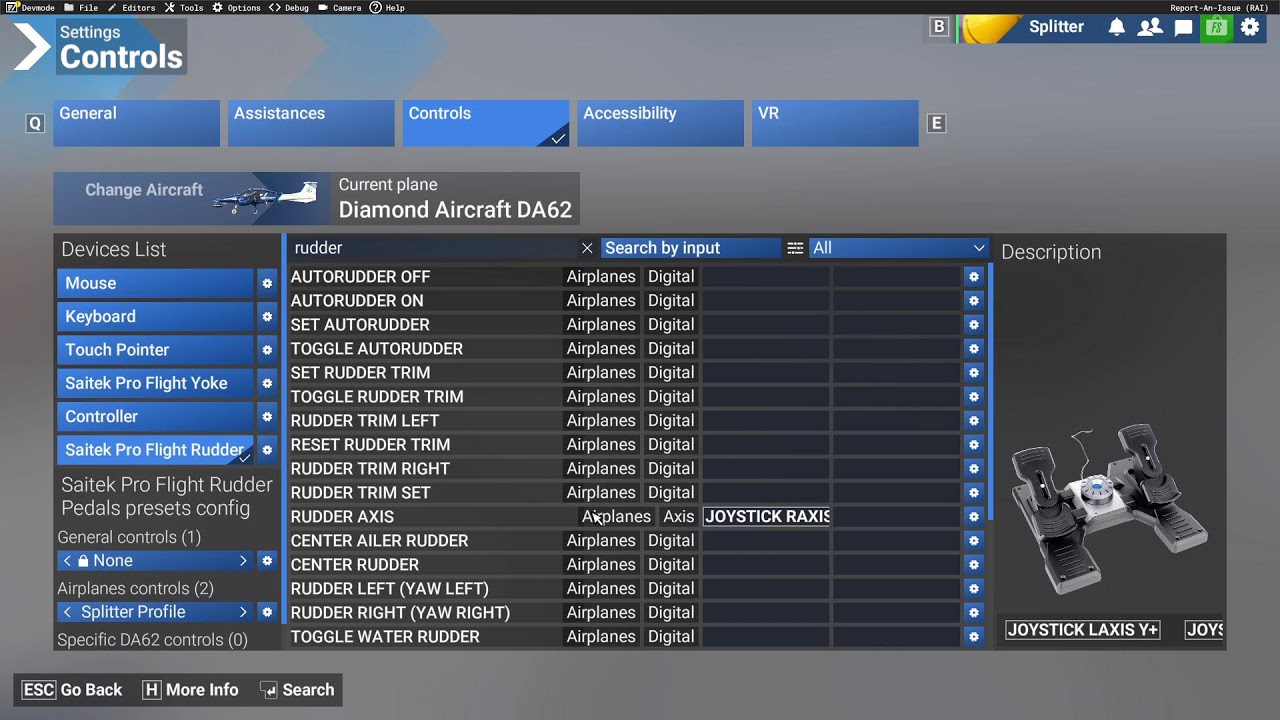
I apologize for the voice -I did specifically set the mic to the mic I was using
Note: just tested with a Cessna 172 - and rudder was workiong fine.
Peter
I do not have an explanation why it is not working for you. Anyhow just did a quick check on the DA62 and it is working as expected.
This said I assume you have an issue with you control bindings.
First thing that comes into my mind is maybe you have accidentally bound the Brake Axis to the rudder axis. Or even the rudder Axis to the brake. This could easily happen when you try bind the brake and accidentally push the rudder axis first during this process.
I would recommend to delet all bindings for the DA62 (Rudder and brake) and just start with the rudder. Do not bind the brake to anything and see if it is working.
In case it is fine you could continue with the brake axis but not before you confirm the rudder is working properly.
Unfortunally I am not familiar with the in-Game binding to see what could be wrong with your bindings. I am using a external software to do all my controlls.
You could also try keyboard inputs to see if something is wrong with you installation. Not sure which keyboard layout you are using but Rudder should be Q=left E=right and CTRL+Q=center
Because it is a simulator and is used with simulator hardware (rudders, flight sticks, etc.). Every sim rudder, every flight stick – in principle, every input device – has its own quirks and inaccuracies. That is why there is a seemingly endless array of configuration options in the sim. When using physical input devices, you must configure them correctly to replicate the behaviour of a real aircraft. After all, even in real life, no two aircraft, even of the same model, behave exactly the same.
Basically, MSFS is already very accurate when it comes to the physics of flying; the underlying CFD model is second to none. I can only compare it to aircraft I fly or have flown in real life (general aviation aircraft and gliders), and here I must say that the flight behaviour is very close to reality, even and especially in extreme situations such as stalls, etc. …
Unfortunately, software as complex as a flight simulator is not a ‘fire-and-forget’ system: as a user, you have to put in a fair bit of effort yourself to configure the system so that it behaves as you might be used to from a real aircraft.
If you have no real-life experience of flying, it is very difficult to judge whether the simulated aircraft feels true to life or not. Real aircraft often behave completely differently from what many ‘sim-only’ users imagine.