MSFS 2024 Airport / Helipad Issue Tracker

:white_check_mark: SIM INFORMATION

This is vital information for our test team, please do not skip it or your issue may not be able to be reproduced or fixed.

  • Microsoft Flight Simulator 2020 or 2024:
    2024
  • Version Build Number (Where do I locate that?):
  • Game Platform (Exampe: Steam, Xbox, MS Store):
    MS

:white_check_mark: ISSUE DESCRIPTION

  1. Did you remove all your community mods/add-ons? If yes, are you still experiencing the issue?
    Yes
  2. ICAO, coordinates (DevMode > Debug > Display position), or specific location:
    OMDB Dubai Premium
  3. Description of the issue:
    Entire 3 Main Terminals Missing on Dubai Premium Edition

:white_check_mark: FREQUENCY OF ISSUE

How often does this occur for you? (Example: Just once, every time on sim load, intermittently)
every time

:white_check_mark: REPRODUCTION STEPS

Please list clear steps you took in order to help our test team reproduce the same issue.

1.load sim
2.goto OMDB
3.See missing terminal

:white_check_mark: YOUR SETTINGS

If the issue still occurs with no mods and add-ons, please continue to report your issue. If not, please move this post to the User Support Hub.

  1. What peripherals are you using, if relevant:
  2. [PC Only] Are you using Developer Mode or have you made any changes to it?
    no
  3. [PC, MSFS 2020 Only] Are you using DX11 or DX12?
    12
  4. [PC Only] What GPU (Graphics Card) do you use?
    4080
  5. [PC Only] What other relevant PC specs can you share?
    127000k 32GB Ram

:white_check_mark: MEDIA

Please add a screenshot or video of the issue occurring.
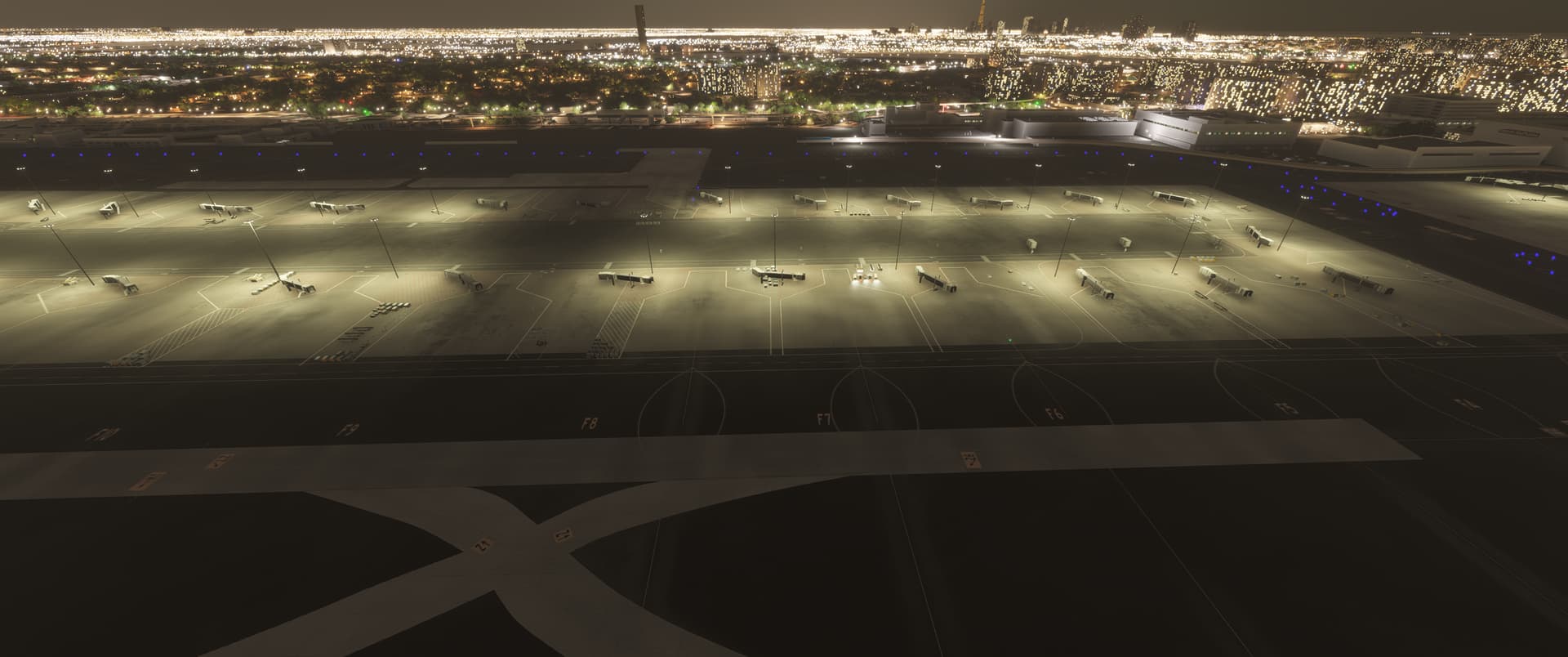
[END OF FIRST USER REPORT]

Using the template below will greatly help the team reproduce the issue and ease the process of fixing it. Before posting, search for an existing report. If you are not sure it’s a bug, please first report in User Support Hub.

2 tags are required - add them in the tag section next to the title above:

Feel free to delete this quote section after adding your appropriate tags.

:white_check_mark: SIM INFORMATION

This is vital information for our test team, please do not skip it or your issue may not be able to be reproduced or fixed.

  • Microsoft Flight Simulator 2020 or 2024:
    2024

  • Version Build Number (Where do I locate that?):
    1.1.7.0

  • Game Platform (Exampe: Steam, Xbox, MS Store):
    MS Store

:white_check_mark: ISSUE DESCRIPTION

  1. Did you remove all your community mods/add-ons? If yes, are you still experiencing the issue?
    Empty Community Folder

  2. ICAO, coordinates (DevMode > Debug > Display position), or specific location:
    KMCO

  3. Description of the issue:
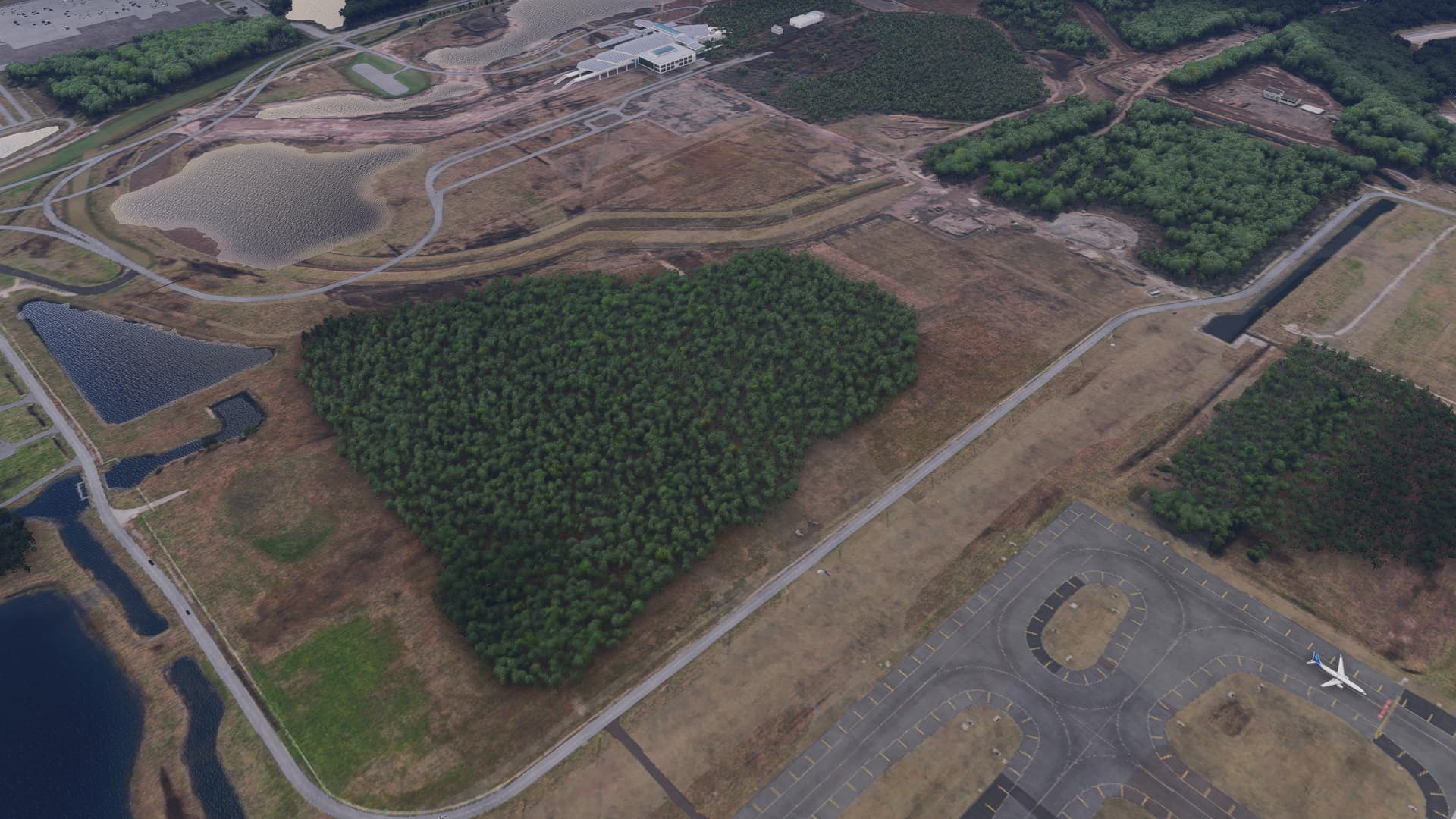
    The main terminal building, terminal C, and the parking garages are all missing.

:white_check_mark: FREQUENCY OF ISSUE

How often does this occur for you? (Example: Just once, every time on sim load, intermittently)
First load.

:white_check_mark: REPRODUCTION STEPS

Please list clear steps you took in order to help our test team reproduce the same issue.

  1. Loaded in at KMCO
  2. Drone camera to view airport.

:white_check_mark: YOUR SETTINGS

If the issue still occurs with no mods and add-ons, please continue to report your issue. If not, please move this post to the User Support Hub.

  1. What peripherals are you using, if relevant:
    Not relevant.

  2. [PC Only] Are you using Developer Mode or have you made any changes to it?
    No developer mode.

  3. [PC, MSFS 2020 Only] Are you using DX11 or DX12?
    N/A

  4. [PC Only] What GPU (Graphics Card) do you use?
    RTX 4070ti Super

  5. [PC Only] What other relevant PC specs can you share?

:white_check_mark: MEDIA

Please add a screenshot or video of the issue occurring.
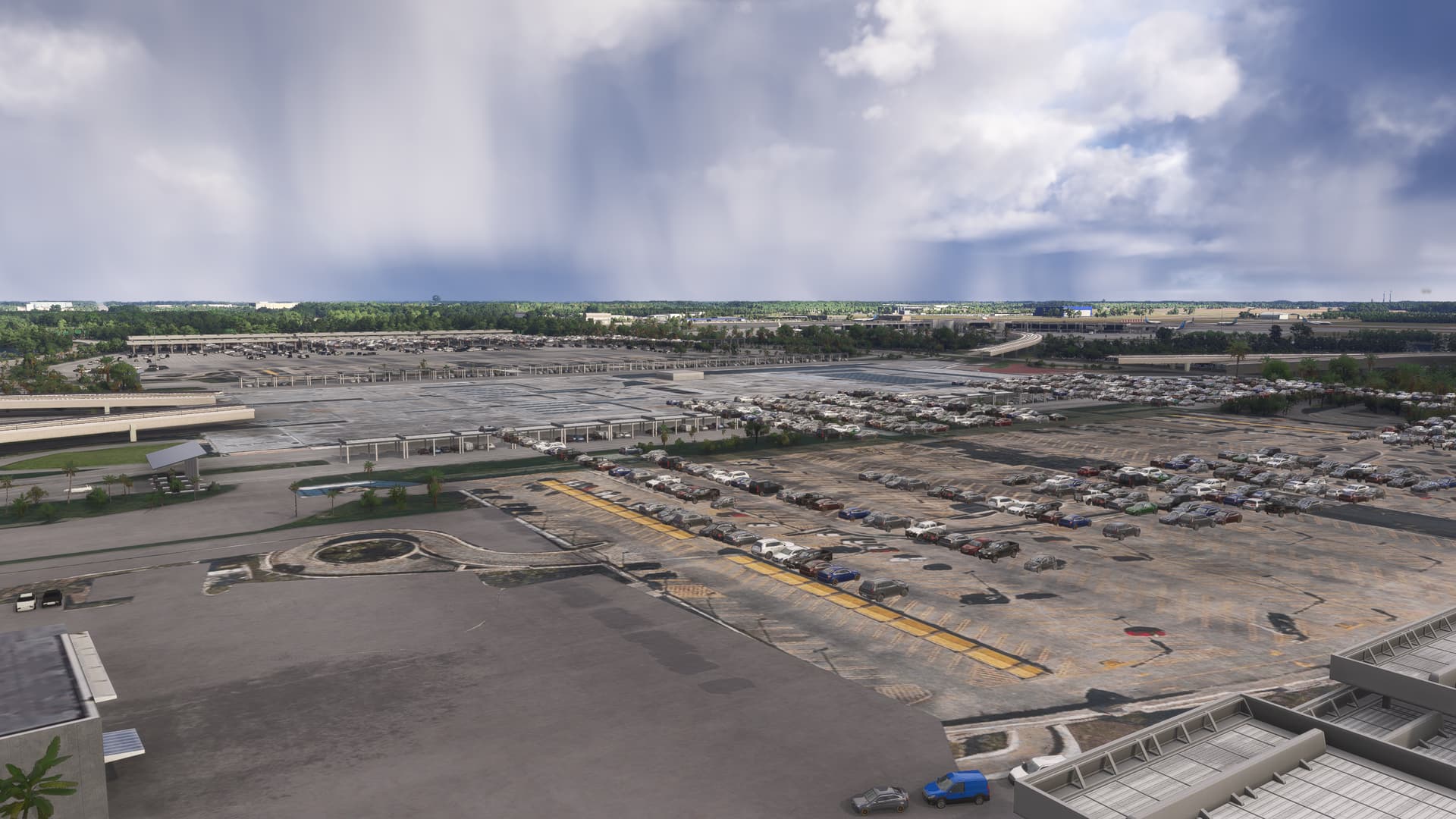
Main Terminal

Terminal C

[END OF FIRST USER REPORT]


:loudspeaker: For anyone who wants to contribute on this issue, Click on the button below to use this template:

Do you have the same issue if you follow the OP’s steps to reproduce it?
•

Provide extra information to complete the original description of the issue:
•

If relevant, provide additional screenshots/video:
•

Floating cranes around the airport.

:white_check_mark: SIM INFORMATION

This is vital information for our test team, please do not skip it or your issue may not be able to be reproduced or fixed.

  • Microsoft Flight Simulator 2020 or 2024:2024

  • Version Build Number (Where do I locate that?):1.1.7.0

  • Game Platform (Exampe: Steam, Xbox, MS Store):Steam

:white_check_mark: ISSUE DESCRIPTION

  1. Did you remove all your community mods/add-ons? If yes, are you still experiencing the issue?

  2. ICAO, coordinates (DevMode > Debug > Display position), or specific location:KTEX

  3. Description of the issue:Telluride airport is loading both the 2020 and 2024 version of the airport and are overlapping causing issues

:white_check_mark: FREQUENCY OF ISSUE

How often does this occur for you? 100% of the time

:white_check_mark: REPRODUCTION STEPS

Please list clear steps you took in order to help our test team reproduce the same issue.

  1. Just load up the airport

:white_check_mark: YOUR SETTINGS

If the issue still occurs with no mods and add-ons, please continue to report your issue. If not, please move this post to the User Support Hub.

  1. [PC Only] Are you using Developer Mode or have you made any changes to it?: No

:white_check_mark: MEDIA


[END OF FIRST USER REPORT]


:loudspeaker: For anyone who wants to contribute on this issue, Click on the button below to use this template:

Do you have the same issue if you follow the OP’s steps to reproduce it?
•

Provide extra information to complete the original description of the issue:
•

If relevant, provide additional screenshots/video:
•

Using the template below will greatly help the team reproduce the issue and ease the process of fixing it. Before posting, search for an existing report. If you are not sure it’s a bug, please first report in User Support Hub.

2 tags are required - add them in the tag section next to the title above:

Feel free to delete this quote section after adding your appropriate tags.

:white_check_mark: SIM INFORMATION

This is vital information for our test team, please do not skip it or your issue may not be able to be reproduced or fixed.

  • Microsoft Flight Simulator 2020 or 2024: MSFS 2024

  • Version Build Number (Where do I locate that?): 1.1.7.0

  • Game Platform (Exampe: Steam, Xbox, MS Store): Steam

:white_check_mark: ISSUE DESCRIPTION

  1. Did you remove all your community mods/add-ons? If yes, are you still experiencing the issue? Yes, I still have the same issue.

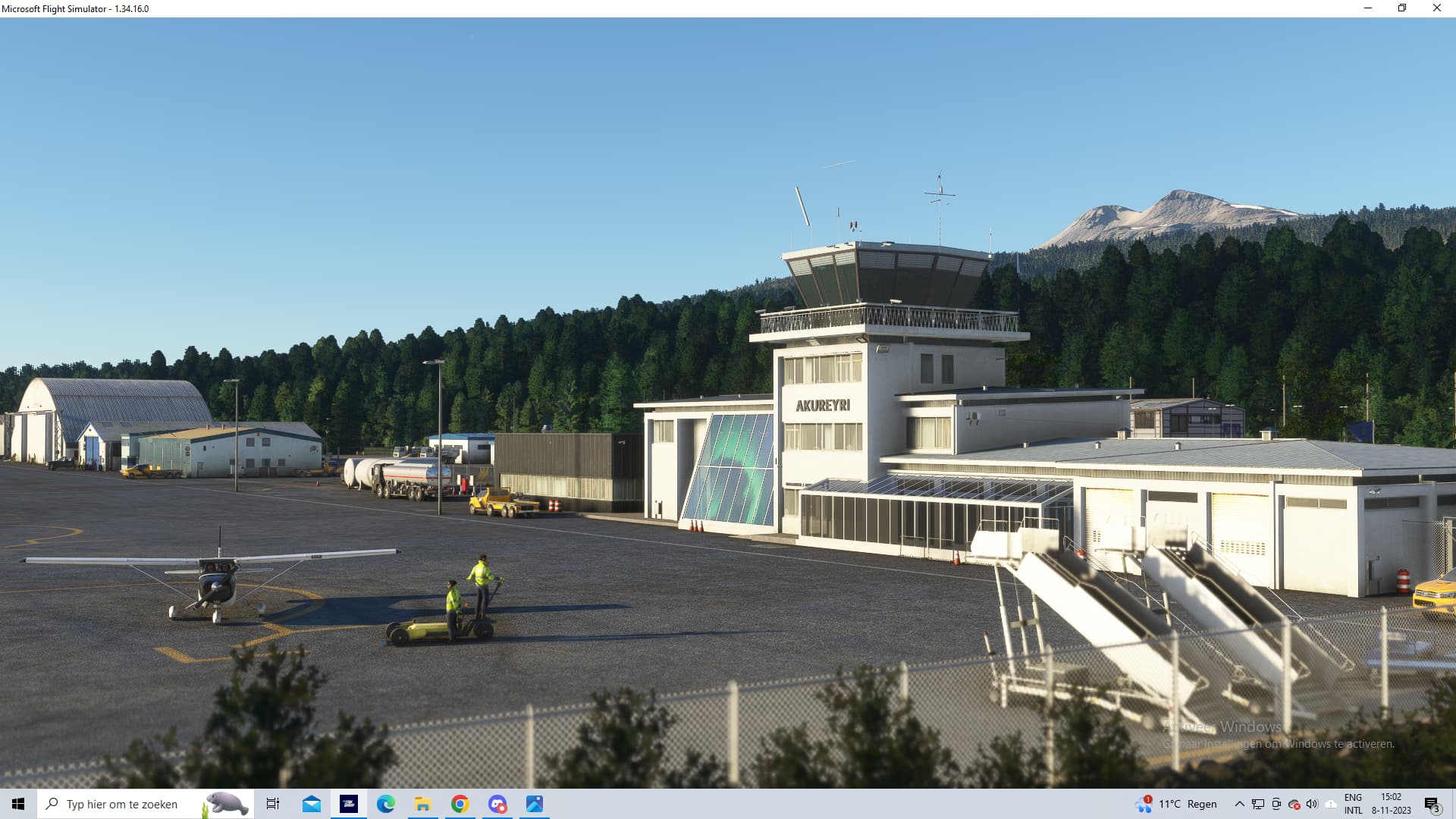
  2. ICAO, coordinates (DevMode > Debug > Display position), or specific location: BIAR - Akureyri Airport.

  3. Description of the issue: Back in MSFS 2020 this airport (BIAR Akureyri) in iceland was handcrafted by GAYA in World update XV Nordics & Greenland. Now in MSFS 2024 I spawned in the exact same airport and it wasn’t the same airport as it was in MSFS 2020. In MSFS 2024 it looks like one of the glider airports that MSFS 2024 would give to it’s players which is cool, but why overwrite a perfectly done airport with it? It’s way lower quality and it’s not 1 to 1 the same as it was in the world update.

:white_check_mark: FREQUENCY OF ISSUE

How often does this occur for you? (Example: Just once, every time on sim load, intermittently) Every time i’m allowed to load in that airport.

:white_check_mark: REPRODUCTION STEPS

Please list clear steps you took in order to help our test team reproduce the same issue.

  1. Start game
  2. Select BIAR in freeflight
  3. Start flight

:white_check_mark: YOUR SETTINGS

If the issue still occurs with no mods and add-ons, please continue to report your issue. If not, please move this post to the User Support Hub.

  1. What peripherals are you using, if relevant: A keyboard and mouse at the moment. My rudder pedals are also plugged in but no used.

  2. [PC Only] Are you using Developer Mode or have you made any changes to it? No, I am not using dev mode.

  3. [PC, MSFS 2020 Only] Are you using DX11 or DX12?

  4. [PC Only] What GPU (Graphics Card) do you use? Nvidia Geforce RTX 4070.

  5. [PC Only] What other relevant PC specs can you share? AMD Ryzen 7700X and 32gb DDR5 RAM.

:white_check_mark: MEDIA

Please add a screenshot or video of the issue occurring.


The first one is MSFS 2024 and the second one is the handcrafted version back in MSFS 2020.

[END OF FIRST USER REPORT]


:loudspeaker: For anyone who wants to contribute on this issue, Click on the button below to use this template:

Do you have the same issue if you follow the OP’s steps to reproduce it?
•

Provide extra information to complete the original description of the issue:
•

If relevant, provide additional screenshots/video:
•

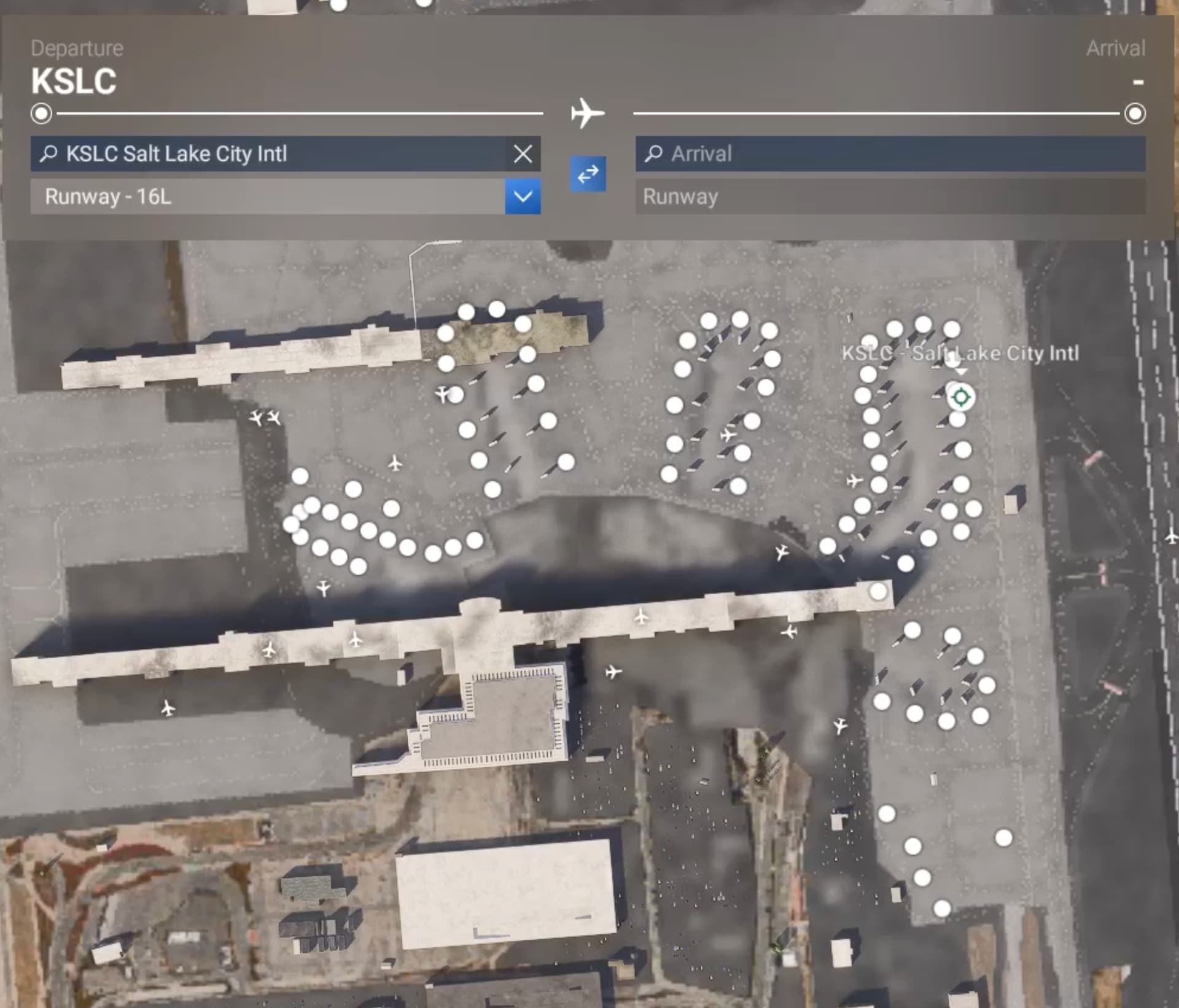
  • Identifier - KSLC
  • Name – Salt Lake International Airport
  • Category – Grounds and Facilities
  • Description – The ground facilities of KSLC in MSFS 2024 are incorrect. The terminals at KSLC were rebuilt in 2020, and the old terminals torn down. In-game, the new terminal buildings are graphically present, but the sim is spawing the gates and parking where they were for the old airport terminals, putting jetways and parking in incorrect locations.

Identifier: KBRG
Name: Belen Regional Airport
Category: General
Description: KBRG is still listed as E80 Belen Alexander Airport

Identifier: 4AC
Name: Coronado Airport
Category: General
Description: 4AC was closed in 2001 and should not appear in the sim.

Identifier: YBNS
Name: Bairnsdale
Category: Building Placed on Taxiway/Parking spots
Description: There is a building placed on the taxiway and on top of and blocking GA parking spots 2, 3 and 4. The building does not exist in reality.

Taxiway @ I73 in Moraine Ohio has trees and ground elevation blocking the pathway cause your plane to crash/damaged when trying to use it.

IMG-5242 hosted at ImgBB — ImgBB


KCGX runway flooded with water. Dont know how it was in 2020 but this definitely needs to be fixed.

Using the template below will greatly help the team reproduce the issue and ease the process of fixing it. Before posting, search for an existing report. If you are not sure it’s a bug, please first report in User Support Hub.

2 tags are required - add them in the tag section next to the title above:

Feel free to delete this quote section after adding your appropriate tags.


ISSUE DESCRIPTION

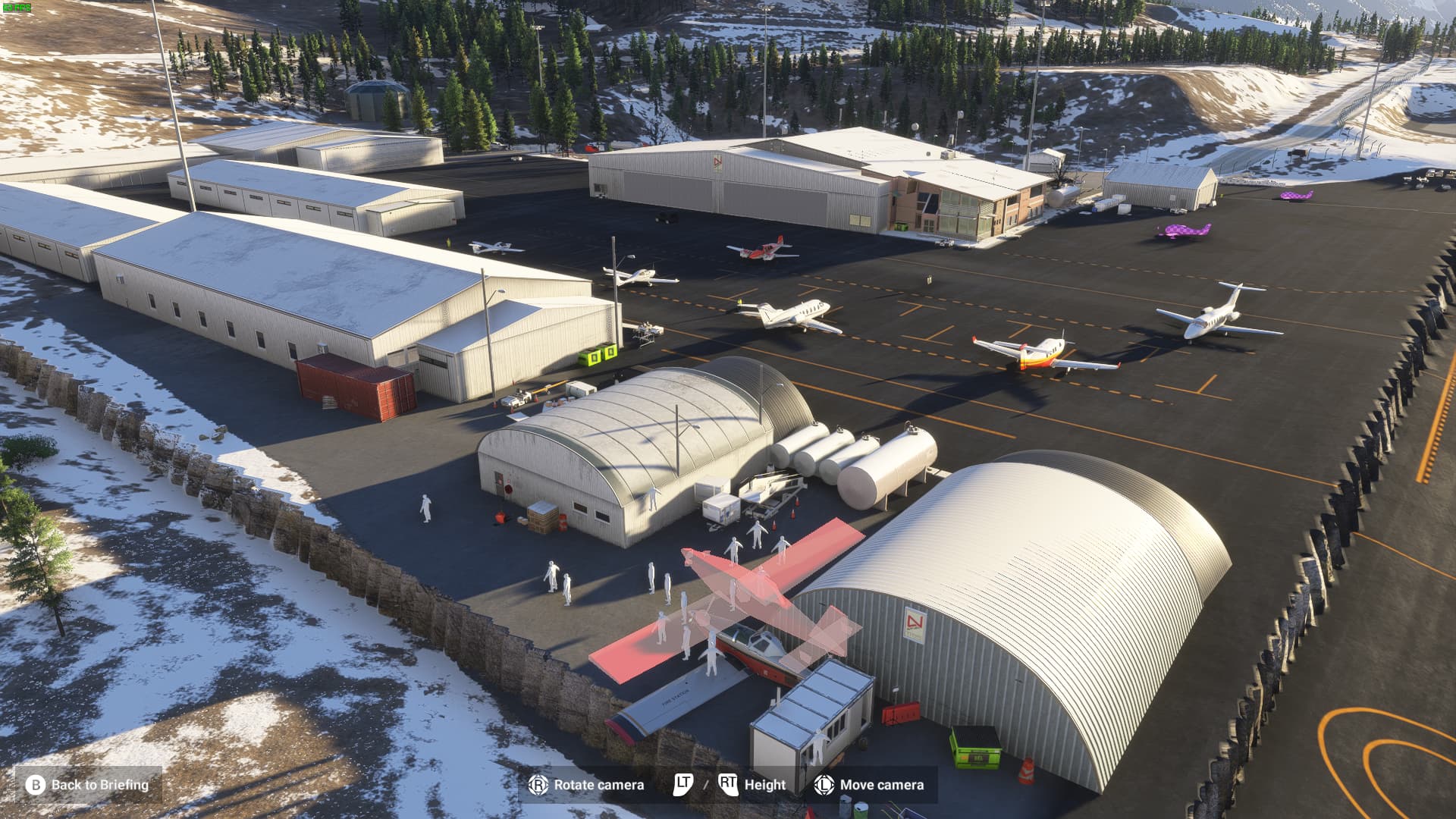
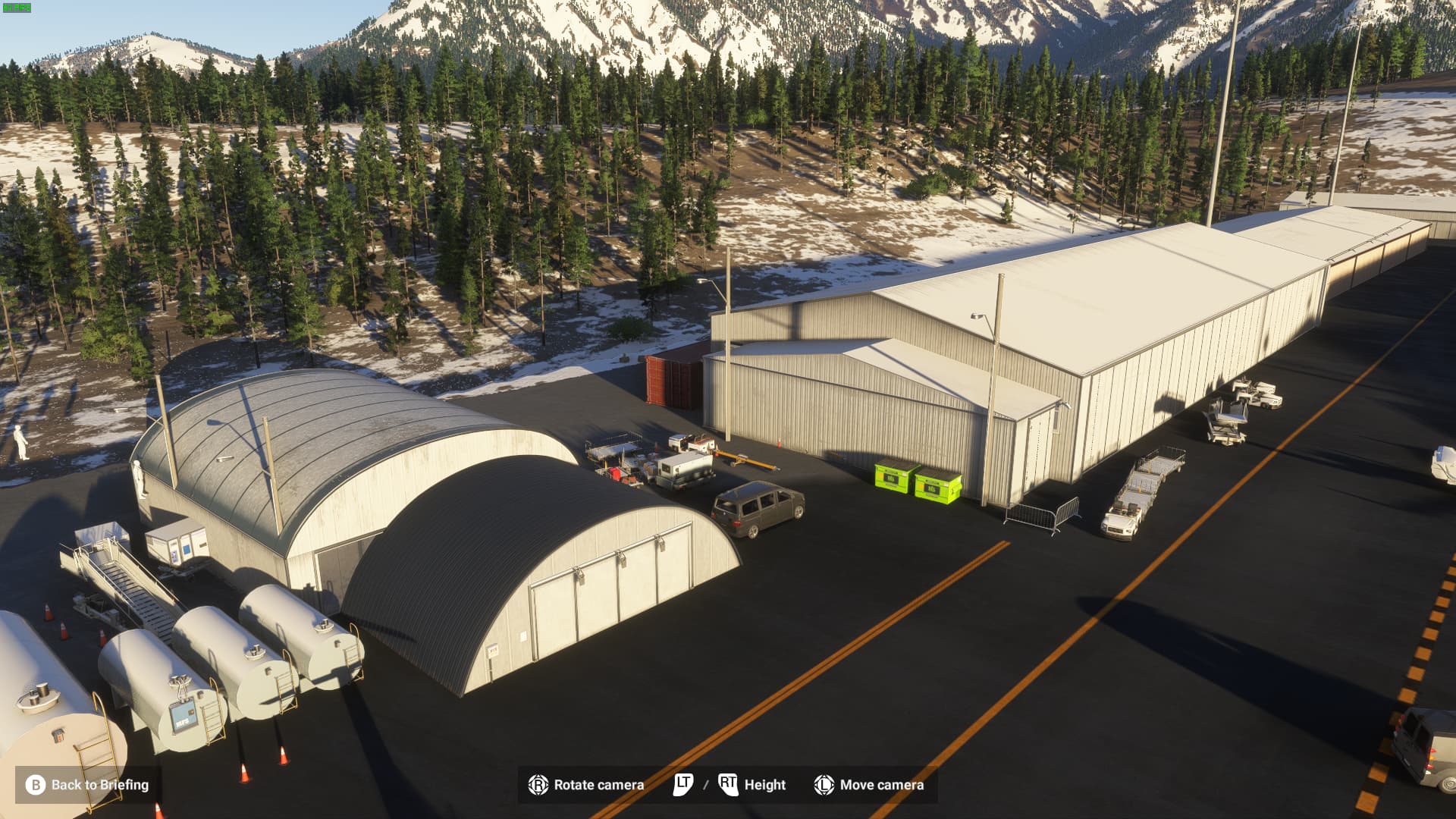
Description of the issue:
Spawned in on my career mode with a cub. Cutscene starts with my character staring down my plane while it’s trying to do a headstand on its prop.

ICAO, coordinates, or specific location:
LKNA (Namest) Airport

[PC Only] Did you remove all your community mods/add-ons? If yes, are you still experiencing the issue?
No addons

FREQUENCY OF ISSUE

How often does this occur for you (Example: Just once, every time on sim load, intermittently)?
Just loaded in to this airport for the first time

REPRODUCTION STEPS

Please list clear steps you took in order to help our test team reproduce the same issue:

  1. Transfer aircraft to airport in career
  2. Load up a sight-seeing flight
  3. Ta-da

YOUR SETTINGS

If the issue still occurs with no mods and add-ons, please continue to report your issue. If not, please move this post to the User Support Hub.

What peripherals are you using, if relevant:

[PC Only] Are you using Developer Mode or have you made any changes to it?
Nope

[PC, MSFS 2020 Only] Are you using DX11 or DX12?
DX12

[PC Only] What GPU (Graphics Card) do you use?
3050

[PC Only] What other relevant PC specs can you share?
Intel i7

MEDIA

Please add a screenshot or video of the issue occurring.

[END OF FIRST USER REPORT]


:loudspeaker: For anyone who wants to contribute on this issue, Click on the button below to use this template:
Do you have the same issue if you follow the OP’s steps to reproduce it?
•

Provide extra information to complete the original description of the issue:
•

If relevant, provide additional screenshots/video:
•

ISSUE DESCRIPTION

Description of the issue:EGKK Gatwick Missing Terminal Buildings. See attached screenshot

ICAO, coordinates, or specific location:
EGKK
[PC Only] Did you remove all your community mods/add-ons? If yes, are you still experiencing the issue? Yes. Yes

FREQUENCY OF ISSUE

How often does this occur for you (Example: Just once, every time on sim load, intermittently)?

REPRODUCTION STEPS

Please list clear steps you took in order to help our test team reproduce the same issue:

YOUR SETTINGS

If the issue still occurs with no mods and add-ons, please continue to report your issue. If not, please move this post to the User Support Hub.

What peripherals are you using, if relevant:

[PC Only] Are you using Developer Mode or have you made any changes to it?

[PC, MSFS 2020 Only] Are you using DX11 or DX12?

[PC Only] What GPU (Graphics Card) do you use?

[PC Only] What other relevant PC specs can you share?

MEDIA

Please add a screenshot or video of the issue occurring.

[END OF FIRST USER REPORT]


:loudspeaker: For anyone who wants to contribute on this issue, Click on the button below to use this template:

Do you have the same issue if you follow the OP’s steps to reproduce it?
•

Provide extra information to complete the original description of the issue:
•

If relevant, provide additional screenshots/video:
•

Originally is there no airport anymore :sweat_smile:

Subject: Request to Add Missing Airport SD4V (Socorro, Brazil)

Dear Asobo Team,

I hope this message finds you well. First, I would like to commend your team for the outstanding work on Microsoft Flight Simulator. The level of realism and detail is incredible, and it has been an amazing experience for aviation enthusiasts like myself.

I am reaching out to report a missing airport in the game: SD4V – Aeródromo de Socorro in Brazil. This airport is operational and officially registered under the ICAO code SD4V, but it is currently not included in the simulator.

Here are some key details about the airport:

• Name: Aeródromo de Socorro

• ICAO Code: SD4V

• Location: Socorro, São Paulo, Brazil

• Coordinates: Latitude -22.578793, Longitude -46.528722

Socorro Airport is a small, but significant location for regional aviation, especially for general aviation and recreational flights. Its inclusion would enrich the experience of flying in this region, as well as provide greater accuracy for Brazilian scenery.

If additional information is required, I would be happy to assist by providing references or further details. Thank you for your time and dedication to continuously improving the simulator. I hope to see SD4V included in a future update.

Best regards,

[Bruno]]

Identifier: SD4V

Name: Aeródromo de Socorro

Category: Missing Airport/Helipad

Description:

The SD4V – Aeródromo de Socorro is a real-world operational private airport located in Socorro, São Paulo, Brazil. It is officially registered with the ANAC (Brazilian National Civil Aviation Agency) and appears on platforms like SkyVector, confirming its existence and functionality.

Runway details:

• Surface: Dirt

• Length: 900 meters

• Width: 20 meters

• Coordinates: Latitude -22.578793, Longitude -46.528722

This aerodrome plays a significant role in regional aviation and its inclusion in the simulator would provide a more accurate representation of the area for virtual pilots.

Identifier:65TA
Name: Flying C Ranch Airport/Texas Health Resources Arlington Memorial Heliport
Category:Navdata?
Description:

Started ferry mission that had the description of “Return aircraft to home base @Brenham”. Started the flight and the arrival airport was designated as 65TA. I arrived to the final waypoint and found that it was on a hospital. I googled the 65TA designation and it came back to a heliport at the hospital. Putting 65TA in google maps pins a dirt runway on a ranch out side of Brenham, Texas. Seems something has caused this 65TA designation to be/have been in use at both locations.

The mission was to return a Cessna 172 which can not be landed on a parking garage. I did try it though.

Identifier: EHAM

Name: Amsterdam Schipol

Category: Jetways and other objects

Description: See attached screenshot.

Jetways and other objects flying in air.

Also some Jetways either missing or expanded into sections.

The jetways seem to change position depending on zoom/LOD level.


theres some way to add this Missing airport to the game ?

Well, that’s news to me. But if it stays in the game and can be selected as a destination, Microsobo should make it functional, right? :thinking: