I’m still on Windows 10. I am curious about the loading times. It’s sort of long but not so much that I ever gave it much thought.
It’s not outside the realm of possibility that the loading is affected by frame generation.
I’m still on Windows 10. I am curious about the loading times. It’s sort of long but not so much that I ever gave it much thought.
It’s not outside the realm of possibility that the loading is affected by frame generation.
Good point, I am using Frame Gen
I did a loading time test and have some data.
I use the Steam version of MSFS 2024 and have it all on a SSD. With the Nvidia Max Frame rate of 50fps on, my loading time from Steam was 4:00 minutes.
It took 23 seconds to launch the sim from Steam. 1 minute of black screen until the video started. Loading language and activating packages lasted until 3:17 minutes. The local files and world loading finished at 4:00
I exited the sim directly after this.
I then disabled the max frame rate in the Nvidia control panel under the program setting for MSFS 2024.
Launching the sim from Steam took 23 seconds. Video started at 30 seconds. Language and activating packages finished at 2:58. Loading local files and world finished and the yellow CTA showed up at 3:28
So this time difference (0.875) is just about the difference between 50 and 60 fps. So I would say that it does appear that the frame rate is limiting the loading time.
Windows 11 24H2.
Why limit the FPS?
To prevent screen tearing on fixed monitor refresh rates, to reduce or eliminate stutters due to fluctuating frame rates and last but not least to reduce power consumption, cooling fan noise and wear and tear by not having the graphics card go pedal to the metal at all times when 60 fps suffice for a smooth experience.
Mucho gracious amigos!
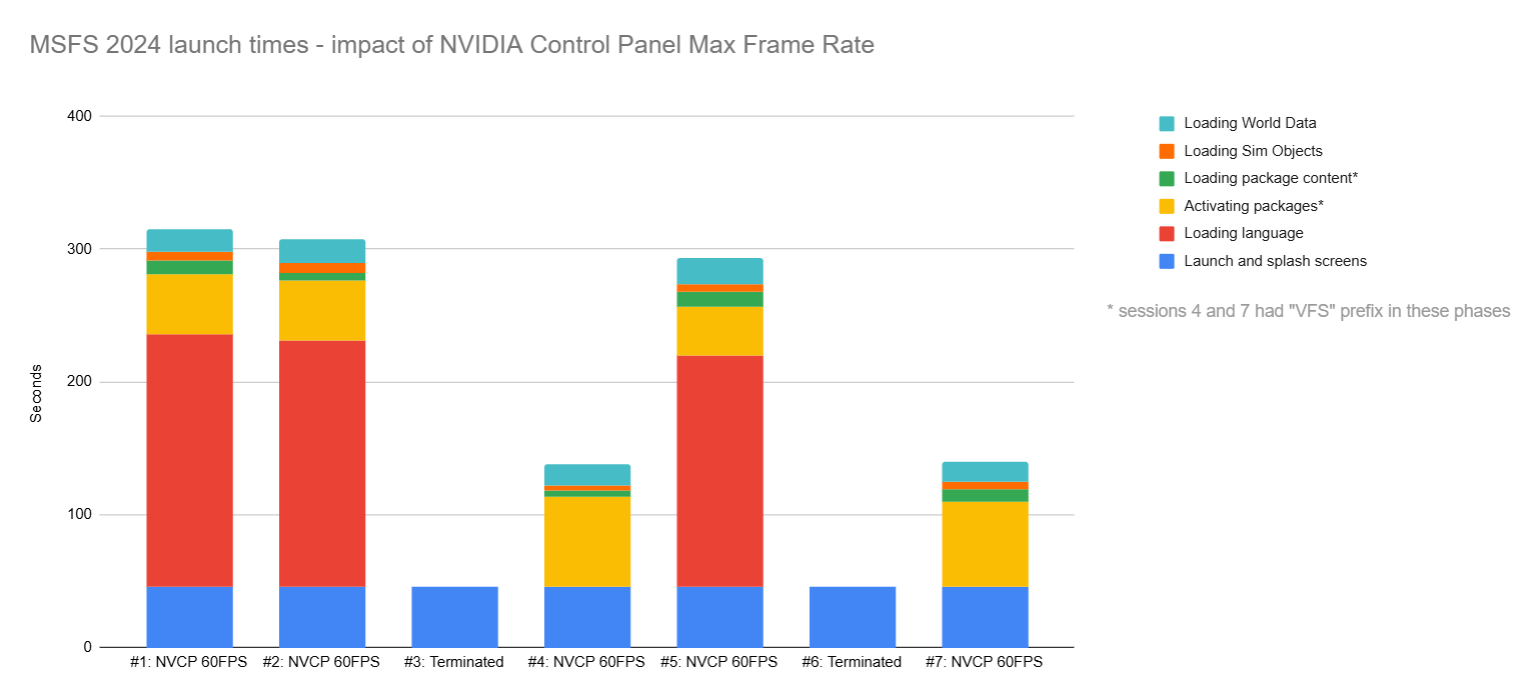
I tested your theory about sessions immediately AFTER a terminated session being quicker to launch, even with the frame limiter. I had the same results as you.
Sessions 1, 2 and 5 are “baseline” sessions with the frame limiter at 60FPS.
Sessions 3 and 6 were deliberately terminated during loading
Sessions 4 and 7 were the first launch after a terminated session, still with 60FPS frame limit.
Interestingly, the phases were slightly different for sessions 4 and 7.
Thanks for doing this test.
Isn’t that interesting?
The skipping of loading language seems weird, especially since this seems to be the crucial part for the long loading time.
Thank you for this post. I’ve been getting frustrated with the 5 minute loading times and the stuttery intro video. It was stuck at 6% Loading Languages for the first 3 minutes.
I had my fps limited to 38 in the Nvidia control panel but had no idea that was causing the loading issue.
I just turned off the limiter and the load time is now reduced to 1 minute, 20 seconds and the intro video runs smoothly!
Is there another way to limit the fps? I like to limit it to half the refresh rate of my VR headset for smooth performance.
I haven’t tried it, but apparently you can use RivaTuner to enable a frame limit AFTER the game has launched. That isn’t possible in the NVIDIA Control Panel, since any changes there are only applied at next launch of MSFS.
Thank you. I’ll check it out 
Well for me it works faster, when i use the google dns or any dns without adblocker or antispam service. Also set the nvidia framerate to 50.
Wow, this is quite remarkable. I couldn’t have a much of a faster PC and I was wondering why my load times were so much longer than what everyone else was reporting.
I originally set the frame limit to deal with the GPU going full tilt on the menu screens.
I’ve wondered why loading languages took so long. I’m just curious what’s going on under the hood.
Years ago, I had a software application I had written. I output a bunch on nonsense (mostly inside jokes and easter eggs) on the loader screen. 
I read this with interest.
I had my Max Frame Rate set to my monitor refresh rate of 144 and what I have been seeing since the original release was that I was getting stuck on 5% loading language in line with the original graph.
After a minute it was still loading but had progressed to 7%.
So I was going to try this.
Now yesterday the beta got upgraded to 1.3.10 and before I altered anything I watched the start and it quickly moved through 5% and after a minute it had actually started loading world data.
Now it could have been a fluke so I repeated the test 5 more times. Each time the same result.
So the indications are either this is an undocumented fix in beta update or a server side fix that has been made.
I do not believe that I am a lucky person so could anybody else that switched off their Max Frame Rate switch it back on to their monitor refresh rate and see whether they see the same thing as myself.
I’m not on the beta.
With the frame rate on it still takes an age to load no difference.
I have played around with DNS and can confirm there is no difference between cloudflare, google or pihole.
It looks like thankfully they may have nailed it in the beta.
I’m on beta so will run the same tests as I did in the first post here. Will share my findings.
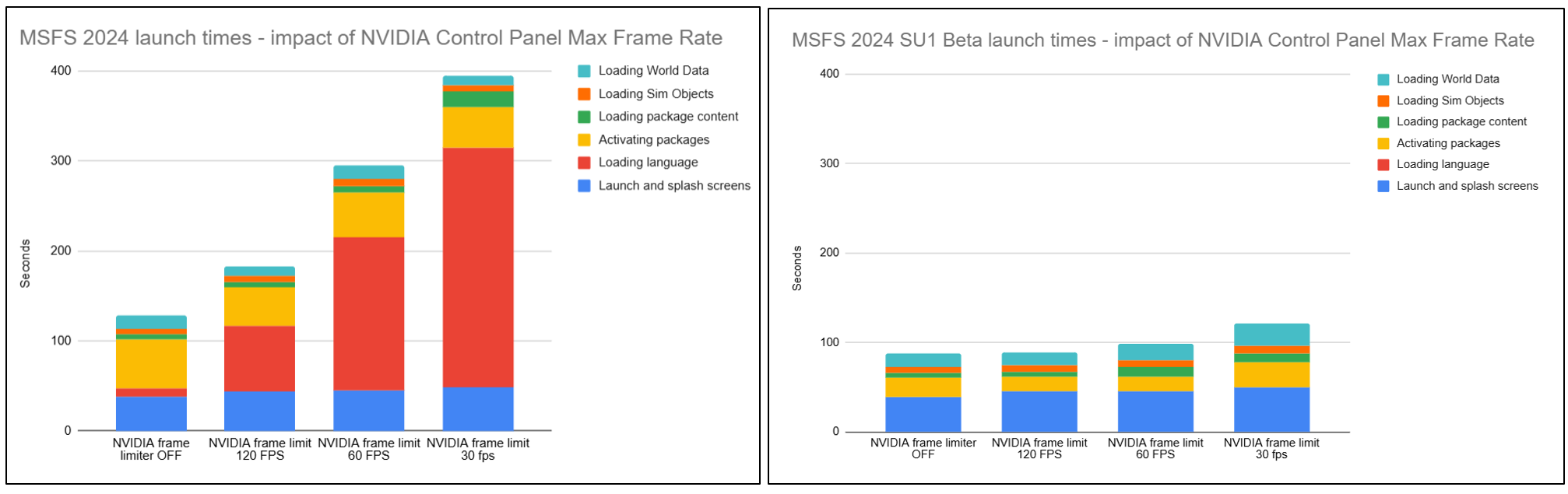
OK here’s an update:
LEFT: original tests before SU1 Beta
RIGHT: SU1 Beta (v1.3.10.0)
So while technically the FPS cap still has an impact, the net result is negligible and I’m happy to leave my 60FPS cap enabled. And the Loading Language phase seems to have disappeared entirely!
One hopefully unrelated observation is that I cannot cleanly exit SU1 beta; after the window closes, the EXE is still hanging around and needs to be terminated manually.
Glad to see that it is not just me benefiting from the latest beta and that I am not going mad.
The exit is another problem that I have been having from day 1 it takes on average anywhere between 10-90 mins to exit.
There are some bug reports out there so hopefully this should get resolved, sooner rather than later.
Thanks for testing!
I need to keep a limit as the MSFS 2024 Menus cause the 4090 GPU to run full throttle, which still happens in in SU1.
The exe for me seems to close after 1 or two seconds from the screen disappearing.