Yes, I made sure all settings in MSFS and the Windows setting page are the same. My question was in reference to setting both of the dropdown boxes on the MSFS Sound page to match the windows sound settings page.
As reported earlier there is a definite Sound Output selection issue in MSFS.
It has been an issue since Release, but has progressively got worse, over the past 18 months.
During start up, MSFS keeps changing and re-selecting sound output devices, depending on your setting in Windows & MSFS.
yes, it finally settle down to what is set in MSFS, towards the end of MSFS loading, but during the loading period, the sound can jump around all over the place, and if it jumps to an output device that you cannot hear, it appears that the sound is Glitching, which typically the sound of an intimate CTD !!
Surely, this is one that Asobo can very easily reproduce & fix. ?? Low hanging Fruit ?
(the Fruit being a LEMON !! )
Sorry, not sure I follow.
First pick the Windows output device. Make sure it is not a “mixer” but an actual output device.
Then set the FS drops to match that same device.
I think we are saying the same thing at this point. As far as a “mixer”, I’m not sure what you mean. I use a Razer Kraken headset that plugs into the USB device it came with. Should I try plugging the headset jack directly into the computer, rather than the USB controller it came with?
If the you can hear sounds from other Windows apps as you have it connected, you should be fine.
In my case, I picked my monitor
(which is obviously connected to my video card) to be the default audio device in both Windows and FS.
1 Like
Did a long flight now and switched like crazy between VR and back, no problems.
The only thing I did was change the output to my headphones and not the system default, like mjchernis suggested.
Right now it looks good.
1 Like
What is your Rolling Cache set to in MSFS settings?
32 Gb. But, this “memory read” problem is not related to the scenery cache.
1 Like
You are completely correct!
But, in this case, I think a Windows Update caused the problem by releasing two updates — separated by a week — that changes the Windows sounds setting to something that completely confused FS.
1 Like
But the switching back between sound outputs has been happening for many months… all 2022, and back into 2021
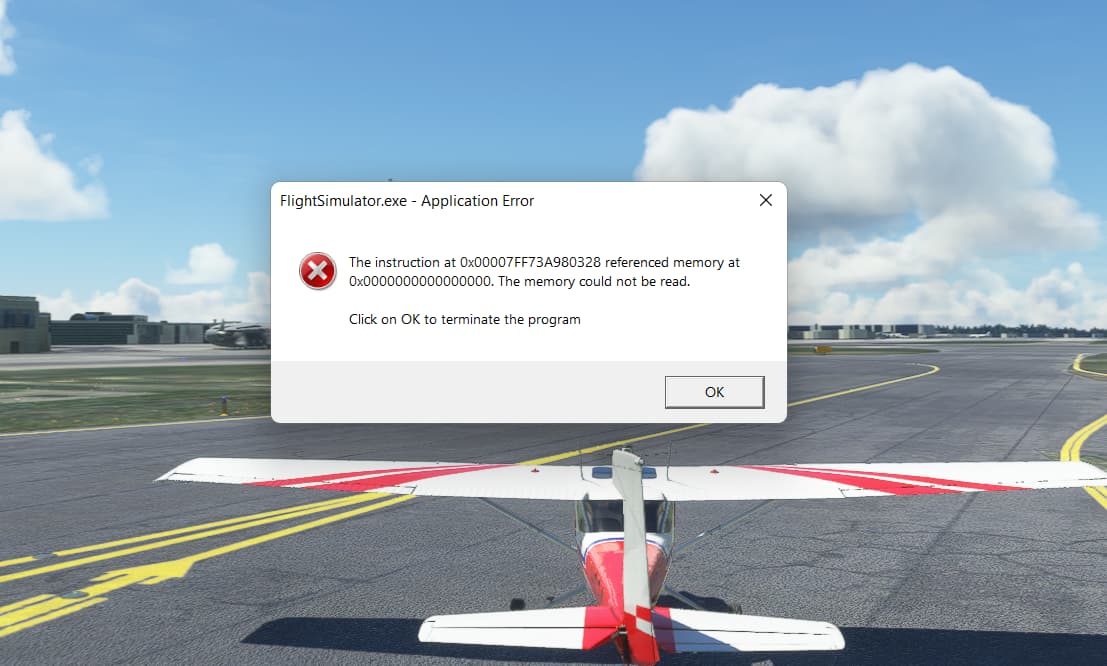
I too seem to have encountered the “memory read” error. For me, this started after the hotfix…had not seen if before.
12900kf/3080ti/32gb
According to gpu-z, max system memory used during the session was 18MB of 32, so not likely a problem. Interesting was that the GPU memory climbed to 11150 at some point. Higher than I’d seen it before and close to the max for the GPU…maybe a clue.
One of my “test” flights is to fly from EGLC and land at Heathrow. Flight went fine until short final when some flickering started (different than the garden-variety stutter). Landed OK, then while taxiing in, got the error message and the sim froze. This was a repeat of a previous flight where the same thing happened only on final approach.
All W11 updates and latest nVidea driver installed. The first failed flight was with the earlier nVidea driver…so new driver did not fix it. Sound outputs checked.
Can you send a screen shot of the audio outputs?
In both instances, the sound in W11 was set to “Speakers…Realtek(R) Audio”. In the first instance, the ingame audio was set to “Use System Default”. Prior to the second instance, I changed the ingame settings to match the W11 settings…did not make a difference.
Realtek audio is the USB device? Is there another device which is the actual output device like a monitor?
Realtek is the audio output device (sound card) built into this computer. I have a set of surround speakers plugged into it. I did check to see that W11 and the sim were “on the same page” so to speak. Both W11 and MSFS are set to output on the speakers. I really don’t think the sound card issue is what’s causing the problem in my case. but we’ll see!
If you keep getting memory read errors….
Just for fun..try setting the output device in Windows and FS to the monitor which is connected to the graphics card..
Reboot and try FS. I am NOT saying this is the solution for all CTDs but I have yet to find someone who it has not solved the Memory Read error for.
I did a clean install, and now MSFS crashes after 30 sec on the Main Menu, with the nice error “Memory could not be read”.
However in the Event Viewer, I have this warning when MSFS crashes:
“Display driver nvlddmkm stopped responding and has successfully recovered”
I ran DDU and reinstalled my Nvidia Drivers… Still the same problem.
Am I the only one with the nvlddmkm warning?
Well, though my main monitor doesn’t actually have speakers, it shows up in W11 as a possible sound output. My second monitor does have speakers and will work as an output if I select it.
Anyway, for me so far Heathrow is the only location that generates the memory issue. When it happens, nothing shows up in the Event Viewer for me.
Anyway, flew around for a couple of hours this afternoon, avoiding Heathrow, juiced the sim up to Ultra and 400 LOD and did not have the memory thing come up. I’ll try Heathrow again later to see if the problem persists there. Hmmm…ain’t this fun!
1 Like
Still playing with this…flew around south of England…ifr approach at EGKA..no issues, sim ran fine maxed out. Decided to try spawning into Heathrow to fly the other way into EGLC…boom, CTD this time instead of the memory out thing. Gonna try some other “high demand” airports to see what happens. Meanwhile…evil lurks at Heathrow! 
I wrote about this Yesterday here too.
I did a new install of the driver.
But before the error message there where no typical graphic issues like blackscreen. Just a pop up of the message.