ISSUE DESCRIPTION
Since cycle 2609 some approach charts have too many landing categories. The proper pilot apps will have two pages in that section which the white arrow icon indicates. But MSFS Planner has no pages and does not give access to some landing category minima.
Unfortunately this has not been resolved with the update with AIRAC 2610, so I’m opening this report.
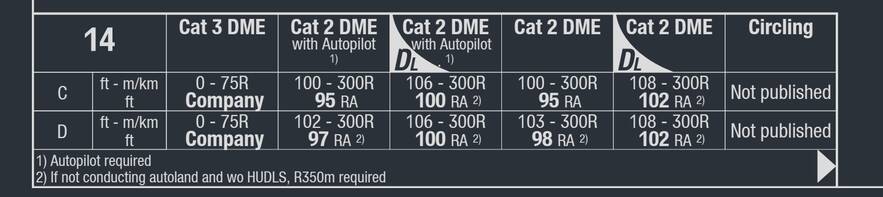
Example: LSZH ILS 14, it doesn’t even list the Cat 1 nor the LOC minima since they don’t fit:
This seems to be caused by the addition of the “DL” type of categories which are for aircraft with wingspan >65m, I think these were not included before but now take away the space for the other regular categories.
FREQUENCY OF ISSUE
On all affected airport charts.
REPRODUCTION STEPS
Open the charts of affected airports and check the minima table, e.g.:
- LSZH ILS 14 (missing CAT 1 and LOC)
- EDDP ILS Z 26R (missing CAT 1 and LOC)
- EDDH ILS 23 (missing LOC)
- EHAM ILS 36R (missing LOC DME)
MEDIA
EDDP ILS Z 26R
Hi @CopperNu
I’m a little confused by your report, as I am not sure what you mean by “proper pilot apps”. All of the charts provided for MSFS 2024 users are provided via a licensing agreement with LIDO, an external company who also provide chart data and much more to real-world airlines.
If you feel that there are issues with the data present in LIDO charts, this is something that would need to be reported directly to LIDO, and is not something MSFS staff are able to investigate.
If I have misunderstood your report, and this is something in correct with the MSFS planner website, please let me know!
Cheers 
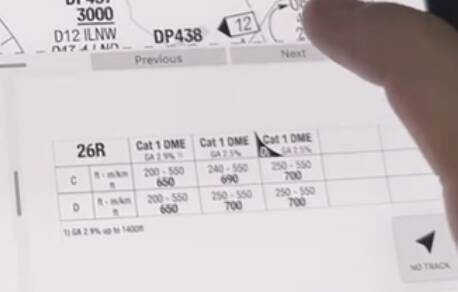
Real world apps provided by LIDO have a pagination feature on the minima, so pilots can flip between two sets of tables in these cases.
Here’s an example on EDDP 26R, note the Previous/Next buttons that flip through these minima tables to access Cat 1 DME data:
This does not work on the single page charts of course, but that causes the issue reported.
I disagree, you have the contract with LIDO, not us users. I have no support contact to LIDO, this is the place to report issues and it’s up to you/MS to pick it up towards your LIDO contacts to fix this.
Well it’s incorrect in the charts that you provide to your users as a feature of your product. Not sure why you think it is something I’d have to report anywhere else than here…
Further I have no idea where the issue is caused, maybe LIDO provides multi-page approach charts but the planner doesn’t ingest them properly? How would I know…
Did you even try to check the issue I’m reporting? Don’t you see it as an issue that the Planner does not show Cat 1 minima in the ILS charts of some major airports?
Hi @CopperNu
I’m just trying to best understand the nature of your report, as the initial post confused me.
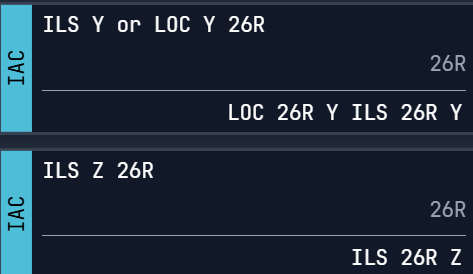
I’ve checked the ILS Y or LOC Y for 26R at EDDP and can see CAT 1 Minima included in this chart for both category C and category D aircraft:
I’m unsure as to whether the specific approach you’re referencing (ILS Z instead of ILS Y) has a CAT 1 or LOC minima. The ILS Z 26R does not list as being both ILS or LOC, whilst the ILS Y 26R does:
Are you sure this example screenshot you’ve provided is for the ILS Z 26R, and not the ILS Y 26R?
For the other examples, I think I understand your report now. I’ll ask the team who work on this to see if they can clarify how the charts are provided and whether there is any scope for us to investigate further.
Cheers
1 Like
Why would you check that since I reported this:
“EDDP ILS Z 26R (missing CAT 1 and LOC)”
I don’t know of any ILS that would have Cat 2 and Cat 3 minima but no Cat 1.
As I said not all charts are affected, just the ones with too many columns to fit the section on one page.
Also as I said there is literally a big arrow (bottom right of the table) indicating that there is a second page of minima, but we can’t access that in the Planner.
Yes, as you can see Cat 1 DME minima are on a separate page (which does not contain Cat 2 and Cat 3).
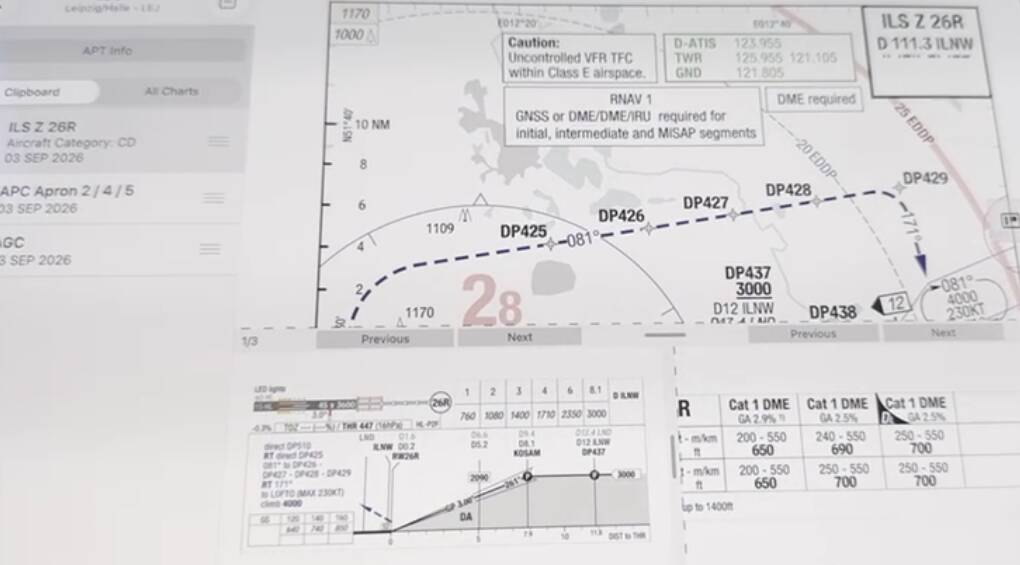
Here’s the full view, where you can clearly see it’s ILS Z 26R:
Thanks
Okay I understand your report now, thanks for clarifying!
As I mention above, I’ll speak to the team who is responsible for this to see if it is something we can look into, or not!
Thanks