Since I updated to msfs2020 1.29.30.0 when I now start the Sim, as the Sim is loading I am now asked over 5 pages to set up the parameters I wish to use in the Sim then apply and save, which I do, however, when I try to use the Sim again I am taken through the same procedure every time. Also my log book is always clear like using the Sim for the very first time.
I am using Microsoft Store version on a PC which runs ok once I get it up and running, however it is a pain always having to set up my preferences as if I’m using the Sim for the very first time. I have re-installed the Sim, my community folder is empty but it didn’t solve the situation.
I’d be grateful for any help in solving this situation.
Next time try setting just one controller setting and applying it, then try flying. Assuming your internet is working it should find the rest. If not you probably need to relax your Windows privacy and security settings particularly when it comes to cloud saving. Similarly if you use 3rd party anti-virus make sure it’s allowing MSFS and the Xbox app through the firewall.
Update Windows via windows update.
Update all apps via Microsoft store app.
Restart PC.
Reinstall gaming services.
How to
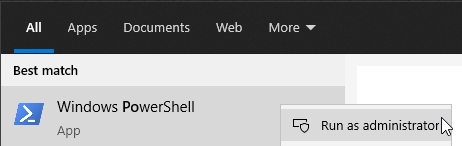
In windows seacrh bar type
powershell
right click on powershell and select run as administrator
Copy/paste into powershell window
(right click to paste into powershell window)
Remove-Item -Path “HKLM:\SYSTEM\CurrentControlSet\Services\GamingServices” -Recurse
press enter
Copy/paste into powershell window
(right click to paste into powershell window)
Remove-Item -Path “HKLM:\SYSTEM\CurrentControlSet\Services\GamingServicesNet” -Recurse
press enter
//////////////////////////////////////////
Restart PC.
/////////////////////////////////////////
Run powershell as administrator.
Copy/paste into powershell window
(right click to paste into powershell window)
start ms-windows-store://pdp/?productid=9MWPM2CQNLHN
Click Get / install
Restart PC
Sign out from xbox app and ms store app.
Restart PC.
Open ms store app > sign in
Open xbox app > sign in > launch msfs
Hi, thanks for the reply but as soon as I get past the Asobo screen, I am taken through 5 set up screens then asked to apply and save, I can’t just save one. I don’t use a 3rd Party Anti-Virus or the cloud and my Firewall allows msfs and xbox through.
Hi, Thanks for the reply, unfortunately I followed your instructions to the letter but sorry to say I’m still in the same position. I’m actually thinking of wiping my SSD that I have MSFS2020 on and starting from square one again but I may wait until the next update hoping that that solves the problem.
I said you should only need to change one setting, you can basically click through the other screens without changes, either MSFS finds it in the cloud or it doesn’t and if so the rest should be automatically assigned, if not something is blocking that. The main suspect has to be something on your PC (or even router) otherwise this would be a common problem.
I understand what you are saying but this only happened when I updated to 1.29.30.0. Before I updated the Sim would just start up and go to the Home Screen without showing me any settings pages. I’ve been toying with the idea of wiping the SSD that I have the Sim on and re-installing it fresh or maybe just waiting til the next update appears but thanks for your input.
Before you take such drastic action try updating your whole system, Windows, store, xbox, gaming services etc. and sign out and back in to all of them that you can. then type health in your taskbar and let windows do a quick check
Hi, I’m pleased to let you know I have got my Sim back to running normally again. Your comment saying… “The main suspect has to be something on your PC (or even router) otherwise this would be a common problem.” triggered a light in my head.
After a lot of hunting, I thought to myself a common denominator with the Sim is Xbox and I found a youtube video explaining which Xbox services should be running and found 2 of my settings had been disabled. Whether is was caused by the update or not I don’t know but I enabled them and Hey Presto back to normal simming.
Once again thank you very much for your input I am very very Grateful.
1 Like