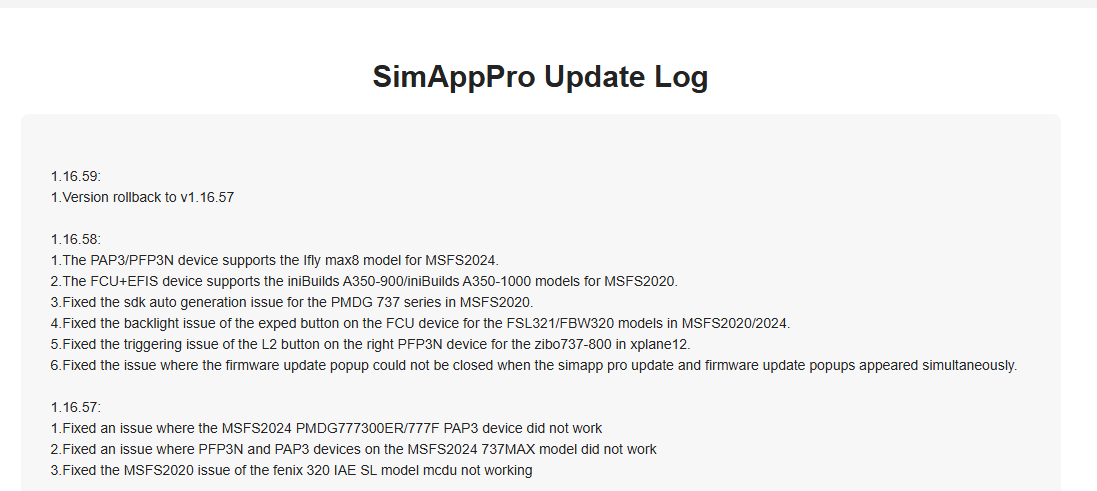
Today I have started a flight as usual, with Fenix A320. After the update of SimAppPro to v 1.16.58, my MCDU all Lsk, all Rsk and first row key (DIR,PROG,PERF etc) doesn’t work anymore.
I’m the only one to face this problem?
Today I have started a flight as usual, with Fenix A320. After the update of SimAppPro to v 1.16.58, my MCDU all Lsk, all Rsk and first row key (DIR,PROG,PERF etc) doesn’t work anymore.
I’m the only one to face this problem?
Hello, same here
My simapp pro app does not even load without javascript error
they reverted back
1.16.59:
1.Version rollback to v1.16.57
I reverted back to 1.16.57 to fix the same issue. Is 1.16.59 already out?
No. I have the same issue.
I have the same problem, but is there no way to go back to version 1.16.58? Does anyone have the installer for version 1.16.58?
Hello, same here 
My mcdu wasn’t working at all in su3 even though it worked perfectly in su2. I fixed it by downloading the simapppro software from their website and reinstalling it. I didn’t uninstall the prior version, just launched and installed and it fixed whatever was broken. I noticed in the software that all of the steps shown had green font upon initialization whereas right after su3 first loaded the simapppro didn’t show all green on the status steps. As for version numbers, mine now shows 1.16.57 beta at the top of the simapppro screen which is odd but it’s working so that’s all I care about.
Try SimmApp Pro 1.16.55
They just released 1.16.60 seems to fix it
It looks like good old winwing have excelled again.
I’ve just discovered 1.16.60 doesn’t work properly with the PFP7 and PAP in the 777. Trying to enter any alphanumeric character in the PFP gives double characters (i.e. enters it twice) and moving the control knobs on the PAP always increments/decrements the display by two.
Rolling back to 1.16.55 solves the problem.
I can confirm that this is occurring in the 777-300ER & 777F MS Store versions streamed into 2024, and I have opened a Ticket with WinWing to report the same. It does not occur on my PC in the 777-200ER purchased directly from PMDG OC3 in 2024, and I have shared this also with WinWing.
RESPONSE FROM WinWing directly after opening my ticket:
“Dear customer, sorry for inconvenience, we will fix this problem ASAP”
Nice one. It’s always good to have a fellow sufferer. I was going to report it but I’ll not bother now it’s in hand. Thanks for confirming.
Welcome. I prefer not to suffer needlessly, so I wanted to get a ticket open with WinWing ASAP and let them sort out SimAppPro. This is at least the 4th or 5th ticket I have opened with them directly on their website chat, each and every one was resolved within a week, some within a few days. No sense delaying getting a needed fix rolling IMO. Cheers!
P.S. not happening in 2020, so I let WinWing know that too.
Mine is still not working properly, though it worked fine before the update. Winwings answer was to turn off McAfee.
I agree with Winwing on that last part, why are you okay with basically having a rootkit installed on your pc?
Did they really say that?
Or did they just suggest temporarily disabling your antivirus to check if SimApp Pro works correctly without it running? It’s usually recommended to turn it off only for testing, to find the cause and if it turns out that the issue disappears without the antivirus, you just need to configure it properly to allow SimApp Pro, not keep it disabled permanently.
yes they did, and it does work fine if I turn McAfee off, and for a short while after, Not long enough to complete a short flight. I have found that if I turn the internet off while it does the initial boot up then turn it back on before loading MSFS2020 it works for one flight, if I pause or interupt in any way its gone again. hope they fix it soon.