Though this may only apply to people with Alienware systems (or those who’ve installed the AW Command Center on their non-AW PC), it was driving me crazy and it seems to be solved now… so I’m compelled to share the following. Even if you don’t have the AWCC app, this might give you a clue as to what to investigate… i.e. overlays.
My system is an Alienware R16, 14900KF CPU, RTX4090 GPU, and 64GB RAM, with MSFS2024 (Store Version) on SU5 Beta.
The Problem…
In VR only (i.e. not in 2D on the monitor) on my Pimax Crystal OG, I’ve been experiencing a persistent pulsing microstutter lasting a half second or so, repeating every 1.5 seconds. Though very subtle, it was clearly discernible, especially at low altitude looking out the window, and once noticed it could not be further ignored, completely breaking smooth flight enjoyment and immersion.
I counted these micro stutters with a timer and it was definitely about a 1.5 second interval with the microstutters lasting about a half second. There was always one second of perfect smoothness in between the half-second stutters, and this rhythmic pulsing became extremely annoying.
Long story short, after viewing dozens (perhaps hundreds) of posts and videos online and spending days troubleshooting a variety of the usual things (no need to list them, many of you know the enormous plethora of fixes that are purported to work)…
The Culprit…
The Alienware Command Center Overlay.
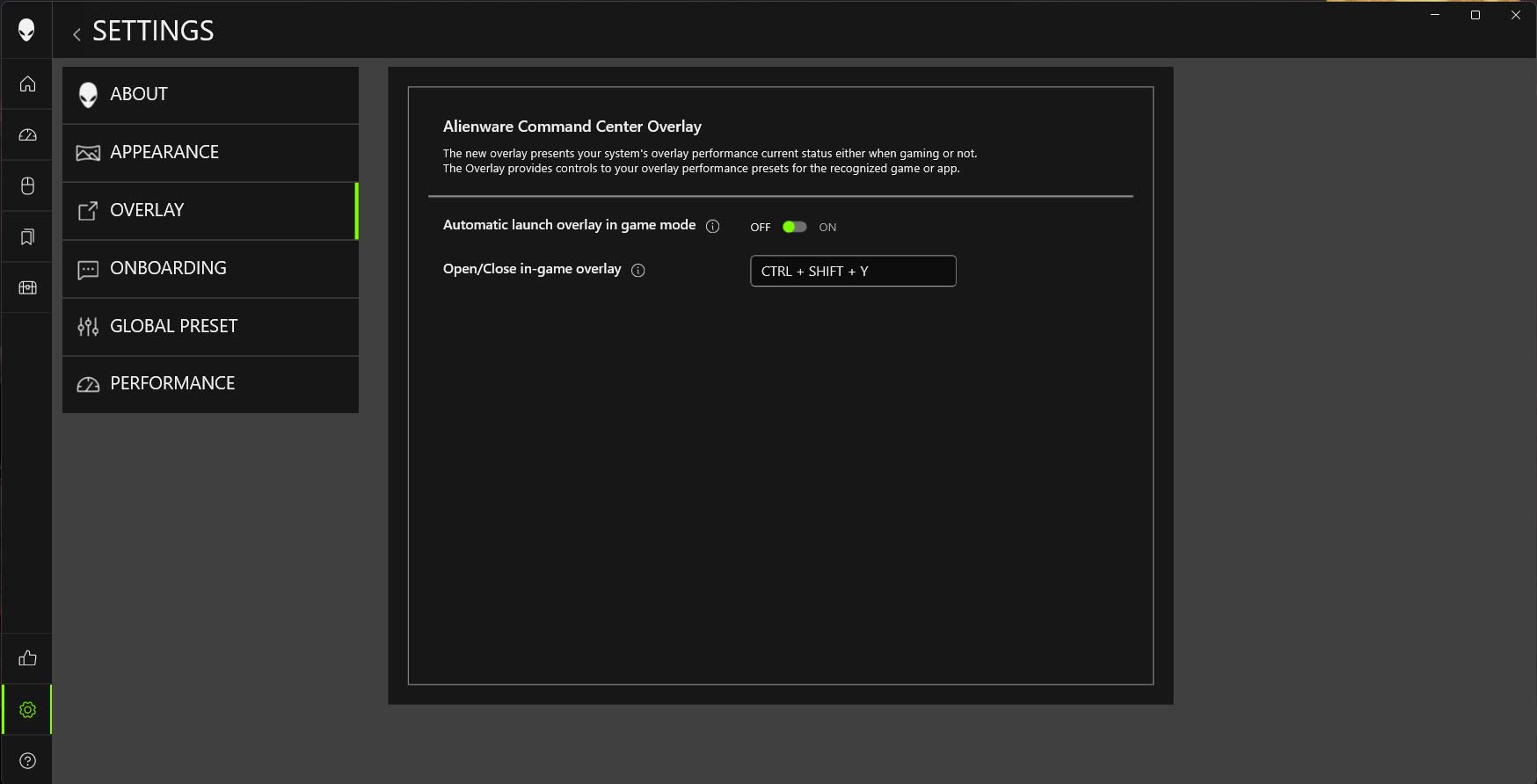
This overlay, when enabled, appears as a small one to two inch bar which hides itself on the left side of the monitor screen until clicked, when it slides out, displaying miscellaneous system data.
To turn it off, open the Alienware Command Center, hit the settings (gear icon) at lower left, choose “Overlay” in left hand menu and toggle the switch to OFF. I’d recommend doing it when the simulator is off, and then rebooting the sim.
Among the troubleshooting things I had previously tried were disabling all overlays and add-ons, i.e Nvidia app, third party apps, clearing the community folder, etc. But for some reason I’d simply overlooked the AWCC Overlay. I assume the reason for the stuttering is the manner in which this overlay “polls the system” every 1.5 seconds or so.
After several stutter free flights, to verify this was indeed the issue, I booted the SIM, and while it was running turned the overlay back on. The stutters did not appear immediately but after some seconds they definitely came back, at 1.5 second “pulsing” intervals.
Exactly how the overlay attaches or unattaches itself to the system when the sim is running unclear, so I recommend turning it off when the sim is off and then reboot the PC for a good measure and double check to verify it is still OFF.
Naturally, I still experience the occasional random stutter or two here and there, especially during takeoffs or landings as nearby assets load, but that’s just the usual MSFS behavior all we’ve come to accept will always be there, but those annoyingly rhythmic 1.5 second microstutters are completely gone now. I’ll confess, when I discovered the culprit, I jumped out of my PC chair and did the Snoopy Dance.
Anyway, I hope that helps any fellow simmers on either an Alienware System or who utilize AWCC who’ve been afflicted by these subtle - but noticeably - pulsing microstutters in VR. If I’d found a similar post before spending multiple hours of searching for answers, it would have saved me a good part of this last week’s free time.