NanoVG Broken After Avionics Update Cockpits Entirely CPU Bound

:wave: Thank you for using the Bug section, using templates provided will greatly help the team reproducing the issue and ease the process of fixing it.

Are you using Developer Mode or made changes in it?

YES

Have you disabled/removed all your mods and addons? If the issue still occurs with no mods and add-ons, please continue to report your issue. If not, please move this post to the Community Support section.

YES

Brief description of the issue:

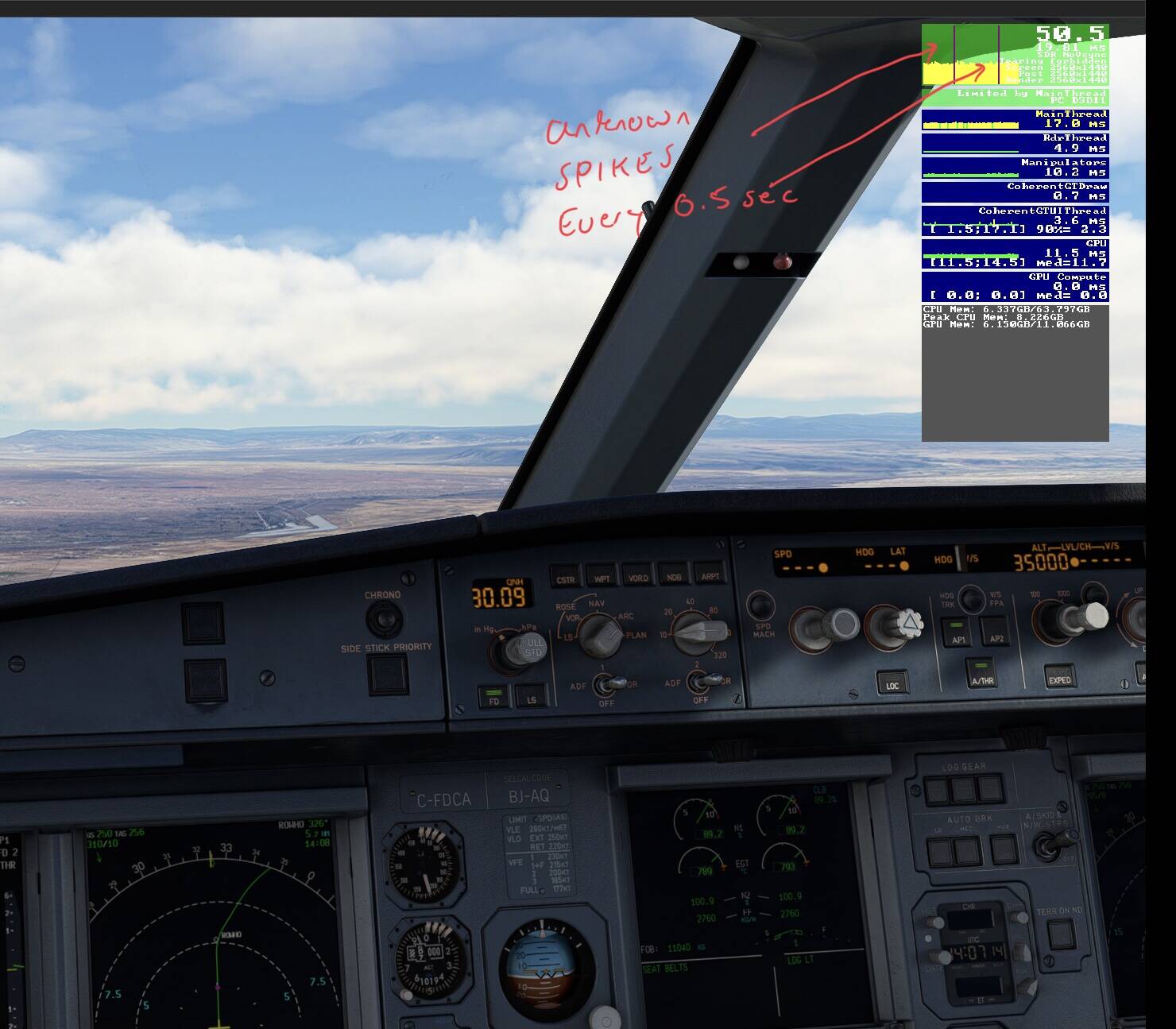
All cockpits are running on CPU even with NanoVG enabled and supporting plane selected

Provide Screenshot(s)/video(s) of the issue encountered:

Detailed steps to reproduce the issue encountered:

You can test this on any NanoVG supported cockpit such as PMDG or stock 320

Many issues may be due to an outdated graphics card. Please state your Graphics Card Driver Manufacturer (NVIDIA, Intel, AMD) and Version (Learn how to find your current graphics card driver version):

GPU driver is up to date and stable

PC specs and/or peripheral set up if relevant:

8086K 32GB 1080ti 11GB

Build Version # when you first started experiencing this issue:

Avionics Update 2 Build 1.33.8.0


:loudspeaker: For anyone who wants to contribute on this issue, Click on the button below to use this template:

Do you have the same issue if you follow the OP’s steps to reproduce it?

Provide extra information to complete the original description of the issue:

If relevant, provide additional screenshots/video:

Just to add to this report I had noticed higher CPU temps lately and was wondering why. After taking the F35 out I noticed really bad FPS much like when it was running entirely on the CPU and I started to dig deeper. This led me to test some stock planes and pdmg planes with NanoVG enabled and disabled. To my surprise I realized NanoVG was not working at all even when enabled. This also explains the cpu thrashing I was experiencing at low alt with Photogrammetry off. This took a little bit of lab testing across a variety of planes which I know their performance levels in.

I should have caught this earlier but I have been flying higher fps warbirds lately. I had even been testing framerates capped and uncapped and had not noticed until I loaded some really cpu heavy planes. MFS 2020 is officially broken again. This is why some are seeing 20-30fps lower performance lately and cpu thrashing in low density areas and or low alt on some setups. It’s also why I was seeing higher cpu temps at normal fps.

I can’t replicate any issue with NanoVG on or off.
This is on VS off on the stock A320, EDDF RWY 07C. Mainthread frametime around 13-14 ms in any case.

ON

OFF

Exactly my point you should see increased performance with NanoVG on and right now it’s not working so performance is exactly the same. It’s all being done on the CPU weather its enabled or disabled. Depending on how beefy your CPU is will determine how noticeable the effects are.

For example with NanoVG on sitting on the apron in the 737 series with the FPS capped at 60 I can hold 57-60 FPS in my parking spot. Without NanoVG it drops to 40-45. Currently I am sitting at 40-45 with NanoVG enabled. This means it’s not actually offloading the XML to the GPU and running everything on the CPU.

I speculate the Avionics update may have broke it or perhaps they disabled it to get to the new avionics upgrades working properly in a timely manner. Either way NanoVG is one of the biggest performance boosts and innovations in MFS 2020 and when it’s enabled and working correctly it frees up more CPU and offloads the tasks to the general processor your GPU.

The effects on the i7 8700K line are very noticeable and you will most certainly feel the difference on the XBOX too. Again though not ALL planes support NanoVG. However most planes natively built for MFS will.

5 Likes

In this same boat myself. Noticed a full 10 degrees celcius added with AAU2. Lost some fps from this as well. Hope this gets remedied fast. Great find!!!

3 Likes

CPU hotter and small performance loss.
Yep I have the same, I reported it as soon as the update launched, I didn’t know the cause, but this maybe it

3 Likes

What is NanoVG??? And how do I check it?

1 Like

Do you have the same issue if you follow the OP’s steps to reproduce it?

No

Provide extra information to complete the original description of the issue:

For me there is still a major performance difference between NanoVG On and Off, although the general performance with NanoVG On seems to have been reduced. I used to get a stable 60 fps at barren locations like the Edwards Air Force Base with the PMDG DC-6, now it’s just 50 fps. Running the whole thing on an i7-8700k and an RTX 3060 Ti at 1080p and the latest NVIDIA drivers.

If relevant, provide additional screenshots/video:

NanoVG On

NanoVG Off

1 Like

NanoVG is an alternative rendering method for gauges (instruments, cockpit screens) that offers much better performance. It used to be only available in Developer mode but for while now, you can Enable/Disable it in “General Options → Experimental → Use NanoVG for XML Gauges”

Thanks…. I’m not sure if this is causing this, but will have a look later today…. Here’s my screen grab from this morning…

It seems this BUG has been sorted in the HOTFIX. I will do a bit more testing to make sure but I am glad that this was fixed quick. Last time we lost NanoVG for months and it really hurt. Thank you to all the developers that pushed this after I alerted them to the issue. Fly safe everyone and enjoy those frames again! o7

3 Likes

What hotfix?

1 Like

what hotfix same low fps issue for me !

there is not hotfix for this yet…and if it was the case, why you know it is fixed? there is no comunication from anyone.

is stil broken the fenix displays freezes completly and the cpu goes to 100%

1 Like

I had an update yesterday (30 June), which surprised me as I thought I already had AAU2, but I’ve been traveling and lost track with all the recent updates.

There was no mention of a hotfix though in the release notes. I still have the White frames appear (but no white dot except momentarily when coming out of drone camera view)

That was an update for the City Update Texas.

2 Likes

Thanks. I wasn’t sure as I also had a WU France & Benelux update in the Marketplace which I assume was for the French city update? I was expecting Texas to be the same way via one of the US WU’s

Can’t keep up with all the changes!

You will have to address that with a future Fenix update I am afraid. Not all planes support NanoVG either. There is a new Fenix build in testing now lets hope its fixed for you either way!

1 Like

There was no official mention but that was the 1.5 GB hotfix to the Avionics update yes. Its funny because as soon as that update was pushed and I saw the notes had not changed or the version number (which requires new compiles) I thought wow did they actually hotfix it? Started the day with a big smile after a quick test in some cockpits.

I’m still getting the White frames, but only occasionally now and only if I leave FREELOOK TOGGLE on. Can’t say I’m noticing and performance drop, even in the demanding 6-screen H145