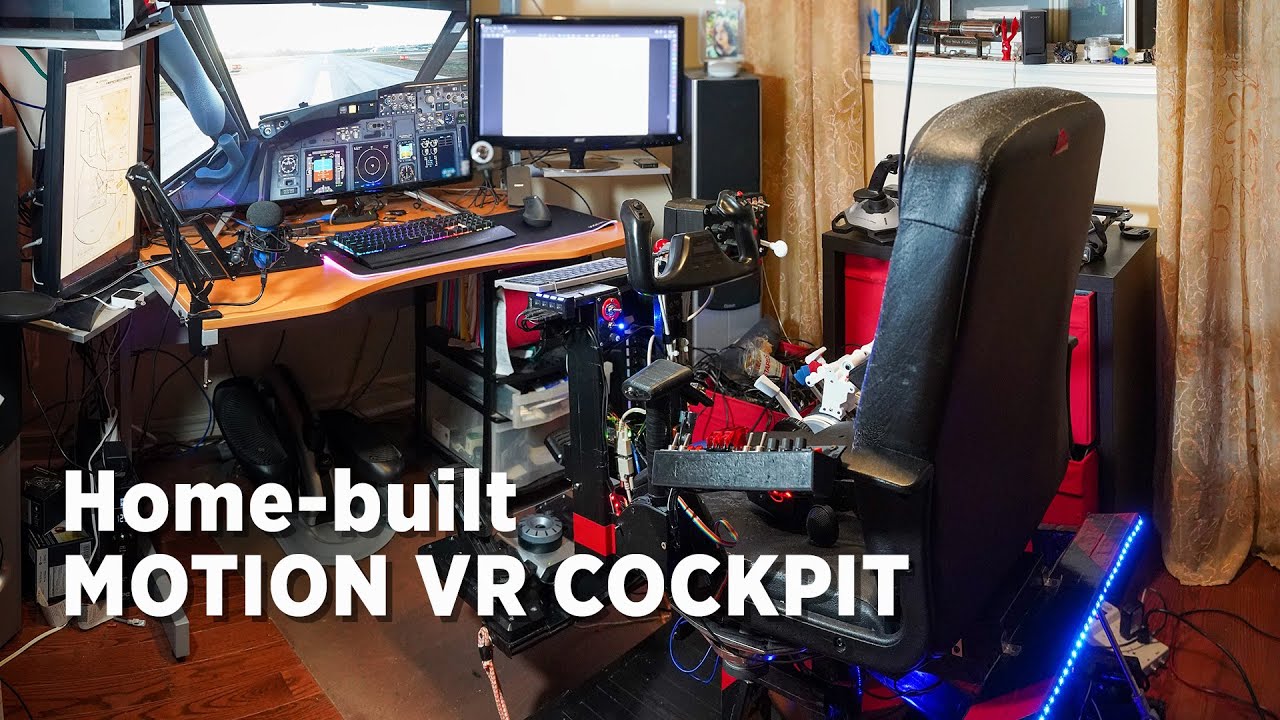
Here’s my first rough test of the Cabri with my motion sim and custom-built cyclic and collective controls. Motion is even more fun (and useful) than with planes. Feels great! Somehow I think though that its harder to hover and keep steady than the real thing. I carefully watched a few videos on real Cabti, including first lessons, and a fresh student pilots could manage OK.
I think the ground effect is almost entirely missing, so the heli isn’t sitting on an air cusion but is as difficult to keep in one spot as if I’d be howering at an altitude.
Activating magneto swithch with a joystick button somehow triggers rotor brake briefly which then retracts back. Mapping rotor break to another swithch makes it stick, so it’s not a double-mapping, also I checked and it’s not… Hmm.
Joystick hat switch is mapped to mimich the way it moves in an actual cockpit (by the numbers), but it feels reversed - clicking it down lowers the nose, is it like this in real one?
Engine is very quiet. I have engine sounds low at about 40% but in all other planes it’s just as I like, but inthie helo it’s whisper quiet.
Ground physics data is completely bonkers: my rig wildly shakes when heli is off and dead. I have to disconnect ground source so those random accelerations stop. They are fine in the air. No plane ever did this. Anyway, here’s the video.
I have built 2 vibration transducers from old car speaker cores, that I feed with SimShaker for Aviators + Sound Module. It creates a lot of feedback, including engine vibrations, touchdowns, turbulence etc. For airplanes you feel flaps and gear extending as well. I could also program a “noise” function for flight, but vibration feels good enough. I do have a “noise” function modulated by speed for airplanes, so I can feel the take-off roll properly.
Great video and explanations! Looks like you’re catching on pretty well from what I see. One question I have about the Cabri G2 is concerning the Vortex Ring State. When I fly this heli, I can be in a high rate of vertical descent and when I pull up the collective, the descent just stops. Is the VSR not modeled? Thanks for the video Roman.
Incredible what you built and how, genial. In real copters always, all the time, there is a small vibration noticeable more or less, depending, right?, maybe there is a DoF software special for helicopters?
A high decent rate is not the only variable that is a factor in inducing VRS, nor is it as common as some sims would have you believe. I assume you were trying to induce it for testing the sim,? Clearly a good heli pilot would be aware of the conditions under which VRS can occur and fly accordingly to avoid it.
Thanks for the reply. Yes, I was intentionally trying to get into VRS but couldn’t seem to make it happen. I do know that using AirlandFS with the flightsim.to Cabri, I am able to get into the VRS fairly easily. I’ll keep testing and enjoying the native support for helicopters in this sim. I feel they will get better and better with the flight model.
It could be they have actually modelled the conditions for VRS more accurately than we usually experience.
You need three conditions for VRS to be possible.
Airspeed lower than effective translational lift.
Decent rate greater than 300 feet per minute.
20-100% of available power applied.
And yes I did have to remind myself of these conditions.
There are a great series of explanations on YouTube covering various aspects of helicopter flight. Well worth a watch, search for Helicopter lessons in 10 minutes or less.
Curious, in HPG H145 I have VRS only lowering the collective full some seconds braking in the air, with these after many hours, none, which is it better modelled?
I’m not sure, but people were complaining about VRS. To me it was just obvious that ground effec is not right.
No need, really. SimShaker software that drives my transducers gets RPM data from MSFS and generates very convincing engine vibrations, wich you can adjust to your taste. It knows it’s a helocpter and loads a heli profile. And if you want movement, and not just vibration, then FlyPT Mover is very powerful in what you can program. You can actually program nested functions that do anythin you like based on 30+ parameters that it gets from MSFS. For example, in airplanes the takeoff roll felt anemic to me, as airplane is not pitching and rolling much, and very small movements are dampened by the functions, in order to feel smooth in the air. So I just added a random noise function to feed roll and pitch, limited it to a very small movement range, and modulated it by ground speed, then connected it to the ground source only (so when airplane is airborne it doesn’t get data). And now I have a very convincing takeoff roll that actually feels like a roll. Vibration transducers add some HF vibration, and the feeling of concrete plate seams speeding up. Together it’s very immersive, and then there’s calmness when you take off, and then you feel the vibrations of gear going up and flaps retracting, very realistic. Also, I felt that the moment of the touchdown is too weak, becuse it was only transducers and they can only do so much with a single “bump”. So I added a large noise peak, modulated by the negative vertical acceleration but only from the ground source, not air. And the only way you can actuallly have a serious negative vertical acceleration on the ground, is just after the moment of the touchdown. So now, if I do a sloppy landing I really get shaken on the touchdown. It’s really affected my flying. I’m trying to be very light on the landing now, so I barely feel it at all.
It simulate turbulence too, right?, so it is like a customizable program like FSRealistic but in movement, better. The H145 is always in turbulence when traveling, watching it from the external camera, I don´t know if it is more realistic or not, sometimes turbulence yes though always…, maybe a heli is different in that.
The collective and joystick are from VIRPIL, aren´t they?
There are 2 independent systems in play: vibration transducers (aka “butt kickers”) and motion simulator. Former is done via SimShaker for Aviatiors software. It does detect turbulence in the MSFS data and sends strong shake to the transducers. The motion simulator is driven by FlyPT Mover software, which also is fed the MSFS data, so it does everything the aircraft in MSFS does. So if there is a turbulence and it affects pitch, roll, yaw, vertical or horizontal acceleration forces - it gets reproduced by the motion sim. So what I feel is both systems working together. Motion works best for the large-scale movements, while transducers reproduce small-scale events better. It’s seamless and feels very natural. The systems complement each other.
In SimShaker you can only adjust the force of every kind of event, while in FlyPT Mover you cah really do anything with any variable data, and there are like 30+ variables - positional data, acceleration data, acceleration+gravity vectors etc.
Do anything that happens is dependent on MSFS - whatever MSFS models will be reflected in the motion, and basic events like turbulence - in the vibration too. There isn’t much difference if it’s a heli or not, beside the ground physics bug that means I have to disable ground part of the motion sim functionas. But as heli doesn’t roll on the ground that’s not really a huge issue, other than I have to do extra clicks before I fly in a heli. Otherwise it uses the same data and same settings.
Ah, not at all! Those are all controls that I myself built and programmed. The joystick looks weird because it’s an extra attachment to the pendular yoke that I built - you can see the yoke pendulum right behind the joystick. I can take the yoke off and attach the joystick that uses the pendulum for pitch, and extra axis for roll. Yoke has its own axis when attached to the top of the pendulum. I 3D-printed the joystick and reused the body of a Saitek yoke. It’s driven by an Arduino as a 3-axis Joystick + 11 buttons. Both yoke and joystich are very large throw and very precise. I designed and 3D-printed parts for cheap bearings, magnets and hall sensors (magnetic field sensors) so they are frictionless, no potentiometers are involved, and very precise. Feels great!. I also designed and 3D-printed a left module that has a switch+pots box, and HOTAS-style throttle that is easily convertible to collective by just replacing a pin that limits the arc either to airplane throttle range (facing upwards) or to a collective range (facing forward). It’s driven by another Arduino board and the same pot is programmed to actually send data on 2 axes simultaneously, so in Windows both modes are calibrated as separate axes, allowing to easily map them for heli/plane controls. I also bult a Boeing style reversers throttle quadrant, so together it covers everything I need or ever want to fly, in a very convincing and realistic way. You can see how it works for planes in my video here:
In my heli flying I’ve found mastering the lateral and longitudinal trim is key to hover in all conditions. It feels really good when this becomes something you don’t think about.
Interesting, Do you also have logitudal trim reversed (pull had down = nose down) as opposed to normal plaine trim (pull had down = nose up)? I mapped it to match the animation when using mouse - interestingly, no animaton happens when used via joystick. But I ended up with reversed trim, or is it the way it’s supposed to be?
Yep pull down is pitch up and essentially follows what you do on the main cyclic joystick. Not that I know but having it any other way has to be nonsense, can’t imagine it being opposite. I have the trims on a 4-way hat that sits comfortably under my thumb and press in on the hat to reset the 2 trims.
Just tried the Cabri G20, although not while using my DOF Reality motion rig. I haven’t flown any choppers since getting the 4090, but now I have it dialled in, I was just blown away by the sharpness flying the Cabri over Florence near sunset. With OXR set at 160% and TAA at 100% the G2 headset has finally come into its own.
You don´t use OXR Toolkit nor DLSS 2? I am in the same way with 3080ti after the DLSS in PERFORMANCE, I do not use MR anymore, and with the Toolkit FOV in Quality-Wide, CAS on and sharpen to 60%, and in override resolution in 3340 or so. In OXR I do not touch nothing, neither in NvidiaControlPanel less the max. framerate to 165, and a new level in smoothness and more clarity in the G2, and in my case with a bit sparer room for increase clarity when hardware and software will let it.
Oh no, I do use the toolkit, for colour adjustments, MR control (usually set at 45fps) and CAS sharpening at 60%. I also use DLSS Quality. There is still no perfect one size fits all settings in VR, even with a 5800x3D and a 4090. So I still have to change some settings depending on where I’m flying and in what.
So DLSS Quality / OXRTK sharpening only / OXR DevTool 160%?
I guess that should take care of blurry glass panels, but you woudl still get DLSS motion trails on all moving things and blurry digits when changing, right?
I settled on TAA100% / OXR 100% / OXRTK CAS sharpening 100% - I think performance is close to DLSS + OXR160% with similar or better clarity and no DLSS artifacts.